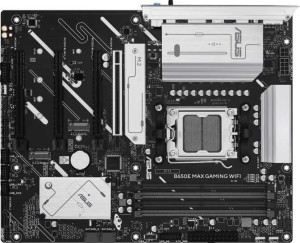
Asus B650E Max Gaming Wi-Fi
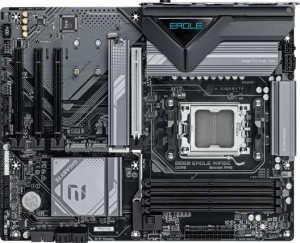
Gigabyte B850 Eagle WiFi6E

Asus B650E Max Gaming Wi-Fi Gigabyte B850 Eagle WiFi6E

Overview

Welcome to our in-depth specification comparison between the Asus B650E Max Gaming Wi-Fi and the Gigabyte B850 Eagle WiFi6E. Both boards share the AM5 socket and ATX form factor, making them direct rivals for AMD platform builds. The key battlegrounds include chipset generation, memory support, expansion slot configurations, and practical features like dual BIOS and RGB lighting. Read on to see which board best suits your next build.

Common Features

  • Both motherboards use the AM5 CPU socket.
  • Both boards have an ATX form factor.
  • Wi-Fi is supported on both products.
  • Both support Wi-Fi 4 (802.11n), Wi-Fi 5 (802.11ac), Wi-Fi 6 (802.11ax), and Wi-Fi 6E (802.11ax).
  • Bluetooth is available on both products.
  • Both boards have Bluetooth version 5.3.
  • Both support HDMI 2.1.
  • Overclocking is supported on both products.
  • Both boards support a maximum of 256GB of RAM.
  • Both have 4 memory slots.
  • Both use DDR5 memory.
  • Both support 2 memory channels.
  • ECC memory is not supported on either product.
  • Both have 2 USB 3.2 Gen 1 ports (USB-A).
  • Neither product has USB 3.2 Gen 2x2, USB 4, or Thunderbolt ports.
  • Both have an HDMI output and 1 DisplayPort output.
  • Both have 2 USB 3.2 Gen 1 ports through expansion and 2 USB 3.0 ports through expansion.
  • Both have 4 SATA 3 connectors and 3 M.2 sockets.
  • A TPM connector is present on both products.
  • Neither product has an mSATA connector or SATA 2 connectors.
  • Both have 1 PCIe 5.0 x16 slot.
  • Both support 7.1 audio channels with 3 audio connectors.
  • S/PDIF Out port is not available on either product.
  • Both support RAID 0, RAID 1, RAID 5, and RAID 10 (1+0).
  • Neither product supports RAID 0+1.

Main Differences

  • The chipset is B650 on Asus B650E Max Gaming Wi-Fi and B850 on Gigabyte B850 Eagle WiFi6E.
  • RGB lighting is present on Asus B650E Max Gaming Wi-Fi but not available on Gigabyte B850 Eagle WiFi6E.
  • Dual BIOS is present on Gigabyte B850 Eagle WiFi6E but not available on Asus B650E Max Gaming Wi-Fi.
  • Maximum RAM speed is 4000 MHz on Asus B650E Max Gaming Wi-Fi and 5200 MHz on Gigabyte B850 Eagle WiFi6E.
  • Overclocked RAM speed reaches up to 8000 MHz on Asus B650E Max Gaming Wi-Fi and 8200 MHz on Gigabyte B850 Eagle WiFi6E.
  • USB 3.2 Gen 2 ports (USB-A) count is 3 on Asus B650E Max Gaming Wi-Fi and 2 on Gigabyte B850 Eagle WiFi6E.
  • USB 3.2 Gen 2 ports (USB-C) count is 1 on Asus B650E Max Gaming Wi-Fi and 0 on Gigabyte B850 Eagle WiFi6E.
  • USB 3.2 Gen 1 ports (USB-C) count is 0 on Asus B650E Max Gaming Wi-Fi and 1 on Gigabyte B850 Eagle WiFi6E.
  • USB 2.0 ports count is 2 on Asus B650E Max Gaming Wi-Fi and 4 on Gigabyte B850 Eagle WiFi6E.
  • A PS/2 port is present on Gigabyte B850 Eagle WiFi6E but not available on Asus B650E Max Gaming Wi-Fi.
  • USB 2.0 ports through expansion number 6 on Asus B650E Max Gaming Wi-Fi and 4 on Gigabyte B850 Eagle WiFi6E.
  • Fan headers count is 4 on Asus B650E Max Gaming Wi-Fi and 6 on Gigabyte B850 Eagle WiFi6E.
  • PCIe 4.0 x16 slot count is 1 on Asus B650E Max Gaming Wi-Fi and 0 on Gigabyte B850 Eagle WiFi6E.
  • PCIe 3.0 x16 slot count is 2 on Asus B650E Max Gaming Wi-Fi and 0 on Gigabyte B850 Eagle WiFi6E.
  • PCIe x1 slot count is 0 on Asus B650E Max Gaming Wi-Fi and 3 on Gigabyte B850 Eagle WiFi6E.
Specs Comparison
Asus B650E Max Gaming Wi-Fi

Asus B650E Max Gaming Wi-Fi

Gigabyte B850 Eagle WiFi6E

Gigabyte B850 Eagle WiFi6E

General info:
CPU socket AM5 AM5
chipset B650 B850
form factor ATX ATX
release date March 2025 January 2025
supports Wi-Fi
Wi-Fi version Wi-Fi 4 (802.11n), Wi-Fi 5 (802.11ac), Wi-Fi 6 (802.11ax), Wi-Fi 6E (802.11ax) Wi-Fi 4 (802.11n), Wi-Fi 5 (802.11ac), Wi-Fi 6 (802.11ax), Wi-Fi 6E (802.11ax)
Has Bluetooth
Bluetooth version 5.3 5.3
HDMI version HDMI 2.1 HDMI 2.1
Easy to overclock
has RGB lighting
Easy to reset BIOS
Has dual BIOS
has aptX
CPU sockets 1 1
Has integrated graphics
warranty period 3 years 3 years
height 244 mm 244 mm
width 305 mm 305 mm
Has integrated CPU

At their core, both the Asus B650E Max Gaming Wi-Fi and the Gigabyte B850 Eagle WiFi6E share the same fundamental profile: ATX form factor with identical 244×305 mm dimensions, an AM5 socket, full Wi-Fi 6E and Bluetooth 5.3 support, HDMI 2.1 output, overclocking support, and a 3-year warranty. For most users, these shared traits mean either board will slot into the same cases, support the same AMD CPUs, and deliver equivalent wireless connectivity out of the box.

The chipset difference is the most consequential distinction: the Gigabyte uses a B850 chipset versus the Asus's B650. The B850 is a newer platform revision, which generally implies improved I/O lane allocation and better support for next-generation peripherals and storage standards — a meaningful advantage for users planning a longer-term build. Complementing this, the Gigabyte also includes dual BIOS, a hardware-level safety net that allows the board to recover from a failed BIOS flash automatically, something the Asus lacks. For enthusiasts who update firmware frequently or overclock aggressively, this is a genuine reliability edge.

On the other side, the Asus counters with RGB lighting, which the Gigabyte omits entirely — a differentiator that matters primarily for aesthetics. In terms of pure platform capability and resilience, the Gigabyte B850 Eagle WiFi6E holds the advantage in this group, thanks to its newer chipset and dual BIOS protection, while the Asus appeals to builders who prioritize visual customization.
Memory:
maximum memory amount 256GB 256GB
RAM speed (max) 4000 MHz 5200 MHz
overclocked RAM speed 8000 MHz 8200 MHz
memory slots 4 4
DDR memory version 5 5
memory channels 2 2
Supports ECC memory

The memory foundations are identical on both boards: 4 slots, DDR5, dual-channel architecture, a 256GB capacity ceiling, and no ECC support. For most desktop builds — gaming, content creation, workstation use — this shared framework is more than sufficient, and neither board restricts the user in terms of kit count or total RAM headroom.

Where they diverge is in raw speed capability. The Gigabyte B850 Eagle supports a native maximum of 5200 MHz versus the Asus B650E Max Gaming's 4000 MHz — a 30% higher baseline that reflects the B850's newer memory controller. On the overclocked side, the gap narrows but persists: 8200 MHz on the Gigabyte versus 8000 MHz on the Asus. In practical terms, higher native speeds reduce reliance on aggressive XMP/EXPO profiles to hit rated kit speeds, which translates to better out-of-the-box stability when pairing fast DDR5 modules. The overclocking ceiling difference is relatively minor at the extreme end, but the native speed advantage is meaningful for everyday use.

The Gigabyte B850 Eagle WiFi6E holds a clear edge in this category. Its higher native RAM speed ceiling makes it the more future-proof choice for users buying fast DDR5 kits, and its modestly higher overclock ceiling gives enthusiasts a bit more headroom at the top end.

Ports:
USB 3.2 Gen 2 ports (USB-A) 3 2
USB 3.2 Gen 1 ports (USB-A) 2 2
USB 3.2 Gen 2 ports (USB-C) 1 0
USB 3.2 Gen 1 ports (USB-C) 0 1
USB 2.0 ports 2 4
USB 3.2 Gen 2x2 ports 0 0
USB 4 40Gbps ports 0 0
USB 4 20Gbps ports 0 0
Thunderbolt 4 ports 0 0
Thunderbolt 3 ports 0 0
has an HDMI output
DisplayPort outputs 1 1
RJ45 ports 1 1
Has USB Type-C
eSATA ports 0 0
DVI outputs 0 0
has a VGA connector
PS/2 ports 0 1

Shared between both boards are the essentials: HDMI, a DisplayPort output, a single RJ45 Ethernet jack, and a mix of USB-A ports across multiple generations. Neither offers Thunderbolt or USB4, so users requiring those high-bandwidth interfaces will need to look elsewhere regardless of which board they choose.

The speed composition of the USB ports is where the Asus B650E Max Gaming Wi-Fi pulls ahead. It provides three USB 3.2 Gen 2 (10Gbps) Type-A ports plus one USB 3.2 Gen 2 Type-C — giving it four 10Gbps-capable rear connections in total. The Gigabyte B850 Eagle, by contrast, offers only two Gen 2 Type-A ports and a single USB 3.2 Gen 1 (5Gbps) Type-C, halving the throughput of its only rear USB-C. For users who regularly attach fast external SSDs, modern peripherals, or high-resolution capture devices, the Asus's superior high-speed port count is a tangible day-to-day advantage. The Gigabyte compensates with four USB 2.0 ports versus the Asus's two, and notably includes a PS/2 port — a legacy connector useful for older keyboards or mice, particularly in niche enthusiast or competitive gaming scenarios where PS/2's interrupt-driven input is valued.

For most modern builds, the Asus B650E Max Gaming Wi-Fi has the clearer port advantage, offering more bandwidth where it counts. The Gigabyte's extra USB 2.0 slots and PS/2 port serve specific legacy needs, but they do not outweigh the Asus's stronger high-speed USB lineup.

Connectors:
USB 3.2 Gen 1 ports (through expansion) 2 2
USB 2.0 ports (through expansion) 6 4
SATA 3 connectors 4 4
fan headers 4 6
USB 3.0 ports (through expansion) 2 2
M.2 sockets 3 3
Has TPM connector
U.2 sockets 0 0
Has mSATA connector
SATA 2 connectors 0 0

Internal connectivity is largely a mirror image across both boards: identical counts of 3 M.2 sockets, 4 SATA 3 ports, matching internal USB expansion headers, and a TPM connector on each. For storage builders, this parity means neither board offers more drive slots than the other — three NVMe drives plus four SATA devices is the ceiling for both.

The one meaningful divergence is in fan and pump headers. The Gigabyte B850 Eagle provides 6 fan headers compared to the Asus B650E Max Gaming's 4. In practice, this matters most for high-airflow or liquid-cooled builds where multiple case fans, a CPU cooler, and one or more radiator fans need to be controlled directly from the board. With only four headers, Asus users running complex cooling setups may need a fan hub to avoid daisy-chaining — an extra cost and a cable management consideration. The Gigabyte's two additional headers offer that flexibility natively.

This is a narrow but practical win for the Gigabyte B850 Eagle WiFi6E in this category. The extra fan headers have no impact on simpler builds, but for enthusiast configurations with demanding thermal management, they eliminate the need for additional hardware and simplify the overall build.

Expansion slots:
PCIe 4.0 x16 slots 1 0
PCIe 5.0 x16 slots 1 1
PCIe 3.0 x16 slots 2 0
PCIe x1 slots 0 3
PCI slots 0 0
PCIe 2.0 x16 slots 0 0
PCIe x4 slots 0 0
PCIe x8 slots 0 0

A PCIe 5.0 x16 primary slot appears on both boards, ensuring full bandwidth support for current and next-generation discrete GPUs on either platform. That shared baseline means neither board handicaps a high-end graphics card installation.

Beyond that primary slot, the two boards take strikingly different approaches to additional expansion. The Asus B650E Max Gaming Wi-Fi adds a PCIe 4.0 x16 slot and two PCIe 3.0 x16 slots, giving it four full-length slots in total. This layout suits users who want to install a second GPU, a high-bandwidth capture card, or a dedicated PCIe storage controller — devices that benefit from wider lane counts. The Gigabyte B850 Eagle, by contrast, forgoes additional full-length slots entirely and instead offers three PCIe x1 slots. These narrower slots are well-suited for smaller add-in cards like dedicated sound cards, 10GbE NICs, or USB expansion cards, but they cannot accommodate full-bandwidth multi-slot devices.

Which layout is preferable depends entirely on the intended build. For users planning a single-GPU system who want flexibility to add several smaller peripheral cards, the Gigabyte's x1-centric approach works well. For anyone considering multi-card configurations or high-bandwidth add-in devices, the Asus B650E Max Gaming Wi-Fi holds a clear structural advantage with its broader selection of full-length slots.

Audio:
audio channels 7.1 7.1
Has S/PDIF Out port
audio connectors 3 3

Audio is a straight tie between these two boards. Both deliver 7.1-channel onboard audio with 3 analog connectors and no S/PDIF optical output — an identical spec sheet across every available data point.

The 7.1 channel configuration supports full surround sound setups, which is relevant for gaming and home theater use cases. The absence of S/PDIF on both means users who want to pass digital audio to an external DAC, AV receiver, or soundbar via optical cable will need an alternative solution — either a discrete sound card or a receiver that accepts analog or HDMI ARC input instead.

There is no differentiator to call out here: both boards are perfectly matched on audio. The decision between them should rest on the spec groups where they actually diverge.

Storage:
Supports RAID 1
Supports RAID 10 (1+0)
Supports RAID 5
Supports RAID 0
Supports RAID 0+1

RAID support is identical across both boards. Each offers RAID 0, 1, 5, and 10, while neither supports RAID 0+1 — a distinction that rarely matters in practice since RAID 10 achieves the same combined striping-and-mirroring result more efficiently.

The supported RAID modes cover the full range of practical desktop and prosumer use cases: RAID 0 for maximum throughput, RAID 1 for simple mirroring and redundancy, RAID 5 for a balanced mix of performance and fault tolerance across three or more drives, and RAID 10 for high-performance redundancy. Users building a NAS-adjacent workstation or a content creation rig with drive redundancy needs will find both boards equally capable.

This is another complete tie. Storage configuration choices will come down to the physical drive connectivity each board provides — covered under Connectors — rather than any difference in RAID capability.

Comparison Summary & Verdict

After a thorough comparison, both boards prove to be capable AM5 motherboards sharing strong fundamentals: DDR5 support up to 256GB, Wi-Fi 6E, Bluetooth 5.3, and full RAID support. However, they diverge in meaningful ways. The Asus B650E Max Gaming Wi-Fi stands out with its broader PCIe expansion — offering PCIe 4.0 and PCIe 3.0 x16 slots alongside the PCIe 5.0 slot — more high-speed USB-A ports, and RGB lighting for aesthetics-focused builders. The Gigabyte B850 Eagle WiFi6E counters with a newer B850 chipset, higher maximum RAM speeds of 5200 MHz, a dual BIOS safety net, more fan headers for complex cooling setups, and three PCIe x1 slots for additional cards. Builders who value legacy expansion and visual customization will lean toward the Asus, while those prioritizing platform longevity, memory performance, and system reliability will find the Gigabyte the stronger choice.

Asus B650E Max Gaming Wi-Fi
Buy Asus B650E Max Gaming Wi-Fi if...

Buy the Asus B650E Max Gaming Wi-Fi if you need broader PCIe expansion with PCIe 4.0 and 3.0 x16 slots, want RGB lighting for a visually customized build, or rely on more high-speed USB-A connectivity.

Gigabyte B850 Eagle WiFi6E
Buy Gigabyte B850 Eagle WiFi6E if...

Buy the Gigabyte B850 Eagle WiFi6E if you want a newer B850 chipset with higher RAM speeds, the added reliability of dual BIOS, more fan headers for advanced cooling, and additional PCIe x1 slots.