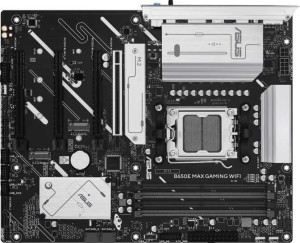
Asus B650E Max Gaming Wi-Fi
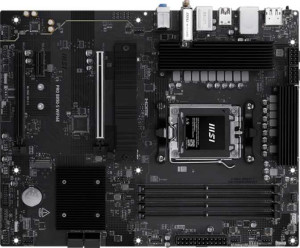
MSI Pro B850-S Wi-Fi6E

Asus B650E Max Gaming Wi-Fi MSI Pro B850-S Wi-Fi6E

Overview

When choosing between the Asus B650E Max Gaming Wi-Fi and the MSI Pro B850-S Wi-Fi6E, buyers face a genuinely interesting decision: both are AM5-socket ATX boards with DDR5 support, Wi-Fi 6E, and Bluetooth 5.3, yet they diverge meaningfully in areas like chipset generation, expansion slot configuration, storage options, and memory speed ceilings. This head-to-head comparison breaks down every key specification to help you find the right fit for your next build.

Common Features

  • Both boards use the AM5 CPU socket.
  • Both boards have an ATX form factor.
  • Wi-Fi is supported on both products.
  • Both products support Wi-Fi 4 (802.11n), Wi-Fi 5 (802.11ac), Wi-Fi 6 (802.11ax), and Wi-Fi 6E (802.11ax).
  • Bluetooth is available on both products, with version 5.3.
  • Both boards feature HDMI 2.1.
  • Overclocking is supported on both products.
  • Both boards support a maximum of 256 GB of RAM.
  • Both boards have 4 memory slots.
  • Both boards use DDR5 memory.
  • Both boards have 2 memory channels.
  • ECC memory is not supported on either product.
  • Both boards have 3 USB 3.2 Gen 2 Type-A ports.
  • Both boards have 1 USB 3.2 Gen 2 Type-C port.
  • Neither board has USB 3.2 Gen 1 Type-C, USB 3.2 Gen 2x2, USB 4, or Thunderbolt ports.
  • Both boards provide 2 USB 3.2 Gen 1 ports through expansion and 2 USB 3.0 ports through expansion.
  • Both boards have 4 SATA 3 connectors and no SATA 2 connectors.
  • A TPM connector is present on both products.
  • Neither board has an mSATA connector.
  • Both boards offer 7.1 audio channels with 3 audio connectors, and neither has an S/PDIF Out port.
  • Both boards have 1 PCIe 4.0 x16 slot and no PCI or PCIe 2.0 x16 slots.
  • RAID 0, RAID 1, and RAID 10 are supported on both products.
  • RAID 0+1 is not supported on either product.

Main Differences

  • The chipset is B650 on the Asus B650E Max Gaming Wi-Fi and B850 on the MSI Pro B850-S Wi-Fi6E.
  • Easy BIOS reset is available on the MSI Pro B850-S Wi-Fi6E but not on the Asus B650E Max Gaming Wi-Fi.
  • The board height is 244 mm on the Asus B650E Max Gaming Wi-Fi and 243.8 mm on the MSI Pro B850-S Wi-Fi6E.
  • The board width is 305 mm on the Asus B650E Max Gaming Wi-Fi and 304.8 mm on the MSI Pro B850-S Wi-Fi6E.
  • Maximum native RAM speed is 4000 MHz on the Asus B650E Max Gaming Wi-Fi and 5600 MHz on the MSI Pro B850-S Wi-Fi6E.
  • Maximum overclocked RAM speed is 8000 MHz on the Asus B650E Max Gaming Wi-Fi and 8200 MHz on the MSI Pro B850-S Wi-Fi6E.
  • USB 3.2 Gen 1 Type-A ports number 2 on the Asus B650E Max Gaming Wi-Fi and 4 on the MSI Pro B850-S Wi-Fi6E.
  • The Asus B650E Max Gaming Wi-Fi has 2 USB 2.0 ports, while the MSI Pro B850-S Wi-Fi6E has none.
  • USB 2.0 ports through expansion number 6 on the Asus B650E Max Gaming Wi-Fi and 4 on the MSI Pro B850-S Wi-Fi6E.
  • Fan headers number 4 on the Asus B650E Max Gaming Wi-Fi and 6 on the MSI Pro B850-S Wi-Fi6E.
  • M.2 sockets number 3 on the Asus B650E Max Gaming Wi-Fi and 2 on the MSI Pro B850-S Wi-Fi6E.
  • The Asus B650E Max Gaming Wi-Fi has 1 PCIe 5.0 x16 slot, while the MSI Pro B850-S Wi-Fi6E has none.
  • The Asus B650E Max Gaming Wi-Fi has 2 PCIe 3.0 x16 slots, while the MSI Pro B850-S Wi-Fi6E has none.
  • The MSI Pro B850-S Wi-Fi6E has 1 PCIe x1 slot, while the Asus B650E Max Gaming Wi-Fi has none.
  • The MSI Pro B850-S Wi-Fi6E has 1 PCIe x4 slot, while the Asus B650E Max Gaming Wi-Fi has none.
  • RAID 5 is supported on the Asus B650E Max Gaming Wi-Fi but not on the MSI Pro B850-S Wi-Fi6E.
Specs Comparison
Asus B650E Max Gaming Wi-Fi

Asus B650E Max Gaming Wi-Fi

MSI Pro B850-S Wi-Fi6E

MSI Pro B850-S Wi-Fi6E

General info:
CPU socket AM5 AM5
chipset B650 B850
form factor ATX ATX
release date March 2025 June 2025
supports Wi-Fi
Wi-Fi version Wi-Fi 4 (802.11n), Wi-Fi 5 (802.11ac), Wi-Fi 6 (802.11ax), Wi-Fi 6E (802.11ax) Wi-Fi 4 (802.11n), Wi-Fi 5 (802.11ac), Wi-Fi 6 (802.11ax), Wi-Fi 6E (802.11ax)
Has Bluetooth
Bluetooth version 5.3 5.3
HDMI version HDMI 2.1 HDMI 2.1
Easy to overclock
has RGB lighting
Easy to reset BIOS
Has dual BIOS
has aptX
CPU sockets 1 1
Has integrated graphics
warranty period 3 years 3 years
height 244 mm 243.8 mm
width 305 mm 304.8 mm
Has integrated CPU

At a glance, the Asus B650E Max Gaming Wi-Fi and the MSI Pro B850-S Wi-Fi6E share a remarkably similar general profile: both use the AM5 socket in a standard ATX form factor, support the same Wi-Fi stack up to Wi-Fi 6E, carry identical Bluetooth 5.3 and HDMI 2.1 outputs, support overclocking, feature RGB lighting, and come with a 3-year warranty. Their physical dimensions are virtually the same — a difference of just 0.2 mm in each direction — so case compatibility is a non-issue for either board.

The most meaningful distinction lies in the chipset and one usability feature. The MSI uses a B850 chipset versus the Asus's B650. Within AMD's lineup, B850 sits above B650, generally offering more PCIe bandwidth and better support for newer platform features, which matters if you plan to populate multiple high-speed devices. The other differentiator is BIOS accessibility: the MSI includes an easy BIOS reset mechanism while the Asus does not — a practical advantage when troubleshooting a failed overclock or a RAM compatibility issue, since it can save you from needing to manually clear the CMOS.

Overall, the MSI Pro B850-S Wi-Fi6E holds a tangible edge in this group. The newer B850 chipset provides a more capable platform foundation, and the BIOS reset convenience adds real-world value for users who push their hardware. The Asus B650E is not a weak board by any means, but based strictly on these general specs, MSI's offering is the stronger starting point.

Memory:
maximum memory amount 256GB 256GB
RAM speed (max) 4000 MHz 5600 MHz
overclocked RAM speed 8000 MHz 8200 MHz
memory slots 4 4
DDR memory version 5 5
memory channels 2 2
Supports ECC memory

Both boards share the same structural memory foundation: 4 slots, dual-channel DDR5, a 256GB maximum capacity, and no ECC support. For the vast majority of users — gamers, creators, and enthusiasts alike — this baseline is identical and more than adequate.

Where they diverge is in memory speed headroom. The MSI Pro B850-S supports a native (JEDEC) RAM speed of 5600 MHz versus the Asus B650E's 4000 MHz. This is a meaningful gap in day-to-day use, since 5600 MHz is actually the official JEDEC standard for modern DDR5 kits — meaning MSI users can run current off-the-shelf memory at rated speeds without relying on XMP/EXPO profiles. On the overclocking side, the MSI also edges ahead with a maximum overclocked speed of 8200 MHz compared to 8000 MHz on the Asus, though in practice this 200 MHz difference at the extreme end is unlikely to produce a noticeable performance gap.

The MSI Pro B850-S takes a clear win here, primarily because of its higher native RAM speed ceiling. Running memory at rated speeds without overclocking profiles reduces compatibility headaches and improves out-of-the-box stability — a practical advantage for users who simply want plug-and-play DDR5 performance without tuning.

Ports:
USB 3.2 Gen 2 ports (USB-A) 3 3
USB 3.2 Gen 1 ports (USB-A) 2 4
USB 3.2 Gen 2 ports (USB-C) 1 1
USB 3.2 Gen 1 ports (USB-C) 0 0
USB 2.0 ports 2 0
USB 3.2 Gen 2x2 ports 0 0
USB 4 40Gbps ports 0 0
USB 4 20Gbps ports 0 0
Thunderbolt 4 ports 0 0
Thunderbolt 3 ports 0 0
has an HDMI output
DisplayPort outputs 1 1
RJ45 ports 1 1
Has USB Type-C
eSATA ports 0 0
DVI outputs 0 0
has a VGA connector
PS/2 ports 0 0

The rear I/O on these two boards is largely a mirror image — both offer 3 USB 3.2 Gen 2 Type-A ports, a single USB 3.2 Gen 2 Type-C, HDMI, DisplayPort, and one RJ45 Ethernet jack. For most desktop setups, this shared foundation covers keyboards, mice, drives, and displays without compromise.

The real difference comes down to how each board fills out its lower-speed USB slots. The MSI Pro B850-S provides 4 USB 3.2 Gen 1 Type-A ports and drops USB 2.0 entirely, while the Asus B650E offers only 2 USB 3.2 Gen 1 ports but adds 2 USB 2.0 ports. In practical terms, USB 2.0 at 480 Mbps is perfectly adequate for peripherals like keyboards, mice, and headset dongles, but the MSI's approach of replacing those slots with Gen 1 ports (5 Gbps) means every rear port delivers at least USB 3.0-class throughput — a cleaner, more future-proof arrangement. The MSI also ends up with one more rear USB-A port in total (8 vs. 7).

The MSI Pro B850-S takes a modest but clear edge here. Eliminating USB 2.0 in favor of faster Gen 1 ports raises the floor on rear connectivity, which matters when plugging in flash drives, external SSDs, or USB hubs where bandwidth actually makes a difference.

Connectors:
USB 3.2 Gen 1 ports (through expansion) 2 2
USB 2.0 ports (through expansion) 6 4
SATA 3 connectors 4 4
fan headers 4 6
USB 3.0 ports (through expansion) 2 2
M.2 sockets 3 2
Has TPM connector
U.2 sockets 0 0
Has mSATA connector
SATA 2 connectors 0 0

Internally, these two boards trade blows in meaningful ways. The Asus B650E pulls ahead with 3 M.2 sockets versus the MSI's 2 — a tangible advantage for storage-heavy builds. Three M.2 slots means you can run a primary NVMe boot drive, a secondary high-speed storage drive, and still have a slot free for expansion, all without touching the 4 shared SATA 3 ports. For users planning a NAS-adjacent workstation or a content creation rig with large fast scratch storage, that extra slot has real utility.

The MSI Pro B850-S counters with 6 fan headers compared to the Asus's 4. In a well-cooled mid-to-full tower with multiple case fans, radiator fans, and a CPU cooler, running out of headers forces you to rely on fan hubs or splitters — which reduces per-fan control granularity. Six native headers gives the MSI a meaningful advantage for thermal management enthusiasts and anyone building a quiet, precisely tuned system.

This group is a genuine trade-off rather than a clean win for either side. The Asus B650E is the better choice for storage-focused builds, while the MSI Pro B850-S serves builders who prioritize detailed fan control and airflow management. Your use case is the deciding factor here.

Expansion slots:
PCIe 4.0 x16 slots 1 1
PCIe 5.0 x16 slots 1 0
PCIe 3.0 x16 slots 2 0
PCIe x1 slots 0 1
PCI slots 0 0
PCIe 2.0 x16 slots 0 0
PCIe x4 slots 0 1
PCIe x8 slots 0 0

Expansion slot philosophy is where these two boards diverge most sharply. The Asus B650E offers a PCIe 5.0 x16 primary slot alongside a PCIe 4.0 x16 and two PCIe 3.0 x16 slots — four slots in total. The MSI Pro B850-S takes a leaner approach: one PCIe 4.0 x16 for the primary GPU, plus a PCIe x4 and a PCIe x1 slot, with no PCIe 5.0 at all.

The PCIe 5.0 x16 slot on the Asus is the standout specification here. Current high-end GPUs do not yet saturate PCIe 4.0 bandwidth, but PCIe 5.0 is the forward-looking standard for next-generation graphics cards and add-in devices. Having it available means the Asus board is better positioned to accommodate future hardware without a platform upgrade. The MSI's omission of PCIe 5.0 is notable given its B850 chipset, which is the newer platform of the two.

For raw expansion capability and future-proofing, the Asus B650E holds a clear advantage. Its PCIe 5.0 x16 slot and greater total number of full-size slots give it more headroom for both current multi-card builds and next-generation GPU compatibility. The MSI's slot layout is functional for a single-GPU setup with modest add-in cards, but it offers less room to grow.

Audio:
audio channels 7.1 7.1
Has S/PDIF Out port
audio connectors 3 3

Audio is a clean draw between these two boards. Both deliver 7.1-channel onboard audio through 3 analog connectors, and neither includes an S/PDIF optical output. There is nothing in the provided data to separate them on this front.

For users who rely on a dedicated sound card or an external USB DAC/amp — which is common in serious audio or gaming setups — the parity here is largely irrelevant anyway. Those who do use onboard audio will get the same surround-sound capable configuration on either board, suitable for a 7.1 headset or a multi-speaker analog setup via the three jacks. The absence of S/PDIF on both means neither board can feed a digital optical signal directly to an AV receiver, which is a minor limitation for home-theater-style PC builds.

This group is a complete tie. Neither board offers any audio advantage over the other based on the available specs, so audio capability should not factor into a decision between these two products.

Storage:
Supports RAID 1
Supports RAID 10 (1+0)
Supports RAID 5
Supports RAID 0
Supports RAID 0+1

RAID support is nearly identical across both boards, with one exception. RAID 0 (striping for speed), RAID 1 (mirroring for redundancy), and RAID 10 (a combined stripe-and-mirror for both performance and protection) are available on both — covering the configurations that the vast majority of multi-drive users will ever need.

The sole differentiator is RAID 5, which the Asus B650E supports and the MSI does not. RAID 5 distributes parity data across three or more drives, offering a balance of read performance, storage efficiency, and single-drive fault tolerance. It is a meaningful option for users building a compact NAS-style workstation or a local media server where maximizing usable capacity without sacrificing redundancy is a priority. That said, RAID 5 is rarely the go-to choice for typical gaming or desktop builds, where RAID 0 or 1 is usually sufficient.

The Asus B650E edges ahead here specifically because of its RAID 5 support, which adds a genuinely useful option for prosumer and small-office storage configurations. For mainstream users who have no interest in RAID 5, the two boards are effectively tied in this category.

Comparison Summary & Verdict

Both boards share a strong foundation — AM5 compatibility, DDR5 memory, Wi-Fi 6E, and solid USB connectivity — but their differences reveal distinct target audiences. The Asus B650E Max Gaming Wi-Fi stands out for enthusiasts who need greater expansion flexibility, offering a PCIe 5.0 x16 slot, two additional PCIe 3.0 x16 slots, three M.2 sockets, and RAID 5 support, making it a stronger pick for storage-heavy or multi-GPU-adjacent setups. The MSI Pro B850-S Wi-Fi6E, built on the newer B850 chipset, counters with a higher native RAM speed ceiling of 5600 MHz, two extra USB 3.2 Gen 1 Type-A ports, two additional fan headers for better thermal management, and a convenient easy BIOS reset feature. It suits builders who value streamlined connectivity and a more modern platform baseline over raw expansion.

Asus B650E Max Gaming Wi-Fi
Buy Asus B650E Max Gaming Wi-Fi if...

Buy the Asus B650E Max Gaming Wi-Fi if you need maximum expansion flexibility, including a PCIe 5.0 x16 slot, more M.2 sockets, and RAID 5 storage support for a feature-rich build.

MSI Pro B850-S Wi-Fi6E
Buy MSI Pro B850-S Wi-Fi6E if...

Buy the MSI Pro B850-S Wi-Fi6E if you prioritize a newer B850 chipset, higher native RAM speeds, more fan headers for thermal control, and a straightforward easy BIOS reset feature.