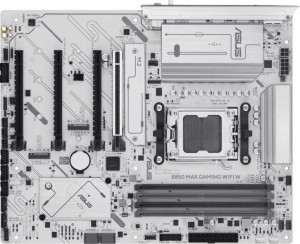
Asus B850 Max Gaming Wi-Fi W
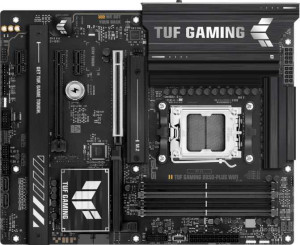
Asus TUF Gaming B850-Plus WiFi

Asus B850 Max Gaming Wi-Fi W Asus TUF Gaming B850-Plus WiFi

Overview

When choosing between the Asus B850 Max Gaming Wi-Fi W and the Asus TUF Gaming B850-Plus WiFi, builders face a fascinating matchup of two AM5 motherboards sharing the same B850 chipset and ATX form factor. While they agree on many fundamentals, key battlegrounds emerge around wireless connectivity, memory capacity, expansion slot configuration, and rear port selection — making the choice far from straightforward for enthusiast builders.

Common Features

  • Both products use the AM5 CPU socket.
  • Both products feature the B850 chipset.
  • Both products have an ATX form factor.
  • Wi-Fi connectivity is available on both products.
  • Bluetooth is available on both products.
  • Both products support HDMI 2.1.
  • Overclocking is supported on both products.
  • RGB lighting is present on both products.
  • Both products support overclocked RAM speeds of up to 8000 MHz.
  • Both products have 4 memory slots.
  • Both products use DDR5 memory.
  • Both products support 2 memory channels.
  • ECC memory is not supported on either product.
  • Both products have 3 USB 3.2 Gen 1 ports via USB-A.
  • Both products have 2 USB 2.0 ports.
  • USB 4 40Gbps ports are not available on either product.
  • USB 4 20Gbps ports are not available on either product.
  • Thunderbolt 4 ports are not available on either product.
  • Thunderbolt 3 ports are not available on either product.
  • An HDMI output is present on both products.
  • Both products have 2 USB 3.2 Gen 1 ports available through expansion.
  • Both products have 4 SATA 3 connectors.
  • Both products have 6 fan headers.
  • Both products have 2 USB 3.0 ports available through expansion.
  • Both products have 3 M.2 sockets.
  • U.2 sockets are not present on either product.
  • An mSATA connector is not available on either product.
  • SATA 2 connectors are not present on either product.
  • Both products have 1 PCIe 4.0 x16 slot.
  • Both products have 1 PCIe 5.0 x16 slot.
  • PCI slots are not present on either product.
  • PCIe 2.0 x16 slots are not present on either product.
  • PCIe x4 slots are not present on either product.
  • PCIe x8 slots are not present on either product.
  • Both products support 7.1 audio channels.
  • An S/PDIF Out port is not available on either product.
  • Both products support RAID 0, RAID 1, RAID 5, and RAID 10.
  • RAID 0+1 is not supported on either product.

Main Differences

  • Wi-Fi 7 (802.11be) support is present on Asus TUF Gaming B850-Plus WiFi but not available on Asus B850 Max Gaming Wi-Fi W.
  • Bluetooth version is 5.3 on Asus B850 Max Gaming Wi-Fi W and 5.4 on Asus TUF Gaming B850-Plus WiFi.
  • Easy BIOS reset is supported on Asus B850 Max Gaming Wi-Fi W but not available on Asus TUF Gaming B850-Plus WiFi.
  • Maximum memory capacity is 256GB on Asus B850 Max Gaming Wi-Fi W and 192GB on Asus TUF Gaming B850-Plus WiFi.
  • USB 3.2 Gen 1 ports via USB-A number 2 on Asus B850 Max Gaming Wi-Fi W and 4 on Asus TUF Gaming B850-Plus WiFi.
  • USB 3.2 Gen 2 ports via USB-C number 1 on Asus B850 Max Gaming Wi-Fi W and 0 on Asus TUF Gaming B850-Plus WiFi.
  • USB 3.2 Gen 2x2 ports number 0 on Asus B850 Max Gaming Wi-Fi W and 1 on Asus TUF Gaming B850-Plus WiFi.
  • USB 2.0 ports available through expansion number 6 on Asus B850 Max Gaming Wi-Fi W and 4 on Asus TUF Gaming B850-Plus WiFi.
  • A TPM connector is present on Asus B850 Max Gaming Wi-Fi W but not available on Asus TUF Gaming B850-Plus WiFi.
  • PCIe 3.0 x16 slots number 2 on Asus B850 Max Gaming Wi-Fi W and 0 on Asus TUF Gaming B850-Plus WiFi.
  • PCIe x1 slots number 0 on Asus B850 Max Gaming Wi-Fi W and 2 on Asus TUF Gaming B850-Plus WiFi.
  • Audio connectors number 3 on Asus B850 Max Gaming Wi-Fi W and 5 on Asus TUF Gaming B850-Plus WiFi.
Specs Comparison
Asus B850 Max Gaming Wi-Fi W

Asus B850 Max Gaming Wi-Fi W

Asus TUF Gaming B850-Plus WiFi

Asus TUF Gaming B850-Plus WiFi

General info:
CPU socket AM5 AM5
chipset B850 B850
form factor ATX ATX
release date April 2025 January 2025
supports Wi-Fi
Wi-Fi version Wi-Fi 4 (802.11n), Wi-Fi 5 (802.11ac), Wi-Fi 6 (802.11ax), Wi-Fi 6E (802.11ax) Wi-Fi 4 (802.11n), Wi-Fi 5 (802.11ac), Wi-Fi 6 (802.11ax), Wi-Fi 6E (802.11ax), Wi-Fi 7 (802.11be)
Has Bluetooth
Bluetooth version 5.3 5.4
HDMI version HDMI 2.1 HDMI 2.1
Easy to overclock
has RGB lighting
Easy to reset BIOS
Has dual BIOS
has aptX
CPU sockets 1 1
Has integrated graphics
warranty period 3 years 3 years
height 244 mm 244 mm
width 305 mm 305 mm
Has integrated CPU

Both the Asus B850 Max Gaming Wi-Fi W and the Asus TUF Gaming B850-Plus WiFi share the same fundamental platform: AM5 socket, B850 chipset, full ATX form factor (244 × 305 mm), and identical feature pillars including dual BIOS, RGB lighting, HDMI 2.1, and overclocking support. For most builders, this means either board slots into the same cases and ecosystem without compromise.

The meaningful differences emerge in wireless connectivity and BIOS accessibility. The TUF Gaming B850-Plus WiFi adds Wi-Fi 7 (802.11be) to its wireless stack, whereas the Max Gaming tops out at Wi-Fi 6E. In practice, Wi-Fi 7 delivers significantly higher theoretical throughput and lower latency — relevant if you have a Wi-Fi 7 router today or plan to upgrade soon. The TUF also carries the newer Bluetooth 5.4 versus 5.3 on the Max Gaming, a marginal but forward-looking improvement in connection stability and peripheral support. On the flip side, the Max Gaming includes an easy BIOS reset mechanism that the TUF lacks — a genuine convenience advantage for overclockers or anyone who frequently experiments with settings and risks unstable boots.

Overall, the TUF Gaming B850-Plus WiFi has the edge for users prioritizing future-proof wireless with Wi-Fi 7, while the Max Gaming Wi-Fi W wins on BIOS ease-of-use for hands-on tinkerers. Neither board offers integrated graphics or aptX audio, and both carry identical 3-year warranties, so the decision narrows cleanly to whether cutting-edge Wi-Fi or convenient BIOS recovery matters more to your use case.
Memory:
maximum memory amount 256GB 192GB
overclocked RAM speed 8000 MHz 8000 MHz
memory slots 4 4
DDR memory version 5 5
memory channels 2 2
Supports ECC memory

On the memory front, both boards share a strong common foundation: 4 DDR5 slots, dual-channel architecture, and an overclocked RAM ceiling of 8000 MHz. DDR5 dual-channel at these speeds is well-suited for modern gaming and content creation workloads, and the slot count gives users room to expand without replacing existing sticks.

The one meaningful split is maximum supported capacity. The Max Gaming Wi-Fi W tops out at 256 GB, while the TUF Gaming B850-Plus WiFi caps at 192 GB. For the vast majority of gaming and general desktop use, even 64 GB is generous — so this gap only becomes relevant in memory-intensive professional workflows like large-scale video editing, virtual machines, or in-memory databases. Neither board supports ECC memory, which rules both out for workstation-grade reliability requirements regardless of capacity.

The Max Gaming Wi-Fi W holds a clear edge here purely on maximum RAM headroom, offering 64 GB more ceiling than the TUF. For typical users this distinction is academic, but for anyone building a high-capacity workstation hybrid on the B850 platform, it is a tangible advantage worth factoring in.

Ports:
USB 3.2 Gen 2 ports (USB-A) 3 3
USB 3.2 Gen 1 ports (USB-A) 2 4
USB 3.2 Gen 2 ports (USB-C) 1 0
USB 3.2 Gen 1 ports (USB-C) 0 0
USB 2.0 ports 2 2
USB 3.2 Gen 2x2 ports 0 1
USB 4 40Gbps ports 0 0
USB 4 20Gbps ports 0 0
Thunderbolt 4 ports 0 0
Thunderbolt 3 ports 0 0
has an HDMI output
DisplayPort outputs 1 1
RJ45 ports 1 1
Has USB Type-C
eSATA ports 0 0
DVI outputs 0 0
has a VGA connector
PS/2 ports 0 0

Rear I/O port selection is where these two boards take noticeably different approaches. Display and networking outputs are identical — both offer HDMI, a DisplayPort, and a single RJ45 ethernet jack — but their USB configurations diverge in ways that matter depending on your peripheral setup.

The TUF Gaming B850-Plus WiFi leans into raw port count and top-end USB-A bandwidth: it fields 4 USB 3.2 Gen 1 (5 Gbps) Type-A ports versus just 2 on the Max Gaming, and crucially includes a USB 3.2 Gen 2x2 port delivering 20 Gbps — the fastest connector on either board. That makes it a better fit for users with high-speed external SSDs or docking stations that saturate a standard 10 Gbps connection. The Max Gaming Wi-Fi W, on the other hand, trades the Gen 2x2 port for a USB 3.2 Gen 2 Type-C at 10 Gbps — increasingly the connector of choice for modern peripherals, smartphones, and compact hubs. It also ends up with two fewer USB-A ports in total.

Neither board is definitively stronger across the board here — it depends on your devices. The TUF edges ahead for sheer port quantity and peak USB-A throughput, while the Max Gaming is the better pick if a rear USB-C port at 10 Gbps is a daily necessity for your workflow.

Connectors:
USB 3.2 Gen 1 ports (through expansion) 2 2
USB 2.0 ports (through expansion) 6 4
SATA 3 connectors 4 4
fan headers 6 6
USB 3.0 ports (through expansion) 2 2
M.2 sockets 3 3
Has TPM connector
U.2 sockets 0 0
Has mSATA connector
SATA 2 connectors 0 0

Internal connectors tell a lot about how a board is designed to be built around, and here the two boards are remarkably well-matched. Both offer 3 M.2 sockets, 4 SATA 3 ports, and 6 fan headers — a generous and balanced combination that comfortably supports multi-drive NVMe setups alongside traditional SATA storage, with enough fan headers to manage airflow in even moderately complex cooling configurations without needing a separate hub.

The two differences worth noting are internal USB expansion and TPM support. The Max Gaming Wi-Fi W provides 6 internal USB 2.0 expansion ports versus 4 on the TUF — useful if you run multiple front-panel USB headers or internal devices like USB hubs or all-in-one cooler controllers. More significantly, the Max Gaming includes a dedicated TPM connector, which the TUF lacks. A hardware TPM module is relevant for enterprise security compliance, BitLocker encryption workflows, and certain professional environments that mandate discrete TPM rather than relying on firmware-based solutions.

For most home builders the TPM connector will go unused, making this category largely a tie in practice. However, for users with security or compliance requirements, the Max Gaming Wi-Fi W holds a clear functional advantage by offering that dedicated TPM header.

Expansion slots:
PCIe 4.0 x16 slots 1 1
PCIe 5.0 x16 slots 1 1
PCIe 3.0 x16 slots 2 0
PCIe x1 slots 0 2
PCI slots 0 0
PCIe 2.0 x16 slots 0 0
PCIe x4 slots 0 0
PCIe x8 slots 0 0

Expansion slot layout reflects a meaningful philosophical difference between these two boards. Both share the same high-bandwidth core: one PCIe 5.0 x16 slot for a primary GPU and one PCIe 4.0 x16 slot for a secondary card or high-speed add-in device. That combination is more than adequate for any current single-GPU gaming or workstation build.

Where they diverge is in how the remaining slots are configured. The Max Gaming Wi-Fi W adds two PCIe 3.0 x16 slots — physically full-length connectors that, while operating at gen 3 speeds, offer broad compatibility with older or bandwidth-light expansion cards like capture cards, RAID controllers, or legacy GPUs. The TUF Gaming B850-Plus WiFi instead opts for two PCIe x1 slots, which are physically smaller and better suited to compact add-in cards such as sound cards, network adapters, or USB expansion cards. Neither approach is universally superior — it depends entirely on what you plan to slot in.

For users who need to install full-size expansion cards beyond the primary GPU, the Max Gaming Wi-Fi W has the advantage with its additional x16-length slots. For those adding compact, single-function cards, the TUF's x1 slots are a more purpose-fit solution. If expansion cards beyond a GPU are not part of your build, this group is essentially a tie.

Audio:
audio channels 7.1 7.1
Has S/PDIF Out port
audio connectors 3 5

Audio capabilities are closely matched at the channel level — both boards deliver 7.1 surround sound output and omit an S/PDIF optical port, meaning neither caters to users who route audio digitally to an external DAC or AV receiver via optical cable. For those users, an external USB audio interface would be the workaround on either board.

The single differentiator in this group is the number of rear audio jacks: the TUF Gaming B850-Plus WiFi provides 5 audio connectors while the Max Gaming Wi-Fi W offers only 3. In practical terms, more jacks mean greater flexibility for analog multi-channel speaker setups — a full 7.1 analog configuration typically requires multiple 3.5mm outputs, so a higher connector count allows more speaker channels to be driven simultaneously without an adapter.

For headset users or simple stereo setups, 3 jacks is perfectly sufficient, making this a non-issue for the majority of gamers. But for anyone running a physical multi-channel speaker array through analog connections, the TUF holds a clear advantage with its more complete jack complement.

Storage:
Supports RAID 1
Supports RAID 10 (1+0)
Supports RAID 5
Supports RAID 0
Supports RAID 0+1

RAID support is identical across both boards, and the coverage is solid: RAID 0, RAID 1, RAID 5, and RAID 10 are all supported, while RAID 0+1 is absent on both — a minor omission given that RAID 10 achieves effectively the same outcome in most practical configurations and is generally the preferred standard.

This means both boards can accommodate the full range of common storage strategies: pure speed striping via RAID 0, straightforward mirroring for redundancy via RAID 1, parity-based fault tolerance with usable capacity via RAID 5, and the combined performance-plus-redundancy of RAID 10. Whether the use case is a home NAS-style array, a content creation setup needing fast sequential throughput, or a workstation wanting drive redundancy, neither board imposes any limitation the other doesn't share.

This group is a complete tie. The RAID feature set is point-for-point identical, and the absent RAID 0+1 is equally irrelevant to both. Storage configuration capability should play no role in choosing between these two boards.

Comparison Summary & Verdict

Both boards are strong AM5 contenders built on the B850 chipset, but their differences reveal distinct target audiences. The Asus B850 Max Gaming Wi-Fi W stands out with a higher maximum memory capacity of 256GB, a TPM connector, an easy BIOS reset button, two PCIe 3.0 x16 slots, and a USB 3.2 Gen 2 Type-C rear port — making it the better pick for power users who need flexible legacy expansion and straightforward system management. The Asus TUF Gaming B850-Plus WiFi counters with Wi-Fi 7 support, Bluetooth 5.4, more rear USB-A ports, a USB 3.2 Gen 2x2 port, and five audio connectors, making it ideal for users who prioritize cutting-edge wireless performance and a richer audio and USB-A connectivity setup at the back panel.

Asus B850 Max Gaming Wi-Fi W
Buy Asus B850 Max Gaming Wi-Fi W if...

Buy the Asus B850 Max Gaming Wi-Fi W if you need a higher maximum memory capacity of 256GB, want a convenient BIOS reset option, or require a TPM connector and greater PCIe legacy slot flexibility.

Asus TUF Gaming B850-Plus WiFi
Buy Asus TUF Gaming B850-Plus WiFi if...

Buy the Asus TUF Gaming B850-Plus WiFi if you want the latest Wi-Fi 7 and Bluetooth 5.4 wireless standards, more rear USB-A ports, or a richer audio connector selection.