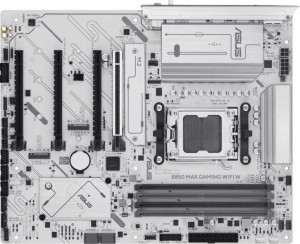
Asus B850 Max Gaming Wi-Fi W
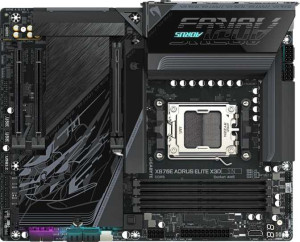
Gigabyte X870E Aorus Elite X3D

Asus B850 Max Gaming Wi-Fi W Gigabyte X870E Aorus Elite X3D

Overview

Welcome to our in-depth spec comparison between the Asus B850 Max Gaming Wi-Fi W and the Gigabyte X870E Aorus Elite X3D — two AM5 ATX motherboards targeting enthusiast builders. Both share a strong foundation of DDR5 support, PCIe 5.0, and wireless connectivity, yet they diverge sharply on chipset tier, high-speed USB and Thunderbolt 4 availability, expansion slot configuration, and overclocked memory ceiling. Read on to see which board aligns with your build goals.

Common Features

  • Both boards use the AM5 CPU socket.
  • Both boards have an ATX form factor.
  • Both boards support Wi-Fi.
  • Both boards have Bluetooth.
  • Both boards include HDMI 2.1 output.
  • Both boards are easy to overclock.
  • Both boards feature RGB lighting.
  • Both boards support easy BIOS reset.
  • Both boards support a maximum of 256GB of memory.
  • Both boards have 4 memory slots.
  • Both boards use DDR5 memory.
  • Both boards have 2 memory channels.
  • Neither board supports ECC memory.
  • Both boards have 1 USB 3.2 Gen 2 port in USB-C format.
  • Neither board has any USB 3.2 Gen 1 USB-C ports.
  • Neither board has USB 3.2 Gen 2x2 ports.
  • Neither board has USB 4 20Gbps ports.
  • Neither board has Thunderbolt 3 ports.
  • Both boards have an HDMI output.
  • Both boards have 1 RJ45 port.
  • Both boards have a USB Type-C port.
  • Both boards have 4 SATA 3 connectors.
  • Both boards have a TPM connector.
  • Neither board has a U.2 socket.
  • Neither board has an mSATA connector.
  • Neither board has any SATA 2 connectors.
  • Both boards have 1 PCIe 5.0 x16 slot.
  • Neither board has PCIe x1 slots.
  • Neither board has PCI slots.
  • Neither board has PCIe 2.0 x16 slots.
  • Neither board has PCIe x8 slots.
  • Both boards support 7.1 audio channels.
  • Both boards support RAID 0, RAID 1, RAID 5, and RAID 10.
  • Neither board supports RAID 0+1.

Main Differences

  • The chipset is B850 on Asus B850 Max Gaming Wi-Fi W and X870 on Gigabyte X870E Aorus Elite X3D.
  • Wi-Fi 7 (802.11be) support is present on Gigabyte X870E Aorus Elite X3D but not available on Asus B850 Max Gaming Wi-Fi W.
  • Bluetooth version is 5.3 on Asus B850 Max Gaming Wi-Fi W and 5.4 on Gigabyte X870E Aorus Elite X3D.
  • Dual BIOS is present on Asus B850 Max Gaming Wi-Fi W but not available on Gigabyte X870E Aorus Elite X3D.
  • Overclocked RAM speed is 8000 MHz on Asus B850 Max Gaming Wi-Fi W and 9000 MHz on Gigabyte X870E Aorus Elite X3D.
  • USB 3.2 Gen 2 ports in USB-A format number 3 on Asus B850 Max Gaming Wi-Fi W and 5 on Gigabyte X870E Aorus Elite X3D.
  • USB 3.2 Gen 1 ports in USB-A format number 2 on Asus B850 Max Gaming Wi-Fi W and 3 on Gigabyte X870E Aorus Elite X3D.
  • USB 2.0 ports number 2 on Asus B850 Max Gaming Wi-Fi W and 0 on Gigabyte X870E Aorus Elite X3D.
  • USB 4 40Gbps ports number 0 on Asus B850 Max Gaming Wi-Fi W and 2 on Gigabyte X870E Aorus Elite X3D.
  • Thunderbolt 4 ports number 0 on Asus B850 Max Gaming Wi-Fi W and 2 on Gigabyte X870E Aorus Elite X3D.
  • DisplayPort output is available on Asus B850 Max Gaming Wi-Fi W but not present on Gigabyte X870E Aorus Elite X3D.
  • USB 3.2 Gen 1 expansion ports number 2 on Asus B850 Max Gaming Wi-Fi W and 4 on Gigabyte X870E Aorus Elite X3D.
  • USB 2.0 expansion ports number 6 on Asus B850 Max Gaming Wi-Fi W and 4 on Gigabyte X870E Aorus Elite X3D.
  • Fan headers number 6 on Asus B850 Max Gaming Wi-Fi W and 8 on Gigabyte X870E Aorus Elite X3D.
  • USB 3.0 expansion ports number 2 on Asus B850 Max Gaming Wi-Fi W and 4 on Gigabyte X870E Aorus Elite X3D.
  • M.2 sockets number 3 on Asus B850 Max Gaming Wi-Fi W and 4 on Gigabyte X870E Aorus Elite X3D.
  • PCIe 4.0 x16 slots number 1 on Asus B850 Max Gaming Wi-Fi W and 0 on Gigabyte X870E Aorus Elite X3D.
  • PCIe 3.0 x16 slots number 2 on Asus B850 Max Gaming Wi-Fi W and 0 on Gigabyte X870E Aorus Elite X3D.
  • A PCIe x4 slot is present on Gigabyte X870E Aorus Elite X3D but not available on Asus B850 Max Gaming Wi-Fi W.
  • An S/PDIF Out port is present on Gigabyte X870E Aorus Elite X3D but not available on Asus B850 Max Gaming Wi-Fi W.
  • Audio connectors number 3 on Asus B850 Max Gaming Wi-Fi W and 2 on Gigabyte X870E Aorus Elite X3D.
Specs Comparison
Asus B850 Max Gaming Wi-Fi W

Asus B850 Max Gaming Wi-Fi W

Gigabyte X870E Aorus Elite X3D

Gigabyte X870E Aorus Elite X3D

General info:
CPU socket AM5 AM5
chipset B850 X870
form factor ATX ATX
release date April 2025 September 2025
supports Wi-Fi
Wi-Fi version Wi-Fi 4 (802.11n), Wi-Fi 5 (802.11ac), Wi-Fi 6 (802.11ax), Wi-Fi 6E (802.11ax) Wi-Fi 4 (802.11n), Wi-Fi 5 (802.11ac), Wi-Fi 6 (802.11ax), Wi-Fi 6E (802.11ax), Wi-Fi 7 (802.11be)
Has Bluetooth
Bluetooth version 5.3 5.4
HDMI version HDMI 2.1 HDMI 2.1
Easy to overclock
has RGB lighting
Easy to reset BIOS
Has dual BIOS
has aptX
CPU sockets 1 1
Has integrated graphics
warranty period 3 years 3 years
height 244 mm 244 mm
width 305 mm 305 mm
Has integrated CPU

Both boards share the same AM5 socket, ATX form factor, and identical dimensions of 244 × 305 mm, meaning they fit the same cases and target the same AMD Ryzen platform. They also match on HDMI 2.1 output, RGB lighting, easy BIOS reset, a 3-year warranty, and overclocking-friendly designs. The real story, however, lies in what separates them at the chipset and connectivity level.

The most meaningful general-info differentiator is the chipset: the Asus runs a B850, while the Gigabyte is built on the higher-tier X870E. In practical terms, X870E unlocks more PCIe lanes, greater overclocking headroom, and is designed for enthusiast-class builds, whereas B850 is a capable but more mainstream chipset. Compounding this, the Gigabyte adds Wi-Fi 7 (802.11be) support — a generational leap that delivers multi-link operation and significantly higher theoretical throughput compared to the Asus's Wi-Fi 6E ceiling. Similarly, its Bluetooth 5.4 edges out the Asus's 5.3, offering marginal improvements in connection stability and energy efficiency.

The Asus strikes back with one notable exclusive: dual BIOS, a hardware-level safety net that lets users recover from a failed BIOS flash without external tools — genuinely useful for overclockers. Still, taken as a whole, the Gigabyte X870E Aorus Elite X3D holds a clear general-specs edge thanks to its superior chipset, next-gen Wi-Fi 7 connectivity, and newer Bluetooth — making it the stronger choice for users who want more platform headroom and future-proof wireless. The Asus B850 Max Gaming Wi-Fi W is the more budget-conscious option with the added peace of mind of dual BIOS.
Memory:
maximum memory amount 256GB 256GB
overclocked RAM speed 8000 MHz 9000 MHz
memory slots 4 4
DDR memory version 5 5
memory channels 2 2
Supports ECC memory

On paper, the memory configurations of these two boards look nearly identical: both offer 4 slots, dual-channel DDR5, a 256GB maximum capacity, and no ECC support. For the vast majority of users, this means the day-to-day memory experience — how many sticks you can install, how much total RAM your system can address — will be exactly the same.

The single differentiator worth examining is the maximum overclocked RAM speed. The Asus B850 Max Gaming Wi-Fi W tops out at 8000 MHz, while the Gigabyte X870E Aorus Elite X3D pushes to 9000 MHz. That 1000 MHz gap matters primarily to enthusiasts who are actively pushing DDR5 to its limits — in heavily memory-bandwidth-dependent workloads like video editing, 3D rendering, or certain simulation tasks, higher memory clocks can translate to measurable throughput gains. For gaming or general productivity, the real-world difference between these two speeds is typically negligible.

The Gigabyte holds a narrow but clear edge here thanks to its higher memory frequency ceiling, which aligns with its X870E chipset's broader overclocking ambitions. However, users who have no intention of pushing RAM beyond the 7000–8000 MHz range will find the Asus's memory subsystem entirely sufficient, making this a differentiator that matters mainly to dedicated memory overclockers rather than the general audience.

Ports:
USB 3.2 Gen 2 ports (USB-A) 3 5
USB 3.2 Gen 1 ports (USB-A) 2 3
USB 3.2 Gen 2 ports (USB-C) 1 1
USB 3.2 Gen 1 ports (USB-C) 0 0
USB 2.0 ports 2 0
USB 3.2 Gen 2x2 ports 0 0
USB 4 40Gbps ports 0 2
USB 4 20Gbps ports 0 0
Thunderbolt 4 ports 0 2
Thunderbolt 3 ports 0 0
has an HDMI output
DisplayPort outputs 1 0
RJ45 ports 1 1
Has USB Type-C
eSATA ports 0 0
DVI outputs 0 0
has a VGA connector
PS/2 ports 0 0

The rear I/O panel is where these two boards diverge most dramatically. The Asus B850 Max Gaming Wi-Fi W offers a respectable but conventional selection: 3 USB 3.2 Gen 2 Type-A ports, 2 Gen 1 Type-A, 1 Gen 2 Type-C, plus 2 legacy USB 2.0 ports — adequate for most peripherals but with no high-speed bandwidth surprises. The Gigabyte X870E Aorus Elite X3D counters with not only more USB-A ports overall (5 Gen 2 Type-A and 3 Gen 1 Type-A), but crucially adds 2 Thunderbolt 4 / USB 4 40Gbps ports — a feature class entirely absent on the Asus.

Those Thunderbolt 4 ports are the headline story here. At 40Gbps per port, they open the door to external NVMe enclosures at near-internal speeds, eGPU setups, ultra-high-bandwidth docking stations, and daisy-chaining up to six devices per port — use cases the Asus simply cannot support at this I/O level. For content creators, power users, or anyone building a high-throughput peripheral ecosystem, this is a meaningful real-world advantage, not just a spec-sheet win.

The one area where the Asus holds ground is video output flexibility: it includes both HDMI and a DisplayPort output, while the Gigabyte offers only HDMI. This gives the Asus a minor edge for users who need to connect a monitor directly to the board without a discrete GPU. Overall, though, the Gigabyte X870E Aorus Elite X3D wins the ports category decisively, delivering a higher port count, faster USB-A speeds across the board, and the transformative addition of Thunderbolt 4 connectivity.

Connectors:
USB 3.2 Gen 1 ports (through expansion) 2 4
USB 2.0 ports (through expansion) 6 4
SATA 3 connectors 4 4
fan headers 6 8
USB 3.0 ports (through expansion) 2 4
M.2 sockets 3 4
Has TPM connector
U.2 sockets 0 0
Has mSATA connector
SATA 2 connectors 0 0

Internal connectors tell the story of how expandable a build can realistically become, and here the Gigabyte X870E Aorus Elite X3D consistently outpaces the Asus B850 Max Gaming Wi-Fi W across the board. The most impactful gap is in M.2 sockets: the Gigabyte provides 4 versus the Asus's 3. For storage-hungry users — those running a primary NVMe OS drive, a secondary game library drive, and additional fast storage for creative work — that extra slot removes a meaningful constraint without resorting to SATA drives or external solutions.

Fan header count is another area where the Gigabyte pulls ahead, offering 8 headers compared to the Asus's 6. In a high-airflow or liquid-cooled build with multiple radiator fans, chassis fans, and pump headers all competing for connections, two additional headers can eliminate the need for fan hubs entirely — simplifying cable management and giving the system more granular thermal control. Both boards match on 4 SATA 3 connectors, which is adequate for a mixed storage setup, and both include a TPM connector, relevant for Windows 11 compliance and security-conscious builds.

Across every internal connector category that varies between these two boards, the Gigabyte holds a numerical advantage. The Asus B850 Max Gaming Wi-Fi W is not lacking for a mainstream build, but the Gigabyte X870E Aorus Elite X3D is clearly engineered for denser, more complex configurations — making it the stronger choice for builders who anticipate expanding their storage or cooling setup over time.

Expansion slots:
PCIe 4.0 x16 slots 1 0
PCIe 5.0 x16 slots 1 1
PCIe 3.0 x16 slots 2 0
PCIe x1 slots 0 0
PCI slots 0 0
PCIe 2.0 x16 slots 0 0
PCIe x4 slots 0 1
PCIe x8 slots 0 0

When it comes to expansion slots, quantity and quality tell different stories for each board. The Asus B850 Max Gaming Wi-Fi W fields a notably broader physical layout: one PCIe 5.0 x16 slot for the primary GPU, one PCIe 4.0 x16 slot, and two PCIe 3.0 x16 slots — four x16-sized slots in total. The Gigabyte X870E Aorus Elite X3D, by contrast, takes a leaner approach: one PCIe 5.0 x16 slot and a single PCIe x4 slot, with nothing else.

For users running a single high-end GPU, neither board presents a limitation — both provide a full-bandwidth PCIe 5.0 x16 primary slot, which is the relevant connection for any current-generation graphics card. Where they diverge is in secondary expansion. The Asus's additional PCIe 4.0 and 3.0 x16 slots can accommodate capture cards, additional NVMe adapters, or other PCIe peripherals. The Gigabyte's secondary slot is a more modest PCIe x4, which limits the bandwidth available to a second card or add-in device.

For a conventional single-GPU gaming or workstation build, this distinction is largely academic — but the Asus B850 Max Gaming Wi-Fi W holds a clear edge for users who plan to populate multiple expansion slots simultaneously, whether for multi-card compute workloads, capture cards, or high-bandwidth PCIe accessories. In this specific category, the Asus is the more flexible platform.

Audio:
audio channels 7.1 7.1
Has S/PDIF Out port
audio connectors 3 2

Audio is one of the tighter matchups between these two boards, with both delivering 7.1-channel surround sound output — more than sufficient for a high-end gaming headset, a surround speaker setup, or a home theater PC configuration. The divergence comes down to two specific differences: analog connector count and digital output availability.

The Asus B850 Max Gaming Wi-Fi W offers 3 analog audio connectors on the rear panel, giving users more physical jacks for simultaneous analog device connections — useful when running speakers and a microphone independently without a splitter. The Gigabyte X870E Aorus Elite X3D counters with just 2 analog connectors, but compensates meaningfully by adding an S/PDIF optical output. S/PDIF is the preferred connection for passing digital audio directly to an AV receiver, a DAC, or a home theater system, preserving signal integrity and bypassing the motherboard's analog circuitry entirely — a notable advantage for audiophiles or home theater enthusiasts.

Which board wins here depends entirely on the user's audio setup. For those relying purely on analog connections — headsets, desktop speakers, and onboard sound — the Asus edges ahead with its extra connector. For anyone routing audio through an external receiver or a dedicated DAC via optical, the Gigabyte's S/PDIF out is the more capable and cleaner solution. Overall, the Gigabyte holds a slight functional edge for quality-focused audio routing, but neither board is a clear universal winner in this category.

Storage:
Supports RAID 1
Supports RAID 10 (1+0)
Supports RAID 5
Supports RAID 0
Supports RAID 0+1

Storage redundancy support is a complete dead heat between these two boards. Both the Asus B850 Max Gaming Wi-Fi W and the Gigabyte X870E Aorus Elite X3D support RAID 0, 1, 5, and 10, and neither supports RAID 0+1 — making their RAID feature sets identical in every respect covered by the provided data.

The supported configurations cover the practical spectrum for a desktop build: RAID 0 for pure striped performance, RAID 1 for mirrored redundancy, RAID 5 for a balanced blend of performance, capacity, and fault tolerance across three or more drives, and RAID 10 for combined striping and mirroring in larger arrays. These options are most relevant to content creators, small workstation users, or enthusiasts who want data protection without relying solely on external backups.

There is no basis for distinguishing these two boards on storage capabilities from the provided specs — this category is a complete tie. Buyers prioritizing RAID flexibility will find both platforms equally capable, and any storage-related decision between them should be driven by the connector and M.2 slot counts covered in the Connectors group rather than RAID support.

Comparison Summary & Verdict

After examining every specification, a clear picture emerges for each board. The Asus B850 Max Gaming Wi-Fi W stands out for builders who value flexibility through its dual BIOS safety net, a dedicated DisplayPort output, and a broader mix of legacy PCIe slots — including PCIe 4.0 and 3.0 x16 slots — making it a more accessible and versatile choice for varied GPU and expansion card setups. The Gigabyte X870E Aorus Elite X3D, on the other hand, is built for power users who demand the absolute cutting edge: its Wi-Fi 7 support, two Thunderbolt 4 and USB 4 40Gbps ports, a higher 9000 MHz overclocked RAM ceiling, four M.2 sockets, and eight fan headers make it the stronger pick for high-performance workstations and enthusiast gaming rigs where maximum throughput and connectivity are non-negotiable.

Asus B850 Max Gaming Wi-Fi W
Buy Asus B850 Max Gaming Wi-Fi W if...

Buy the Asus B850 Max Gaming Wi-Fi W if you want the reassurance of dual BIOS, need a DisplayPort output on your motherboard, or prefer a wider range of PCIe expansion slots at a more accessible chipset tier.

Gigabyte X870E Aorus Elite X3D
Buy Gigabyte X870E Aorus Elite X3D if...

Buy the Gigabyte X870E Aorus Elite X3D if you need Wi-Fi 7, Thunderbolt 4, USB 4 40Gbps connectivity, a higher 9000 MHz RAM overclock ceiling, or more M.2 slots and fan headers for a top-tier enthusiast build.