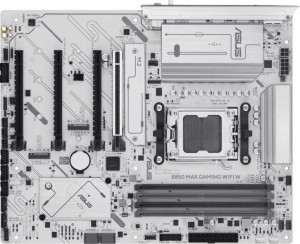
Asus B850 Max Gaming Wi-Fi W
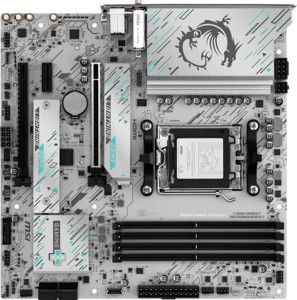
MSI B850M Gaming Plus Wi-Fi

Asus B850 Max Gaming Wi-Fi W MSI B850M Gaming Plus Wi-Fi

Overview

Deciding between the Asus B850 Max Gaming Wi-Fi W and the MSI B850M Gaming Plus Wi-Fi comes down to more than just price — these two B850-chipset motherboards diverge in meaningful ways across form factor, expansion capabilities, and wireless connectivity. While they share a strong common foundation on the AM5 platform, their differences in storage options, PCIe slots, and Wi-Fi standards make each board better suited to a distinct type of builder. Read on to see how they truly stack up.

Common Features

  • Both boards use the AM5 CPU socket.
  • Both boards feature the B850 chipset.
  • Wi-Fi connectivity is available on both products.
  • Bluetooth is available on both products.
  • Both boards support HDMI 2.1.
  • Overclocking is supported on both products.
  • RGB lighting is present on both products.
  • Easy BIOS reset is supported on both products.
  • Both boards support a maximum of 256GB of memory.
  • Both boards have 4 memory slots.
  • Both boards use DDR5 memory.
  • Both boards have 2 memory channels.
  • ECC memory is not supported on either product.
  • Both boards have 3 USB 3.2 Gen 2 Type-A ports.
  • Neither board has USB 3.2 Gen 1 Type-C ports.
  • Neither board has USB 3.2 Gen 2x2 ports.
  • Neither board has USB 4 or Thunderbolt ports.
  • An HDMI output is present on both products.
  • Both boards have 2 USB 3.2 Gen 1 expansion ports and 2 USB 3.0 expansion ports.
  • Both boards have 4 SATA 3 connectors and no SATA 2 connectors.
  • A TPM connector is present on both products.
  • mSATA connectivity is not available on either product.
  • Both boards have 1 PCIe 5.0 x16 slot and no PCI or PCIe 2.0 x16 slots.
  • Both boards offer 7.1 audio channels with 3 audio connectors.
  • S/PDIF Out is not available on either product.
  • Both boards support RAID 0, RAID 1, and RAID 10, but not RAID 0+1.

Main Differences

  • The form factor is ATX on Asus B850 Max Gaming Wi-Fi W and Micro-ATX on MSI B850M Gaming Plus Wi-Fi.
  • Wi-Fi 7 (802.11be) support is present on MSI B850M Gaming Plus Wi-Fi but not available on Asus B850 Max Gaming Wi-Fi W.
  • The Bluetooth version is 5.3 on Asus B850 Max Gaming Wi-Fi W and 5.4 on MSI B850M Gaming Plus Wi-Fi.
  • The board height is 244 mm on Asus B850 Max Gaming Wi-Fi W and 243.8 mm on MSI B850M Gaming Plus Wi-Fi.
  • The board width is 305 mm on Asus B850 Max Gaming Wi-Fi W and 243.8 mm on MSI B850M Gaming Plus Wi-Fi.
  • The maximum overclocked RAM speed is 8000 MHz on Asus B850 Max Gaming Wi-Fi W and 8200 MHz on MSI B850M Gaming Plus Wi-Fi.
  • USB 3.2 Gen 1 Type-A ports number 2 on Asus B850 Max Gaming Wi-Fi W and 3 on MSI B850M Gaming Plus Wi-Fi.
  • USB 3.2 Gen 2 Type-C ports number 1 on Asus B850 Max Gaming Wi-Fi W and 2 on MSI B850M Gaming Plus Wi-Fi.
  • USB 2.0 ports number 2 on Asus B850 Max Gaming Wi-Fi W and 0 on MSI B850M Gaming Plus Wi-Fi.
  • USB 2.0 expansion ports number 6 on Asus B850 Max Gaming Wi-Fi W and 4 on MSI B850M Gaming Plus Wi-Fi.
  • Fan headers number 6 on Asus B850 Max Gaming Wi-Fi W and 5 on MSI B850M Gaming Plus Wi-Fi.
  • M.2 sockets number 3 on Asus B850 Max Gaming Wi-Fi W and 2 on MSI B850M Gaming Plus Wi-Fi.
  • PCIe 4.0 x16 slots number 1 on Asus B850 Max Gaming Wi-Fi W and 0 on MSI B850M Gaming Plus Wi-Fi.
  • PCIe 3.0 x16 slots number 2 on Asus B850 Max Gaming Wi-Fi W and 0 on MSI B850M Gaming Plus Wi-Fi.
  • PCIe x1 slots number 0 on Asus B850 Max Gaming Wi-Fi W and 1 on MSI B850M Gaming Plus Wi-Fi.
  • PCIe x4 slots number 0 on Asus B850 Max Gaming Wi-Fi W and 1 on MSI B850M Gaming Plus Wi-Fi.
  • RAID 5 support is present on Asus B850 Max Gaming Wi-Fi W but not available on MSI B850M Gaming Plus Wi-Fi.
Specs Comparison
Asus B850 Max Gaming Wi-Fi W

Asus B850 Max Gaming Wi-Fi W

MSI B850M Gaming Plus Wi-Fi

MSI B850M Gaming Plus Wi-Fi

General info:
CPU socket AM5 AM5
chipset B850 B850
form factor ATX Micro-ATX
release date April 2025 January 2025
supports Wi-Fi
Wi-Fi version Wi-Fi 4 (802.11n), Wi-Fi 5 (802.11ac), Wi-Fi 6 (802.11ax), Wi-Fi 6E (802.11ax) Wi-Fi 4 (802.11n), Wi-Fi 5 (802.11ac), Wi-Fi 6 (802.11ax), Wi-Fi 6E (802.11ax), Wi-Fi 7 (802.11be)
Has Bluetooth
Bluetooth version 5.3 5.4
HDMI version HDMI 2.1 HDMI 2.1
Easy to overclock
has RGB lighting
Easy to reset BIOS
Has dual BIOS
has aptX
CPU sockets 1 1
Has integrated graphics
warranty period 3 years 3 years
height 244 mm 243.8 mm
width 305 mm 243.8 mm
Has integrated CPU

Both the Asus B850 Max Gaming Wi-Fi W and the MSI B850M Gaming Plus Wi-Fi share the same AM5 socket and B850 chipset foundation, meaning they target the same generation of AMD processors and offer identical baseline platform capabilities. They also match on quality-of-life features: both include dual BIOS, easy BIOS reset, RGB lighting, HDMI 2.1 output, and a 3-year warranty, so neither board has an obvious edge in build confidence or usability conveniences.

The most meaningful differentiator in this group is the form factor. The Asus is a full ATX board (305 × 244 mm), while the MSI is Micro-ATX (243.8 × 243.8 mm). This is a fundamental build decision: ATX opens up more PCIe slots, better airflow spacing, and compatibility with a wider range of mid-tower and full-tower cases, whereas Micro-ATX is the better fit for compact builds where footprint matters. Neither is inherently superior — it depends entirely on the user's chassis and expansion plans.

On wireless connectivity, the MSI holds a real-world edge: it supports Wi-Fi 7 (802.11be), while the Asus tops out at Wi-Fi 6E. Wi-Fi 7 delivers significantly higher theoretical throughput and lower latency, particularly useful as routers supporting the standard become more common. The MSI also carries a marginally newer Bluetooth 5.4 versus the Asus's Bluetooth 5.3, a minor but forward-looking improvement. Overall, the MSI wins this group on wireless specs; the Asus wins if a full-size ATX layout is a priority for the build.
Memory:
maximum memory amount 256GB 256GB
overclocked RAM speed 8000 MHz 8200 MHz
memory slots 4 4
DDR memory version 5 5
memory channels 2 2
Supports ECC memory

The memory configurations on these two boards are nearly identical at the platform level: both offer 4 DIMM slots, dual-channel DDR5, a 256GB maximum capacity, and no ECC support. For the vast majority of users — including gamers and content creators — 256GB headroom is far more than sufficient, and the dual-channel DDR5 architecture ensures strong memory bandwidth across both boards.

The only differentiator here is the maximum supported overclock speed. The MSI B850M Gaming Plus Wi-Fi reaches 8200 MHz, while the Asus B850 Max Gaming Wi-Fi W caps at 8000 MHz. In practical terms, this 200 MHz gap is marginal — the real-world performance delta in games or productivity workloads would be negligible, and hitting either ceiling requires carefully selected high-speed DDR5 kits paired with stable EXPO/XMP tuning.

For memory, these boards are effectively tied. The MSI holds a paper advantage with its slightly higher overclock ceiling, but it is unlikely to matter in any real use case. Buyers focused purely on memory capability should treat this as a non-factor and weigh other spec groups when making their decision.

Ports:
USB 3.2 Gen 2 ports (USB-A) 3 3
USB 3.2 Gen 1 ports (USB-A) 2 3
USB 3.2 Gen 2 ports (USB-C) 1 2
USB 3.2 Gen 1 ports (USB-C) 0 0
USB 2.0 ports 2 0
USB 3.2 Gen 2x2 ports 0 0
USB 4 40Gbps ports 0 0
USB 4 20Gbps ports 0 0
Thunderbolt 4 ports 0 0
Thunderbolt 3 ports 0 0
has an HDMI output
DisplayPort outputs 1 1
RJ45 ports 1 1
Has USB Type-C
eSATA ports 0 0
DVI outputs 0 0
has a VGA connector
PS/2 ports 0 0

Video output and networking are identical across both boards — each provides HDMI, one DisplayPort output, and a single RJ45 ethernet port, so there is no differentiation there. The more interesting story is in the USB rear I/O. Both boards match on 3 USB 3.2 Gen 2 Type-A ports (10Gbps each), but the MSI pulls ahead with 2 USB 3.2 Gen 2 Type-C ports versus the Asus's single one. That extra high-speed Type-C port is genuinely useful as USB-C peripherals — external SSDs, docks, and modern controllers — continue to become the norm.

The MSI also edges out the Asus in total USB-A count by adding a third USB 3.2 Gen 1 port, bringing it to six USB-A ports in total compared to the Asus's five. Meanwhile, the Asus retains 2 USB 2.0 ports that the MSI omits entirely. For most users this is irrelevant, but those with older peripherals like certain headset dongles or legacy input devices will appreciate having them — they draw less power management overhead and are universally compatible.

On balance, the MSI B850M Gaming Plus Wi-Fi wins this group for users building a modern, forward-looking setup, thanks to its superior USB-C count and slightly larger USB-A total. The Asus B850 Max Gaming Wi-Fi W is the better choice only if legacy USB 2.0 device compatibility is a genuine requirement. Neither board offers USB 4 or Thunderbolt, so heavy-duty external GPU or ultra-high-speed storage users will find both equally limited at this price tier.

Connectors:
USB 3.2 Gen 1 ports (through expansion) 2 2
USB 2.0 ports (through expansion) 6 4
SATA 3 connectors 4 4
fan headers 6 5
USB 3.0 ports (through expansion) 2 2
M.2 sockets 3 2
Has TPM connector
U.2 sockets 0 0
Has mSATA connector
SATA 2 connectors 0 0

Internal connectivity tells a clear story in favor of the Asus B850 Max Gaming Wi-Fi W. Its 3 M.2 sockets versus the MSI's 2 is the headline differentiator here — each M.2 slot is a direct path to a fast NVMe SSD, and having three means users can run a dedicated OS drive, a storage drive, and a third for scratch space or game libraries without touching the SATA ports. For storage-heavy builds, that extra slot is a tangible advantage.

Fan header count follows the same pattern: the Asus provides 6 fan headers to the MSI's 5. In a well-cooled gaming or workstation build with multiple case fans plus a CPU cooler and pump header, running out of native headers forces users to add splitters or fan hubs. The Asus's extra header keeps cable management and thermal control simpler out of the box. The Asus also offers 6 USB 2.0 expansion ports versus the MSI's 4, which matters for front-panel USB headers and all-in-one cooler controllers that commonly rely on internal USB 2.0.

Where the two boards are equal — 4 SATA 3 connectors, identical USB 3.0/3.2 Gen 1 expansion headers, and a TPM connector on both — those shared specs confirm a solid baseline on either platform. But taken as a whole, the Asus wins this group meaningfully. The additional M.2 slot alone is a compelling reason to prefer it for users who prioritize NVMe storage expansion, and the extra fan header is a welcome bonus for enthusiast cooling setups.

Expansion slots:
PCIe 4.0 x16 slots 1 0
PCIe 5.0 x16 slots 1 1
PCIe 3.0 x16 slots 2 0
PCIe x1 slots 0 1
PCI slots 0 0
PCIe 2.0 x16 slots 0 0
PCIe x4 slots 0 1
PCIe x8 slots 0 0

PCIe slot layout is where the ATX form factor of the Asus B850 Max Gaming Wi-Fi W pays real dividends. It offers a total of four x16-sized slots — one PCIe 5.0 x16 for the primary GPU, one PCIe 4.0 x16 for a secondary card or high-bandwidth add-in, and two PCIe 3.0 x16 slots for additional expansion. That kind of physical breadth suits users who want to run multiple GPUs for compute workloads, add a dedicated capture card, or install a high-end NVMe controller — all in full-width slots.

The MSI B850M Gaming Plus Wi-Fi, constrained by its Micro-ATX footprint, takes a more focused approach: one PCIe 5.0 x16 slot for the GPU, one PCIe x4 slot, and one PCIe x1 slot. The x4 and x1 slots are useful for cards like 2.5GbE NICs, USB expansion controllers, or sound cards, but they cannot accommodate a second full-size GPU or any card that requires x16 physical or electrical bandwidth. This is a direct consequence of the smaller board size rather than a design shortcoming per se.

The Asus wins this group decisively for users who value expandability. Four x16-capable slots versus one, plus two additional lower-bandwidth options on the MSI, is a substantial gap. For a single-GPU gaming build that only needs occasional add-in cards, the MSI's layout is perfectly adequate — but anyone planning a multi-card or heavily expanded system has a clear reason to choose the Asus.

Audio:
audio channels 7.1 7.1
Has S/PDIF Out port
audio connectors 3 3

Audio is a clean draw between these two boards — every spec in this group is identical. Both deliver 7.1-channel surround sound support, 3 audio connectors on the rear panel, and neither includes an S/PDIF optical output. There is simply nothing to separate them here.

The absence of S/PDIF on both is worth noting for users with older AV receivers or DACs that rely on optical input — they will need a USB audio interface or a dedicated sound card on either platform. For everyone else, the 3-jack analog output arrangement covers the standard line-out, mic-in, and line-in configuration that handles the vast majority of headset and speaker setups without issue.

Audio should play no role in the decision between these two boards. Anyone with serious audio requirements — whether for music production, high-fidelity listening, or streaming — will likely add a dedicated solution regardless of which board they choose, making this group a non-factor in the overall comparison.

Storage:
Supports RAID 1
Supports RAID 10 (1+0)
Supports RAID 5
Supports RAID 0
Supports RAID 0+1

RAID support is largely a shared story here, with one meaningful exception. Both boards handle the everyday RAID configurations — RAID 0 for striping, RAID 1 for mirroring, and RAID 10 for the combined stripe-and-mirror approach — covering the needs of most users who want either raw performance or basic redundancy across multiple drives.

The single differentiator is RAID 5, which the Asus B850 Max Gaming Wi-Fi W supports and the MSI B850M Gaming Plus Wi-Fi does not. RAID 5 distributes parity data across three or more drives, allowing the array to survive a single drive failure while using storage capacity more efficiently than RAID 1. It is a popular choice for small NAS-style or workstation setups where both redundancy and usable capacity matter. The MSI's lack of RAID 5 support is a genuine gap for that specific use case.

For the typical gamer or enthusiast who would never configure RAID at all, this distinction is irrelevant. But for users who run multi-drive arrays for media storage, backups, or creative workflows, the Asus holds a clear and practical advantage in this group by virtue of its RAID 5 capability alone.

Comparison Summary & Verdict

Both the Asus B850 Max Gaming Wi-Fi W and the MSI B850M Gaming Plus Wi-Fi deliver a solid AM5 and B850 platform with DDR5, Wi-Fi, Bluetooth, and 7.1 audio — but they serve different builders. The Asus B850 Max Gaming Wi-Fi W is the stronger choice for users who demand maximum expandability: its full ATX form factor houses three M.2 sockets, six fan headers, additional PCIe 4.0 and PCIe 3.0 x16 slots, and exclusive RAID 5 support, making it ideal for power users and storage-heavy workstation builds. The MSI B850M Gaming Plus Wi-Fi, on the other hand, is purpose-built for compact and connectivity-forward systems, offering a Micro-ATX footprint, Wi-Fi 7, Bluetooth 5.4, two USB 3.2 Gen 2 Type-C ports, and a slightly higher overclocked RAM ceiling of 8200 MHz. Choose the Asus for a fully loaded full-size rig, and the MSI for a modern, space-efficient build.

Asus B850 Max Gaming Wi-Fi W
Buy Asus B850 Max Gaming Wi-Fi W if...

Buy the Asus B850 Max Gaming Wi-Fi W if you want a full ATX build with maximum expandability, including three M.2 sockets, more PCIe slots, six fan headers, and RAID 5 support.

MSI B850M Gaming Plus Wi-Fi
Buy MSI B850M Gaming Plus Wi-Fi if...

Buy the MSI B850M Gaming Plus Wi-Fi if you are building a compact Micro-ATX system and want cutting-edge wireless with Wi-Fi 7, Bluetooth 5.4, and two USB 3.2 Gen 2 Type-C ports.