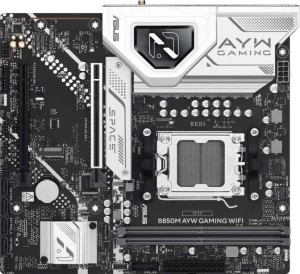
Asus B850M AYW Gaming Wi-Fi
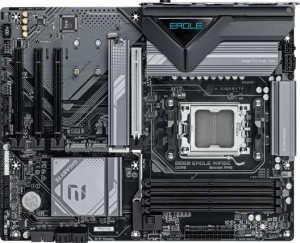
Gigabyte B850 Eagle WiFi6E

Asus B850M AYW Gaming Wi-Fi Gigabyte B850 Eagle WiFi6E

Overview

Welcome to our detailed spec comparison between the Asus B850M AYW Gaming Wi-Fi and the Gigabyte B850 Eagle WiFi6E, two AMD AM5 motherboards built on the B850 chipset that take notably different approaches to expansion, connectivity, and form factor. While both boards share a strong common foundation, key battlegrounds emerge around memory capacity and slot count, storage options, wireless standards, and overall board size — making the choice between them far from straightforward.

Common Features

  • Both boards use the AM5 CPU socket.
  • Both boards feature the B850 chipset.
  • Wi-Fi connectivity is available on both products.
  • Bluetooth is present on both products, with version 5.3.
  • Both boards support HDMI 2.1.
  • Overclocking is supported on both products.
  • Easy BIOS reset is not available on either product.
  • Both boards use DDR5 memory.
  • Both boards have 2 memory channels.
  • ECC memory support is not available on either product.
  • Both boards have 2 USB 3.2 Gen 2 Type-A ports.
  • Both boards have 2 USB 3.2 Gen 1 Type-A ports.
  • Neither board has USB 3.2 Gen 2 Type-C ports.
  • Both boards have 4 USB 2.0 ports.
  • Neither board has USB 3.2 Gen 2x2, USB 4 40Gbps, USB 4 20Gbps, or Thunderbolt 4 ports.
  • Both boards have 4 SATA 3 connectors and no SATA 2 connectors.
  • Neither board has an mSATA connector.
  • Both boards have 1 PCIe 5.0 x16 slot.
  • Both boards support 7.1 audio channels with 3 audio connectors.
  • S/PDIF Out is not available on either product.
  • Both boards support RAID 0, RAID 1, RAID 5, and RAID 10, but neither supports RAID 0+1.

Main Differences

  • The Asus B850M AYW Gaming Wi-Fi has a Micro-ATX form factor, while the Gigabyte B850 Eagle WiFi6E uses an ATX form factor.
  • Wi-Fi 6E (802.11ax) support is present on the Gigabyte B850 Eagle WiFi6E but not available on the Asus B850M AYW Gaming Wi-Fi.
  • RGB lighting is present on the Asus B850M AYW Gaming Wi-Fi but not available on the Gigabyte B850 Eagle WiFi6E.
  • The Asus B850M AYW Gaming Wi-Fi measures 221 mm in height, while the Gigabyte B850 Eagle WiFi6E measures 244 mm.
  • The Asus B850M AYW Gaming Wi-Fi measures 244 mm in width, while the Gigabyte B850 Eagle WiFi6E measures 305 mm.
  • Maximum memory capacity is 128 GB on the Asus B850M AYW Gaming Wi-Fi and 256 GB on the Gigabyte B850 Eagle WiFi6E.
  • Maximum overclocked RAM speed is 8400 MHz on the Asus B850M AYW Gaming Wi-Fi and 8200 MHz on the Gigabyte B850 Eagle WiFi6E.
  • The Asus B850M AYW Gaming Wi-Fi has 2 memory slots, while the Gigabyte B850 Eagle WiFi6E has 4 memory slots.
  • A USB 3.2 Gen 1 Type-C port is present on the Gigabyte B850 Eagle WiFi6E but not available on the Asus B850M AYW Gaming Wi-Fi.
  • A DisplayPort output is present on the Gigabyte B850 Eagle WiFi6E but not available on the Asus B850M AYW Gaming Wi-Fi.
  • USB Type-C connectivity is available on the Gigabyte B850 Eagle WiFi6E but not on the Asus B850M AYW Gaming Wi-Fi.
  • A PS/2 port is present on the Gigabyte B850 Eagle WiFi6E but not available on the Asus B850M AYW Gaming Wi-Fi.
  • The Asus B850M AYW Gaming Wi-Fi has 4 fan headers, while the Gigabyte B850 Eagle WiFi6E has 6 fan headers.
  • The Asus B850M AYW Gaming Wi-Fi has 2 M.2 sockets, while the Gigabyte B850 Eagle WiFi6E has 3 M.2 sockets.
  • A TPM connector is present on the Gigabyte B850 Eagle WiFi6E but not available on the Asus B850M AYW Gaming Wi-Fi.
  • The Asus B850M AYW Gaming Wi-Fi has 1 PCIe 4.0 x16 slot, while the Gigabyte B850 Eagle WiFi6E has none.
  • The Gigabyte B850 Eagle WiFi6E has 3 PCIe x1 slots, while the Asus B850M AYW Gaming Wi-Fi has none.
Specs Comparison
Asus B850M AYW Gaming Wi-Fi

Asus B850M AYW Gaming Wi-Fi

Gigabyte B850 Eagle WiFi6E

Gigabyte B850 Eagle WiFi6E

General info:
CPU socket AM5 AM5
chipset B850 B850
form factor Micro-ATX ATX
release date April 2025 January 2025
supports Wi-Fi
Wi-Fi version Wi-Fi 4 (802.11n), Wi-Fi 5 (802.11ac), Wi-Fi 6 (802.11ax) Wi-Fi 4 (802.11n), Wi-Fi 5 (802.11ac), Wi-Fi 6 (802.11ax), Wi-Fi 6E (802.11ax)
Has Bluetooth
Bluetooth version 5.3 5.3
HDMI version HDMI 2.1 HDMI 2.1
Easy to overclock
has RGB lighting
Easy to reset BIOS
Has dual BIOS
has aptX
CPU sockets 1 1
Has integrated graphics
warranty period 3 years 3 years
height 221 mm 244 mm
width 244 mm 305 mm
Has integrated CPU

Both the Asus B850M AYW Gaming Wi-Fi and the Gigabyte B850 Eagle WiFi6E share the same AM5 socket and B850 chipset foundation, meaning they target the same generation of AMD processors with identical overclocking support, dual BIOS protection, and a 3-year warranty. For everyday build decisions, these shared traits make them functionally equivalent at the platform level.

The most practically significant divergence in this group is the form factor: the Asus is Micro-ATX (221 × 244 mm) while the Gigabyte is a full ATX (244 × 305 mm). This matters beyond just case compatibility — the larger ATX board typically allows for more expansion slots, better VRM spacing, and more airflow headroom. Builders working with compact cases will favor the Asus, while those prioritizing expandability or using a mid/full tower will find the Gigabyte's footprint more accommodating. A second notable difference is wireless connectivity: the Gigabyte adds Wi-Fi 6E (802.11ax) support, which opens access to the less congested 6 GHz band — a real-world advantage in dense wireless environments — whereas the Asus tops out at Wi-Fi 6. Bluetooth 5.3 is identical on both. The Asus counters with RGB lighting, which the Gigabyte lacks entirely.

Overall, the Gigabyte B850 Eagle WiFi6E holds a clear edge in this group for users who prioritize wireless performance and build flexibility, thanks to its Wi-Fi 6E support and larger ATX layout. The Asus B850M AYW Gaming Wi-Fi is the better fit for small-form-factor builds or builders who value onboard RGB aesthetics, but it concedes on both wireless capability and physical expansion potential.

Memory:
maximum memory amount 128GB 256GB
overclocked RAM speed 8400 MHz 8200 MHz
memory slots 2 4
DDR memory version 5 5
memory channels 2 2
Supports ECC memory

At the DDR5 and dual-channel level, these two boards are in complete agreement — but the physical slot count tells a very different story. The Asus B850M AYW Gaming Wi-Fi offers just 2 memory slots, capping maximum capacity at 128 GB, while the Gigabyte B850 Eagle WiFi6E doubles both figures with 4 slots and a 256 GB ceiling. For most gaming and productivity workloads today, 128 GB is more than sufficient, but the Gigabyte's headroom becomes meaningful for content creators, heavy virtualization users, or anyone planning a long-term build they won't want to revisit.

The slot count difference also has a subtler implication: with only 2 slots, the Asus requires users to buy their full intended capacity upfront — there is no room to start small and upgrade later. The Gigabyte's 4-slot design allows a more gradual investment, starting with two sticks and expanding when needed. On the flip side, the Asus edges ahead on peak overclocked RAM speed, supporting up to 8400 MHz versus the Gigabyte's 8200 MHz — a 200 MHz gap that is largely negligible in practice for the vast majority of users.

The Gigabyte B850 Eagle WiFi6E holds a clear advantage in this group. Greater slot count, double the maximum RAM capacity, and upgrade flexibility make it the stronger choice for any build with serious memory demands, while the Asus's minor speed edge does not meaningfully offset those limitations.

Ports:
USB 3.2 Gen 2 ports (USB-A) 2 2
USB 3.2 Gen 1 ports (USB-A) 2 2
USB 3.2 Gen 2 ports (USB-C) 0 0
USB 3.2 Gen 1 ports (USB-C) 0 1
USB 2.0 ports 4 4
USB 3.2 Gen 2x2 ports 0 0
USB 4 40Gbps ports 0 0
USB 4 20Gbps ports 0 0
Thunderbolt 4 ports 0 0
Thunderbolt 3 ports 0 0
has an HDMI output
DisplayPort outputs 0 1
RJ45 ports 1 1
Has USB Type-C
eSATA ports 0 0
DVI outputs 0 0
has a VGA connector
PS/2 ports 0 1

The rear I/O layouts of these two boards share a solid common base — matching counts of USB 3.2 Gen 2 and Gen 1 Type-A ports, four USB 2.0 ports, a single RJ45 Ethernet jack, and HDMI output. Where they diverge is in the details that increasingly matter for modern peripherals and displays. The Gigabyte B850 Eagle WiFi6E adds a USB 3.2 Gen 1 Type-C port and a DisplayPort output, neither of which appears on the Asus B850M AYW Gaming Wi-Fi. The Type-C port is relevant for users connecting newer storage devices, smartphones, or audio interfaces that have moved away from Type-A, while the DisplayPort output gives multi-monitor users a second video output option without relying on an adapter.

The Gigabyte also includes a PS/2 port — a legacy connector that serves a niche but real audience: enthusiasts using older mechanical keyboards or mice who prefer PS/2's interrupt-driven input, which avoids USB polling latency. It is an unusual inclusion on a modern board, but not a drawback. The Asus, by contrast, offers no Type-C connectivity whatsoever on its rear panel, which is a noticeable omission given how common the connector has become.

The Gigabyte B850 Eagle WiFi6E takes a clear edge in this group. The addition of a Type-C port and a dedicated DisplayPort output meaningfully widens its compatibility with current and future peripherals and display setups, giving it a more versatile rear I/O panel than the Asus.

Connectors:
USB 3.2 Gen 1 ports (through expansion) 2 2
USB 2.0 ports (through expansion) 4 4
SATA 3 connectors 4 4
fan headers 4 6
USB 3.0 ports (through expansion) 2 2
M.2 sockets 2 3
Has TPM connector
U.2 sockets 0 0
Has mSATA connector
SATA 2 connectors 0 0

Internal connectivity is largely mirrored between these two boards — both provide 4 SATA 3 connectors, identical internal USB expansion headers, and no legacy SATA 2 or U.2 sockets. Where the Gigabyte B850 Eagle WiFi6E pulls ahead is in three specific areas that compound in importance for more demanding builds. It offers 3 M.2 sockets versus the Asus B850M AYW Gaming Wi-Fi's 2, meaning users can run an additional NVMe drive without sacrificing any SATA ports — a tangible advantage for content creators or anyone building a high-capacity storage array.

Fan and cooling management is another point of separation. The Gigabyte's 6 fan headers versus the Asus's 4 gives builders significantly more flexibility for direct-from-board control of case fans, radiator pumps, and CPU coolers — reducing reliance on external fan hubs and keeping cable management cleaner. The Gigabyte also includes a TPM connector, which the Asus lacks entirely. While TPM functionality is often handled by firmware on modern platforms, a dedicated header is relevant for enterprise users, those running specific security configurations, or builds requiring a discrete TPM module for compliance reasons.

Taken together, the Gigabyte B850 Eagle WiFi6E holds a clear advantage in this group. The extra M.2 slot, additional fan headers, and TPM connector collectively serve builders who plan more complex or expandable systems, while the Asus offers a more constrained internal layout that suits straightforward, no-frills configurations.
Expansion slots:
PCIe 4.0 x16 slots 1 0
PCIe 5.0 x16 slots 1 1
PCIe 3.0 x16 slots 0 0
PCIe x1 slots 0 3
PCI slots 0 0
PCIe 2.0 x16 slots 0 0
PCIe x4 slots 0 0
PCIe x8 slots 0 0

Both boards anchor their expansion layout with a single PCIe 5.0 x16 slot, which is the primary GPU slot and the most bandwidth-intensive connection on any modern desktop platform. For the overwhelming majority of users installing a discrete graphics card, this shared feature means the two boards are functionally equivalent at the most critical point. The divergence lies in what surrounds that primary slot.

The Asus B850M AYW Gaming Wi-Fi adds a PCIe 4.0 x16 slot as its second expansion option — useful for a second graphics card, a high-bandwidth capture card, or a PCIe 4.0 NVMe add-in card. The Gigabyte B850 Eagle WiFi6E takes a different approach entirely, foregoing that second x16 slot in favor of three PCIe x1 slots. These smaller slots are well-suited for add-in cards that don't need high bandwidth — think sound cards, additional network adapters, or USB expansion cards. Three of them represents genuine flexibility for a feature-rich build, though none can accommodate x16-sized cards.

Which layout is preferable depends entirely on the use case. The Asus edges ahead for users who want a second high-bandwidth slot for multi-card or compute workloads, while the Gigabyte suits builders who plan to populate the system with multiple smaller add-in cards. Neither board holds a universally superior position here — this group is effectively a trade-off rather than a clear win for either side.

Audio:
audio channels 7.1 7.1
Has S/PDIF Out port
audio connectors 3 3

Audio is the one group in this comparison where there is simply nothing to separate the two boards. The Asus B850M AYW Gaming Wi-Fi and the Gigabyte B850 Eagle WiFi6E both deliver 7.1-channel onboard audio with 3 analog audio connectors and no S/PDIF optical output on either side. Users relying on a surround sound speaker system or a multi-channel headphone amplifier will find the same capabilities — and the same limitations — on both.

The absence of S/PDIF Out is worth noting for anyone who uses an external DAC, AV receiver, or home theater setup that expects a digital optical signal. Neither board accommodates this without a dedicated sound card or USB audio device, so both are equally limited in that regard. The 3-connector analog layout is a standard implementation for 7.1 output, achieved by repurposing the line-in and microphone jacks alongside the primary line-out.

This group is a complete tie. Buyers for whom audio quality is a priority should treat onboard audio as a baseline on both boards and factor in a dedicated sound card or external DAC accordingly — the choice between these two products will not be influenced by anything in this specification group.

Storage:
Supports RAID 1
Supports RAID 10 (1+0)
Supports RAID 5
Supports RAID 0
Supports RAID 0+1

Storage configuration support is identical across both boards. The Asus B850M AYW Gaming Wi-Fi and the Gigabyte B850 Eagle WiFi6E each support RAID 0, 1, 5, and 10, covering the full spectrum of the most practically relevant array types for desktop builds. Neither supports RAID 0+1, but that omission is equally shared and largely inconsequential — RAID 0+1 and RAID 10 serve overlapping purposes, and RAID 10 is generally the preferred implementation anyway.

For users who care about these capabilities, the supported modes cover the key use cases well: RAID 0 for striped performance, RAID 1 for straightforward mirroring and redundancy, RAID 5 for a balance of storage efficiency and fault tolerance across three or more drives, and RAID 10 for combining redundancy with performance at scale. Whether building a NAS-like workstation or simply wanting drive mirroring for peace of mind, both boards accommodate the same configurations without restriction.

This group is a complete tie. Storage RAID support offers no basis for differentiation between these two products — buyers with specific array requirements will find neither board at a disadvantage relative to the other.

Comparison Summary & Verdict

After a thorough side-by-side analysis, both boards prove capable on the fundamentals — sharing the AM5 socket, B850 chipset, DDR5 support, PCIe 5.0 x16, and solid RAID and audio features. However, their differences paint a clear picture of who each board is for. The Gigabyte B850 Eagle WiFi6E stands out for power users who demand more: it offers 4 memory slots with up to 256 GB capacity, 3 M.2 sockets, 6 fan headers, Wi-Fi 6E, a TPM connector, and a DisplayPort output. The Asus B850M AYW Gaming Wi-Fi, on the other hand, appeals to builders who want a compact Micro-ATX footprint with RGB lighting, a slightly higher overclocked RAM ceiling of 8400 MHz, and a more streamlined feature set for smaller cases. Choose Asus for a space-efficient, visually customizable build; choose Gigabyte for a feature-rich, highly expandable workstation or gaming rig.

Asus B850M AYW Gaming Wi-Fi
Buy Asus B850M AYW Gaming Wi-Fi if...

Buy the Asus B850M AYW Gaming Wi-Fi if you need a compact Micro-ATX board with RGB lighting and the highest overclocked RAM speeds, and your build does not require more than two memory slots.

Gigabyte B850 Eagle WiFi6E
Buy Gigabyte B850 Eagle WiFi6E if...

Buy the Gigabyte B850 Eagle WiFi6E if you want maximum expandability with 4 memory slots, up to 256 GB RAM, 3 M.2 sockets, Wi-Fi 6E, and a full ATX layout for a high-end or future-proof build.