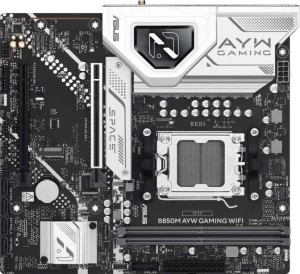
Asus B850M AYW Gaming Wi-Fi
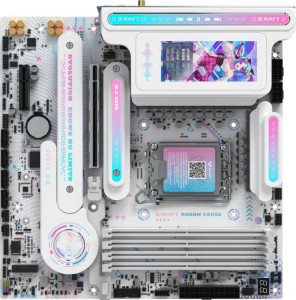
Maxsun iCraft B860M Cross Pro

Asus B850M AYW Gaming Wi-Fi Maxsun iCraft B860M Cross Pro

Overview

Welcome to our detailed spec comparison between the Asus B850M AYW Gaming Wi-Fi and the Maxsun iCraft B860M Cross Pro, two Micro-ATX motherboards that share a surprising amount of common ground while diverging sharply in connectivity, memory capacity, and platform choice. We put these boards head-to-head across key battlegrounds including USB port selection, wireless standards, expansion options, and audio capabilities to help you find the right fit for your next build.

Common Features

  • Both boards use the Micro-ATX form factor.
  • Wi-Fi support is available on both products.
  • Bluetooth is available on both products.
  • Both boards support overclocking.
  • RGB lighting is present on both products.
  • Dual BIOS is available on both products.
  • aptX support is not available on either product.
  • Both boards have a single CPU socket.
  • Both use DDR5 memory.
  • Both boards feature a dual-channel memory configuration.
  • ECC memory support is not available on either product.
  • Neither board has USB 3.2 Gen 2 ports in USB-C format.
  • Neither board has USB 3.2 Gen 1 ports in USB-C format.
  • Neither board has USB 3.2 Gen 2x2 ports.
  • Neither board has USB 4 20Gbps ports.
  • Neither board has Thunderbolt 3 ports.
  • An HDMI output is present on both products.
  • Both boards feature one RJ45 port.
  • Neither board has eSATA ports.
  • Both boards provide 2 USB 3.2 Gen 1 ports through expansion.
  • Both boards include 4 SATA 3 connectors.
  • Neither board has a TPM connector.
  • Neither board has a U.2 socket.
  • Neither board has an mSATA connector.
  • Neither board has SATA 2 connectors.
  • Both boards feature one PCIe 5.0 x16 slot.
  • Neither board has PCIe 3.0 x16 slots, PCIe x1 slots, PCI slots, PCIe 2.0 x16 slots, or PCIe x8 slots.
  • RAID 0+1 support is not available on either product.

Main Differences

  • The CPU socket is AM5 on the Asus B850M AYW Gaming Wi-Fi and LGA 1851 on the Maxsun iCraft B860M Cross Pro.
  • The chipset is B850 on the Asus B850M AYW Gaming Wi-Fi and B860 on the Maxsun iCraft B860M Cross Pro.
  • Wi-Fi versions supported go up to Wi-Fi 6 on the Asus B850M AYW Gaming Wi-Fi, while the Maxsun iCraft B860M Cross Pro additionally supports Wi-Fi 6E and Wi-Fi 7.
  • Bluetooth version is 5.3 on the Asus B850M AYW Gaming Wi-Fi and 5.4 on the Maxsun iCraft B860M Cross Pro.
  • The HDMI version is 2.1 on the Asus B850M AYW Gaming Wi-Fi and 2.0 on the Maxsun iCraft B860M Cross Pro.
  • Easy BIOS reset is not available on the Asus B850M AYW Gaming Wi-Fi but is present on the Maxsun iCraft B860M Cross Pro.
  • Board height is 221 mm on the Asus B850M AYW Gaming Wi-Fi and 245 mm on the Maxsun iCraft B860M Cross Pro.
  • Board width is 244 mm on the Asus B850M AYW Gaming Wi-Fi and 245 mm on the Maxsun iCraft B860M Cross Pro.
  • Maximum memory capacity is 128 GB on the Asus B850M AYW Gaming Wi-Fi and 192 GB on the Maxsun iCraft B860M Cross Pro.
  • Maximum overclocked RAM speed is 8400 MHz on the Asus B850M AYW Gaming Wi-Fi and 9066 MHz on the Maxsun iCraft B860M Cross Pro.
  • Memory slots total 2 on the Asus B850M AYW Gaming Wi-Fi and 4 on the Maxsun iCraft B860M Cross Pro.
  • USB 3.2 Gen 2 ports (USB-A) number 2 on the Asus B850M AYW Gaming Wi-Fi and 8 on the Maxsun iCraft B860M Cross Pro.
  • USB 3.2 Gen 1 ports (USB-A) number 2 on the Asus B850M AYW Gaming Wi-Fi and 0 on the Maxsun iCraft B860M Cross Pro.
  • USB 2.0 ports number 4 on the Asus B850M AYW Gaming Wi-Fi and 0 on the Maxsun iCraft B860M Cross Pro.
  • A USB 4 40Gbps port is present on the Maxsun iCraft B860M Cross Pro but not available on the Asus B850M AYW Gaming Wi-Fi.
  • A Thunderbolt 4 port is present on the Maxsun iCraft B860M Cross Pro but not available on the Asus B850M AYW Gaming Wi-Fi.
  • A DisplayPort output is present on the Maxsun iCraft B860M Cross Pro but not available on the Asus B850M AYW Gaming Wi-Fi.
  • USB Type-C connectivity is present on the Maxsun iCraft B860M Cross Pro but not available on the Asus B850M AYW Gaming Wi-Fi.
  • USB 2.0 ports through expansion number 4 on the Asus B850M AYW Gaming Wi-Fi and 3 on the Maxsun iCraft B860M Cross Pro.
  • Fan headers total 4 on the Asus B850M AYW Gaming Wi-Fi and 5 on the Maxsun iCraft B860M Cross Pro.
  • M.2 sockets total 2 on the Asus B850M AYW Gaming Wi-Fi and 3 on the Maxsun iCraft B860M Cross Pro.
  • A PCIe 4.0 x16 slot is present on the Asus B850M AYW Gaming Wi-Fi but not available on the Maxsun iCraft B860M Cross Pro.
  • A PCIe x4 slot is present on the Maxsun iCraft B860M Cross Pro but not available on the Asus B850M AYW Gaming Wi-Fi.
  • An S/PDIF Out port is present on the Maxsun iCraft B860M Cross Pro but not available on the Asus B850M AYW Gaming Wi-Fi.
  • Audio connectors number 3 on the Asus B850M AYW Gaming Wi-Fi and 5 on the Maxsun iCraft B860M Cross Pro.
Specs Comparison
Asus B850M AYW Gaming Wi-Fi

Asus B850M AYW Gaming Wi-Fi

Maxsun iCraft B860M Cross Pro

Maxsun iCraft B860M Cross Pro

General info:
CPU socket AM5 LGA 1851
chipset B850 B860
form factor Micro-ATX Micro-ATX
release date April 2025 January 2025
supports Wi-Fi
Wi-Fi version Wi-Fi 4 (802.11n), Wi-Fi 5 (802.11ac), Wi-Fi 6 (802.11ax) Wi-Fi 4 (802.11n), Wi-Fi 5 (802.11ac), Wi-Fi 6 (802.11ax), Wi-Fi 6E (802.11ax), Wi-Fi 7 (802.11be)
Has Bluetooth
Bluetooth version 5.3 5.4
HDMI version HDMI 2.1 HDMI 2.0
Easy to overclock
has RGB lighting
Easy to reset BIOS
Has dual BIOS
has aptX
CPU sockets 1 1
Has integrated graphics
warranty period 3 years 3 years
height 221 mm 245 mm
width 244 mm 245 mm
Has integrated CPU

The most fundamental difference between these two boards is their CPU platform: the Asus B850M AYW Gaming Wi-Fi targets AMD AM5 processors, while the Maxsun iCraft B860M Cross Pro is built for Intel LGA 1851. This means they are not cross-compatible and your CPU choice will dictate which board is even relevant to you. Both use a Micro-ATX form factor and share dual BIOS, RGB lighting, Bluetooth, and Wi-Fi support, making them structurally comparable mid-range options within their respective ecosystems.

Where meaningful differences emerge is in wireless and firmware usability. The Maxsun supports up to Wi-Fi 7 (802.11be) and Bluetooth 5.4, giving it a notable edge in future-proof connectivity — Wi-Fi 7 delivers significantly higher throughput and lower latency than Wi-Fi 6. The Asus tops out at Wi-Fi 6 and Bluetooth 5.3, which is still capable but a generation behind. On HDMI, the roles reverse: the Asus offers HDMI 2.1 (supporting 4K@120Hz or 8K output), while the Maxsun is limited to HDMI 2.0 (capped at 4K@60Hz) — a real-world downgrade for users connecting to high-refresh-rate displays via integrated video output. The Maxsun also wins on convenience with easy BIOS reset support, a small but practical advantage during initial builds or troubleshooting.

Overall, neither board has a universal advantage. The Maxsun iCraft B860M Cross Pro leads on wireless connectivity and ease of BIOS management, while the Asus B850M AYW Gaming Wi-Fi counters with a superior HDMI output standard. Both carry a 3-year warranty and are evenly matched on core features like dual BIOS and RGB. The decision ultimately hinges on your CPU platform preference and which trade-off — better wireless or better video output — matters more for your specific use case.

Memory:
maximum memory amount 128GB 192GB
overclocked RAM speed 8400 MHz 9066 MHz
memory slots 2 4
DDR memory version 5 5
memory channels 2 2
Supports ECC memory

Both boards run DDR5 memory in a dual-channel configuration, so the generational baseline is identical. The divergence lies in capacity and physical expandability. The Maxsun iCraft B860M Cross Pro offers 4 DIMM slots and a ceiling of 192GB, whereas the Asus B850M AYW Gaming Wi-Fi is limited to 2 DIMM slots and 128GB maximum. In practice, four slots allow users to start with two sticks and upgrade later without replacing existing modules — a meaningful flexibility advantage for builds that evolve over time.

On overclocked RAM speeds, the Maxsun again pulls ahead, supporting up to 9066 MHz compared to the Asus's 8400 MHz. While both figures are well beyond what most productivity or gaming workloads can meaningfully exploit today, the higher ceiling benefits users running memory-sensitive workloads or those who simply want headroom for future memory standards and profiles. Neither board supports ECC memory, so workstation-grade reliability use cases are off the table for both.

The Maxsun iCraft B860M Cross Pro holds a clear advantage in this category across every differentiating spec — more slots, higher capacity, and faster overclocked speeds. For users who anticipate heavy multitasking, content creation, or long-term upgradability, that gap is tangible. The Asus remains a solid choice for standard dual-stick builds where 128GB is a sufficient ceiling, but it simply cannot match the Maxsun's memory headroom.

Ports:
USB 3.2 Gen 2 ports (USB-A) 2 8
USB 3.2 Gen 1 ports (USB-A) 2 0
USB 3.2 Gen 2 ports (USB-C) 0 0
USB 3.2 Gen 1 ports (USB-C) 0 0
USB 2.0 ports 4 0
USB 3.2 Gen 2x2 ports 0 0
USB 4 40Gbps ports 0 1
USB 4 20Gbps ports 0 0
Thunderbolt 4 ports 0 1
Thunderbolt 3 ports 0 0
has an HDMI output
DisplayPort outputs 0 1
RJ45 ports 1 1
Has USB Type-C
eSATA ports 0 0
DVI outputs 0 0
has a VGA connector
PS/2 ports 0 0

The rear I/O panel is where the gap between these two boards becomes most dramatic. The Maxsun iCraft B860M Cross Pro delivers 8 USB 3.2 Gen 2 (10Gbps) Type-A ports alongside a Thunderbolt 4 port and a USB 4 40Gbps Type-C connector — a rear panel lineup that rivals boards at significantly higher price points. The Asus B850M AYW Gaming Wi-Fi, by contrast, offers a more modest mix of 2 USB 3.2 Gen 2 and 2 USB 3.2 Gen 1 ports, supplemented by 4 USB 2.0 ports. Those legacy USB 2.0 connections are adequate for keyboards and mice, but they represent a step back in a port layout where fast-transfer slots are at a premium.

Beyond raw USB count, the Maxsun's inclusion of Thunderbolt 4 is a standout differentiator. Thunderbolt 4 supports daisy-chaining peripherals, connecting external GPUs, and driving high-resolution displays — all over a single cable. It also adds a DisplayPort output, giving users a second video-out option alongside HDMI, which matters for multi-monitor setups using integrated graphics. The Asus has no USB-C on its rear panel at all and no DisplayPort, limiting display and high-speed device flexibility considerably.

The Maxsun iCraft B860M Cross Pro wins this category decisively. Its rear I/O is faster, more versatile, and more future-proof in virtually every dimension — more high-speed USB-A ports, Thunderbolt 4, USB 4, USB-C, and an extra video output. The Asus is not poorly equipped in absolute terms, but against the Maxsun's rear panel, it caters to users with simpler peripheral needs and tighter budgets.
Connectors:
USB 3.2 Gen 1 ports (through expansion) 2 2
USB 2.0 ports (through expansion) 4 3
SATA 3 connectors 4 4
fan headers 4 5
USB 3.0 ports (through expansion) 2 2
M.2 sockets 2 3
Has TPM connector
U.2 sockets 0 0
Has mSATA connector
SATA 2 connectors 0 0

Internal connectors tell a lot about a board's expandability for storage and cooling, and here the two boards are closely matched with a few notable distinctions. Both provide 4 SATA 3 connectors and identical internal USB expansion headers, so legacy storage and front-panel USB capabilities are on equal footing. The meaningful storage difference is in M.2: the Maxsun iCraft B860M Cross Pro includes 3 M.2 sockets versus the Asus B850M AYW Gaming Wi-Fi's 2. That extra slot is genuinely useful for users who want to run multiple NVMe drives — for example, a fast primary drive, a secondary storage drive, and a dedicated cache or game library drive — all without touching the SATA ports.

On thermal management, the Maxsun again edges ahead with 5 fan headers compared to the Asus's 4. In a Micro-ATX build where airflow management is tighter than in full-sized towers, an additional header gives builders more flexibility to independently control case fans and radiator pumps without relying on splitters, which can complicate fine-grained fan curve tuning.

Taken together, the Maxsun iCraft B860M Cross Pro holds a modest but real advantage in this group. The extra M.2 slot and additional fan header cater directly to users building storage-heavy or thermally demanding systems. The Asus is not lacking for a mainstream build, but users who anticipate multi-drive NVMe configurations or more elaborate cooling setups will find the Maxsun's internal connector layout more accommodating.

Expansion slots:
PCIe 4.0 x16 slots 1 0
PCIe 5.0 x16 slots 1 1
PCIe 3.0 x16 slots 0 0
PCIe x1 slots 0 0
PCI slots 0 0
PCIe 2.0 x16 slots 0 0
PCIe x4 slots 0 1
PCIe x8 slots 0 0

For GPU installation, both boards are equally equipped — each offers a single PCIe 5.0 x16 slot, ensuring full-bandwidth compatibility with current and next-generation graphics cards. That parity means neither board constrains GPU performance at the primary slot level, which is the only slot most single-GPU builds will ever use.

The divergence lies in the secondary slot. The Asus B850M AYW Gaming Wi-Fi adds a PCIe 4.0 x16 slot as its second expansion option, which — while likely wired at fewer physical lanes — still provides meaningful bandwidth for add-in cards like capture cards, high-speed network adapters, or NVMe expansion cards. The Maxsun iCraft B860M Cross Pro's second slot is a PCIe x4, offering considerably less bandwidth headroom for bandwidth-hungry expansion cards, though it remains sufficient for most peripheral add-in cards.

On balance, the Asus B850M AYW Gaming Wi-Fi has an edge in this category. Its secondary PCIe 4.0 x16 slot is physically and electrically more capable than the Maxsun's x4 slot, giving users greater flexibility when adding high-throughput expansion cards down the line. For users whose needs go no further than a GPU and nothing else, the two boards are effectively tied — but for anyone planning to populate that second slot with a demanding card, the Asus offers more headroom.

Audio:
Has S/PDIF Out port
audio connectors 3 5

The Asus B850M AYW Gaming Wi-Fi and the Maxsun iCraft B860M Cross Pro have some differences in their audio capabilities. The Asus board does not have an S/PDIF Out port, while the Maxsun includes this feature, allowing for digital audio output to compatible devices.

In terms of audio connectors, the Asus provides 3, whereas the Maxsun offers 5, providing more flexibility for connecting audio devices like speakers, headphones, and microphones.

Overall, the Maxsun provides a more robust audio setup with both the S/PDIF Out port and additional audio connectors, while the Asus offers a more basic configuration.

Storage:
Supports RAID 0+1

Both the Asus B850M AYW Gaming Wi-Fi and the Maxsun iCraft B860M Cross Pro do not support RAID 0+1, meaning neither board offers the option for these specific RAID configurations for storage redundancy or performance.

In this case, the storage capabilities related to RAID 0+1 are identical for both products, with neither providing support for this particular RAID level.

Therefore, users looking for RAID 0+1 functionality will need to consider other options, as both motherboards lack support in this area.

Comparison Summary & Verdict

After examining every specification, a clear picture emerges for each board. The Asus B850M AYW Gaming Wi-Fi is a solid choice for builders entering the AMD AM5 ecosystem on a focused budget, offering PCIe 4.0 x16 flexibility and a compact footprint at 221 mm tall. The Maxsun iCraft B860M Cross Pro, however, pulls ahead in almost every connectivity metric: it supports Wi-Fi 7 and Bluetooth 5.4, delivers up to 192 GB of DDR5 RAM across four slots at 9066 MHz, packs 8 USB 3.2 Gen 2 Type-A ports alongside a Thunderbolt 4 and USB 4 40Gbps port, adds a DisplayPort output, offers three M.2 sockets, five fan headers, and rounds out its feature set with five audio connectors and an S/PDIF Out port. For power users, content creators, or Intel LGA 1851 platform adopters who demand future-proof connectivity and maximum expandability, the Maxsun is the stronger all-round package.

Asus B850M AYW Gaming Wi-Fi
Buy Asus B850M AYW Gaming Wi-Fi if...

Buy the Asus B850M AYW Gaming Wi-Fi if you are building an AMD AM5 system and value a slightly more compact board with a PCIe 4.0 x16 slot and a proven Wi-Fi 6 wireless setup.

Maxsun iCraft B860M Cross Pro
Buy Maxsun iCraft B860M Cross Pro if...

Buy the Maxsun iCraft B860M Cross Pro if you need the best possible connectivity, including Wi-Fi 7, Thunderbolt 4, USB 4 40Gbps, four memory slots supporting up to 192 GB, and a richer audio and port selection on the Intel LGA 1851 platform.