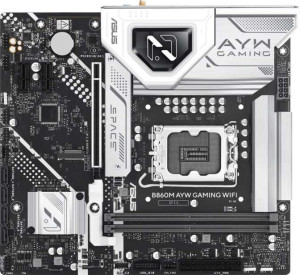
Asus B860M AYW Gaming WiFi
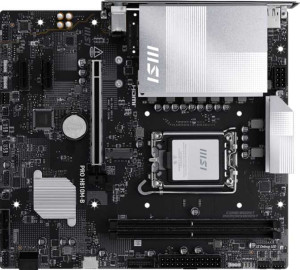
MSI Pro H810M-B

Asus B860M AYW Gaming WiFi MSI Pro H810M-B

Overview

Welcome to our in-depth specification comparison between the Asus B860M AYW Gaming WiFi and the MSI Pro H810M-B — two Micro-ATX motherboards built around the LGA 1851 socket. While they share a strong common foundation, key battlegrounds emerge around connectivity options, expansion slot generations, and storage flexibility. Read on to see which board better matches your build requirements.

Common Features

  • Both boards use the LGA 1851 CPU socket.
  • Both boards share the Micro-ATX form factor.
  • Wi-Fi support is available on both products.
  • Both boards feature HDMI 2.1 output.
  • RGB lighting is present on both products.
  • Dual BIOS is available on both products.
  • Both boards have a single CPU socket.
  • Integrated graphics are not supported on either product.
  • Both boards support a maximum memory amount of 128GB.
  • Both boards have 2 memory slots.
  • Both boards use DDR5 memory.
  • Both boards support 2 memory channels.
  • ECC memory is not supported on either product.
  • Both boards provide 2 USB 3.2 Gen 1 ports (USB-A).
  • Neither board has USB 3.2 Gen 2 ports (USB-C), USB 3.2 Gen 1 ports (USB-C), USB 3.2 Gen 2x2 ports, USB 4 ports, Thunderbolt 4, or Thunderbolt 3 ports.
  • Both boards offer 2 USB 3.2 Gen 1 ports through expansion and 4 USB 2.0 ports through expansion.
  • Both boards include 4 SATA 3 connectors.
  • Both boards have 3 fan headers.
  • A TPM connector is present on both products.
  • An mSATA connector is not available on either product.
  • Both boards have 2 PCIe x1 slots and no PCIe 3.0 x16, PCIe 2.0 x16, PCIe x4, PCIe x8, or PCI slots.
  • Both boards support 7.1 audio channels.
  • S/PDIF Out port is not available on either product.
  • Both boards have 3 audio connectors.
  • RAID 0+1 is not supported on either product.

Main Differences

  • Bluetooth support is present on the Asus B860M AYW Gaming WiFi but not available on the MSI Pro H810M-B.
  • Overclocking ease is a feature of the Asus B860M AYW Gaming WiFi but is not present on the MSI Pro H810M-B.
  • Easy BIOS reset is available on the Asus B860M AYW Gaming WiFi but not on the MSI Pro H810M-B.
  • Height is 222 mm on the Asus B860M AYW Gaming WiFi and 220 mm on the MSI Pro H810M-B.
  • Width is 244 mm on the Asus B860M AYW Gaming WiFi and 243.8 mm on the MSI Pro H810M-B.
  • USB 3.2 Gen 2 ports (USB-A) count is 1 on the Asus B860M AYW Gaming WiFi and 0 on the MSI Pro H810M-B.
  • USB 2.0 ports count is 3 on the Asus B860M AYW Gaming WiFi and 4 on the MSI Pro H810M-B.
  • DisplayPort outputs count is 0 on the Asus B860M AYW Gaming WiFi and 1 on the MSI Pro H810M-B.
  • M.2 sockets count is 2 on the Asus B860M AYW Gaming WiFi and 1 on the MSI Pro H810M-B.
  • PCIe 4.0 x16 slot is present on the Asus B860M AYW Gaming WiFi but not on the MSI Pro H810M-B.
  • PCIe 5.0 x16 slot is present on the MSI Pro H810M-B but not on the Asus B860M AYW Gaming WiFi.
Specs Comparison
Asus B860M AYW Gaming WiFi

Asus B860M AYW Gaming WiFi

MSI Pro H810M-B

MSI Pro H810M-B

General info:
CPU socket LGA 1851 LGA 1851
form factor Micro-ATX Micro-ATX
release date January 2025 May 2025
supports Wi-Fi
Has Bluetooth
HDMI version HDMI 2.1 HDMI 2.1
Easy to overclock
has RGB lighting
Easy to reset BIOS
Has dual BIOS
CPU sockets 1 1
Has integrated graphics
warranty period 3 years 3 years
height 222 mm 220 mm
width 244 mm 243.8 mm
Has integrated CPU

Both the Asus B860M AYW Gaming WiFi and the MSI Pro H810M-B share the same fundamental platform: the LGA 1851 socket, a Micro-ATX form factor, HDMI 2.1 output, built-in Wi-Fi, dual BIOS, and a 3-year warranty. Their physical footprints are virtually identical, so neither has a meaningful size advantage for case compatibility. On paper, they start from the same foundation.

The real divergence appears in usability and feature depth. The Asus board includes Bluetooth, which the MSI lacks — a practical omission for users who rely on wireless peripherals or audio devices. More significantly, the Asus is rated as easy to overclock and easy to reset BIOS, while the MSI scores negatively on both counts. For enthusiasts or builders who anticipate tuning their system or recovering from a bad BIOS flash, these are meaningful day-to-day conveniences, not minor footnotes. The MSI's dual BIOS partially mitigates the BIOS reset concern, but the Asus offers both the safety net and the ease of use.

In this category, the Asus B860M AYW Gaming WiFi holds a clear edge. It delivers every feature the MSI offers, then adds Bluetooth, overclocking accessibility, and simpler BIOS management — making it the more versatile and user-friendly board for a broad range of builders, from casual upgraders to performance-focused users.

Memory:
maximum memory amount 128GB 128GB
memory slots 2 2
DDR memory version 5 5
memory channels 2 2
Supports ECC memory

When it comes to memory, these two boards are in complete lockstep. Both support DDR5 with 2 slots, a dual-channel configuration, and a ceiling of 128GB — and neither supports ECC memory. There is simply no differentiator here.

That said, the shared specs are worth contextualizing. DDR5 brings higher bandwidth and improved power efficiency over DDR4, which benefits memory-intensive workloads like video editing, large data sets, and modern gaming. The dual-channel configuration means both boards can take full advantage of that bandwidth, provided memory is installed in matched pairs. The 128GB ceiling is generous for a Micro-ATX platform and will comfortably accommodate even demanding prosumer use cases for years to come. The absence of ECC support is standard for consumer-grade boards and only relevant to users with specific data-integrity requirements.

This category is an unambiguous tie. Every memory specification is identical across both boards, so memory capability should play no role in choosing between them.

Ports:
USB 3.2 Gen 2 ports (USB-A) 1 0
USB 3.2 Gen 1 ports (USB-A) 2 2
USB 3.2 Gen 2 ports (USB-C) 0 0
USB 3.2 Gen 1 ports (USB-C) 0 0
USB 2.0 ports 3 4
USB 3.2 Gen 2x2 ports 0 0
USB 4 40Gbps ports 0 0
USB 4 20Gbps ports 0 0
Thunderbolt 4 ports 0 0
Thunderbolt 3 ports 0 0
has an HDMI output
DisplayPort outputs 0 1
RJ45 ports 1 1
Has USB Type-C
eSATA ports 0 0
DVI outputs 0 0
has a VGA connector
PS/2 ports 0 0

The port layouts on these two boards diverge in two meaningful ways. The Asus B860M AYW Gaming WiFi includes one USB 3.2 Gen 2 port (10Gbps), which the MSI Pro H810M-B entirely lacks — a tangible advantage for users connecting fast external SSDs or modern peripherals that can saturate a Gen 1 connection. The MSI compensates with one extra USB 2.0 port, but swapping high-speed throughput for a legacy 480Mbps port is a poor trade for most modern use cases.

On the display side, the dynamic flips. The MSI pairs its HDMI output with a DisplayPort output, enabling true dual-monitor connectivity from the rear I/O without additional hardware. The Asus offers only HDMI, which limits users relying on integrated graphics to a single display unless they add a discrete GPU. For office or productivity setups targeting multi-monitor use on integrated graphics, this is a meaningful practical gap.

The verdict here depends on the user's priorities. The Asus holds an edge for peripheral connectivity thanks to its faster USB port, while the MSI is better suited for multi-display setups out of the box. Neither board offers USB-C on the rear I/O, which is a shared limitation worth noting. Overall, the Asus edges ahead for general-purpose users, but the MSI's DisplayPort output makes it the stronger pick for display-centric configurations.

Connectors:
USB 3.2 Gen 1 ports (through expansion) 2 2
USB 2.0 ports (through expansion) 4 4
SATA 3 connectors 4 4
fan headers 3 3
USB 3.0 ports (through expansion) 2 2
M.2 sockets 2 1
Has TPM connector
U.2 sockets 0 0
Has mSATA connector
SATA 2 connectors 0 0

Across most internal connectors, these boards are identical — matching counts of SATA 3 ports, USB expansion headers, fan headers, and both carrying a TPM connector. For the vast majority of builds, that common ground is entirely adequate. The single differentiator, however, is a notable one: the Asus B860M AYW Gaming WiFi provides 2 M.2 sockets, while the MSI Pro H810M-B offers only 1.

M.2 slots are the primary home for modern NVMe SSDs, which deliver dramatically faster read and write speeds than SATA drives. Having two slots means the Asus can accommodate a primary boot drive and a secondary high-speed storage drive simultaneously — without consuming any of the four SATA ports. On the MSI, users who want a second fast storage device must fall back to SATA, accepting a significant throughput reduction, or forgo the second drive entirely. For content creators, gamers with large libraries, or anyone building a storage-forward system, this difference matters.

The Asus B860M AYW Gaming WiFi takes a clear win in this category. An extra M.2 slot is a straightforward, practical advantage that expands storage flexibility without compromise — something the MSI simply cannot match on internal connectors alone.

Expansion slots:
PCIe 4.0 x16 slots 1 0
PCIe 5.0 x16 slots 0 1
PCIe 3.0 x16 slots 0 0
PCIe x1 slots 2 2
PCI slots 0 0
PCIe 2.0 x16 slots 0 0
PCIe x4 slots 0 0
PCIe x8 slots 0 0

The x1 slot count is identical across both boards, but the primary GPU slot tells a different story. The Asus B860M AYW Gaming WiFi features a PCIe 4.0 x16 slot, while the MSI Pro H810M-B steps up to PCIe 5.0 x16 — a generational difference that doubles the theoretical bandwidth available to a discrete graphics card or other full-size expansion card.

In practical terms, most current consumer GPUs do not yet saturate PCIe 4.0 bandwidth, so day-one gaming performance will be indistinguishable between the two boards. The real argument for PCIe 5.0 is longevity: as next-generation GPUs and high-throughput expansion cards increasingly target PCIe 5.0, the MSI's slot ensures the board won't become a bandwidth bottleneck over the system's lifespan. For users planning to hold onto this platform for several years and upgrade their GPU down the line, that headroom carries genuine future-proofing value.

The MSI Pro H810M-B wins this category. While the advantage is largely theoretical today, having a PCIe 5.0 x16 slot over a PCIe 4.0 equivalent is a forward-looking edge that favors the MSI for buyers who prioritize long-term platform viability.

Audio:
audio channels 7.1 7.1
Has S/PDIF Out port
audio connectors 3 3

Audio is another category where these two boards offer no grounds for differentiation. Both deliver 7.1-channel surround sound support through 3 analog audio connectors, and neither includes an S/PDIF optical output. Every specification is a direct match.

The shared 7.1-channel capability is a solid baseline for a home theater or gaming audio setup, supporting full surround configurations when paired with compatible speakers or a receiver. The absence of S/PDIF Out is a minor limitation for users who prefer lossless digital audio passthrough to an external DAC or AV receiver — but this is a shared constraint and not a point of comparison between the two boards.

This category is a complete tie. Audio hardware should not factor into a decision between these two boards, as there is nothing in the provided specs to separate them.

Storage:
Supports RAID 0+1

The only storage-specific data point provided for this category is RAID 0+1 support, and both the Asus B860M AYW Gaming WiFi and the MSI Pro H810M-B come up identical: neither board supports it. This is a shared limitation rather than a differentiator, and it is fairly typical for consumer-grade Micro-ATX motherboards in this segment.

For the overwhelming majority of home and gaming builds, the absence of RAID 0+1 support is inconsequential — that feature is primarily relevant in workstation or small business environments where redundant storage arrays are needed for data protection or performance striping across multiple drives. Standard single-drive or multi-drive configurations without RAID remain fully supported through the boards' SATA and M.2 interfaces covered in the connectors category.

This category is a tie by default. With only one shared spec to evaluate, there is no basis for distinguishing between the two boards here, and storage configuration should not influence the purchase decision on these grounds alone.

Comparison Summary & Verdict

Both boards deliver a solid Micro-ATX package with LGA 1851 support, DDR5 memory, Wi-Fi, dual BIOS, and 7.1 audio — making either a capable foundation for a modern system. However, their differences point to distinct audiences. The Asus B860M AYW Gaming WiFi stands out for enthusiasts who want Bluetooth connectivity, overclocking capability, two M.2 slots, and a USB 3.2 Gen 2 port for faster peripheral speeds. The MSI Pro H810M-B, on the other hand, appeals to users who prioritize a PCIe 5.0 x16 slot for next-generation GPU bandwidth and a dedicated DisplayPort output for multi-display flexibility. Choose the Asus if feature richness and overclocking matter most; choose the MSI if cutting-edge GPU connectivity and display output are your priorities.

Asus B860M AYW Gaming WiFi
Buy Asus B860M AYW Gaming WiFi if...

Buy the Asus B860M AYW Gaming WiFi if you want Bluetooth support, overclocking capability, two M.2 slots, and a USB 3.2 Gen 2 port for a feature-rich gaming build.

MSI Pro H810M-B
Buy MSI Pro H810M-B if...

Buy the MSI Pro H810M-B if you need a PCIe 5.0 x16 slot for a next-generation GPU or require a DisplayPort output for connecting additional displays.