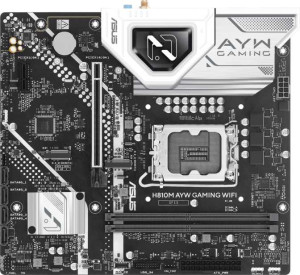
Asus H810M AYW Gaming WiFi
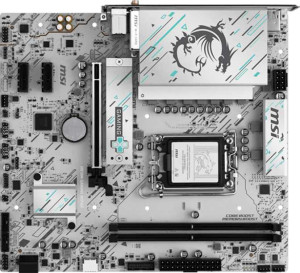
MSI H810M Gaming Wi-Fi6E

Asus H810M AYW Gaming WiFi MSI H810M Gaming Wi-Fi6E

Overview

Welcome to our in-depth specification face-off between the Asus H810M AYW Gaming WiFi and the MSI H810M Gaming Wi-Fi6E — two Micro-ATX motherboards built around the LGA 1851 socket. While they share a surprisingly similar foundation, the details reveal meaningful divergences worth examining closely. From wireless connectivity standards and memory speeds to expansion slot generations and storage options, this comparison will help you decide which board truly fits your build.

Common Features

  • Both boards use the LGA 1851 CPU socket.
  • Both boards have a Micro-ATX form factor.
  • Wi-Fi support is available on both products.
  • Bluetooth is available on both products, with version 5.3.
  • Both boards share HDMI 2.1 output.
  • Overclocking is not supported on either product.
  • RGB lighting is present on both products.
  • Both boards support a maximum of 128GB of RAM.
  • Both boards have 2 memory slots.
  • Both boards use DDR5 memory.
  • Both boards have 2 memory channels.
  • ECC memory is not supported on either product.
  • Neither product has USB 3.2 Gen 1 ports (USB-C) on the rear panel.
  • Both boards have 4 USB 2.0 rear panel ports.
  • Neither product has USB 3.2 Gen 2x2, USB 4, or Thunderbolt ports.
  • Both boards have an HDMI output.
  • Both boards provide 2 USB 3.2 Gen 1 ports through expansion.
  • Both boards have 4 SATA 3 connectors and 0 SATA 2 connectors.
  • Both boards have 3 fan headers.
  • Both boards have 7.1 audio channels with 3 audio connectors, and S/PDIF Out is not available on either product.

Main Differences

  • Wi-Fi 6E (802.11ax) support is present on MSI H810M Gaming Wi-Fi6E but not available on Asus H810M AYW Gaming WiFi.
  • Easy BIOS reset is available on Asus H810M AYW Gaming WiFi but not on MSI H810M Gaming Wi-Fi6E.
  • Height is 222 mm on Asus H810M AYW Gaming WiFi and 220 mm on MSI H810M Gaming Wi-Fi6E.
  • Width is 244 mm on Asus H810M AYW Gaming WiFi and 243.8 mm on MSI H810M Gaming Wi-Fi6E.
  • Maximum RAM speed is 6400 MHz on Asus H810M AYW Gaming WiFi and 4800 MHz on MSI H810M Gaming Wi-Fi6E.
  • USB 3.2 Gen 2 ports (USB-A) count is 2 on Asus H810M AYW Gaming WiFi and 0 on MSI H810M Gaming Wi-Fi6E.
  • USB 3.2 Gen 1 ports (USB-A) count is 0 on Asus H810M AYW Gaming WiFi and 2 on MSI H810M Gaming Wi-Fi6E.
  • USB Type-C support is present on MSI H810M Gaming Wi-Fi6E (1 USB 3.2 Gen 2 port) but not available on Asus H810M AYW Gaming WiFi.
  • USB 2.0 ports through expansion number 2 on Asus H810M AYW Gaming WiFi and 4 on MSI H810M Gaming Wi-Fi6E.
  • M.2 sockets number 2 on Asus H810M AYW Gaming WiFi and 1 on MSI H810M Gaming Wi-Fi6E.
  • A TPM connector is present on Asus H810M AYW Gaming WiFi but not on MSI H810M Gaming Wi-Fi6E.
  • PCIe 4.0 x16 slot count is 1 on Asus H810M AYW Gaming WiFi and 0 on MSI H810M Gaming Wi-Fi6E.
  • PCIe 5.0 x16 slot count is 0 on Asus H810M AYW Gaming WiFi and 1 on MSI H810M Gaming Wi-Fi6E.
  • PCIe x1 slot count is 1 on Asus H810M AYW Gaming WiFi and 2 on MSI H810M Gaming Wi-Fi6E.
Specs Comparison
Asus H810M AYW Gaming WiFi

Asus H810M AYW Gaming WiFi

MSI H810M Gaming Wi-Fi6E

MSI H810M Gaming Wi-Fi6E

General info:
CPU socket LGA 1851 LGA 1851
form factor Micro-ATX Micro-ATX
release date January 2025 May 2025
supports Wi-Fi
Wi-Fi version Wi-Fi 4 (802.11n), Wi-Fi 5 (802.11ac), Wi-Fi 6 (802.11ax) Wi-Fi 4 (802.11n), Wi-Fi 5 (802.11ac), Wi-Fi 6 (802.11ax), Wi-Fi 6E (802.11ax)
Has Bluetooth
Bluetooth version 5.3 5.3
HDMI version HDMI 2.1 HDMI 2.1
Easy to overclock
has RGB lighting
Easy to reset BIOS
Has dual BIOS
has aptX
CPU sockets 1 1
Has integrated graphics
warranty period 3 years 3 years
height 222 mm 220 mm
width 244 mm 243.8 mm
Has integrated CPU

Both the Asus H810M AYW Gaming WiFi and the MSI H810M Gaming Wi-Fi6E share the same foundational platform: the LGA 1851 socket, a Micro-ATX form factor, Bluetooth 5.3, HDMI 2.1 output, dual BIOS, and a 3-year warranty. For most buyers, this means both boards are equally capable starting points for the same generation of hardware, with identical connectivity and display output ceilings.

The single most meaningful differentiator in this group is wireless connectivity. The MSI extends its Wi-Fi support to Wi-Fi 6E (802.11ax), while the Asus tops out at Wi-Fi 6. In practice, Wi-Fi 6E opens access to the less congested 6 GHz band, which can translate to lower latency and more consistent throughput in dense environments — a tangible benefit for competitive gaming or heavy streaming. On the other hand, the Asus offers an easier BIOS recovery experience (Easy to reset BIOS: YES vs. NO on the MSI), which is a meaningful quality-of-life advantage for users who plan to experiment with settings or recover from a failed update without extra tools.

Overall, the MSI H810M Gaming Wi-Fi6E holds a clear edge for users with Wi-Fi 6E-capable routers or future-proofing in mind, while the Asus H810M AYW counters with simpler BIOS management — making it the safer pick for less experienced builders. If wireless performance is the priority, MSI wins this group; if ease of maintenance matters more, Asus has the advantage.

Memory:
maximum memory amount 128GB 128GB
RAM speed (max) 6400 MHz 4800 MHz
memory slots 2 2
DDR memory version 5 5
memory channels 2 2
Supports ECC memory

The memory configurations of these two boards are nearly identical on paper — both support DDR5, cap out at 128GB across 2 slots in dual-channel mode, and neither accommodates ECC memory. For the vast majority of gaming and content creation workloads, this shared foundation means equivalent multitasking headroom and bandwidth scaling.

Where they diverge is RAM speed ceiling: the Asus supports modules up to 6400 MHz, compared to the MSI's 4800 MHz limit. That 1600 MHz gap is not trivial. DDR5 systems — particularly those pairing fast CPUs with memory-sensitive tasks like game streaming, video editing, or large dataset processing — can see measurable gains from higher-clocked RAM. Running at 4800 MHz is technically within DDR5's baseline spec, but it leaves performance on the table if the user already owns or plans to buy faster kits.

The Asus H810M AYW Gaming WiFi holds a clear advantage in this group strictly because of its higher memory speed ceiling. Users who want to extract maximum performance from their DDR5 investment, or who plan to upgrade to faster kits down the line, will find the Asus the more capable platform. For buyers who have no plans to exceed 4800 MHz, the MSI remains fully adequate — but the Asus offers more headroom at no apparent trade-off within this spec group.

Ports:
USB 3.2 Gen 2 ports (USB-A) 2 0
USB 3.2 Gen 1 ports (USB-A) 0 2
USB 3.2 Gen 2 ports (USB-C) 0 1
USB 3.2 Gen 1 ports (USB-C) 0 0
USB 2.0 ports 4 4
USB 3.2 Gen 2x2 ports 0 0
USB 4 40Gbps ports 0 0
USB 4 20Gbps ports 0 0
Thunderbolt 4 ports 0 0
Thunderbolt 3 ports 0 0
has an HDMI output
DisplayPort outputs 1 1
RJ45 ports 1 1
Has USB Type-C
eSATA ports 0 0
DVI outputs 0 0
has a VGA connector
PS/2 ports 0 0

Rear I/O connectivity tells an interesting story here, because each board makes a different trade-off in how it allocates its high-speed USB ports. The Asus delivers 2x USB 3.2 Gen 2 Type-A ports running at 10Gbps, while the MSI counters with 2x USB 3.2 Gen 1 Type-A (5Gbps) plus a single USB 3.2 Gen 2 Type-C also at 10Gbps. In practice, the Asus is the stronger choice for users with multiple high-speed Type-A peripherals — think fast external SSDs or pro audio interfaces — whereas the MSI trades one of those fast Type-A ports for a modern Type-C connector that is increasingly essential for newer devices, monitors, and accessories.

Beyond the USB split, the two boards are evenly matched: both offer HDMI output, one DisplayPort, a single RJ45 ethernet port, and four USB 2.0 ports for legacy peripherals. Neither includes Thunderbolt, eSATA, or any legacy video outputs, which is expected at this tier.

Declaring a winner depends on the user's peripheral ecosystem. For a traditional desktop setup dominated by Type-A devices, the Asus H810M AYW Gaming WiFi has the speed edge. For anyone connecting a USB-C monitor, docking station, or modern peripheral directly to the rear panel, the MSI H810M Gaming Wi-Fi6E is the more future-ready option. Neither board holds an outright advantage — the choice comes down to which port type matters most to the individual user.

Connectors:
USB 3.2 Gen 1 ports (through expansion) 2 2
USB 2.0 ports (through expansion) 2 4
SATA 3 connectors 4 4
fan headers 3 3
USB 3.0 ports (through expansion) 2 2
M.2 sockets 2 1
Has TPM connector
U.2 sockets 0 0
Has mSATA connector
SATA 2 connectors 0 0

Internal storage expansion is where these two boards diverge most meaningfully. The Asus provides 2x M.2 sockets versus the MSI's single M.2 socket, which is a tangible advantage for users wanting to run two NVMe drives simultaneously — whether for OS plus game storage, or a RAID-style fast scratch drive setup — without falling back on the 4x SATA 3 connectors both boards share. That SATA count is identical, so for traditional HDD or SSD builds the two are evenly matched, but the extra M.2 slot on the Asus gives it a meaningful edge in high-speed storage flexibility.

The Asus also includes a TPM connector, which the MSI lacks. This is relevant for enterprise or security-conscious users who want to attach a discrete TPM module for hardware-level encryption and secure boot workflows — a small but non-trivial differentiator for certain use cases. On the other side, the MSI offers 4 internal USB 2.0 expansion headers compared to the Asus's 2, giving it a slight edge for users who rely on front-panel USB 2.0 ports or internal USB devices like RGB controllers and card readers.

On balance, the Asus H810M AYW Gaming WiFi holds the stronger position in this group: the second M.2 socket is a practical, high-impact advantage for modern storage configurations, and the TPM connector adds security capability the MSI simply does not offer. The MSI's additional USB 2.0 internal headers are a secondary convenience that rarely tips the scale for mainstream builders.

Expansion slots:
PCIe 4.0 x16 slots 1 0
PCIe 5.0 x16 slots 0 1
PCIe 3.0 x16 slots 0 0
PCIe x1 slots 1 2
PCI slots 0 0
PCIe 2.0 x16 slots 0 0
PCIe x4 slots 0 0
PCIe x8 slots 0 0

The primary GPU slot is where this comparison gets decisive. The MSI equips its main slot with PCIe 5.0 x16, while the Asus tops out at PCIe 4.0 x16. PCIe 5.0 doubles the theoretical bandwidth of PCIe 4.0 — from roughly 64 GB/s to 128 GB/s — which matters most for current and next-generation graphics cards and NVMe drives designed to saturate that interface. While few GPUs available today fully utilize PCIe 5.0 bandwidth, the MSI's slot ensures this board won't become a bottleneck as GPU generations advance, making it the more forward-looking platform for a long-term build.

The secondary slot count also tips slightly in the MSI's favor: it offers 2x PCIe x1 slots versus the Asus's single x1 slot. For users who rely on add-in cards — such as capture cards, sound cards, or network adapters — that extra x1 slot provides meaningful flexibility without competing for the primary GPU slot.

This group delivers a clear edge to the MSI H810M Gaming Wi-Fi6E on both counts. The PCIe 5.0 x16 primary slot is a generational advantage over the Asus's PCIe 4.0, and the additional x1 slot adds expansion headroom. For builders prioritizing longevity and GPU upgrade paths, the MSI is the stronger choice here.

Audio:
audio channels 7.1 7.1
Has S/PDIF Out port
audio connectors 3 3

Audio is the rare category where these two boards are in complete lockstep. Both deliver 7.1-channel surround sound support through 3 analog audio connectors, and neither includes an S/PDIF optical output — meaning users who want to connect a home theater receiver or external DAC via digital optical will need to source that capability elsewhere, such as through a discrete sound card or USB audio interface.

The 7.1-channel capability is worth contextualizing: with only 3 analog jacks, achieving full 7.1 output typically requires the audio codec to multiplex channels across those connectors, which is standard practice on boards at this tier. For stereo headphones, gaming headsets, and basic speaker setups, 3 jacks is entirely sufficient — the absence of S/PDIF is only a drawback for users with specific home theater or audiophile routing needs.

This group is a straight tie. The Asus H810M AYW Gaming WiFi and the MSI H810M Gaming Wi-Fi6E offer identical audio specifications, and neither holds any advantage over the other here. Buyers with demanding audio requirements beyond what onboard solutions typically provide should factor in the cost of a dedicated sound card regardless of which board they choose.

Storage:
Supports RAID 0+1

The storage group provides just one data point for this comparison: neither the Asus H810M AYW Gaming WiFi nor the MSI H810M Gaming Wi-Fi6E supports RAID 0+1. This is a shared limitation rather than a differentiator, and it is broadly typical for consumer-grade motherboards at this form factor and price tier, where RAID support is often omitted in favor of simplicity.

For most gaming and general-purpose builds, the absence of RAID 0+1 is inconsequential — modern NVMe drives are fast enough that RAID striping offers diminishing returns for everyday workloads, and redundancy needs are more commonly addressed through dedicated backup solutions or cloud storage. The users most affected would be those building small workstations requiring hardware-level drive mirroring for data protection, who would need to look elsewhere.

Based solely on the data provided for this group, the two boards are a complete tie — both carry the same limitation, and neither holds any advantage over the other in this category.

Comparison Summary & Verdict

After reviewing all the specifications, both boards serve the same platform but cater to subtly different builder priorities. The Asus H810M AYW Gaming WiFi stands out with its higher maximum RAM speed of 6400 MHz, two M.2 sockets, PCIe 4.0 x16 slot, a TPM connector, and convenient BIOS reset — making it a strong pick for users who want storage flexibility and easy system maintenance. The MSI H810M Gaming Wi-Fi6E, on the other hand, earns its name with Wi-Fi 6E support, a faster PCIe 5.0 x16 slot for next-generation graphics cards, and a USB Type-C rear port — appealing to builders focused on future-proofing their connectivity and GPU bandwidth. Neither board supports overclocking, and both deliver 7.1 audio and DDR5 memory, so the choice ultimately comes down to whether you value storage expansion and memory headroom or cutting-edge wireless and PCIe performance.

Asus H810M AYW Gaming WiFi
Buy Asus H810M AYW Gaming WiFi if...

Buy the Asus H810M AYW Gaming WiFi if you want faster DDR5 memory support up to 6400 MHz, two M.2 slots for storage flexibility, and the convenience of easy BIOS reset.

MSI H810M Gaming Wi-Fi6E
Buy MSI H810M Gaming Wi-Fi6E if...

Buy the MSI H810M Gaming Wi-Fi6E if you prioritize Wi-Fi 6E connectivity, a PCIe 5.0 x16 slot for next-generation graphics cards, and a rear USB Type-C port.