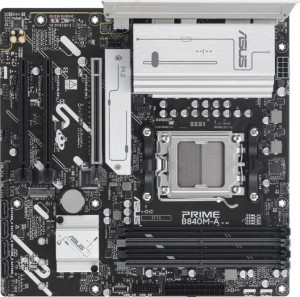
Asus Prime B840M-A
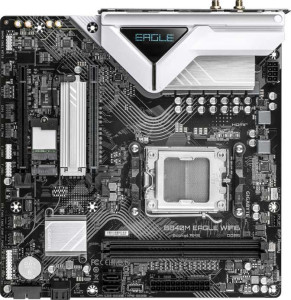
Gigabyte B840M Eagle WiFi6

Asus Prime B840M-A Gigabyte B840M Eagle WiFi6

Overview

Choosing between the Asus Prime B840M-A and the Gigabyte B840M Eagle WiFi6 is no simple matter, as both Micro-ATX motherboards share the AM5 socket and DDR5 memory support as a common foundation. Where they part ways is in wireless connectivity, memory expandability, and storage options — key battlegrounds that will determine which board truly fits your next build.

Common Features

  • Both boards use the AM5 CPU socket.
  • Both have a Micro-ATX form factor.
  • Both feature HDMI 2.1 output.
  • Overclocking is supported on both boards.
  • Dual BIOS is present on both products.
  • Neither board has integrated graphics.
  • Both carry a 3-year warranty.
  • Both use DDR5 memory.
  • Both support a dual-channel memory configuration.
  • ECC memory is not supported on either board.
  • Neither board has any USB 3.2 Gen 2 ports with USB-C connector on the rear panel.
  • Neither board has any USB 3.2 Gen 1 ports with USB-C connector on the rear panel.
  • Both boards provide 4 USB 2.0 ports on the rear panel.
  • Neither board features USB 3.2 Gen 2x2, USB 4 40Gbps, USB 4 20Gbps, Thunderbolt 4, or Thunderbolt 3 ports.
  • Both provide 2 USB 3.2 Gen 1 ports and 4 USB 2.0 ports through expansion headers.
  • Both have 4 SATA 3 connectors.
  • Both include 4 fan headers.
  • A TPM connector is present on both boards.
  • Neither board has an mSATA connector.
  • Both boards offer 7.1-channel audio with 3 audio connectors.
  • S/PDIF Out is not available on either board.
  • Both support 1 PCIe 4.0 x16 slot and have no PCIe 5.0 x16 slots.
  • Both support RAID 0, RAID 1, RAID 5, and RAID 10, but neither supports RAID 0+1.

Main Differences

  • Wi-Fi is built into the Gigabyte B840M Eagle WiFi6 but is not available on the Asus Prime B840M-A.
  • Bluetooth is present on the Gigabyte B840M Eagle WiFi6 but not on the Asus Prime B840M-A.
  • RGB lighting is featured on the Asus Prime B840M-A but is absent on the Gigabyte B840M Eagle WiFi6.
  • Easy BIOS reset is supported on the Asus Prime B840M-A but not on the Gigabyte B840M Eagle WiFi6.
  • Maximum supported memory is 256 GB on the Asus Prime B840M-A and 128 GB on the Gigabyte B840M Eagle WiFi6.
  • Overclocked RAM speed reaches up to 7600 MHz on the Asus Prime B840M-A and up to 7200 MHz on the Gigabyte B840M Eagle WiFi6.
  • The Asus Prime B840M-A has 4 memory slots while the Gigabyte B840M Eagle WiFi6 has 2.
  • USB 3.2 Gen 2 ports (USB-A) number 2 on the Asus Prime B840M-A and 0 on the Gigabyte B840M Eagle WiFi6.
  • USB 3.2 Gen 1 ports (USB-A) number 1 on the Asus Prime B840M-A and 2 on the Gigabyte B840M Eagle WiFi6.
  • DisplayPort outputs total 2 on the Asus Prime B840M-A and 1 on the Gigabyte B840M Eagle WiFi6.
  • A USB Type-C port is present on the Asus Prime B840M-A but is not available on the Gigabyte B840M Eagle WiFi6.
  • The Gigabyte B840M Eagle WiFi6 includes a PS/2 port while the Asus Prime B840M-A does not.
  • M.2 sockets total 3 on the Asus Prime B840M-A and 2 on the Gigabyte B840M Eagle WiFi6.
  • The Asus Prime B840M-A has 2 PCIe 3.0 x16 slots while the Gigabyte B840M Eagle WiFi6 has none.
  • The Gigabyte B840M Eagle WiFi6 provides 1 PCIe x4 slot while the Asus Prime B840M-A has none.
Specs Comparison
Asus Prime B840M-A

Asus Prime B840M-A

Gigabyte B840M Eagle WiFi6

Gigabyte B840M Eagle WiFi6

General info:
CPU socket AM5 AM5
form factor Micro-ATX Micro-ATX
release date January 2025 January 2025
supports Wi-Fi
Has Bluetooth
HDMI version HDMI 2.1 HDMI 2.1
Easy to overclock
has RGB lighting
Easy to reset BIOS
Has dual BIOS
CPU sockets 1 1
Has integrated graphics
warranty period 3 years 3 years
height 244 mm 244 mm
width 244 mm 244 mm
Has integrated CPU

Both the Asus Prime B840M-A and the Gigabyte B840M Eagle WiFi6 share a strong common foundation: identical Micro-ATX form factor at 244 × 244 mm, the same AM5 CPU socket, HDMI 2.1 video output, dual BIOS, easy overclocking support, and a 3-year warranty. For a builder prioritizing platform compatibility or display output, either board is equally capable.

The critical differentiator lies in connectivity and usability features. The Gigabyte Eagle WiFi6 includes built-in Wi-Fi and Bluetooth, which is a meaningful real-world advantage — eliminating the need for a PCIe adapter or USB dongle in wireless builds, and freeing up expansion slots. The Asus Prime, by contrast, offers no wireless connectivity at all, making it purely dependent on wired Ethernet. On the other hand, the Asus board features RGB lighting and an easy BIOS reset mechanism, while the Gigabyte lacks both — the absence of a simple BIOS reset can complicate recovery from a bad overclock or failed update, which is a practical concern given that both boards are marketed as overclock-friendly.

Overall, the Gigabyte B840M Eagle WiFi6 has a clear edge for most users: integrated wireless connectivity is a tangible, hardware-level addition that adds flexibility and reduces build complexity. The Asus Prime's RGB and easier BIOS reset are conveniences, but they do not offset the absence of Wi-Fi and Bluetooth for the majority of modern use cases.
Memory:
maximum memory amount 256GB 128GB
overclocked RAM speed 7600 MHz 7200 MHz
memory slots 4 2
DDR memory version 5 5
memory channels 2 2
Supports ECC memory

The memory subsystems of these two boards diverge significantly despite sharing the same DDR5 standard and dual-channel architecture. The Asus Prime B840M-A offers 4 memory slots supporting up to 256 GB, while the Gigabyte B840M Eagle WiFi6 is limited to 2 slots and a 128 GB ceiling — a difference that directly impacts both upgrade headroom and total capacity for memory-intensive workloads like video editing, virtualization, or large dataset processing.

On raw speed, the Asus board also pulls ahead, supporting overclocked RAM up to 7600 MHz versus the Gigabyte's 7200 MHz. While the practical performance gap between these two frequencies is modest in most everyday tasks, enthusiasts pushing XMP/EXPO profiles will appreciate the extra ceiling on the Asus. The additional slots also provide a practical advantage: users can start with a smaller kit and expand later without replacing existing modules, whereas the Gigabyte's 2-slot design forces a full swap if you ever want to upgrade beyond the initial configuration.

The Asus Prime B840M-A holds a clear advantage in this category. More slots, a higher capacity ceiling, and a faster maximum overclock speed make it the more scalable and future-proof choice for anyone who anticipates growing their memory footprint over time.

Ports:
USB 3.2 Gen 2 ports (USB-A) 2 0
USB 3.2 Gen 1 ports (USB-A) 1 2
USB 3.2 Gen 2 ports (USB-C) 0 0
USB 3.2 Gen 1 ports (USB-C) 0 0
USB 2.0 ports 4 4
USB 3.2 Gen 2x2 ports 0 0
USB 4 40Gbps ports 0 0
USB 4 20Gbps ports 0 0
Thunderbolt 4 ports 0 0
Thunderbolt 3 ports 0 0
has an HDMI output
DisplayPort outputs 2 1
RJ45 ports 1 1
Has USB Type-C
eSATA ports 0 0
DVI outputs 0 0
has a VGA connector
PS/2 ports 0 1

Rear I/O connectivity tells an interesting story here. The Asus Prime B840M-A equips two USB 3.2 Gen 2 (10 Gbps) Type-A ports alongside a USB-C header, while the Gigabyte B840M Eagle WiFi6 tops out at USB 3.2 Gen 1 (5 Gbps) across its Type-A ports and includes no USB-C whatsoever. That speed gap is tangible when transferring large files to modern external SSDs or high-speed flash drives — Gen 2 can cut transfer times roughly in half compared to Gen 1.

Display output is another area where the Asus pulls ahead, offering both HDMI and two DisplayPort outputs for a total of three simultaneous display connections, versus the Gigabyte's HDMI plus a single DisplayPort. For multi-monitor setups driven by the CPU's integrated graphics — relevant particularly on APU-based builds — that extra DisplayPort is a genuine differentiator. The Gigabyte does include a PS/2 port, which serves a niche audience using legacy keyboards or mice, but this is unlikely to factor into most modern build decisions.

The Asus Prime B840M-A has a clear advantage in this category. Faster USB throughput, the addition of USB-C, and superior multi-display support collectively make it the more capable and forward-looking board for users who demand flexibility from their rear I/O.

Connectors:
USB 3.2 Gen 1 ports (through expansion) 2 2
USB 2.0 ports (through expansion) 4 4
SATA 3 connectors 4 4
fan headers 4 4
USB 3.0 ports (through expansion) 2 2
M.2 sockets 3 2
Has TPM connector
U.2 sockets 0 0
Has mSATA connector
SATA 2 connectors 0 0

When it comes to internal connectors, these two boards are remarkably well-matched across most of the spec sheet — identical counts of SATA 3 connectors, fan headers, expansion USB ports, and both include a TPM connector. For the vast majority of builders, this parity means cooling, storage via traditional drives, and front-panel connectivity will feel identical on either platform.

The single point of separation is M.2 storage slots: the Asus Prime B840M-A provides three M.2 sockets versus two on the Gigabyte B840M Eagle WiFi6. In practice, that third slot is meaningful for users who want to run a primary NVMe boot drive, a secondary NVMe for data or games, and a third for backup or additional fast storage — all without touching any of the four SATA ports. On the Gigabyte, that third drive would require falling back to a SATA connection, which offers significantly lower bandwidth than a modern NVMe slot.

This category goes to the Asus Prime B840M-A, but narrowly. For builders who will never need more than two M.2 drives, both boards are effectively tied. The Asus advantage only materializes in storage-heavy configurations, making the Gigabyte a perfectly adequate choice for typical single or dual-SSD builds.

Expansion slots:
PCIe 4.0 x16 slots 1 1
PCIe 5.0 x16 slots 0 0
PCIe 3.0 x16 slots 2 0
PCIe x1 slots 0 0
PCI slots 0 0
PCIe 2.0 x16 slots 0 0
PCIe x4 slots 0 1
PCIe x8 slots 0 0

The Asus Prime B840M-A and Gigabyte B840M Eagle WiFi6 differ in their expansion slot configurations. Both motherboards feature one PCIe 4.0 x16 slot, but the Asus board provides two PCIe 3.0 x16 slots, while the Gigabyte board includes one PCIe x4 slot. The Gigabyte board lacks PCIe 3.0 x16 slots altogether, which could be a factor for users needing multiple high-speed graphics or expansion cards.

Neither motherboard includes PCI slots, PCIe 2.0 x16 slots, or PCIe x1 slots. However, the Gigabyte board has an advantage in offering a PCIe x4 slot, which the Asus board does not have.

In summary, the Asus board provides more PCIe 3.0 x16 slots, while the Gigabyte board offers a PCIe x4 slot, which could benefit users with specific expansion needs.

Audio:
audio channels 7.1 7.1
Has S/PDIF Out port
audio connectors 3 3

Both the Asus Prime B840M-A and Gigabyte B840M Eagle WiFi6 offer 7.1 audio channels, ensuring high-quality surround sound support. Both motherboards are also equipped with three audio connectors, providing essential connectivity for audio devices.

Neither motherboard includes an S/PDIF Out port, so users seeking digital audio output through this port will need to look elsewhere.

Overall, the audio capabilities of both boards are identical, with matching audio channels, connectors, and the absence of an S/PDIF Out port.

Storage:
Supports RAID 1
Supports RAID 10 (1+0)
Supports RAID 5
Supports RAID 0
Supports RAID 0+1

Both the Asus Prime B840M-A and Gigabyte B840M Eagle WiFi6 support the same RAID configurations: RAID 1, RAID 10 (1+0), RAID 5, and RAID 0. However, neither motherboard supports RAID 0+1, so users looking for this specific RAID setup will not find it on either board.

Overall, both motherboards offer the same RAID support, with no differences in their capabilities within this group.

Comparison Summary & Verdict

Both boards are solid Micro-ATX platforms on AM5 with DDR5, dual BIOS, and full RAID support, making either a dependable foundation for a modern build. The Asus Prime B840M-A earns its place as the more expandable option: its 4 memory slots with a 256 GB capacity ceiling, three M.2 sockets, faster 7600 MHz overclocked RAM, USB Type-C, two USB 3.2 Gen 2 ports, and dual DisplayPort outputs give power users and enthusiasts considerably more room to grow. The Gigabyte B840M Eagle WiFi6, on the other hand, is the straightforward pick for anyone who wants a wireless-ready build out of the box, as its built-in Wi-Fi 6 and Bluetooth eliminate the need for additional adapters entirely — a convenience the Asus board cannot match. Choose the Asus for maximum expandability and richer connectivity; choose the Gigabyte for a cleaner, cable-free setup with integrated wireless.

Asus Prime B840M-A
Buy Asus Prime B840M-A if...

Buy the Asus Prime B840M-A if you need maximum memory headroom with up to 256 GB across 4 slots, richer USB connectivity including USB Type-C and USB 3.2 Gen 2 ports, and three M.2 slots for extensive storage expansion.

Gigabyte B840M Eagle WiFi6
Buy Gigabyte B840M Eagle WiFi6 if...

Choose the Gigabyte B840M Eagle WiFi6 if built-in Wi-Fi 6 and Bluetooth are essential for a clean, cable-free wireless setup without the need for additional adapters.