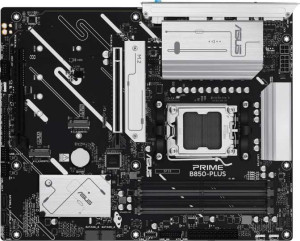
Asus Prime B850-Plus
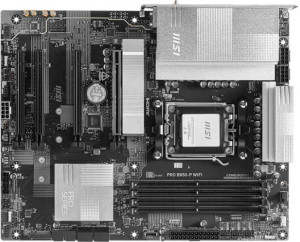
MSI Pro B850-P WiFi

Asus Prime B850-Plus MSI Pro B850-P WiFi

Overview

Welcome to our in-depth specification comparison between the Asus Prime B850-Plus and the MSI Pro B850-P WiFi. Both boards share the same AM5 socket, B850 chipset, and ATX form factor, making this a closely matched contest. The key battlegrounds include wireless connectivity, rear USB port configurations, expansion slot options, and advanced RAID support — areas where each board takes a notably different approach to serving its target audience.

Common Features

  • Both motherboards use the AM5 CPU socket.
  • Both boards are built on the B850 chipset.
  • Both boards use the ATX form factor.
  • Both boards feature HDMI 2.1 output.
  • Overclocking is supported on both boards.
  • RGB lighting is present on both boards.
  • Easy BIOS reset functionality is available on both boards.
  • Dual BIOS is supported on both boards.
  • Both boards support a maximum memory amount of 256GB.
  • Both boards have 4 memory slots.
  • Both boards support DDR5 memory.
  • Both boards feature 2 memory channels.
  • ECC memory is not supported on either board.
  • Both boards have 1 RJ45 port.
  • An HDMI output is present on both boards.
  • Both boards have 4 SATA 3 connectors.
  • Both boards include 6 fan headers.
  • Both boards have 3 M.2 sockets.
  • A TPM connector is present on both boards.
  • Both boards support 7.1 audio channels.
  • Both boards support RAID 0 and RAID 1.
  • RAID 0+1 is not supported on either board.
  • Both boards include 1 PCIe 5.0 x16 slot and 1 PCIe 4.0 x16 slot.
  • Both boards provide 4 USB 2.0 ports through expansion.

Main Differences

  • Wi-Fi support is present on MSI Pro B850-P WiFi but not available on Asus Prime B850-Plus.
  • Bluetooth is available on MSI Pro B850-P WiFi but not on Asus Prime B850-Plus.
  • The maximum overclocked RAM speed is 8000 MHz on Asus Prime B850-Plus and 8200 MHz on MSI Pro B850-P WiFi.
  • There are 3 USB 3.2 Gen 2 ports (USB-A) on Asus Prime B850-Plus and 1 on MSI Pro B850-P WiFi.
  • There are 2 USB 3.2 Gen 1 ports (USB-A) on Asus Prime B850-Plus and 1 on MSI Pro B850-P WiFi.
  • There is 1 USB 3.2 Gen 2 port (USB-C) on Asus Prime B850-Plus and 2 on MSI Pro B850-P WiFi.
  • There are 2 USB 2.0 ports on Asus Prime B850-Plus and 4 on MSI Pro B850-P WiFi.
  • Asus Prime B850-Plus has 1 DisplayPort output, while MSI Pro B850-P WiFi has none.
  • There are 2 USB 3.2 Gen 1 ports through expansion on Asus Prime B850-Plus and 4 on MSI Pro B850-P WiFi.
  • There are 0 PCIe x1 slots on Asus Prime B850-Plus and 2 on MSI Pro B850-P WiFi.
  • S/PDIF Out port is present on MSI Pro B850-P WiFi but not available on Asus Prime B850-Plus.
  • There are 3 audio connectors on Asus Prime B850-Plus and 2 on MSI Pro B850-P WiFi.
  • RAID 10 (1+0) is supported on Asus Prime B850-Plus but not on MSI Pro B850-P WiFi.
  • RAID 5 is supported on Asus Prime B850-Plus but not on MSI Pro B850-P WiFi.
  • The height is 244 mm on Asus Prime B850-Plus and 243.8 mm on MSI Pro B850-P WiFi.
  • The width is 305 mm on Asus Prime B850-Plus and 304.8 mm on MSI Pro B850-P WiFi.
Specs Comparison
Asus Prime B850-Plus

Asus Prime B850-Plus

MSI Pro B850-P WiFi

MSI Pro B850-P WiFi

General info:
CPU socket AM5 AM5
chipset B850 B850
form factor ATX ATX
release date April 2025 January 2025
supports Wi-Fi
Has Bluetooth
HDMI version HDMI 2.1 HDMI 2.1
Easy to overclock
has RGB lighting
Easy to reset BIOS
Has dual BIOS
CPU sockets 1 1
Has integrated graphics
warranty period 3 years 3 years
height 244 mm 243.8 mm
width 305 mm 304.8 mm
Has integrated CPU

At their core, the Asus Prime B850-Plus and MSI Pro B850-P WiFi share the same fundamental platform: both use the AM5 socket with a B850 chipset, adopt the standard ATX form factor, output video via HDMI 2.1, and come backed by a 3-year warranty. Their physical dimensions are effectively identical — within fractions of a millimeter — meaning both will fit any ATX-compatible case with no practical difference in installation.

The single meaningful differentiator in this category is connectivity: the MSI Pro B850-P WiFi includes built-in Wi-Fi and Bluetooth, while the Asus Prime B850-Plus offers neither. In real-world terms, this matters significantly for builds in locations where running an Ethernet cable is inconvenient, or for users who want to connect peripherals like wireless headsets, controllers, or speakers without adding a PCIe adapter. For a desktop placed near a router with a cable run, the omission on the Asus side costs nothing; for a living-room or cable-free build, it is a concrete limitation.

On all other general specs — overclocking support, dual BIOS, BIOS reset ease, RGB lighting, and the absence of integrated graphics or a built-in CPU — the two boards are completely tied. The MSI Pro B850-P WiFi holds a clear edge in this group purely due to its integrated wireless connectivity, which eliminates the need for an add-in card and keeps the build cleaner. Buyers who already have wired networking and no wireless peripheral needs will find both boards equally matched here.

Memory:
maximum memory amount 256GB 256GB
overclocked RAM speed 8000 MHz 8200 MHz
memory slots 4 4
DDR memory version 5 5
memory channels 2 2
Supports ECC memory

Memory capability is nearly identical across both boards. Each supports up to 256GB of DDR5 RAM across 4 slots in a dual-channel configuration — plenty of headroom for even the most demanding workstations, with everyday gaming and productivity builds using a fraction of that ceiling. Neither board supports ECC memory, which is expected at this chipset tier and only relevant for professional or server use cases.

The sole differentiator here is the maximum supported overclocked RAM speed: the MSI Pro B850-P WiFi tops out at 8200 MHz, compared to 8000 MHz on the Asus Prime B850-Plus. In practice, the gap between these two frequencies is marginal — real-world performance differences at these speeds are measurable only in synthetic benchmarks, and neither board will feel noticeably faster in gaming or general productivity as a result of this 200 MHz delta. It does, however, give the MSI a slight future-proofing edge for enthusiasts who want to push cutting-edge high-frequency kits to their rated ceiling.

For the vast majority of users, this group is effectively a tie. The MSI holds a technical edge on overclocked RAM headroom, but it is a narrow one that only matters if you are specifically pairing the board with an 8200 MHz kit and prioritizing every last megahertz of memory performance.

Ports:
USB 3.2 Gen 2 ports (USB-A) 3 1
USB 3.2 Gen 1 ports (USB-A) 2 1
USB 3.2 Gen 2 ports (USB-C) 1 2
USB 3.2 Gen 1 ports (USB-C) 0 0
USB 2.0 ports 2 4
USB 3.2 Gen 2x2 ports 0 0
USB 4 40Gbps ports 0 0
USB 4 20Gbps ports 0 0
Thunderbolt 4 ports 0 0
Thunderbolt 3 ports 0 0
has an HDMI output
DisplayPort outputs 1 0
RJ45 ports 1 1
Has USB Type-C
eSATA ports 0 0
DVI outputs 0 0
has a VGA connector
PS/2 ports 0 0

Port selection is where these two boards diverge most visibly, and the contrast reflects genuinely different design philosophies. The Asus Prime B850-Plus leans heavily into high-speed USB-A availability, offering 3x USB 3.2 Gen 2 and 2x USB 3.2 Gen 1 Type-A ports — a total of five USB-A connections at Gen 1 speeds or faster. For users with a dense peripheral setup (external drives, DACs, hubs, capture cards), this translates directly to fewer dongles and adapters. The MSI Pro B850-P WiFi counters with 2x USB 3.2 Gen 2 Type-C ports versus the Asus's single one, making it a better fit for modern devices that ship with USB-C natively, such as smartphones, NVMe enclosures, and recent peripherals.

Two other differences stand out. First, the Asus includes a DisplayPort output alongside HDMI, while the MSI offers only HDMI — relevant for users driving multiple monitors directly from the board's integrated output, or those whose display only accepts DisplayPort. Second, the MSI's 4 USB 2.0 ports (versus 2 on the Asus) offer more room for low-bandwidth devices like keyboards, mice, and dongles without occupying faster ports, though this is a minor practical advantage.

Taken together, the Asus Prime B850-Plus has a clear edge in this category for most users. Its superior count of high-speed USB-A ports addresses the most common real-world peripheral mix, and the addition of DisplayPort adds meaningful display flexibility. The MSI's extra USB-C Gen 2 port is a genuine advantage for USB-C-centric setups, but that use case is narrower than the broad utility the Asus layout provides.
Connectors:
USB 3.2 Gen 1 ports (through expansion) 2 4
USB 2.0 ports (through expansion) 4 4
SATA 3 connectors 4 4
fan headers 6 6
USB 3.0 ports (through expansion) 2 4
M.2 sockets 3 3
Has TPM connector
U.2 sockets 0 0
Has mSATA connector
SATA 2 connectors 0 0

Internal connectivity tells a fairly consistent story across both boards, with shared highlights including 3 M.2 sockets, 4 SATA 3 connectors, 6 fan headers, and a TPM connector on each. Three M.2 slots is a strong offering at this tier, enabling an all-NVMe storage configuration without touching any SATA ports — a setup that suits modern builds prioritizing speed and cable-free interiors. The six fan headers give builders solid thermal management flexibility regardless of which board they choose.

The one area where the boards diverge is internal USB expansion. The MSI Pro B850-P WiFi provides 4 USB 3.2 Gen 1 headers for front-panel and expansion use, compared to just 2 on the Asus Prime B850-Plus. For a standard build with a typical mid-tower case, two Gen 1 headers is usually sufficient — most cases only need one for the front-panel USB cluster. However, in complex builds involving USB hubs, all-in-one coolers with USB connections, or cases with multiple USB 3.0 front ports, the MSI's doubled header count provides meaningful breathing room without requiring an internal hub.

This group is largely a tie in practical terms, but the MSI holds a modest edge thanks to its expanded internal USB 3.0 header count. It is not a decisive advantage for the majority of builders, but for those running feature-rich cases or multi-device internal setups, the extra headers eliminate a potential bottleneck before it arises.

Expansion slots:
PCIe 4.0 x16 slots 1 1
PCIe 5.0 x16 slots 1 1
PCIe 3.0 x16 slots 0 0
PCIe x1 slots 0 2
PCI slots 0 0
PCIe 2.0 x16 slots 0 0
PCIe x4 slots 0 0
PCIe x8 slots 0 0

Both boards share the same primary slot configuration: one PCIe 5.0 x16 slot for the primary GPU and one PCIe 4.0 x16 slot for a secondary card or high-bandwidth add-in device. The PCIe 5.0 primary slot is the headline here — it delivers double the bandwidth of Gen 4, future-proofing the board for next-generation graphics cards and NVMe expansion cards that can saturate that interface. For current GPU generations, the practical difference over PCIe 4.0 is negligible, but the headroom is there when hardware catches up.

The only differentiator in this group is the MSI Pro B850-P WiFi's inclusion of 2 PCIe x1 slots, which the Asus Prime B850-Plus entirely lacks. PCIe x1 slots serve a specific purpose: adding low-bandwidth expansion cards such as dedicated sound cards, additional USB controllers, capture cards, or network adapters. They are not essential for the majority of builds, but their absence on the Asus means users needing that kind of expansion have no slot-based fallback beyond the two x16 sockets.

The MSI has a clear, if narrow, advantage here. For a typical single-GPU gaming or productivity build, both boards are functionally identical in this category. But the two x1 slots on the MSI add genuine flexibility for power users or integrators who want to drop in supplementary cards without consuming a full x16 slot — a small but real capability gap in the MSI's favor.

Audio:
audio channels 7.1 7.1
Has S/PDIF Out port
audio connectors 3 2

Audio output capability is matched at the top level — both boards deliver 7.1 surround sound, which is the standard ceiling for onboard audio at this tier and sufficient for the vast majority of headset, speaker, and home theater setups. Where they diverge is in how that audio reaches your devices.

The MSI Pro B850-P WiFi includes an S/PDIF optical output, which the Asus Prime B850-Plus omits entirely. S/PDIF is the key connection for passing digital audio to external DACs, AV receivers, and soundbars that accept optical input — keeping the signal in the digital domain avoids the analog conversion on the motherboard, which can be a source of noise in electrically busy systems. For users with an optical-capable audio chain, this is a meaningful differentiator. The Asus compensates slightly with 3 analog audio jacks versus the MSI's 2, giving it one additional analog connector for multi-speaker or simultaneous headset-and-mic setups without a splitter.

The right board here depends entirely on your audio setup. For analog-only users — the majority of people plugging headsets or desktop speakers directly into the back panel — the Asus's extra jack is a minor but practical convenience. For anyone routing audio through an optical connection to an external receiver or DAC, the MSI holds the clear advantage with its S/PDIF output, a feature the Asus simply cannot replicate without an add-in card.

Storage:
Supports RAID 1
Supports RAID 10 (1+0)
Supports RAID 5
Supports RAID 0
Supports RAID 0+1

RAID support is a niche but important consideration for users building NAS-adjacent workstations, small office servers, or any system where data redundancy or performance striping matters. Both boards cover the basics — RAID 0 for pure performance striping and RAID 1 for mirroring — which satisfies most home and prosumer use cases. Beyond that, however, the two boards part ways significantly.

The Asus Prime B850-Plus extends its RAID capability to RAID 5 and RAID 10, two configurations that carry real weight in more demanding environments. RAID 5 distributes parity across drives for a balance of redundancy and storage efficiency across three or more drives, while RAID 10 combines mirroring and striping for both speed and fault tolerance — typically the preferred configuration in performance-critical setups that cannot afford downtime. The MSI Pro B850-P WiFi supports neither, leaving users who need those configurations without a native solution.

The Asus holds a clear advantage in this category. For casual users running a single drive or a simple two-drive mirror, both boards are adequate. But for anyone building a multi-drive array with redundancy requirements beyond basic RAID 1 — content creators managing large media libraries, small business users, or data hoarders who want parity protection — the Asus's broader RAID support is a concrete capability the MSI simply cannot match.

Comparison Summary & Verdict

After a thorough review of all specifications, both boards prove to be highly capable B850 platform options with strong shared foundations. The Asus Prime B850-Plus stands out for users who need more USB 3.2 Gen 2 Type-A ports, a dedicated DisplayPort output, and advanced storage flexibility through RAID 5 and RAID 10 support — making it a compelling pick for power users and content creators managing large storage arrays. On the other hand, the MSI Pro B850-P WiFi wins over users who require built-in Wi-Fi and Bluetooth, a higher overclocked RAM ceiling of 8200 MHz, more USB 3.2 Gen 1 internal expansion headers, and the added versatility of two PCIe x1 slots and an S/PDIF audio output. In short, choose the Asus for wired, storage-focused builds, and the MSI for wireless-ready, connectivity-rich systems.

Asus Prime B850-Plus
Buy Asus Prime B850-Plus if...

Buy the Asus Prime B850-Plus if you want more USB 3.2 Gen 2 Type-A ports, a DisplayPort output, and advanced RAID 5 and RAID 10 storage support in a wired-only build.

MSI Pro B850-P WiFi
Buy MSI Pro B850-P WiFi if...

Buy the MSI Pro B850-P WiFi if built-in Wi-Fi and Bluetooth are essential, or if you need a higher overclocked RAM speed, more internal USB expansion headers, and an S/PDIF audio output.