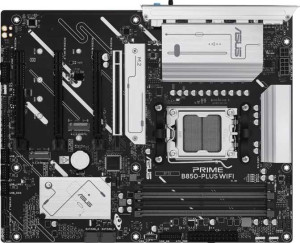
Asus Prime B850-Plus Wi-Fi
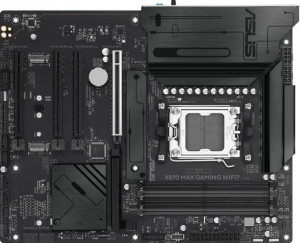
Asus X870 Max Gaming Wi-Fi7

Asus Prime B850-Plus Wi-Fi Asus X870 Max Gaming Wi-Fi7

Overview

When choosing between the Asus Prime B850-Plus Wi-Fi and the Asus X870 Max Gaming Wi-Fi7, buyers face a compelling decision between a well-rounded mainstream board and a feature-rich flagship. Both share the AM5 socket, ATX form factor, DDR5 support, and robust connectivity, yet they diverge sharply on chipset tier, wireless capabilities, high-speed USB options, and BIOS management features — battlegrounds that matter greatly depending on your build goals.

Common Features

  • Both boards use the AM5 CPU socket.
  • Both boards have an ATX form factor.
  • Wi-Fi connectivity is available on both products.
  • Bluetooth is available on both products.
  • Both boards feature HDMI 2.1 output.
  • Overclocking is supported on both products.
  • RGB lighting is present on both products.
  • aptX support is not available on either product.
  • Both boards support a maximum of 256GB of memory.
  • Both boards support overclocked RAM speeds up to 8000 MHz.
  • Both boards have 4 memory slots across 2 memory channels.
  • Both boards use DDR5 memory.
  • ECC memory is not supported on either product.
  • Neither board has USB 3.2 Gen 1 USB-C ports, USB 3.2 Gen 2x2 ports, USB 4 20Gbps ports, or Thunderbolt 3 ports.
  • Both boards have a single RJ45 port.
  • USB Type-C connectivity is available on both products.
  • eSATA ports are not present on either product.
  • Both boards have an HDMI output.
  • Both boards provide 2 USB 3.2 Gen 1 ports through expansion, 4 USB 2.0 ports through expansion, 4 SATA 3 connectors, 6 fan headers, 3 M.2 sockets, and no U.2 sockets.
  • A TPM connector is present on both products.
  • Both boards have one PCIe 5.0 x16 slot and no PCIe x1, PCI, PCIe 2.0 x16, or PCIe x8 slots.
  • Both boards support 7.1 audio channels with 3 audio connectors.
  • S/PDIF Out port is not available on either product.
  • Both boards support RAID 0, RAID 1, RAID 5, and RAID 10, but neither supports RAID 0+1.

Main Differences

  • The chipset is B850 on Asus Prime B850-Plus Wi-Fi and X870 on Asus X870 Max Gaming Wi-Fi7.
  • Wi-Fi 7 (802.11be) support is present on Asus X870 Max Gaming Wi-Fi7 but not available on Asus Prime B850-Plus Wi-Fi.
  • Bluetooth version is 5.3 on Asus Prime B850-Plus Wi-Fi and 5.4 on Asus X870 Max Gaming Wi-Fi7.
  • Easy BIOS reset is available on Asus Prime B850-Plus Wi-Fi but not on Asus X870 Max Gaming Wi-Fi7.
  • Dual BIOS is present on Asus Prime B850-Plus Wi-Fi but not available on Asus X870 Max Gaming Wi-Fi7.
  • USB 3.2 Gen 2 USB-A ports number 3 on Asus Prime B850-Plus Wi-Fi and 1 on Asus X870 Max Gaming Wi-Fi7.
  • USB 3.2 Gen 1 USB-A ports number 2 on Asus Prime B850-Plus Wi-Fi and 3 on Asus X870 Max Gaming Wi-Fi7.
  • USB 3.2 Gen 2 USB-C ports number 1 on Asus Prime B850-Plus Wi-Fi and 0 on Asus X870 Max Gaming Wi-Fi7.
  • USB 2.0 ports number 2 on Asus Prime B850-Plus Wi-Fi and 4 on Asus X870 Max Gaming Wi-Fi7.
  • USB 4 40Gbps ports are absent on Asus Prime B850-Plus Wi-Fi but 2 are present on Asus X870 Max Gaming Wi-Fi7.
  • Thunderbolt 4 ports are absent on Asus Prime B850-Plus Wi-Fi but 2 are present on Asus X870 Max Gaming Wi-Fi7.
  • A DisplayPort output is present on Asus Prime B850-Plus Wi-Fi but not available on Asus X870 Max Gaming Wi-Fi7.
  • PCIe 4.0 x16 slots number 1 on Asus Prime B850-Plus Wi-Fi and 2 on Asus X870 Max Gaming Wi-Fi7.
  • A PCIe 3.0 x16 slot is absent on Asus Prime B850-Plus Wi-Fi but 1 is present on Asus X870 Max Gaming Wi-Fi7.
Specs Comparison
Asus Prime B850-Plus Wi-Fi

Asus Prime B850-Plus Wi-Fi

Asus X870 Max Gaming Wi-Fi7

Asus X870 Max Gaming Wi-Fi7

General info:
CPU socket AM5 AM5
chipset B850 X870
form factor ATX ATX
release date April 2025 April 2025
supports Wi-Fi
Wi-Fi version Wi-Fi 4 (802.11n), Wi-Fi 5 (802.11ac), Wi-Fi 6 (802.11ax), Wi-Fi 6E (802.11ax) Wi-Fi 4 (802.11n), Wi-Fi 5 (802.11ac), Wi-Fi 6 (802.11ax), Wi-Fi 6E (802.11ax), Wi-Fi 7 (802.11be)
Has Bluetooth
Bluetooth version 5.3 5.4
HDMI version HDMI 2.1 HDMI 2.1
Easy to overclock
has RGB lighting
Easy to reset BIOS
Has dual BIOS
has aptX
CPU sockets 1 1
Has integrated graphics
warranty period 3 years 3 years
height 244 mm 244 mm
width 305 mm 305 mm
Has integrated CPU

Both boards share the same AM5 socket, ATX form factor, and identical physical dimensions, making them drop-in alternatives for the same class of builds. They also match on integrated graphics support (none), a single CPU socket, and a 3-year warranty — so the real differentiators come down to chipset tier, wireless capability, and BIOS resilience features.

The most meaningful hardware gap is in wireless. The Asus Prime B850-Plus Wi-Fi tops out at Wi-Fi 6E, while the Asus X870 Max Gaming Wi-Fi7 adds Wi-Fi 7 (802.11be) support — a standard that delivers significantly higher throughput and lower latency on compatible routers. Its Bluetooth 5.4 (vs. 5.3 on the Prime) is a minor but real upgrade, offering marginally improved range and connection stability. The chipset difference — X870 versus B850 — also signals that the X870 Max is positioned for higher-end platform features and more aggressive overclocking headroom, even though both boards are listed as easy to overclock.

Where the Prime B850-Plus pulls ahead is in reliability tooling: it offers both dual BIOS and an easy BIOS reset function, which the X870 Max lacks entirely. For builders who value a safety net against failed BIOS updates or corrupted firmware, that is a tangible practical advantage. Overall, the X870 Max Gaming Wi-Fi7 has the edge in connectivity and platform ceiling, but the Prime B850-Plus offers stronger fault-tolerance features — making the right choice dependent on whether cutting-edge wireless or bulletproof BIOS recovery matters more to the buyer.
Memory:
maximum memory amount 256GB 256GB
overclocked RAM speed 8000 MHz 8000 MHz
memory slots 4 4
DDR memory version 5 5
memory channels 2 2
Supports ECC memory

Across every memory specification provided, the Asus Prime B850-Plus Wi-Fi and the Asus X870 Max Gaming Wi-Fi7 are identical. Both support DDR5 with 4 slots, a dual-channel configuration, a 256GB capacity ceiling, and overclocked speeds up to 8000 MHz — meaning neither board offers any memory-related advantage over the other on paper.

The shared 8000 MHz overclock ceiling is worth contextualizing: that figure sits well above typical DDR5 out-of-the-box speeds and indicates both boards are tuned to extract serious performance from high-binned memory kits. The 256GB maximum is more than sufficient for gaming, content creation, and most professional workloads, and the dual-channel architecture ensures bandwidth is used efficiently across all four slots.

The verdict here is a clear tie. A buyer choosing between these two boards will find zero differentiation in memory capability — the decision should rest entirely on the other specification groups.

Ports:
USB 3.2 Gen 2 ports (USB-A) 3 1
USB 3.2 Gen 1 ports (USB-A) 2 3
USB 3.2 Gen 2 ports (USB-C) 1 0
USB 3.2 Gen 1 ports (USB-C) 0 0
USB 2.0 ports 2 4
USB 3.2 Gen 2x2 ports 0 0
USB 4 40Gbps ports 0 2
USB 4 20Gbps ports 0 0
Thunderbolt 4 ports 0 2
Thunderbolt 3 ports 0 0
has an HDMI output
DisplayPort outputs 1 0
RJ45 ports 1 1
Has USB Type-C
eSATA ports 0 0
DVI outputs 0 0
has a VGA connector
PS/2 ports 0 0

The port selection on these two boards tells very different stories about their intended audiences. The Asus Prime B850-Plus Wi-Fi prioritizes breadth of high-speed USB-A connectivity — offering 3x USB 3.2 Gen 2 Type-A ports alongside a USB 3.2 Gen 2 Type-C and a DisplayPort output, making it a practical choice for users with a wide range of existing peripherals and monitors. The Asus X870 Max Gaming Wi-Fi7, by contrast, makes a bolder architectural bet: it trades those mid-tier high-speed ports for 2x Thunderbolt 4 ports and 2x USB4 40Gbps ports — a dramatically different value proposition.

That distinction matters enormously in practice. Thunderbolt 4 at 40Gbps supports daisy-chaining high-res displays, connecting Thunderbolt docks, and saturating the fastest NVMe enclosures available — none of which are possible on the Prime's port set. For content creators, video editors, or anyone running a high-bandwidth external storage or display workflow, the X870 Max's rear I/O is in a different league. The Prime's addition of a DisplayPort output is a useful convenience for integrated-graphics-adjacent use cases, but the X870 Max's lack of one is a minor omission given its target user.

The X870 Max Gaming Wi-Fi7 holds a clear edge in this category. The presence of Thunderbolt 4 and USB4 40Gbps ports represents genuinely future-proof, high-ceiling connectivity that the Prime simply cannot match — and for power users building around fast external devices or complex multi-display setups, that gap is decisive.

Connectors:
USB 3.2 Gen 1 ports (through expansion) 2 2
USB 2.0 ports (through expansion) 4 4
SATA 3 connectors 4 4
fan headers 6 6
USB 3.0 ports (through expansion) 2 2
M.2 sockets 3 3
Has TPM connector
U.2 sockets 0 0
Has mSATA connector
SATA 2 connectors 0 0

Internal connectivity is one area where these two boards are in complete lockstep. Both offer 3x M.2 sockets and 4x SATA 3 connectors — a combination that comfortably supports a multi-drive setup with fast NVMe storage alongside traditional SSDs or HDDs, covering virtually every mainstream storage configuration without compromise.

Thermal and system management capabilities are equally matched, with 6 fan headers each — enough to run a well-ventilated mid-to-high-end cooling layout, whether air or liquid. The shared TPM connector ensures both boards meet Windows 11 security requirements and enterprise compliance needs out of the box. Expansion USB headers and the absence of legacy connectors like mSATA or SATA 2 are also identical across both.

This group is a definitive tie — not a single connector or socket differentiates the two boards. Buyers focused on internal build flexibility and storage expansion will find no reason to favor one over the other based on this specification group alone.

Expansion slots:
PCIe 4.0 x16 slots 1 2
PCIe 5.0 x16 slots 1 1
PCIe 3.0 x16 slots 0 1
PCIe x1 slots 0 0
PCI slots 0 0
PCIe 2.0 x16 slots 0 0
PCIe x8 slots 0 0

Expansion slot layout is another area where the Asus X870 Max Gaming Wi-Fi7 pulls ahead. While both boards share a single PCIe 5.0 x16 slot — the primary GPU lane, delivering the maximum bandwidth current graphics cards can leverage — the X870 Max adds a PCIe 3.0 x16 slot and a second PCIe 4.0 x16 slot, giving it four total expansion slots versus the Prime's two.

That extra real estate is meaningful for builders who want to run multiple cards simultaneously — whether a dedicated GPU alongside a capture card, a high-end network adapter, or an additional NVMe controller. The Asus Prime B850-Plus Wi-Fi's leaner layout is perfectly adequate for a standard single-GPU build, but it leaves little room to grow if expansion needs increase over time.

The X870 Max Gaming Wi-Fi7 has a clear advantage here. The additional PCIe 4.0 and PCIe 3.0 slots offer meaningfully more flexibility for multi-card or accessory-heavy configurations, making it the stronger choice for anyone who anticipates populating more than one expansion slot.

Audio:
audio channels 7.1 7.1
Has S/PDIF Out port
audio connectors 3 3

Audio is yet another category where these two boards offer no differentiation whatsoever. Both deliver 7.1-channel surround sound support via 3 analog audio connectors, and neither includes an S/PDIF optical output — meaning users who rely on optical passthrough to an external DAC or receiver will need to look at add-in solutions regardless of which board they choose.

The 7.1-channel configuration is a solid baseline for gaming and home theater audio setups, covering the full surround sound spectrum without requiring an external sound card for most users. The absence of S/PDIF is a shared limitation worth noting for audiophiles, but it is a common omission at this tier and affects both boards equally.

This group is a complete tie. Audio capability plays no role in differentiating these two boards, and buyers with specific high-fidelity or optical output requirements should plan for a dedicated sound card on either platform.

Storage:
Supports RAID 1
Supports RAID 10 (1+0)
Supports RAID 5
Supports RAID 0
Supports RAID 0+1

RAID support is identical on both boards. The Asus Prime B850-Plus Wi-Fi and the Asus X870 Max Gaming Wi-Fi7 each support RAID 0, 1, 5, and 10 — covering the full spectrum of configurations most desktop users would realistically deploy, from pure performance striping to mirrored redundancy and the balanced hybrid of RAID 10.

The shared absence of RAID 0+1 is a negligible omission in practice, as RAID 10 achieves a functionally superior outcome for the same use case and is the preferred standard. Any user looking to build a redundant or high-throughput multi-drive array will find both boards equally capable of supporting that goal.

This is another clean tie. Storage configuration flexibility is a non-differentiator between these two boards, and buyers with RAID requirements can confidently choose either without compromise.

Comparison Summary & Verdict

After a thorough comparison, these two boards carve out clearly distinct niches. The Asus Prime B850-Plus Wi-Fi stands out for its practical advantages: a dual BIOS for added safety, an easy BIOS reset option, more high-speed USB 3.2 Gen 2 Type-A ports, a USB-C rear output, and a DisplayPort — making it a smart, reliable choice for builders who value redundancy and versatile connectivity without stepping into flagship territory. The Asus X870 Max Gaming Wi-Fi7, by contrast, raises the bar with its X870 chipset, Wi-Fi 7 support, Bluetooth 5.4, two USB 4 40Gbps ports, two Thunderbolt 4 ports, and extra PCIe slots — catering to power users and enthusiasts who demand cutting-edge wireless performance and maximum expandability. Your ideal pick comes down to whether you prioritize practical resilience and port diversity or next-generation speed and expansion headroom.

Asus Prime B850-Plus Wi-Fi
Buy Asus Prime B850-Plus Wi-Fi if...

Buy the Asus Prime B850-Plus Wi-Fi if you want a dependable mainstream board with dual BIOS protection, easy BIOS reset, and a stronger selection of rear USB 3.2 Gen 2 and display outputs at a lower tier price point.

Asus X870 Max Gaming Wi-Fi7
Buy Asus X870 Max Gaming Wi-Fi7 if...

Buy the Asus X870 Max Gaming Wi-Fi7 if you need the latest Wi-Fi 7 wireless standard, Thunderbolt 4 and USB 4 40Gbps connectivity, and greater PCIe expansion for a high-performance or future-proofed enthusiast build.