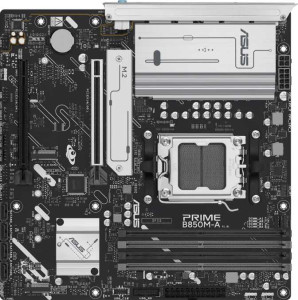
Asus Prime B850M-A
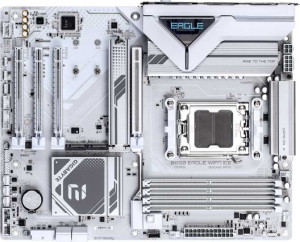
Gigabyte B850 Eagle Wi-Fi7 Ice

Asus Prime B850M-A Gigabyte B850 Eagle Wi-Fi7 Ice

Overview

Welcome to our in-depth specification comparison of the Asus Prime B850M-A and the Gigabyte B850 Eagle Wi-Fi7 Ice, two AM5 motherboards built on the B850 chipset. While they share a strong common foundation, key battlegrounds emerge around form factor and connectivity, wireless capabilities, expansion slot configurations, and board-level features like dual BIOS. Read on to see how these two boards stack up across every major specification.

Common Features

  • Both boards use the AM5 CPU socket.
  • Both boards feature the B850 chipset.
  • Both boards support HDMI 2.1.
  • Overclocking is supported on both boards.
  • RGB lighting is present on both boards.
  • Easy BIOS reset is not available on either board.
  • Neither board has integrated graphics.
  • Each board has a single CPU socket.
  • Both boards support a maximum of 256GB of memory.
  • Both boards have 4 memory slots.
  • Both boards use DDR5 memory.
  • Both boards operate in dual-channel memory mode.
  • ECC memory is not supported on either board.
  • Both boards have 2 USB 3.2 Gen 2 Type-A ports.
  • Both boards have 2 USB 3.2 Gen 1 Type-A ports.
  • Both boards have 4 USB 2.0 ports.
  • Neither board has USB 3.2 Gen 2 Type-C, USB 3.2 Gen 2x2, USB 4 40Gbps, USB 4 20Gbps, or Thunderbolt 4 ports.
  • Both boards provide 2 USB 3.2 Gen 1 ports and 4 USB 2.0 ports through expansion.
  • Both boards have 4 SATA 3 connectors and 3 M.2 sockets.
  • A TPM connector is present on both boards.
  • Neither board has a mSATA connector or U.2 sockets.
  • Both boards feature 1 PCIe 5.0 x16 slot.
  • Both boards support 7.1 audio channels with 3 audio connectors.
  • S/PDIF Out port is not available on either board.
  • Both boards support RAID 0, RAID 1, RAID 5, and RAID 10, but neither supports RAID 0+1.

Main Differences

  • The Asus Prime B850M-A has a Micro-ATX form factor, while the Gigabyte B850 Eagle Wi-Fi7 Ice has an ATX form factor.
  • Wi-Fi is available on the Gigabyte B850 Eagle Wi-Fi7 Ice but not on the Asus Prime B850M-A.
  • Bluetooth is available on the Gigabyte B850 Eagle Wi-Fi7 Ice but not on the Asus Prime B850M-A.
  • Dual BIOS is present on the Asus Prime B850M-A but not on the Gigabyte B850 Eagle Wi-Fi7 Ice.
  • The width is 244 mm on the Asus Prime B850M-A and 305 mm on the Gigabyte B850 Eagle Wi-Fi7 Ice.
  • The maximum overclocked RAM speed is 8000 MHz on the Asus Prime B850M-A and 8200 MHz on the Gigabyte B850 Eagle Wi-Fi7 Ice.
  • The Asus Prime B850M-A has 0 USB 3.2 Gen 1 Type-C ports, while the Gigabyte B850 Eagle Wi-Fi7 Ice has 1.
  • USB Type-C connectivity is available on the Gigabyte B850 Eagle Wi-Fi7 Ice but not on the Asus Prime B850M-A.
  • The Asus Prime B850M-A has 2 DisplayPort outputs, while the Gigabyte B850 Eagle Wi-Fi7 Ice has 1.
  • The Asus Prime B850M-A has 0 PS/2 ports, while the Gigabyte B850 Eagle Wi-Fi7 Ice has 1.
  • The Asus Prime B850M-A has 5 fan headers, while the Gigabyte B850 Eagle Wi-Fi7 Ice has 6.
  • The Asus Prime B850M-A has 1 PCIe 4.0 x16 slot, while the Gigabyte B850 Eagle Wi-Fi7 Ice has none.
  • The Asus Prime B850M-A has 0 PCIe x1 slots, while the Gigabyte B850 Eagle Wi-Fi7 Ice has 2.
  • The Asus Prime B850M-A has 0 PCIe x4 slots, while the Gigabyte B850 Eagle Wi-Fi7 Ice has 1.
Specs Comparison
Asus Prime B850M-A

Asus Prime B850M-A

Gigabyte B850 Eagle Wi-Fi7 Ice

Gigabyte B850 Eagle Wi-Fi7 Ice

General info:
CPU socket AM5 AM5
chipset B850 B850
form factor Micro-ATX ATX
release date January 2025 April 2025
supports Wi-Fi
Has Bluetooth
HDMI version HDMI 2.1 HDMI 2.1
Easy to overclock
has RGB lighting
Easy to reset BIOS
Has dual BIOS
CPU sockets 1 1
Has integrated graphics
warranty period 3 years 3 years
height 244 mm 244 mm
width 244 mm 305 mm
Has integrated CPU

Both boards share the same AM5 socket and B850 chipset foundation, meaning they target the same generation of AMD processors and offer identical overclocking headroom. They also match on HDMI 2.1 output, RGB lighting, and a 3-year warranty, so neither holds an advantage on those fronts.

The most consequential differences lie in form factor and connectivity. The Gigabyte B850 Eagle Wi-Fi7 Ice is a full ATX board (244 × 305 mm), giving it more physical space for additional VRM phases, PCIe slots, and headers — a meaningful advantage if you are building in a mid-tower with room to grow. The Asus Prime B850M-A is Micro-ATX (244 × 244 mm), making it the right pick for compact or small-form-factor cases where footprint matters. On wireless connectivity, the Gigabyte includes both Wi-Fi 7 and Bluetooth, eliminating the need for a separate adapter — a real convenience and cost saving for builds without a nearby Ethernet port. The Asus offers neither, so wireless connectivity would require an add-in card.

The one area where the Asus fights back is dual BIOS support, which provides a hardware-level backup if a firmware update goes wrong — a genuine safety net the Gigabyte lacks. Overall, the Gigabyte B850 Eagle Wi-Fi7 Ice has the broader feature set for a standard desktop build thanks to its ATX size and integrated wireless stack, while the Asus Prime B850M-A is the stronger choice for space-constrained builds where dual BIOS redundancy is valued over wireless convenience.
Memory:
maximum memory amount 256GB 256GB
overclocked RAM speed 8000 MHz 8200 MHz
memory slots 4 4
DDR memory version 5 5
memory channels 2 2
Supports ECC memory

For memory fundamentals, these two boards are nearly identical: both support DDR5 in a dual-channel configuration across 4 slots, cap out at 256 GB maximum capacity, and exclude ECC memory support. In practice, this means either board can comfortably handle 32 GB or 64 GB mainstream builds today, with ample room to upgrade well into the future.

The only measurable difference is the maximum overclocked RAM speed — the Gigabyte reaches 8200 MHz versus 8000 MHz on the Asus. While faster memory speeds do offer marginal gains in memory-bandwidth-sensitive workloads like video editing or large dataset processing, a 200 MHz gap at this tier is unlikely to be perceptible in everyday use or most gaming scenarios. It matters primarily to enthusiasts who plan to push their DDR5 kits to their absolute ceiling.

On memory, the two boards are effectively tied for the vast majority of users. The Gigabyte holds a narrow technical edge for extreme overclockers chasing the highest possible RAM frequencies, but this advantage is too slim to be a deciding factor on its own.

Ports:
USB 3.2 Gen 2 ports (USB-A) 2 2
USB 3.2 Gen 1 ports (USB-A) 2 2
USB 3.2 Gen 2 ports (USB-C) 0 0
USB 3.2 Gen 1 ports (USB-C) 0 1
USB 2.0 ports 4 4
USB 3.2 Gen 2x2 ports 0 0
USB 4 40Gbps ports 0 0
USB 4 20Gbps ports 0 0
Thunderbolt 4 ports 0 0
Thunderbolt 3 ports 0 0
has an HDMI output
DisplayPort outputs 2 1
RJ45 ports 1 1
Has USB Type-C
eSATA ports 0 0
DVI outputs 0 0
has a VGA connector
PS/2 ports 0 1

The rear I/O on these two boards is largely symmetrical — matching counts of USB 3.2 Gen 2 and Gen 1 Type-A ports, four USB 2.0 ports, HDMI, and a single RJ45 Ethernet jack. For a typical desktop workload, that shared baseline is more than adequate. The interesting trade-offs emerge once you look at the outliers.

The Asus Prime B850M-A counters with two DisplayPort outputs versus the Gigabyte's single one, which is a genuine advantage for anyone running a multi-monitor setup driven entirely by the CPU's integrated display engine — no discrete GPU required to feed a second screen. The Gigabyte B850 Eagle Wi-Fi7 Ice responds with a USB 3.2 Gen 1 Type-C port on the rear panel, a connector the Asus omits entirely. That USB-C matters for plugging in newer peripherals, external drives, or displays that use USB-C cables without needing an adapter. The Gigabyte also includes a PS/2 port, which is relevant only in very specific legacy or KVM scenarios.

The verdict here hinges on use case: if driving two monitors without a dedicated GPU is a priority, the Asus holds the edge with its extra DisplayPort. For users who value modern connector flexibility and occasional legacy compatibility, the Gigabyte's USB-C addition tips the balance slightly in its favor. Neither board pulls decisively ahead — it is a direct trade between display output count and connector modernity.

Connectors:
USB 3.2 Gen 1 ports (through expansion) 2 2
USB 2.0 ports (through expansion) 4 4
SATA 3 connectors 4 4
fan headers 5 6
USB 3.0 ports (through expansion) 2 2
M.2 sockets 3 3
Has TPM connector
U.2 sockets 0 0
Has mSATA connector
SATA 2 connectors 0 0

Internal connectivity is remarkably consistent across these two boards. Both offer 3 M.2 sockets for fast NVMe storage, 4 SATA 3 connectors for traditional drives, matching internal USB expansion headers, and a TPM connector for hardware-based security — a practical necessity for Windows 11 compliance. For the vast majority of builds, this shared feature set covers every realistic storage and expansion scenario.

The single point of divergence is fan headers: the Gigabyte provides 6 fan headers compared to 5 on the Asus. That extra header is a quiet but meaningful advantage in thermally demanding builds — think full towers with multiple case fans, large CPU coolers, and radiator fans all running simultaneously. Hitting a header limit forces users into fan hubs or splitters, adding cost and cable complexity, so having one more native header built in offers a cleaner solution out of the box.

Overall, this group is nearly a wash, but the Gigabyte takes a slim edge thanks to its additional fan header — a small convenience that becomes genuinely useful in high-airflow or liquid-cooled configurations. For compact or moderate builds, the Asus's five headers are entirely sufficient, making the difference largely irrelevant unless you are planning an aggressively cooled system.

Expansion slots:
PCIe 4.0 x16 slots 1 0
PCIe 5.0 x16 slots 1 1
PCIe 3.0 x16 slots 0 0
PCIe x1 slots 0 2
PCI slots 0 0
PCIe 2.0 x16 slots 0 0
PCIe x4 slots 0 1
PCIe x8 slots 0 0

Both boards lead with a PCIe 5.0 x16 slot as their primary GPU lane — the current standard for flagship discrete graphics cards, ensuring neither board bottlenecks even the most demanding modern GPUs. That shared foundation puts them on equal footing for the primary use case most builders care about.

Beyond the main slot, the picture diverges. The Asus Prime B850M-A adds a PCIe 4.0 x16 slot, which, while operating at a lower generation than the primary slot, still provides substantial bandwidth for a secondary GPU, a high-end capture card, or a 10GbE network card. The Gigabyte B850 Eagle Wi-Fi7 Ice takes a different approach, swapping that second full-length slot for two PCIe x1 slots and a PCIe x4 slot. This spread favors builders who want to add multiple smaller add-in cards — think sound cards, additional USB controllers, or RAID cards — rather than a second large device.

The Gigabyte's broader slot variety gives it an edge in expandability for multi-card accessory builds, while the Asus offers a more practical second high-bandwidth slot for users who need raw PCIe throughput on a secondary device. As a Micro-ATX board, the Asus making room for a full second x16 slot is notable. For most single-GPU builds neither difference matters, but the Gigabyte edges ahead for users planning a more accessory-dense configuration.

Audio:
audio channels 7.1 7.1
Has S/PDIF Out port
audio connectors 3 3

Audio is a clean draw between these two boards. Both deliver 7.1-channel onboard audio through 3 analog connectors, and neither includes an S/PDIF optical output. The 7.1 channel support means both can feed a full surround sound speaker setup, while the 3-jack layout handles the standard line-in, line-out, and microphone configuration found on most analog headsets and speaker systems.

The absence of S/PDIF on both boards is worth noting for users who own an external DAC or AV receiver that relies on optical digital input — in that scenario, neither board provides a direct solution, and a USB audio interface or discrete sound card would be needed regardless of which motherboard is chosen.

There is no differentiator here: the two boards are perfectly matched on every provided audio specification. Audio performance should play no role in the decision between these two products.

Storage:
Supports RAID 1
Supports RAID 10 (1+0)
Supports RAID 5
Supports RAID 0
Supports RAID 0+1

Storage redundancy support is identical across both boards. Each offers RAID 0 for performance striping, RAID 1 for mirroring, RAID 5 for distributed parity, and RAID 10 for the combined striping-and-mirroring approach — covering the full practical range of configurations a desktop builder or small workstation would realistically deploy. Neither supports RAID 0+1, though this omission is inconsequential given that RAID 10 achieves the same core goals more efficiently and is the standard choice in modern setups.

This is another category where the two boards offer no meaningful point of differentiation. Users planning a multi-drive redundant array or a performance-focused striped setup will find both platforms equally capable, and storage configuration requirements should not factor into the buying decision between these two products.

Comparison Summary & Verdict

Both the Asus Prime B850M-A and the Gigabyte B850 Eagle Wi-Fi7 Ice deliver a solid B850 platform with DDR5 support, three M.2 sockets, PCIe 5.0, and 7.1 audio, making either a capable choice for an AMD AM5 build. However, their differences point them toward distinct audiences. The Asus Prime B850M-A is the better fit for compact builds, thanks to its Micro-ATX form factor, and adds peace of mind with its dual BIOS feature and an extra DisplayPort output. The Gigabyte B850 Eagle Wi-Fi7 Ice caters to users who need built-in Wi-Fi 7 and Bluetooth, a USB Type-C rear port, more fan headers, and greater PCIe expansion flexibility in a full ATX layout. Choose the Asus for a smaller, resilient build; choose the Gigabyte if wireless connectivity and expandability are your priorities.

Asus Prime B850M-A
Buy Asus Prime B850M-A if...

Buy the Asus Prime B850M-A if you are building a compact system that requires a Micro-ATX form factor and want the added security of a dual BIOS alongside multiple DisplayPort outputs.

Gigabyte B850 Eagle Wi-Fi7 Ice
Buy Gigabyte B850 Eagle Wi-Fi7 Ice if...

Buy the Gigabyte B850 Eagle Wi-Fi7 Ice if built-in Wi-Fi 7 and Bluetooth are essential, or if you need a full ATX board with USB Type-C, more fan headers, and greater PCIe expansion options.