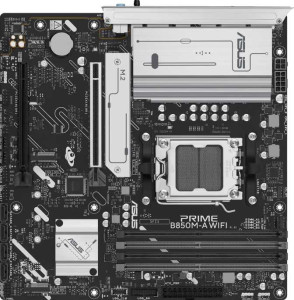
Asus Prime B850M-A WiFi
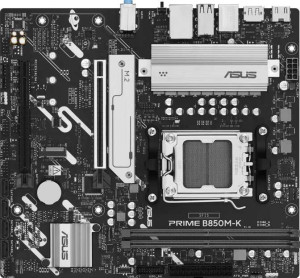
Asus Prime B850M-K

Asus Prime B850M-A WiFi Asus Prime B850M-K

Overview

Choosing between the Asus Prime B850M-A WiFi and the Asus Prime B850M-K means weighing connectivity, memory expandability, and storage flexibility across two Micro-ATX motherboards sharing the same B850 chipset and AM5 socket. While they stand on a common technical foundation, key battlegrounds emerge around wireless connectivity, maximum RAM capacity, and the overall number of expansion options each board brings to a build.

Common Features

  • Both products use the AM5 CPU socket.
  • Both products feature the B850 chipset.
  • Both products use the Micro-ATX form factor.
  • Both products support HDMI 2.1.
  • Overclocking is supported on both products.
  • RGB lighting is present on both products.
  • Easy BIOS reset is not available on either product.
  • Dual BIOS is present on both products.
  • Both products use DDR5 memory.
  • Both products have 2 memory channels.
  • ECC memory is not supported on either product.
  • Both products have 2 USB 3.2 Gen 2 ports (USB-A).
  • Both products have 2 USB 3.2 Gen 1 ports (USB-A).
  • Both products have 4 USB 2.0 ports.
  • Neither product has USB 3.2 Gen 2 (USB-C), USB 3.2 Gen 1 (USB-C), USB 3.2 Gen 2x2, USB 4 40Gbps, or USB 4 20Gbps ports.
  • Both products have 4 SATA 3 connectors and no SATA 2 connectors.
  • Both products include a TPM connector.
  • Both products have 2 USB 3.2 Gen 1 ports and 4 USB 2.0 ports available through expansion.
  • Both products feature 1 PCIe 5.0 x16 slot and 1 PCIe 4.0 x16 slot.
  • Both products support 7.1 audio channels with 3 audio connectors, and neither has an S/PDIF Out port.
  • Both products support RAID 0, RAID 1, RAID 5, and RAID 10, but neither supports RAID 0+1.

Main Differences

  • Wi-Fi is present on Asus Prime B850M-A WiFi but not available on Asus Prime B850M-K.
  • Bluetooth is present on Asus Prime B850M-A WiFi but not available on Asus Prime B850M-K.
  • The height is 244 mm on Asus Prime B850M-A WiFi and 221 mm on Asus Prime B850M-K.
  • Maximum memory capacity is 256 GB on Asus Prime B850M-A WiFi and 128 GB on Asus Prime B850M-K.
  • Maximum overclocked RAM speed is 8000 MHz on Asus Prime B850M-A WiFi and 8400 MHz on Asus Prime B850M-K.
  • Memory slots number 4 on Asus Prime B850M-A WiFi and 2 on Asus Prime B850M-K.
  • DisplayPort outputs number 2 on Asus Prime B850M-A WiFi and 1 on Asus Prime B850M-K.
  • Fan headers number 5 on Asus Prime B850M-A WiFi and 4 on Asus Prime B850M-K.
  • M.2 sockets number 3 on Asus Prime B850M-A WiFi and 2 on Asus Prime B850M-K.
Specs Comparison
Asus Prime B850M-A WiFi

Asus Prime B850M-A WiFi

Asus Prime B850M-K

Asus Prime B850M-K

General info:
CPU socket AM5 AM5
chipset B850 B850
form factor Micro-ATX Micro-ATX
release date January 2025 April 2025
supports Wi-Fi
Has Bluetooth
HDMI version HDMI 2.1 HDMI 2.1
Easy to overclock
has RGB lighting
Easy to reset BIOS
Has dual BIOS
CPU sockets 1 1
Has integrated graphics
warranty period 3 years 3 years
height 244 mm 221 mm
width 244 mm 244 mm
Has integrated CPU

Both the Asus Prime B850M-A WiFi and the Asus Prime B850M-K share the same foundational platform: an AM5 socket with a B850 chipset in a Micro-ATX form factor. They support the same CPU generation, offer identical overclocking capability, dual BIOS protection, RGB lighting, and carry the same 3-year warranty. For a buyer focused purely on core computing functionality, both boards start from the same competent baseline.

The most significant differentiator in this group is connectivity. The B850M-A WiFi includes built-in Wi-Fi and Bluetooth, while the B850M-K offers neither. In practical terms, this means the B850M-K requires a dedicated PCIe or USB wireless adapter for wireless networking — an added cost and potential compatibility consideration, particularly in compact builds where slot availability is limited. For users building in a location without easy Ethernet access, or those wanting a clean, cable-free setup, this distinction is decisive.

There is also a minor physical difference: the B850M-A WiFi measures 244 × 244 mm, while the B850M-K is slightly shorter at 221 × 244 mm. This could matter in very tight Micro-ATX cases with strict height clearance, giving the B850M-K a marginal fitment edge in ultra-compact enclosures. Overall though, the B850M-A WiFi holds a clear advantage in this group for most users, thanks to integrated wireless connectivity — unless the target build is strictly wired and space-constrained.

Memory:
maximum memory amount 256GB 128GB
overclocked RAM speed 8000 MHz 8400 MHz
memory slots 4 2
DDR memory version 5 5
memory channels 2 2
Supports ECC memory

Both boards run DDR5 memory in a dual-channel configuration, which is the expected standard for AM5 platforms and ensures strong memory bandwidth for modern workloads. Where they diverge meaningfully is in slot count and capacity ceiling: the B850M-A WiFi offers 4 slots and supports up to 256 GB, while the B850M-K provides only 2 slots with a maximum of 128 GB. For most everyday users this gap is academic, but for content creators, virtualization workloads, or anyone planning a long-term upgrade path, the extra headroom on the A WiFi is a tangible advantage.

Interestingly, the B850M-K edges ahead on peak overclocked RAM speed, supporting up to 8400 MHz versus 8000 MHz on the B850M-A WiFi. In practice, the real-world performance difference between these two frequencies is marginal — typically within a few percent in benchmarks — and only relevant to enthusiasts chasing maximum memory throughput. The B850M-K's 2-slot design may also make it slightly easier to achieve those top speeds, since running two sticks rather than four generally places less stress on the memory controller.

On balance, the B850M-A WiFi holds the stronger position in this category for most users. Four slots and a 256 GB ceiling offer greater flexibility and future-proofing, and the modest sacrifice in maximum overclocked frequency is unlikely to be felt in real-world use. The B850M-K's speed advantage is real but narrow, making it appealing only to those who prioritize peak RAM tuning over capacity and expandability.

Ports:
USB 3.2 Gen 2 ports (USB-A) 2 2
USB 3.2 Gen 1 ports (USB-A) 2 2
USB 3.2 Gen 2 ports (USB-C) 0 0
USB 3.2 Gen 1 ports (USB-C) 0 0
USB 2.0 ports 4 4
USB 3.2 Gen 2x2 ports 0 0
USB 4 40Gbps ports 0 0
USB 4 20Gbps ports 0 0
Thunderbolt 4 ports 0 0
Thunderbolt 3 ports 0 0
has an HDMI output
DisplayPort outputs 2 1
RJ45 ports 1 1
Has USB Type-C
eSATA ports 0 0
DVI outputs 0 0
has a VGA connector
PS/2 ports 0 0

The rear I/O port lineup on these two boards is nearly identical: the same USB complement across generations, a shared RJ45 ethernet port, and an HDMI output on both. For the vast majority of peripheral connectivity needs — keyboards, mice, storage drives, headsets — users of either board will have an equivalent experience with 2× USB 3.2 Gen 2, 2× USB 3.2 Gen 1, and 4× USB 2.0 ports available.

The sole but meaningful differentiator in this category is display output. The B850M-A WiFi includes 2 DisplayPort outputs, while the B850M-K offers only 1. Combined with the shared HDMI port, the A WiFi can therefore drive up to three monitors simultaneously from the rear I/O alone, whereas the B850M-K is capped at two. For productivity-focused users, traders, or anyone running a multi-display workflow, this is a practical constraint worth considering.

Neither board features USB-C, Thunderbolt, or USB4 on the rear panel, which is a shared limitation for users who rely on high-speed external storage or modern display connections via USB-C. On this group's specs, the B850M-A WiFi has a clear edge purely due to its additional DisplayPort output — a small but real advantage for multi-monitor setups.

Connectors:
USB 3.2 Gen 1 ports (through expansion) 2 2
USB 2.0 ports (through expansion) 4 4
SATA 3 connectors 4 4
fan headers 5 4
USB 3.0 ports (through expansion) 2 2
M.2 sockets 3 2
Has TPM connector
U.2 sockets 0 0
Has mSATA connector
SATA 2 connectors 0 0

Internal connector parity between these two boards is high across most categories: both offer 4× SATA 3 ports, identical USB expansion headers, and a TPM connector — a shared baseline that suits typical storage and peripheral configurations without compromise. The real divergence surfaces in two areas that matter for build ambition and thermal management.

On storage expansion, the B850M-A WiFi includes 3 M.2 sockets versus 2 on the B850M-K. That third M.2 slot opens the door to a dedicated NVMe drive for OS, a second for fast storage, and a third for additional capacity or a PCIe-based device — all without touching a single SATA port. For users building a high-performance or content-heavy system, this extra slot is a meaningful advantage that keeps the build tidy and avoids reliance on slower SATA-based SSDs.

Fan and pump header count follows a similar pattern: 5 headers on the B850M-A WiFi versus 4 on the B850M-K. In a Micro-ATX build with a CPU cooler, a couple of case fans, and potentially an AIO pump, that extra header on the A WiFi provides more direct control without requiring a fan splitter. Taken together, the B850M-A WiFi has a clear edge in this group — its additional M.2 socket and fan header offer meaningfully more flexibility for performance-oriented builds.

Expansion slots:
PCIe 4.0 x16 slots 1 1
PCIe 5.0 x16 slots 1 1
PCIe 3.0 x16 slots 0 0
PCIe x1 slots 0 0
PCI slots 0 0
PCIe 2.0 x16 slots 0 0
PCIe x4 slots 0 0
PCIe x8 slots 0 0

Expansion slot configurations on these two boards are a perfect match: each provides one PCIe 5.0 x16 slot and one PCIe 4.0 x16 slot, with no additional x1, x4, or legacy PCI slots on either. For Micro-ATX boards, this is a sensible and clean layout — the primary PCIe 5.0 slot handles a current-generation discrete GPU at full bandwidth, while the PCIe 4.0 slot serves a secondary card such as a capture device, NVMe add-in card, or networking adapter.

The presence of a PCIe 5.0 x16 slot on both boards is worth noting for longevity. As GPU manufacturers move toward PCIe 5.0 adoption, both boards are positioned to support next-generation graphics cards without a platform bottleneck — a forward-looking feature that extends the useful life of either build.

With no differences whatsoever between these two boards in this category, expansion slots are a complete tie. A buyer's decision here will hinge entirely on the other specification groups rather than anything in the slot configuration.

Audio:
audio channels 7.1 7.1
Has S/PDIF Out port
audio connectors 3 3

Audio capability is identical across both boards. Each supports 7.1-channel surround sound output and provides 3 analog audio connectors — a standard rear-panel arrangement that typically covers line-in, line-out, and microphone connections, sufficient for most headsets, speakers, and basic home studio use.

Neither board includes an S/PDIF optical output, which means users who rely on a digital connection to an external DAC, AV receiver, or soundbar will need to route audio differently — either via HDMI or through a dedicated sound card. This is a shared limitation rather than a differentiator, but worth flagging for audiophiles or home theater setups.

With every audio specification matching exactly, this category is a complete tie. Neither the B850M-A WiFi nor the B850M-K offers any audio advantage over the other, and users with more demanding audio requirements will find the same constraints and capabilities on both platforms.

Storage:
Supports RAID 1
Supports RAID 10 (1+0)
Supports RAID 5
Supports RAID 0
Supports RAID 0+1

RAID support is identical on both boards. Each covers the four most practical configurations: RAID 0 for striped performance, RAID 1 for mirrored redundancy, RAID 5 for distributed parity across three or more drives, and RAID 10 for a combined stripe-and-mirror setup that balances speed with fault tolerance. Neither board supports RAID 0+1, though this is rarely missed given that RAID 10 serves the same fundamental purpose more efficiently.

For a NAS-adjacent desktop build, a small workstation, or any setup where data redundancy matters, the availability of RAID 5 and RAID 10 on both platforms is a genuine asset — these configurations go beyond basic consumer use and signal that either board can anchor a more serious storage architecture when paired with multiple drives.

With no divergence across any RAID level, this category is a complete tie. Storage configuration capability plays no role in differentiating these two boards, and the choice between them should rest on the distinctions surfaced in other specification groups.

Comparison Summary & Verdict

Both the Asus Prime B850M-A WiFi and the Asus Prime B850M-K offer a capable Micro-ATX platform with B850 chipset support, PCIe 5.0, flexible RAID modes, and 7.1-channel audio. Their differences, however, point each board toward a distinct type of builder. The Prime B850M-A WiFi is the stronger choice for users who want built-in Wi-Fi and Bluetooth, a higher maximum memory capacity of 256 GB across four slots, three M.2 sockets, five fan headers, and dual DisplayPort outputs — making it well suited to feature-rich desktops or expandable workstations. The Prime B850M-K appeals to those who prioritize a more compact board footprint and can benefit from its slightly higher overclocked RAM ceiling of 8400 MHz, while accepting fewer expansion slots and no integrated wireless connectivity.

Asus Prime B850M-A WiFi
Buy Asus Prime B850M-A WiFi if...

Choose the Asus Prime B850M-A WiFi if you need built-in Wi-Fi and Bluetooth, greater memory expandability with four slots and up to 256 GB, and more storage and display outputs for a fully featured build.

Asus Prime B850M-K
Buy Asus Prime B850M-K if...

Choose the Asus Prime B850M-K if you prefer a more compact board with a slightly higher maximum overclocked RAM speed of 8400 MHz and have no need for integrated wireless connectivity.