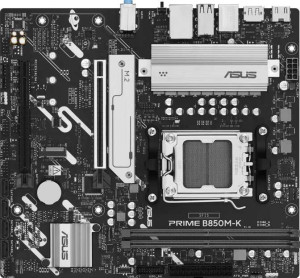
Asus Prime B850M-K
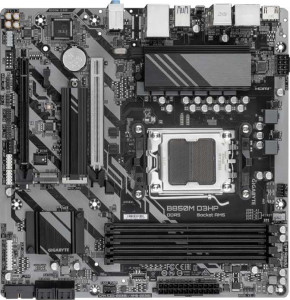
Gigabyte B850M D3HP

Asus Prime B850M-K Gigabyte B850M D3HP

Overview

Welcome to our detailed specification face-off between the Asus Prime B850M-K and the Gigabyte B850M D3HP, two Micro-ATX motherboards built on the AM5 platform with the B850 chipset. While they share a strong common foundation, key battlegrounds emerge around memory capacity and slot count, rear port selection, and expansion slot configurations. Read on to discover which board better suits your next build.

Common Features

  • Both boards use the AM5 CPU socket.
  • Both boards feature the B850 chipset.
  • Both boards have a Micro-ATX form factor.
  • Neither board includes Wi-Fi support.
  • Neither board includes Bluetooth support.
  • Both boards have HDMI 2.1 output.
  • Both boards support overclocking.
  • Neither board has an easy BIOS reset feature.
  • Both boards use DDR5 memory.
  • Both boards support 2 memory channels.
  • Neither board supports ECC memory.
  • Neither board has USB 3.2 Gen 2 USB-C ports on the rear.
  • Neither board has USB 3.2 Gen 2x2 ports.
  • Neither board has USB 4 or Thunderbolt ports.
  • Both boards have 1 RJ45 port.
  • Both boards have an HDMI output.
  • Both boards provide 2 USB 3.2 Gen 1 ports through expansion and 4 USB 2.0 ports through expansion.
  • Both boards have 4 SATA 3 connectors, 2 M.2 sockets, and 4 fan headers.
  • Both boards include a TPM connector.
  • Both boards have 1 PCIe 5.0 x16 slot and no PCIe 3.0 x16, PCIe 2.0 x16, PCIe x8, PCIe x1, or PCI slots.
  • Both boards support 7.1 audio channels with 3 audio connectors.
  • Neither board has an S/PDIF Out port.
  • Both boards support RAID 0, RAID 1, RAID 5, and RAID 10, but neither supports RAID 0+1.

Main Differences

  • RGB lighting is present on the Asus Prime B850M-K but not available on the Gigabyte B850M D3HP.
  • The Asus Prime B850M-K is 221 mm tall, while the Gigabyte B850M D3HP is 244 mm tall.
  • Maximum supported memory is 128 GB on the Asus Prime B850M-K and 256 GB on the Gigabyte B850M D3HP.
  • Overclocked RAM speed reaches 8400 MHz on the Asus Prime B850M-K and 8200 MHz on the Gigabyte B850M D3HP.
  • The Asus Prime B850M-K has 2 memory slots, while the Gigabyte B850M D3HP has 4 memory slots.
  • USB 3.2 Gen 2 USB-A ports number 2 on the Asus Prime B850M-K and 0 on the Gigabyte B850M D3HP.
  • USB 3.2 Gen 1 USB-A ports number 2 on the Asus Prime B850M-K and 3 on the Gigabyte B850M D3HP.
  • USB 3.2 Gen 1 USB-C ports number 0 on the Asus Prime B850M-K and 1 on the Gigabyte B850M D3HP.
  • USB 2.0 ports number 4 on the Asus Prime B850M-K and 0 on the Gigabyte B850M D3HP.
  • DisplayPort outputs number 1 on the Asus Prime B850M-K and 2 on the Gigabyte B850M D3HP.
  • A USB Type-C port is present on the Gigabyte B850M D3HP but not available on the Asus Prime B850M-K.
  • PS/2 ports number 0 on the Asus Prime B850M-K and 1 on the Gigabyte B850M D3HP.
  • The Asus Prime B850M-K has 1 PCIe 4.0 x16 slot, while the Gigabyte B850M D3HP has none.
  • The Gigabyte B850M D3HP has 1 PCIe x4 slot, while the Asus Prime B850M-K has none.
Specs Comparison
Asus Prime B850M-K

Asus Prime B850M-K

Gigabyte B850M D3HP

Gigabyte B850M D3HP

General info:
CPU socket AM5 AM5
chipset B850 B850
form factor Micro-ATX Micro-ATX
release date April 2025 January 2025
supports Wi-Fi
Has Bluetooth
HDMI version HDMI 2.1 HDMI 2.1
Easy to overclock
has RGB lighting
Easy to reset BIOS
Has dual BIOS
CPU sockets 1 1
Has integrated graphics
warranty period 3 years 3 years
height 221 mm 244 mm
width 244 mm 244 mm
Has integrated CPU

At their core, the Asus Prime B850M-K and Gigabyte B850M D3HP are remarkably similar boards: both use the AM5 socket with a B850 chipset in a Micro-ATX form factor, support overclocking, include dual BIOS protection, output via HDMI 2.1, and carry a 3-year warranty. Neither offers Wi-Fi or Bluetooth, so users needing wireless connectivity will need a separate adapter or PCIe card regardless of which board they choose.

The two most meaningful differences lie in physical size and aesthetics. Despite sharing the same 244 mm width, the Asus Prime B850M-K is notably shorter at 221 mm tall versus the Gigabyte's 244 mm — a 23 mm difference that can matter in compact or tight-fitting cases where vertical clearance is at a premium. On the aesthetics side, the Asus board includes RGB lighting while the Gigabyte does not, which is a straightforward advantage for users building a visually themed system, and a non-issue for those indifferent to lighting.

For this spec group, the Asus Prime B850M-K holds a slight edge: its smaller height gives it better compatibility with space-constrained Micro-ATX cases, and its RGB support adds flexibility without any functional trade-off. The Gigabyte B850M D3HP is the cleaner choice for minimalist builders who prefer no lighting and have no case height constraints, but on balance the Asus offers marginally more versatility in general-use scenarios.

Memory:
maximum memory amount 128GB 256GB
overclocked RAM speed 8400 MHz 8200 MHz
memory slots 2 4
DDR memory version 5 5
memory channels 2 2
Supports ECC memory

Both boards run DDR5 memory across dual channels and neither supports ECC, making them squarely consumer-oriented platforms. Where they diverge significantly is in physical slot count and maximum capacity: the Gigabyte B850M D3HP provides 4 DIMM slots and supports up to 256 GB, while the Asus Prime B850M-K offers only 2 slots with a ceiling of 128 GB. In practice, four slots matter for users who want to start with two sticks and expand later without discarding existing modules — a meaningful long-term flexibility advantage.

On the speed side, the Asus board edges ahead with a maximum overclocked RAM speed of 8400 MHz versus the Gigabyte's 8200 MHz. That 200 MHz gap is real but narrow — in everyday workloads and even most gaming scenarios, the performance delta will be negligible. It becomes slightly more relevant in memory-bandwidth-sensitive tasks like video encoding or large dataset processing, but it is unlikely to be a deciding factor for most users.

Overall, the Gigabyte B850M D3HP holds a clear advantage in this category. Doubling both the slot count and the maximum supported capacity gives it substantially more headroom for demanding workloads and future upgrades. The Asus Prime B850M-K's modest speed lead does not compensate for its more limited memory configuration, making the Gigabyte the stronger choice for anyone planning to run memory-intensive applications or upgrade their RAM over the system's lifetime.

Ports:
USB 3.2 Gen 2 ports (USB-A) 2 0
USB 3.2 Gen 1 ports (USB-A) 2 3
USB 3.2 Gen 2 ports (USB-C) 0 0
USB 3.2 Gen 1 ports (USB-C) 0 1
USB 2.0 ports 4 0
USB 3.2 Gen 2x2 ports 0 0
USB 4 40Gbps ports 0 0
USB 4 20Gbps ports 0 0
Thunderbolt 4 ports 0 0
Thunderbolt 3 ports 0 0
has an HDMI output
DisplayPort outputs 1 2
RJ45 ports 1 1
Has USB Type-C
eSATA ports 0 0
DVI outputs 0 0
has a VGA connector
PS/2 ports 0 1

The USB situation on these two boards tells very different stories. The Asus Prime B850M-K delivers a higher total port count — 2 USB 3.2 Gen 2 (10 Gbps) and 2 USB 3.2 Gen 1 (5 Gbps) Type-A ports, plus 4 USB 2.0 ports — giving it the edge for users who connect many peripherals simultaneously. Critically, those Gen 2 ports run at double the bandwidth of anything the Gigabyte offers, which matters when regularly transferring large files to external SSDs or high-speed flash drives. The Gigabyte B850M D3HP, by contrast, provides only 4 USB ports total — three Gen 1 Type-A and one Gen 1 Type-C — but no Gen 2 speed tier at all.

Where the Gigabyte reclaims relevance is in connector variety and display output. Its inclusion of a USB-C port (absent entirely on the Asus) is increasingly practical as modern accessories, phones, and portable drives adopt the format. On the video side, the Gigabyte offers 2 DisplayPort outputs versus the Asus's single one, alongside HDMI on both — making it the stronger pick for anyone running a multi-monitor setup from the board's integrated display outputs.

The verdict depends heavily on use case. For sheer USB throughput and quantity of ports, the Asus Prime B850M-K has a clear advantage. For modern connector compatibility and multi-display flexibility, the Gigabyte B850M D3HP is more forward-looking. Users prioritizing peripheral bandwidth and port density should favor the Asus; those needing USB-C or a second DisplayPort output will find the Gigabyte better suited.

Connectors:
USB 3.2 Gen 1 ports (through expansion) 2 2
USB 2.0 ports (through expansion) 4 4
SATA 3 connectors 4 4
fan headers 4 4
USB 3.0 ports (through expansion) 2 2
M.2 sockets 2 2
Has TPM connector
U.2 sockets 0 0
Has mSATA connector
SATA 2 connectors 0 0

Rare in a head-to-head comparison, the internal connectors on these two boards are an exact match across every single specification. Both offer 2 M.2 sockets for NVMe storage, 4 SATA 3 connectors for traditional drives, 4 fan headers for cooling management, and a TPM connector for hardware-based security — a requirement for Windows 11 and enterprise-oriented setups. The expansion USB headers are equally matched, supporting the same internal front-panel connectivity options.

The practical takeaway is that neither board offers a storage or cooling advantage over the other. Two M.2 slots is a reasonable allocation for a Micro-ATX platform — enough for a primary NVMe boot drive and a secondary storage drive, with four SATA ports available for additional HDDs or SSDs should the build demand it. Four fan headers give builders adequate control over airflow in most compact or mid-range cases without needing a separate fan hub.

This category is a complete tie. No differentiating factor exists between the Asus Prime B850M-K and the Gigabyte B850M D3HP on internal connectors — users should look to other specification groups to inform their decision.

Expansion slots:
PCIe 4.0 x16 slots 1 0
PCIe 5.0 x16 slots 1 1
PCIe 3.0 x16 slots 0 0
PCIe x1 slots 0 0
PCI slots 0 0
PCIe 2.0 x16 slots 0 0
PCIe x4 slots 0 1
PCIe x8 slots 0 0

Both boards lead with a PCIe 5.0 x16 slot — the current standard for flagship discrete GPUs — so neither compromises on primary graphics card bandwidth. The meaningful split comes in the secondary slot. The Asus Prime B850M-K pairs its PCIe 5.0 slot with a full PCIe 4.0 x16 slot, while the Gigabyte B850M D3HP offers a PCIe x4 slot as its secondary option. That distinction carries real weight depending on what a user plans to install.

A PCIe 4.0 x16 slot on the Asus opens the door to a wider range of add-in cards at full bandwidth — think high-throughput NVMe expansion cards, capture cards, or even a secondary GPU — without any lane bottlenecking. The Gigabyte's x4 slot is adequate for most single-function add-in cards like networking adapters or basic capture hardware, but it will constrain anything that benefits from wider lane access. For the majority of single-GPU consumer builds, neither secondary slot will ever be populated, making this a non-issue in practice.

For users who do plan to use the secondary slot meaningfully, the Asus Prime B850M-K has a clear advantage — a PCIe 4.0 x16 slot is substantially more capable than an x4 slot and accommodates a broader class of expansion hardware without compromise. Builders with a straightforward single-GPU setup will find both boards equally sufficient in this category.

Audio:
audio channels 7.1 7.1
Has S/PDIF Out port
audio connectors 3 3

Audio is another category where these two boards land in exactly the same place. Both deliver 7.1-channel surround sound support through 3 analog audio connectors, and neither includes an S/PDIF optical output — meaning users who rely on digital audio passthrough to an external DAC or AV receiver will need a workaround such as HDMI audio extraction or a dedicated sound card on both platforms equally.

The 7.1-channel capability is a reasonable offering for a mid-range Micro-ATX board, covering stereo, 5.1, and full 7.1 surround configurations for headsets and speaker systems. Three rear-panel jacks is the standard implementation for this channel count, typically providing line-in, line-out, and microphone connectivity with front-panel header support handling the remaining channels.

This category is a complete tie — the Asus Prime B850M-K and Gigabyte B850M D3HP are functionally identical on audio. Neither holds any advantage here, and audio capability should play no role in differentiating these two boards.

Storage:
Supports RAID 1
Supports RAID 10 (1+0)
Supports RAID 5
Supports RAID 0
Supports RAID 0+1

RAID support is identical across both boards. The Asus Prime B850M-K and Gigabyte B850M D3HP each support RAID 0, 1, 5, and 10 — covering the full practical range that consumer and prosumer builders are likely to need. RAID 0 prioritizes speed by striping data across drives, RAID 1 provides straightforward mirroring for redundancy, RAID 5 balances performance with fault tolerance across three or more drives, and RAID 10 combines striping and mirroring for both speed and resilience.

Neither board supports RAID 0+1, but this is inconsequential — RAID 10 is generally considered the superior implementation of the same concept and is present on both. The RAID 5 inclusion is worth noting for users building small NAS-adjacent workstations or local backup systems, as it allows one drive's worth of parity protection without sacrificing as much capacity as pure mirroring.

Storage configuration is a complete tie here. The Asus Prime B850M-K and Gigabyte B850M D3HP offer precisely the same RAID capabilities, and storage redundancy preferences should carry no weight in choosing between these two boards.

Comparison Summary & Verdict

Both the Asus Prime B850M-K and the Gigabyte B850M D3HP are competent AM5 B850 Micro-ATX boards that share core features like DDR5 support, PCIe 5.0 x16, dual M.2 sockets, and 7.1 audio. However, their differences draw a clear line between two types of builders. The Asus Prime B850M-K is the better pick for those who want faster overclocked RAM speeds up to 8400 MHz, RGB aesthetics, and a more diverse rear USB selection including USB 3.2 Gen 2 ports. The Gigabyte B850M D3HP, on the other hand, excels for users who need higher maximum memory capacity of up to 256 GB across its 4 memory slots, a USB Type-C rear port, dual DisplayPort outputs, and a PCIe x4 slot for added flexibility. Choose according to your memory and connectivity priorities.

Asus Prime B850M-K
Buy Asus Prime B850M-K if...

Buy the Asus Prime B850M-K if you want faster overclocked RAM speeds, a wider variety of rear USB ports including USB 3.2 Gen 2, and RGB lighting for your build.

Gigabyte B850M D3HP
Buy Gigabyte B850M D3HP if...

Buy the Gigabyte B850M D3HP if you need a higher maximum memory capacity of 256 GB across 4 slots, a rear USB Type-C port, or dual DisplayPort outputs.