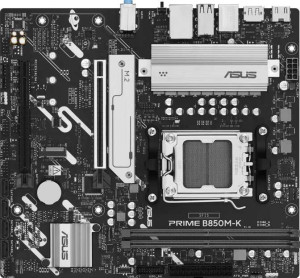
Asus Prime B850M-K
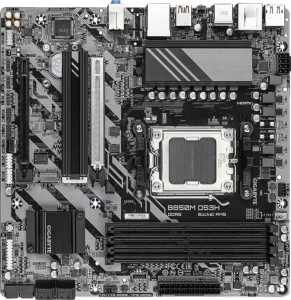
Gigabyte B850M DS3H

Asus Prime B850M-K Gigabyte B850M DS3H

Overview

Welcome to our detailed specification comparison between the Asus Prime B850M-K and the Gigabyte B850M DS3H — two Micro-ATX motherboards sharing the same AM5 socket and B850 chipset foundation. While they agree on many core features, key battlegrounds emerge around memory capacity and slot count, rear port selection, and expansion slot configurations. Read on to see which board better matches your build requirements.

Common Features

  • Both boards use the AM5 CPU socket.
  • Both boards feature the B850 chipset.
  • Both boards use the Micro-ATX form factor.
  • Neither board includes Wi-Fi support.
  • Neither board includes Bluetooth support.
  • Both boards feature HDMI 2.1 output.
  • Overclocking is supported on both boards.
  • Easy BIOS reset is not available on either board.
  • Both boards support DDR5 memory.
  • Both boards have 2 memory channels.
  • ECC memory is not supported on either board.
  • Both boards have 2 USB 3.2 Gen 1 Type-A ports on the rear.
  • Neither board has USB 3.2 Gen 1 Type-C, Gen 2x2, USB 4 40Gbps, USB 4 20Gbps, Thunderbolt 3, or Thunderbolt 4 ports.
  • Both boards include an HDMI output.
  • Both boards provide 2 USB 3.2 Gen 1 ports and 4 USB 2.0 ports through internal expansion headers.
  • Both boards have 4 SATA 3 connectors.
  • Both boards include 4 fan headers.
  • Both boards have 2 M.2 sockets.
  • A TPM connector is present on both boards.
  • Both boards feature 1 PCIe 5.0 x16 slot and no PCIe 3.0 x16, PCIe 2.0 x16, PCIe x8, PCIe x1, or PCI slots.
  • Both boards deliver 7.1-channel audio with 3 audio connectors and no S/PDIF output.
  • Both boards support RAID 0, RAID 1, RAID 5, and RAID 10, but neither supports RAID 0+1.

Main Differences

  • RGB lighting is present on the Asus Prime B850M-K but not available on the Gigabyte B850M DS3H.
  • The Asus Prime B850M-K is 221 mm tall, while the Gigabyte B850M DS3H is 244 mm tall.
  • Maximum supported memory is 128 GB on the Asus Prime B850M-K and 256 GB on the Gigabyte B850M DS3H.
  • The maximum overclocked RAM speed is 8400 MHz on the Asus Prime B850M-K and 8200 MHz on the Gigabyte B850M DS3H.
  • The Asus Prime B850M-K has 2 memory slots, while the Gigabyte B850M DS3H has 4 memory slots.
  • USB 3.2 Gen 2 Type-A ports number 2 on the Asus Prime B850M-K and 1 on the Gigabyte B850M DS3H.
  • A USB 3.2 Gen 2 Type-C port is absent on the Asus Prime B850M-K but present on the Gigabyte B850M DS3H.
  • The Asus Prime B850M-K has 4 rear USB 2.0 ports, while the Gigabyte B850M DS3H has none.
  • DisplayPort outputs number 1 on the Asus Prime B850M-K and 2 on the Gigabyte B850M DS3H.
  • A rear USB Type-C port is not present on the Asus Prime B850M-K but is available on the Gigabyte B850M DS3H.
  • A PS/2 port is absent on the Asus Prime B850M-K but present on the Gigabyte B850M DS3H.
  • The Asus Prime B850M-K includes 1 PCIe 4.0 x16 slot, while the Gigabyte B850M DS3H has none.
  • The Gigabyte B850M DS3H includes 1 PCIe x4 slot, while the Asus Prime B850M-K has none.
Specs Comparison
Asus Prime B850M-K

Asus Prime B850M-K

Gigabyte B850M DS3H

Gigabyte B850M DS3H

General info:
CPU socket AM5 AM5
chipset B850 B850
form factor Micro-ATX Micro-ATX
release date April 2025 January 2025
supports Wi-Fi
Has Bluetooth
HDMI version HDMI 2.1 HDMI 2.1
Easy to overclock
has RGB lighting
Easy to reset BIOS
Has dual BIOS
CPU sockets 1 1
Has integrated graphics
warranty period 3 years 3 years
height 221 mm 244 mm
width 244 mm 244 mm
Has integrated CPU

At their core, the Asus Prime B850M-K and Gigabyte B850M DS3H share the same fundamental platform: both use the AM5 socket with a B850 chipset in a Micro-ATX form factor, support overclocking, include dual BIOS, and carry a 3-year warranty. Neither board offers Wi-Fi or Bluetooth, so users requiring wireless connectivity will need to budget for a separate adapter or PCIe card. Both also output video via HDMI 2.1, which supports up to 4K@120Hz — adequate for most display setups that rely on integrated processor graphics, though neither board has integrated graphics of its own, meaning a discrete GPU or a compatible APU is required.

The most meaningful differentiator in this group is physical size. Despite both being Micro-ATX, the Asus Prime B850M-K measures 221 × 244 mm while the Gigabyte B850M DS3H is a slightly larger 244 × 244 mm square footprint. The 23 mm height difference in the Asus board can matter in compact Micro-ATX cases where vertical clearance near the bottom of the board is tight — a smaller PCB can ease cable routing and airflow management. The second notable distinction is aesthetics: the Asus includes RGB lighting, while the Gigabyte does not. For builders who care about case lighting or themed builds, this is a real perk; for those who prioritize a clean, no-frills look, the Gigabyte's absence of RGB is equally appealing.

Overall, these two boards are closely matched on platform fundamentals. The Asus Prime B850M-K holds a modest edge in this group for its smaller footprint — beneficial for tight builds — and its inclusion of RGB lighting, giving it slightly more flexibility for aesthetics-conscious builders. The Gigabyte is not at a significant disadvantage, but it offers no compensating advantage within this spec group.

Memory:
maximum memory amount 128GB 256GB
overclocked RAM speed 8400 MHz 8200 MHz
memory slots 2 4
DDR memory version 5 5
memory channels 2 2
Supports ECC memory

Both boards run DDR5 in dual-channel mode, which is expected at this platform tier, but the similarities largely end there. The Gigabyte B850M DS3H ships with 4 memory slots capable of holding up to 256 GB, while the Asus Prime B850M-K offers only 2 slots and a 128 GB ceiling. In practical terms, the Gigabyte's extra slots mean a builder can start with two sticks today and expand later without discarding existing modules — a genuine upgrade path. The Asus, by contrast, is maxed out at whatever two-stick configuration the user installs from the start, leaving no headroom for incremental upgrades.

On overclocked RAM speed, the Asus edges ahead with support up to 8400 MHz versus the Gigabyte's 8200 MHz. The real-world gap between these two figures is negligible for virtually all workloads — the difference in memory bandwidth translates to single-digit percentage gains at best in benchmarks, and is imperceptible in everyday use or gaming. Neither board supports ECC memory, so error-correcting use cases like workstations or servers are off the table for both.

The Gigabyte B850M DS3H holds a clear advantage in this group. Four slots and a 256 GB maximum capacity offer meaningfully more flexibility for memory-intensive workflows — video editing, large virtual machines, or simply future-proofing — and preserve an upgrade path that the Asus simply cannot match. The Asus's marginally higher overclock ceiling is a minor consolation that does not offset the structural limitation of having only two slots.

Ports:
USB 3.2 Gen 2 ports (USB-A) 2 1
USB 3.2 Gen 1 ports (USB-A) 2 2
USB 3.2 Gen 2 ports (USB-C) 0 1
USB 3.2 Gen 1 ports (USB-C) 0 0
USB 2.0 ports 4 0
USB 3.2 Gen 2x2 ports 0 0
USB 4 40Gbps ports 0 0
USB 4 20Gbps ports 0 0
Thunderbolt 4 ports 0 0
Thunderbolt 3 ports 0 0
has an HDMI output
DisplayPort outputs 1 2
RJ45 ports 1 1
Has USB Type-C
eSATA ports 0 0
DVI outputs 0 0
has a VGA connector
PS/2 ports 0 1

The rear I/O panels of these two boards reveal genuinely different design philosophies. The Asus Prime B850M-K leans into quantity and legacy compatibility: it provides 4 USB 2.0 ports alongside its higher-speed USB-A stack, making it well-suited for users with older peripherals like keyboards, mice, or audio interfaces that don't benefit from faster USB anyway. The Gigabyte B850M DS3H, by contrast, drops USB 2.0 entirely and instead includes a USB 3.2 Gen 2 Type-C port — a meaningful addition for connecting modern external SSDs, hubs, or recent peripherals at up to 10 Gbps. Neither board reaches USB4 or Thunderbolt territory, so both are mid-range in terms of peak transfer capability.

For display output, the Gigabyte pulls ahead with 2 DisplayPort outputs compared to the Asus's single DisplayPort. Combined with HDMI on both boards, the Gigabyte can drive up to three monitors simultaneously from the rear I/O alone — a practical advantage for multi-display productivity setups. The Asus is limited to two displays at most in this configuration. The Gigabyte also includes a PS/2 port, which is niche but useful in specific enterprise or KVM environments; it's not a factor for most builders.

On balance, the Gigabyte B850M DS3H has the edge here for modern use cases. Its USB-C port and dual DisplayPort outputs reflect a more forward-looking I/O layout. The Asus's strength — its generous USB 2.0 count — is most relevant to users with a large collection of legacy peripherals, but that advantage narrows quickly for anyone building a contemporary system.

Connectors:
USB 3.2 Gen 1 ports (through expansion) 2 2
USB 2.0 ports (through expansion) 4 4
SATA 3 connectors 4 4
fan headers 4 4
USB 3.0 ports (through expansion) 2 2
M.2 sockets 2 2
Has TPM connector
U.2 sockets 0 0
Has mSATA connector
SATA 2 connectors 0 0

Rarely does a comparison yield a complete draw, but the internal connectors on these two boards are a point-for-point match. Both offer 2 M.2 sockets for NVMe storage, 4 SATA 3 connectors for traditional drives, 4 fan headers for cooling management, and identical internal USB expansion headers. Neither supports U.2 or mSATA, and both include a TPM connector — relevant for Windows 11 compliance and hardware-based security features.

The 2 M.2 sockets shared by both boards represent the most practically significant spec here. For most Micro-ATX builds, two M.2 slots comfortably accommodate a primary boot drive and a secondary storage drive, covering the needs of gamers, content creators, and general users alike without relying on the SATA ports at all. The four SATA connectors remain useful for those migrating HDDs or larger SATA SSDs from previous builds. Four fan headers is a reasonable allocation for a compact form factor, giving builders enough control points for a CPU cooler, case fans, and an AIO pump without requiring a separate fan hub.

This group is a dead tie. Every connector, socket, and header is identical across both boards. Buyers choosing between the Asus Prime B850M-K and the Gigabyte B850M DS3H will need to look to other spec groups — memory, ports, or general features — to differentiate them, as internal connectivity offers no basis for preference either way.

Expansion slots:
PCIe 4.0 x16 slots 1 0
PCIe 5.0 x16 slots 1 1
PCIe 3.0 x16 slots 0 0
PCIe x1 slots 0 0
PCI slots 0 0
PCIe 2.0 x16 slots 0 0
PCIe x4 slots 0 1
PCIe x8 slots 0 0

Both boards lead with a PCIe 5.0 x16 slot as their primary GPU slot — the current standard for top-tier discrete graphics cards, ensuring no bandwidth bottleneck for even the fastest modern GPUs. Where they diverge is in their secondary slot. The Asus Prime B850M-K adds a PCIe 4.0 x16 slot, while the Gigabyte B850M DS3H offers a PCIe x4 slot instead. This distinction has meaningful consequences depending on how the builder plans to use that second slot.

A PCIe 4.0 x16 physical slot — even if it operates at fewer electrical lanes in practice — is a more versatile expansion option. It can accommodate a second GPU for compute workloads, a high-bandwidth capture card, or a PCIe storage expansion card with room to breathe. A PCIe x4 slot is narrower in bandwidth ceiling and limits the class of add-in cards that can run at full performance. For most single-GPU builds, neither secondary slot sees heavy use, but the Asus's offering is the more capable of the two for anyone who eventually wants to expand beyond a standard GPU-plus-nothing configuration.

The Asus Prime B850M-K has a clear edge in this group. Its secondary PCIe 4.0 x16 slot is a more capable expansion option than the Gigabyte's PCIe x4 slot, providing greater flexibility for future add-in cards. For builders who are certain they will never populate that second slot, the difference is moot — but for anyone planning a more feature-rich build, the Asus delivers more headroom.

Audio:
audio channels 7.1 7.1
Has S/PDIF Out port
audio connectors 3 3

Audio is another category where these two boards land in exactly the same place. Both deliver 7.1-channel surround sound support through 3 analog audio connectors, and neither includes an S/PDIF optical output — ruling out direct digital passthrough to external DACs or AV receivers that rely on that interface.

The 7.1-channel capability is a reasonable offering for a mid-range motherboard, covering stereo, 5.1, and full 7.1 surround configurations for gaming headsets or multi-speaker setups. Three analog jacks is the standard minimum to enable that full 7.1 layout via analog output. Users with serious audio requirements — such as audiophile DACs, studio interfaces, or home theater receivers expecting optical input — will need to add a dedicated sound card or USB audio device regardless of which board they choose.

This group is a complete tie. The onboard audio specifications are identical in every measured dimension, and neither board offers a feature that distinguishes it from the other here. Audio quality should not factor into the decision between these two boards based on the available data.

Storage:
Supports RAID 1
Supports RAID 10 (1+0)
Supports RAID 5
Supports RAID 0
Supports RAID 0+1

Storage redundancy support is identical across both boards. The Asus Prime B850M-K and Gigabyte B850M DS3H each support RAID 0, 1, 5, and 10, covering the full spectrum of configurations that matter in a consumer or prosumer context — from pure performance striping (RAID 0) to mirrored redundancy (RAID 1) to the more advanced parity and striped-mirror modes (RAID 5 and 10). Neither board supports RAID 0+1, but that omission is inconsequential given that RAID 10 achieves a functionally equivalent outcome in most practical scenarios.

For the majority of desktop builders, RAID support is largely a background feature — most users run a single NVMe drive and never engage it. Where it becomes relevant is in small office or workstation builds that use multiple SATA drives for data redundancy or throughput. Both boards are equally capable of serving those use cases, with no advantage on either side.

This is another complete tie. Storage configuration support is a non-differentiator between these two boards, and buyers should base their decision entirely on the distinctions found in other spec groups.

Comparison Summary & Verdict

Both the Asus Prime B850M-K and the Gigabyte B850M DS3H are competent B850 Micro-ATX boards that share a strong common foundation, including PCIe 5.0 x16 support, dual M.2 sockets, 7.1-channel audio, and broad RAID support. However, their differences reveal distinct target audiences. The Asus Prime B850M-K suits builders who want faster overclocked RAM speeds (up to 8400 MHz), RGB lighting, and a more compact 221 mm footprint. The Gigabyte B850M DS3H is the stronger pick for those who need 4 memory slots with up to 256 GB of RAM, a rear USB Type-C port, dual DisplayPort outputs, and a PCIe x4 slot for additional storage or expansion cards. Choose the Asus for a tighter, style-conscious build; choose the Gigabyte for a more expandable and connectivity-rich platform.

Asus Prime B850M-K
Buy Asus Prime B850M-K if...

Buy the Asus Prime B850M-K if you want a compact Micro-ATX board with RGB lighting and the fastest overclocked RAM speeds of the two, and you do not need more than 2 memory slots.

Gigabyte B850M DS3H
Buy Gigabyte B850M DS3H if...

Buy the Gigabyte B850M DS3H if you need 4 memory slots supporting up to 256 GB of RAM, a rear USB Type-C port, dual DisplayPort outputs, and a PCIe x4 slot for greater expandability.