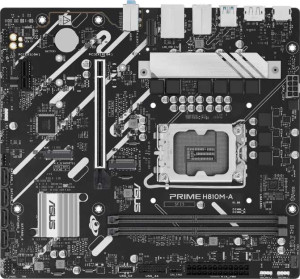
Asus Prime H810M-A
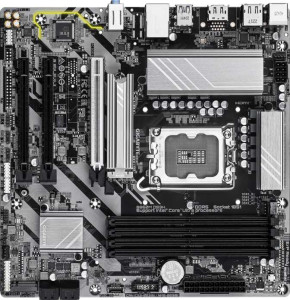
Gigabyte B860M DS3H

Asus Prime H810M-A Gigabyte B860M DS3H

Overview

When choosing between the Asus Prime H810M-A and the Gigabyte B860M DS3H, buyers are faced with two Micro-ATX motherboards sharing the LGA 1851 socket and DDR5 memory support, yet diverging in some meaningful ways. This comparison digs into their key battlegrounds, including memory capacity and slot count, PCIe generation support, overclocking capability, and onboard feature sets, to help you determine which board is the better fit for your next build.

Common Features

  • Both boards use the LGA 1851 CPU socket.
  • Both boards have a Micro-ATX form factor.
  • Neither board supports Wi-Fi.
  • Neither board has Bluetooth.
  • Both boards feature HDMI 2.1 output.
  • Both boards have a single CPU socket.
  • Neither board has integrated graphics.
  • Both boards carry a 3-year warranty.
  • Both boards support DDR5 memory.
  • Both boards support a maximum RAM speed of 6400 MHz.
  • Both boards have 2 memory channels.
  • Neither board supports ECC memory.
  • Neither board has USB 3.2 Gen 2 Type-C ports.
  • Neither board has USB 3.2 Gen 1 Type-C ports.
  • Neither board has USB 3.2 Gen 2x2 ports.
  • Neither board has USB 4 or Thunderbolt ports.
  • Both boards have an HDMI output.
  • Both boards provide 2 USB 3.2 Gen 1 ports through expansion.
  • Both boards have 4 SATA 3 connectors.
  • Both boards have 2 M.2 sockets.
  • Neither board has a U.2 socket or mSATA connector.
  • Both boards include a TPM connector.
  • Both boards have no PCIe 3.0 x16, PCIe 2.0 x16, PCIe x4, PCIe x8, or PCI slots.
  • Both boards support 7.1 audio channels.
  • Both boards have 3 audio connectors.
  • Neither board has an S/PDIF Out port.
  • Neither board supports RAID 0+1.

Main Differences

  • Overclocking support is available on Gigabyte B860M DS3H but not on Asus Prime H810M-A.
  • RGB lighting is present on Asus Prime H810M-A but not on Gigabyte B860M DS3H.
  • Easy BIOS reset is supported on Asus Prime H810M-A but not on Gigabyte B860M DS3H.
  • Dual BIOS is featured on Gigabyte B860M DS3H but not on Asus Prime H810M-A.
  • The board height is 222 mm on Asus Prime H810M-A and 244 mm on Gigabyte B860M DS3H.
  • Maximum memory capacity is 128 GB on Asus Prime H810M-A and 256 GB on Gigabyte B860M DS3H.
  • Memory slots number 2 on Asus Prime H810M-A and 4 on Gigabyte B860M DS3H.
  • USB 3.2 Gen 2 Type-A ports number 2 on Asus Prime H810M-A and 1 on Gigabyte B860M DS3H.
  • USB 3.2 Gen 1 Type-A ports number 0 on Asus Prime H810M-A and 2 on Gigabyte B860M DS3H.
  • USB 2.0 ports number 4 on Asus Prime H810M-A and 3 on Gigabyte B860M DS3H.
  • USB 2.0 ports available through expansion number 2 on Asus Prime H810M-A and 4 on Gigabyte B860M DS3H.
  • Fan headers number 3 on Asus Prime H810M-A and 4 on Gigabyte B860M DS3H.
  • PCIe 4.0 x16 slots number 1 on Asus Prime H810M-A and 0 on Gigabyte B860M DS3H.
  • PCIe 5.0 x16 slots number 0 on Asus Prime H810M-A and 1 on Gigabyte B860M DS3H.
  • PCIe x1 slots number 1 on Asus Prime H810M-A and 2 on Gigabyte B860M DS3H.
Specs Comparison
Asus Prime H810M-A

Asus Prime H810M-A

Gigabyte B860M DS3H

Gigabyte B860M DS3H

General info:
CPU socket LGA 1851 LGA 1851
form factor Micro-ATX Micro-ATX
release date January 2025 January 2025
supports Wi-Fi
Has Bluetooth
HDMI version HDMI 2.1 HDMI 2.1
Easy to overclock
has RGB lighting
Easy to reset BIOS
Has dual BIOS
CPU sockets 1 1
Has integrated graphics
warranty period 3 years 3 years
height 222 mm 244 mm
width 244 mm 244 mm
Has integrated CPU

Both the Asus Prime H810M-A and the Gigabyte B860M DS3H share the same foundational platform: the LGA 1851 socket, a Micro-ATX form factor, and identical HDMI 2.1 output support. Neither board offers Wi-Fi or Bluetooth, meaning wireless connectivity requires a separate add-in card or adapter in both cases. With a matching 3-year warranty and identical width of 244 mm, the two are closely matched at a structural level — though the Prime H810M-A is slightly shorter at 222 mm versus the DS3H's 244 mm, which could matter in very tight Micro-ATX cases.

The most meaningful differences lie in their feature trade-offs. The B860M DS3H supports easy overclocking and includes a dual BIOS — a significant reliability advantage, as dual BIOS allows automatic recovery from a corrupted firmware flash, something power users and overclockers genuinely appreciate. The Prime H810M-A, by contrast, locks out overclocking but offers easy BIOS reset and RGB lighting support, catering more to straightforward builds where aesthetics and simplicity matter over tuning headroom.

For users who want to push their system's performance or need firmware resilience, the Gigabyte B860M DS3H holds a clear edge thanks to its overclocking capability and dual BIOS safety net. The Asus Prime H810M-A is better suited to no-fuss, visually customizable builds where stability out-of-the-box and RGB integration take priority over advanced tuning features.

Memory:
maximum memory amount 128GB 256GB
RAM speed (max) 6400 MHz 6400 MHz
memory slots 2 4
DDR memory version 5 5
memory channels 2 2
Supports ECC memory

On the memory front, these two boards share a common foundation: both run DDR5 RAM at up to 6400 MHz across a dual-channel configuration. That means neither board has a raw bandwidth advantage — at the same speed and channel count, real-world memory performance in everyday tasks and gaming will be effectively identical.

Where they diverge sharply is capacity and expandability. The Gigabyte B860M DS3H ships with 4 DIMM slots and supports up to 256 GB of RAM, while the Asus Prime H810M-A is limited to 2 slots and a 128 GB ceiling. In practical terms, 2 slots means you either buy your full memory kit upfront or replace modules entirely when upgrading — there's no room to add sticks later. Four slots, by contrast, allow a more gradual upgrade path, starting with two sticks and expanding as needs grow. The doubled maximum capacity also makes the DS3H far more viable for memory-intensive workloads like video editing, virtualization, or large data processing.

The Gigabyte B860M DS3H has a clear advantage in this category. Unless a user is certain their memory needs will never exceed two sticks or 128 GB, the DS3H's greater slot count and headroom offer meaningfully more flexibility and longevity — with no trade-off in speed or memory type.

Ports:
USB 3.2 Gen 2 ports (USB-A) 2 1
USB 3.2 Gen 1 ports (USB-A) 0 2
USB 3.2 Gen 2 ports (USB-C) 0 0
USB 3.2 Gen 1 ports (USB-C) 0 0
USB 2.0 ports 4 3
USB 3.2 Gen 2x2 ports 0 0
USB 4 40Gbps ports 0 0
USB 4 20Gbps ports 0 0
Thunderbolt 4 ports 0 0
Thunderbolt 3 ports 0 0
has an HDMI output
DisplayPort outputs 1 1
RJ45 ports 1 1
Has USB Type-C
eSATA ports 0 0
DVI outputs 0 0
has a VGA connector
PS/2 ports 1 1

The rear I/O layouts of these two boards are remarkably similar in structure — both offer HDMI, one DisplayPort, a single RJ45 ethernet port, and a legacy PS/2 connector, with no USB-C, Thunderbolt, or video outputs beyond the HDMI and DisplayPort pair. For most desktop builds, this shared video output combination covers the vast majority of monitor configurations without needing a discrete GPU's outputs.

The real distinction comes down to USB port quality. Both boards provide six USB-A ports in total, but the Asus Prime H810M-A allocates two USB 3.2 Gen 2 (10 Gbps) ports alongside four USB 2.0 ports, whereas the Gigabyte B860M DS3H offers only one USB 3.2 Gen 2 port, complemented by two USB 3.2 Gen 1 (5 Gbps) ports and three USB 2.0 ports. In practice, Gen 2 ports are what you want for fast external SSDs or high-speed peripherals — and the Prime H810M-A gives you twice as many of them.

On port selection, the Asus Prime H810M-A holds a modest but clear edge: its higher count of Gen 2 ports means faster transfers for more devices simultaneously, without having to choose which peripheral gets the premium connection. The DS3H's inclusion of Gen 1 ports is a reasonable middle ground, but for users who regularly move large files or use multiple high-speed peripherals, the Asus lineup is the stronger option here.

Connectors:
USB 3.2 Gen 1 ports (through expansion) 2 2
USB 2.0 ports (through expansion) 2 4
SATA 3 connectors 4 4
fan headers 3 4
USB 3.0 ports (through expansion) 2 2
M.2 sockets 2 2
Has TPM connector
U.2 sockets 0 0
Has mSATA connector
SATA 2 connectors 0 0

Internal connectors tell a lot about how a board handles real-world build complexity, and here the two boards are largely in lockstep. Both feature 4 SATA 3 connectors, 2 M.2 sockets, a TPM connector, and identical USB expansion headers for Gen 1 and USB 3.0 — meaning storage configurations and front-panel USB options are effectively the same on either board.

The gaps are subtle but worth noting. The Gigabyte B860M DS3H carries 4 fan headers versus the Prime H810M-A's 3, which is a genuine convenience advantage in builds with multiple case fans or a beefy air cooler setup — fewer fans will need to be daisy-chained or routed to a separate controller. The DS3H also doubles the internal USB 2.0 expansion headers to 4, useful if your case has front-panel USB 2.0 ports or you're connecting internal devices like RGB hubs or USB-based card readers.

Neither board dominates here, but the Gigabyte B860M DS3H holds a slight edge in connector flexibility — the extra fan header alone is a meaningful quality-of-life improvement for thermal management, and the additional USB 2.0 headers offer more internal connectivity options without any apparent trade-off.

Expansion slots:
PCIe 4.0 x16 slots 1 0
PCIe 5.0 x16 slots 0 1
PCIe 3.0 x16 slots 0 0
PCIe x1 slots 1 2
PCI slots 0 0
PCIe 2.0 x16 slots 0 0
PCIe x4 slots 0 0
PCIe x8 slots 0 0

Expansion slot layout is where these two boards make a pointed statement about their intended audience. The Asus Prime H810M-A offers one PCIe 4.0 x16 slot for a discrete GPU, while the Gigabyte B860M DS3H steps up with a PCIe 5.0 x16 slot — the newer standard that doubles the theoretical bandwidth to 64 GB/s. For current mainstream graphics cards, PCIe 4.0 is rarely a bottleneck, but PCIe 5.0 x16 provides meaningful headroom for next-generation GPUs and high-throughput expansion devices that will increasingly leverage that extra bandwidth.

The DS3H also edges ahead with 2 PCIe x1 slots compared to the Prime H810M-A's single one. That extra x1 slot is handy for users who want to add both a sound card and a network card, or any combination of low-profile add-in cards, without having to choose between them.

The Gigabyte B860M DS3H holds a clear advantage in this category on both fronts — a faster primary GPU slot that is more future-proof, and greater flexibility for auxiliary expansion cards. For users planning to hold onto their build for several years or who anticipate adopting next-gen GPUs, the DS3H's PCIe 5.0 slot is a tangible long-term benefit that the Prime H810M-A simply cannot match.

Audio:
audio channels 7.1 7.1
Has S/PDIF Out port
audio connectors 3 3

Audio is the one category where there is nothing to separate these two boards — every spec is identical. Both deliver 7.1-channel surround sound support through 3 analog audio connectors, and neither includes an S/PDIF optical output, which rules out a direct digital connection to an AV receiver or high-end DAC without additional hardware.

The 7.1-channel capability is a solid baseline for gaming headsets and speaker setups, covering the vast majority of consumer use cases. The absence of S/PDIF is a minor limitation only for users who specifically need a bitstream digital output — for everyone else, the 3.5mm analog jacks handle headphones, speakers, and microphones without issue.

This category is an unambiguous tie. Users with demanding audio requirements — studio monitoring, audiophile setups, or digital surround output — would likely be looking at a dedicated sound card regardless of which board they choose, making the onboard audio parity here essentially irrelevant to the buying decision.

Storage:
Supports RAID 0+1

Storage configuration options are identical across both boards: neither the Asus Prime H810M-A nor the Gigabyte B860M DS3H supports RAID 0+1. This combined RAID level — which stripes data for performance while simultaneously mirroring it for redundancy — is typically found on workstation or server-grade platforms rather than consumer desktop boards, so its absence here is expected and unlikely to affect the majority of users.

For those who specifically need hardware RAID for a NAS-style setup or fault-tolerant storage array, both boards fall equally short, and a dedicated RAID controller card or a software RAID solution would be required on either platform.

This category is a complete tie — neither board offers an advantage, and the shared limitation is unlikely to be a deciding factor for the typical consumer or enthusiast this class of motherboard targets.

Comparison Summary & Verdict

Both the Asus Prime H810M-A and the Gigabyte B860M DS3H are competent Micro-ATX boards built around the LGA 1851 platform with DDR5 support, but they cater to slightly different builder profiles. The Gigabyte B860M DS3H pulls ahead for users who need headroom to grow, thanks to its 4 memory slots supporting up to 256 GB of RAM, a PCIe 5.0 x16 slot for next-generation graphics cards, overclocking support, dual BIOS, and an extra fan header. The Asus Prime H810M-A, on the other hand, suits builders who value easy BIOS recovery, RGB lighting aesthetics, more USB 3.2 Gen 2 Type-A ports, and a slightly more compact footprint. If future-proofing and expandability are priorities, the Gigabyte is the stronger choice; if simplicity, aesthetics, and faster rear USB connectivity matter more, the Asus holds its own.

Asus Prime H810M-A
Buy Asus Prime H810M-A if...

Buy the Asus Prime H810M-A if you want easy BIOS reset functionality, RGB lighting, and more USB 3.2 Gen 2 Type-A rear ports in a slightly more compact Micro-ATX board.

Gigabyte B860M DS3H
Buy Gigabyte B860M DS3H if...

Buy the Gigabyte B860M DS3H if you need greater memory expandability with 4 slots and up to 256 GB of RAM, a PCIe 5.0 x16 slot, overclocking support, and dual BIOS protection.