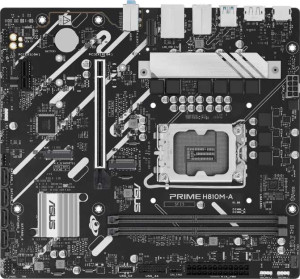
Asus Prime H810M-A
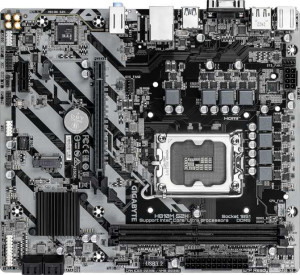
Gigabyte H810M S2H

Asus Prime H810M-A Gigabyte H810M S2H

Overview

Welcome to our detailed spec comparison between the Asus Prime H810M-A and the Gigabyte H810M S2H, two Micro-ATX motherboards sharing the LGA 1851 socket and DDR5 memory support. While they have much in common on paper, key battlegrounds emerge around USB connectivity, storage expansion options, and a handful of practical board features that could tip the decision for builders with specific needs.

Common Features

  • Both boards use the LGA 1851 CPU socket.
  • Both boards have a Micro-ATX form factor.
  • Neither board supports Wi-Fi.
  • Neither board has Bluetooth.
  • Both boards have HDMI 2.1 output.
  • Overclocking is not supported on either board.
  • Neither board has a dual BIOS feature.
  • Both boards support a maximum memory amount of 128GB.
  • Both boards have a maximum RAM speed of 6400 MHz.
  • Both boards have 2 memory slots.
  • Both boards use DDR5 memory.
  • Both boards support 2 memory channels.
  • ECC memory is not supported on either board.
  • Neither board has USB 3.2 Gen 2 ports in USB-C format.
  • Neither board has USB 3.2 Gen 1 ports in USB-C format.
  • Neither board has USB 3.2 Gen 2x2 ports.
  • Neither board has USB 4 40Gbps or 20Gbps ports.
  • Neither board has Thunderbolt 3 or Thunderbolt 4 ports.
  • Both boards have an HDMI output.
  • Both boards provide 2 USB 3.2 Gen 1 ports through expansion.
  • Both boards provide 2 USB 2.0 ports through expansion.
  • Both boards have 4 SATA 3 connectors.
  • Both boards have 3 fan headers.
  • Both boards include a TPM connector.
  • Neither board has an mSATA connector.
  • Both boards have 1 PCIe 4.0 x16 slot.
  • Neither board has PCIe 5.0 x16 slots.
  • Both boards have 1 PCIe x1 slot.
  • Neither board has PCI slots.
  • Both boards support 7.1 audio channels.
  • Neither board has an S/PDIF Out port.
  • Both boards have 3 audio connectors.
  • Neither board supports RAID 0+1.
  • RGB lighting is present on both boards.

Main Differences

  • Easy BIOS reset is supported on Asus Prime H810M-A but not available on Gigabyte H810M S2H.
  • The height is 222 mm on Asus Prime H810M-A and 215 mm on Gigabyte H810M S2H.
  • USB 3.2 Gen 2 ports (USB-A) count is 2 on Asus Prime H810M-A and 0 on Gigabyte H810M S2H.
  • USB 3.2 Gen 1 ports (USB-A) count is 0 on Asus Prime H810M-A and 1 on Gigabyte H810M S2H.
  • USB 2.0 ports count is 4 on Asus Prime H810M-A and 5 on Gigabyte H810M S2H.
  • A VGA connector is present on Gigabyte H810M S2H but not available on Asus Prime H810M-A.
  • M.2 sockets count is 2 on Asus Prime H810M-A and 1 on Gigabyte H810M S2H.
Specs Comparison
Asus Prime H810M-A

Asus Prime H810M-A

Gigabyte H810M S2H

Gigabyte H810M S2H

General info:
CPU socket LGA 1851 LGA 1851
form factor Micro-ATX Micro-ATX
release date January 2025 April 2025
supports Wi-Fi
Has Bluetooth
HDMI version HDMI 2.1 HDMI 2.1
Easy to overclock
has RGB lighting
Easy to reset BIOS
Has dual BIOS
CPU sockets 1 1
Has integrated graphics
warranty period 3 years 3 years
height 222 mm 215 mm
width 244 mm 244 mm
Has integrated CPU

At their core, the Asus Prime H810M-A and Gigabyte H810M S2H are remarkably similar boards: both use the LGA 1851 socket in a Micro-ATX form factor, omit Wi-Fi and Bluetooth, output video over HDMI 2.1, and carry a 3-year warranty. Neither supports overclocking, neither has dual BIOS or integrated graphics, and both include RGB lighting. For a buyer focused purely on platform compatibility or connectivity, these two boards are effectively interchangeable.

The most meaningful practical difference lies in BIOS management: the Asus Prime H810M-A supports easy BIOS reset, while the Gigabyte H810M S2H does not. In real-world terms, this matters most when a failed BIOS flash or a misconfigured setting renders the system unbootable — on the Asus, recovery is straightforward; on the Gigabyte, it may require more involved troubleshooting steps. There is also a minor size difference: the Asus stands 222 mm tall versus the Gigabyte's 215 mm, a 7 mm gap that is unlikely to affect case compatibility in practice but is worth noting for very tight builds.

Overall, the Asus Prime H810M-A holds a clear edge in this category, driven entirely by its easy BIOS reset capability. For mainstream users and system builders who value straightforward recovery options, that single feature meaningfully reduces risk, making the Asus the safer long-term choice between the two.

Memory:
maximum memory amount 128GB 128GB
RAM speed (max) 6400 MHz 6400 MHz
memory slots 2 2
DDR memory version 5 5
memory channels 2 2
Supports ECC memory

When it comes to memory, these two boards are identical in every measurable way. Both support DDR5 RAM across 2 slots in a dual-channel configuration, cap out at 128 GB of maximum capacity, and top out at 6400 MHz — a respectable ceiling that comfortably accommodates high-performance DDR5 kits suited for demanding workloads and modern gaming.

The dual-channel setup is worth highlighting: running two sticks rather than one effectively doubles the memory bandwidth available to the CPU, which translates to noticeably better performance in bandwidth-sensitive tasks like video editing, large dataset processing, and GPU-integrated workloads. The 6400 MHz ceiling means builders are not constrained to baseline DDR5 speeds and can take full advantage of faster kits without hitting a wall imposed by the board itself.

With no differences whatsoever across any memory specification, this category is a complete tie. Neither the Asus Prime H810M-A nor the Gigabyte H810M S2H offers any advantage here — memory configuration should play no role in choosing between these two boards.

Ports:
USB 3.2 Gen 2 ports (USB-A) 2 0
USB 3.2 Gen 1 ports (USB-A) 0 1
USB 3.2 Gen 2 ports (USB-C) 0 0
USB 3.2 Gen 1 ports (USB-C) 0 0
USB 2.0 ports 4 5
USB 3.2 Gen 2x2 ports 0 0
USB 4 40Gbps ports 0 0
USB 4 20Gbps ports 0 0
Thunderbolt 4 ports 0 0
Thunderbolt 3 ports 0 0
has an HDMI output
DisplayPort outputs 1 1
RJ45 ports 1 1
Has USB Type-C
eSATA ports 0 0
DVI outputs 0 0
has a VGA connector
PS/2 ports 1 1

Both boards share a solid common foundation — HDMI output, one DisplayPort, a single RJ45 ethernet jack, and a PS/2 port — but the USB configuration is where they diverge meaningfully. The Asus Prime H810M-A offers 2 USB 3.2 Gen 2 (10 Gbps) Type-A ports, while the Gigabyte H810M S2H replaces those with a single USB 3.2 Gen 1 (5 Gbps) port. That difference is significant in practice: Gen 2 doubles the theoretical throughput of Gen 1, which matters when transferring large files to fast external SSDs or high-speed peripherals.

The Gigabyte does edge ahead with 5 USB 2.0 ports versus the Asus's 4, but USB 2.0 bandwidth is so limited by modern standards that an extra port here is a minor consolation. More notable is the Gigabyte's inclusion of a VGA output — a legacy connector absent on the Asus. For most new builds this is irrelevant, but for anyone needing to drive an older monitor or projector without an adapter, it could be genuinely useful.

On balance, the Asus Prime H810M-A holds the advantage in this category. Its two Gen 2 USB ports deliver meaningfully faster real-world data transfer speeds, which benefits a broader range of modern use cases than the Gigabyte's extra USB 2.0 port or legacy VGA output. Unless VGA compatibility is a specific requirement, the Asus offers the stronger port configuration.

Connectors:
USB 3.2 Gen 1 ports (through expansion) 2 2
USB 2.0 ports (through expansion) 2 2
SATA 3 connectors 4 4
fan headers 3 3
USB 3.0 ports (through expansion) 2 2
M.2 sockets 2 1
Has TPM connector
U.2 sockets 0 0
Has mSATA connector
SATA 2 connectors 0 0

Strip away the identical specs — 4 SATA 3 connectors, 3 fan headers, matching internal USB expansion headers, and a TPM connector on both — and a single differentiator defines this category: M.2 socket count. The Asus Prime H810M-A provides 2 M.2 sockets, while the Gigabyte H810M S2H offers just 1.

That gap carries real-world weight. M.2 is the dominant interface for modern NVMe SSDs, which deliver dramatically faster read and write speeds than traditional SATA drives. A second M.2 slot means a builder can run a primary NVMe boot drive alongside a second high-speed storage drive — without consuming any SATA ports or adding cables. For content creators, gamers with large libraries, or anyone planning a storage-heavy build, this flexibility is genuinely useful rather than just a paper spec.

The Asus Prime H810M-A wins this category outright. With all other internal connectors matching exactly, the extra M.2 socket gives the Asus a meaningful, practical advantage in storage expandability — and it is the kind of feature that becomes increasingly valuable as NVMe storage costs continue to fall and adoption rises.

Expansion slots:
PCIe 4.0 x16 slots 1 1
PCIe 5.0 x16 slots 0 0
PCIe 3.0 x16 slots 0 0
PCIe x1 slots 1 1
PCI slots 0 0
PCIe 2.0 x16 slots 0 0
PCIe x8 slots 0 0

Expansion slot configurations are identical across both boards: one PCIe 4.0 x16 slot and one PCIe x1 slot, with no legacy PCI, PCIe 5.0, or additional x16 slots on either. For a Micro-ATX platform, this is a perfectly standard layout — the x16 slot handles a discrete GPU, while the x1 slot accommodates a single low-bandwidth add-in card such as a sound card, Wi-Fi adapter, or capture card.

The absence of a PCIe 5.0 x16 slot is worth contextualizing: while PCIe 5.0 GPUs do exist, the vast majority of current discrete graphics cards operate comfortably within PCIe 4.0 bandwidth, meaning neither board imposes a real-world performance penalty for GPU use today. Builders with longer upgrade horizons should simply be aware of this ceiling.

This category is a complete tie — the Asus Prime H810M-A and Gigabyte H810M S2H offer precisely the same expansion slot configuration, and neither holds any advantage over the other here.

Audio:
audio channels 7.1 7.1
Has S/PDIF Out port
audio connectors 3 3

Audio is another area where these two boards converge entirely. Both deliver 7.1-channel surround sound support through 3 analog audio connectors, and neither includes an S/PDIF optical output. The 7.1 capability is a solid offering for a motherboard in this class — it supports full surround sound setups without requiring a dedicated sound card, which is sufficient for most gaming and home theater use cases.

The absence of S/PDIF on both boards is worth noting for anyone wanting a direct digital audio connection to an external DAC, AV receiver, or soundbar via optical cable. In that scenario, both boards equally require a workaround — either a USB DAC or a discrete sound card in the PCIe x1 slot. Neither board has an advantage or disadvantage here; the limitation applies to both.

This category is a complete tie. The Asus Prime H810M-A and Gigabyte H810M S2H are identically matched on every audio specification, and audio capability should carry no weight in the decision between these two boards.

Storage:
Supports RAID 0+1

The only storage-specific spec provided for this group is RAID 0+1 support, and both the Asus Prime H810M-A and Gigabyte H810M S2H come up short equally — neither board supports it. For mainstream consumer builds this is rarely a dealbreaker, as RAID configurations are more commonly associated with workstation or NAS environments where data redundancy or striped performance across multiple drives is a priority. Typical home and gaming builds rely on independent drives without RAID, so most buyers in this segment will not feel the absence.

This category is a complete tie — both boards share the same limitation, and neither holds any storage advantage over the other based on the available data.

Comparison Summary & Verdict

Both the Asus Prime H810M-A and Gigabyte H810M S2H deliver a very similar foundation: LGA 1851, DDR5 support up to 6400 MHz, 128GB max RAM, and a shared PCIe 4.0 x16 slot. However, the differences matter depending on your build goals. The Asus Prime H810M-A stands out with two M.2 sockets, two USB 3.2 Gen 2 (USB-A) ports, and a convenient easy BIOS reset feature, making it the stronger pick for performance-focused builders. The Gigabyte H810M S2H, on the other hand, offers a VGA output alongside HDMI, one USB 3.2 Gen 1 port, and a slightly more compact footprint at 215 mm, suiting users with legacy display needs or tighter cases. Neither board supports Wi-Fi, Bluetooth, or RAID, so choose based on your storage and connectivity priorities.

Asus Prime H810M-A
Buy Asus Prime H810M-A if...

Buy the Asus Prime H810M-A if you want faster USB 3.2 Gen 2 ports and dual M.2 sockets for expanded NVMe storage, plus the convenience of easy BIOS reset.

Gigabyte H810M S2H
Buy Gigabyte H810M S2H if...

Buy the Gigabyte H810M S2H if you need a VGA output for a legacy monitor or prefer a slightly more compact board with an extra USB 2.0 port.