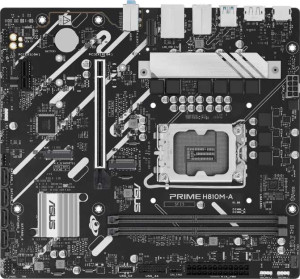
Asus Prime H810M-A
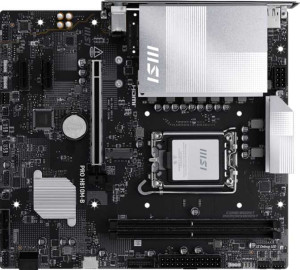
MSI Pro H810M-B

Asus Prime H810M-A MSI Pro H810M-B

Overview

Welcome to this detailed spec comparison between the Asus Prime H810M-A and the MSI Pro H810M-B, two Micro-ATX motherboards sharing the LGA 1851 socket and DDR5 memory support. While they agree on many fundamentals, key battlegrounds emerge around PCIe generation support, wireless connectivity, storage expansion, and BIOS management features. Read on to discover which board better suits your build.

Common Features

  • Both products use the LGA 1851 CPU socket.
  • Both products have a Micro-ATX form factor.
  • Bluetooth is not available on either product.
  • Both products support HDMI 2.1.
  • Neither product is easy to overclock.
  • RGB lighting is present on both products.
  • Both products have 1 CPU socket.
  • Integrated graphics are not available on either product.
  • Both products support a maximum memory amount of 128GB.
  • Both products have a maximum RAM speed of 6400 MHz.
  • Both products have 2 memory slots.
  • Both products use DDR5 memory.
  • Both products support 2 memory channels.
  • ECC memory is not supported on either product.
  • Neither product has USB 3.2 Gen 2 ports (USB-C), USB 3.2 Gen 1 ports (USB-C), USB 3.2 Gen 2x2 ports, USB 4 40Gbps ports, USB 4 20Gbps ports, Thunderbolt 4 ports, or Thunderbolt 3 ports.
  • Both products have 4 USB 2.0 ports.
  • Both products have 2 USB 3.2 Gen 1 ports through expansion and 2 USB 3.0 ports through expansion.
  • Both products have 4 SATA 3 connectors and 0 SATA 2 connectors.
  • Both products have 3 fan headers.
  • A TPM connector is present on both products.
  • An mSATA connector is not available on either product.
  • Neither product has any U.2 sockets.
  • Neither product has PCIe 3.0 x16, PCIe 2.0 x16, PCI, PCIe x4, or PCIe x8 slots.
  • Both products support 7.1 audio channels.
  • Neither product has an S/PDIF Out port.
  • Both products have 3 audio connectors.
  • RAID 0+1 is not supported on either product.

Main Differences

  • Wi-Fi support is present on MSI Pro H810M-B but not available on Asus Prime H810M-A.
  • Easy BIOS reset is available on Asus Prime H810M-A but not on MSI Pro H810M-B.
  • Dual BIOS is present on MSI Pro H810M-B but not available on Asus Prime H810M-A.
  • Height is 222 mm on Asus Prime H810M-A and 220 mm on MSI Pro H810M-B.
  • Width is 244 mm on Asus Prime H810M-A and 243.8 mm on MSI Pro H810M-B.
  • USB 3.2 Gen 2 ports (USB-A) count is 2 on Asus Prime H810M-A and 0 on MSI Pro H810M-B.
  • USB 3.2 Gen 1 ports (USB-A) count is 0 on Asus Prime H810M-A and 2 on MSI Pro H810M-B.
  • A PS/2 port is present on Asus Prime H810M-A but not available on MSI Pro H810M-B.
  • USB 2.0 ports through expansion number 2 on Asus Prime H810M-A and 4 on MSI Pro H810M-B.
  • M.2 sockets number 2 on Asus Prime H810M-A and 1 on MSI Pro H810M-B.
  • PCIe 4.0 x16 slot is present on Asus Prime H810M-A but not available on MSI Pro H810M-B.
  • PCIe 5.0 x16 slot is present on MSI Pro H810M-B but not available on Asus Prime H810M-A.
  • PCIe x1 slots number 1 on Asus Prime H810M-A and 2 on MSI Pro H810M-B.
Specs Comparison
Asus Prime H810M-A

Asus Prime H810M-A

MSI Pro H810M-B

MSI Pro H810M-B

General info:
CPU socket LGA 1851 LGA 1851
form factor Micro-ATX Micro-ATX
release date January 2025 May 2025
supports Wi-Fi
Has Bluetooth
HDMI version HDMI 2.1 HDMI 2.1
Easy to overclock
has RGB lighting
Easy to reset BIOS
Has dual BIOS
CPU sockets 1 1
Has integrated graphics
warranty period 3 years 3 years
height 222 mm 220 mm
width 244 mm 243.8 mm
Has integrated CPU

Both the Asus Prime H810M-A and the MSI Pro H810M-B share a solid common foundation: the same LGA 1851 socket, a Micro-ATX form factor, HDMI 2.1 output, RGB lighting, and a 3-year warranty. Neither supports overclocking and both lack integrated graphics or a built-in CPU, so they target the same general audience — builders looking for a mainstream, budget-conscious H810 platform.

The most meaningful differentiators lie in connectivity and firmware resilience. The MSI Pro H810M-B includes built-in Wi-Fi, which eliminates the need for a separate PCIe or USB adapter — a genuine convenience advantage for users in environments where running an Ethernet cable is impractical. However, the MSI trades away easy BIOS recovery: it offers a dual BIOS chip (a passive hardware failsafe) but does not support easy BIOS reset. The Asus, by contrast, provides easy BIOS reset without a secondary chip — meaning recovery from a bad flash is a straightforward process rather than relying on automatic chip-switching. These represent two different philosophies on firmware safety.

Overall, the MSI Pro H810M-B has a practical edge for users who prioritize wireless connectivity out of the box, while the Asus Prime H810M-A is the more user-friendly option when it comes to BIOS maintenance and recovery. The physical dimensions are virtually identical and not a deciding factor. Your choice should hinge on whether onboard Wi-Fi or hands-on BIOS recoverability matters more to your specific build.

Memory:
maximum memory amount 128GB 128GB
RAM speed (max) 6400 MHz 6400 MHz
memory slots 2 2
DDR memory version 5 5
memory channels 2 2
Supports ECC memory

When it comes to memory, these two boards are a perfect mirror of each other. Both support DDR5 RAM across 2 slots in a dual-channel configuration, with a ceiling of 128GB and a maximum rated speed of 6400 MHz. For a Micro-ATX board at this tier, that is a competitive spec sheet — DDR5 at 6400 MHz delivers substantially higher bandwidth than DDR4 platforms, which translates to tangible gains in memory-intensive workloads like video editing, large dataset processing, and modern gaming.

The dual-channel setup is worth emphasizing: running two matched sticks rather than a single module effectively doubles the memory bandwidth available to the CPU, and both boards are built to take full advantage of this. The 128GB maximum is also generous for an H810 chipset, leaving ample headroom for users whose needs grow over time — though in practice, most mainstream builds will never approach that ceiling. Neither board supports ECC memory, which is expected at this market segment and only relevant to workstation or server use cases.

This category is a straightforward tie. The memory subsystems on the Asus Prime H810M-A and the MSI Pro H810M-B are spec-for-spec identical, so RAM compatibility, capacity, and performance potential will be indistinguishable between the two. Memory considerations should play no role in deciding between these boards.

Ports:
USB 3.2 Gen 2 ports (USB-A) 2 0
USB 3.2 Gen 1 ports (USB-A) 0 2
USB 3.2 Gen 2 ports (USB-C) 0 0
USB 3.2 Gen 1 ports (USB-C) 0 0
USB 2.0 ports 4 4
USB 3.2 Gen 2x2 ports 0 0
USB 4 40Gbps ports 0 0
USB 4 20Gbps ports 0 0
Thunderbolt 4 ports 0 0
Thunderbolt 3 ports 0 0
has an HDMI output
DisplayPort outputs 1 1
RJ45 ports 1 1
Has USB Type-C
eSATA ports 0 0
DVI outputs 0 0
has a VGA connector
PS/2 ports 1 0

The rear I/O layouts of these two boards look similar at a glance, but one distinction stands out immediately: the Asus Prime H810M-A equips its two high-speed USB-A ports as USB 3.2 Gen 2 (10 Gbps), while the MSI Pro H810M-B offers USB 3.2 Gen 1 (5 Gbps) in the same slot count. That gap is meaningful in practice — Gen 2 doubles the theoretical throughput, which translates to noticeably faster transfers when connecting modern external SSDs, high-speed flash drives, or other bandwidth-hungry peripherals. For users who regularly move large files externally, the Asus has a tangible edge here.

Beyond that, the two boards share an identical structure: four USB 2.0 ports, a single HDMI and single DisplayPort output, and one RJ45 Ethernet jack. Neither board offers USB-C on the rear panel, which is a limitation worth noting for users with newer peripherals or monitors that rely on it. The Asus also includes a PS/2 port — a legacy input largely irrelevant to modern builds, but occasionally valued by users with older keyboards or mice, or in enterprise environments requiring PS/2-specific hardware.

On balance, the Asus Prime H810M-A holds a clear advantage in this category. The faster Gen 2 USB speeds are a real-world differentiator for anyone who relies on high-speed external storage, and the overall port selection is otherwise comparable between the two boards.

Connectors:
USB 3.2 Gen 1 ports (through expansion) 2 2
USB 2.0 ports (through expansion) 2 4
SATA 3 connectors 4 4
fan headers 3 3
USB 3.0 ports (through expansion) 2 2
M.2 sockets 2 1
Has TPM connector
U.2 sockets 0 0
Has mSATA connector
SATA 2 connectors 0 0

The internal connector layouts are largely aligned, but one difference carries significant weight for storage-focused builds: the Asus Prime H810M-A provides 2 M.2 sockets, while the MSI Pro H810M-B offers only 1. M.2 slots are prime real estate on any modern motherboard — they are the natural home for fast NVMe SSDs, and having two means a builder can run a primary boot drive and a secondary storage drive simultaneously without touching the SATA ports. On the MSI, users who need a second fast drive must fall back to SATA, which is a step down in both speed and convenience.

Everything else in this group is essentially matched: both boards carry 4 SATA 3 connectors, 3 fan headers, and a TPM connector — the latter being relevant for Windows 11 compliance and hardware-based security features. The expansion USB headers are nearly identical, with only a minor difference in USB 2.0 expansion port count (2 on the Asus vs. 4 on the MSI), which is unlikely to matter in most builds given how rarely all internal USB headers are fully utilized.

The Asus Prime H810M-A has a clear advantage in this category. The second M.2 slot is a meaningful practical benefit — it future-proofs the build for additional NVMe storage and reduces dependence on SATA, making it the stronger choice for users who prioritize fast, flexible internal storage options.

Expansion slots:
PCIe 4.0 x16 slots 1 0
PCIe 5.0 x16 slots 0 1
PCIe 3.0 x16 slots 0 0
PCIe x1 slots 1 2
PCI slots 0 0
PCIe 2.0 x16 slots 0 0
PCIe x4 slots 0 0
PCIe x8 slots 0 0

The primary GPU slot is where these two boards diverge most meaningfully. The MSI Pro H810M-B features a PCIe 5.0 x16 slot, while the Asus Prime H810M-A tops out at PCIe 4.0 x16. PCIe 5.0 doubles the bandwidth ceiling of Gen 4 — from roughly 64 GB/s to 128 GB/s — which is particularly relevant for next-generation discrete GPUs and high-end NVMe drives that can actually saturate a Gen 5 lane. For users planning to pair this board with current or upcoming high-performance graphics cards, the MSI's Gen 5 slot is a meaningful future-proofing advantage.

The secondary slot count also differs: the MSI provides 2 PCIe x1 slots versus the Asus's 1. These smaller slots are used for add-in cards such as sound cards, capture cards, or additional network adapters. Having two opens up more simultaneous expansion options, which is a modest but real benefit for users building a more feature-rich system within a Micro-ATX footprint.

Taken together, the MSI Pro H810M-B holds a clear advantage in expansion. The PCIe 5.0 primary slot is the headline differentiator — it positions the board better for high-bandwidth hardware both today and as the platform matures — and the extra x1 slot adds a further layer of flexibility for multi-card configurations.

Audio:
audio channels 7.1 7.1
Has S/PDIF Out port
audio connectors 3 3

Audio is a non-issue in this comparison — the Asus Prime H810M-A and the MSI Pro H810M-B are completely identical across every provided spec. Both deliver 7.1-channel surround sound support via 3 analog audio connectors, and neither includes an S/PDIF optical output. The 7.1 channel capability is a reasonable offering at this tier, covering the needs of most gaming headsets, stereo speakers, and multi-channel speaker setups without requiring a dedicated sound card.

The absence of S/PDIF on both boards is worth flagging for users who own an AV receiver or external DAC that relies on optical input for a clean digital signal path. For those users, a USB DAC or a PCIe sound card would be the practical workaround — and both boards have the expansion capacity to accommodate that. For everyone else, the onboard 3-jack analog layout is the standard configuration for Micro-ATX boards at this price point and covers the vast majority of real-world use cases.

This category is an unambiguous tie. Audio hardware should carry zero weight in the decision between these two boards.

Storage:
Supports RAID 0+1

The only storage-specific spec provided for this group is RAID 0+1 support, and neither the Asus Prime H810M-A nor the MSI Pro H810M-B offers it. RAID 0+1 combines striping and mirroring to deliver both performance and redundancy simultaneously — a feature more commonly found on higher-end chipsets targeting workstation or enthusiast builds. Its absence here is consistent with the H810 platform's positioning as a mainstream, cost-conscious chipset.

For the overwhelming majority of consumer builds — gaming rigs, home workstations, general-purpose desktops — the lack of RAID 0+1 is not a practical limitation. Users who require hardware RAID for data redundancy or performance tiering are typically operating outside the scope of an H810 board regardless. Both boards still offer multiple SATA and M.2 connections (as seen in the Connectors group), so independent drive configurations remain fully viable.

This is a tie by every available measure in this category. Neither board differentiates itself on storage controller features, and this spec should not influence the purchasing decision between the two.

Comparison Summary & Verdict

Both the Asus Prime H810M-A and MSI Pro H810M-B are competent Micro-ATX boards on the LGA 1851 platform, but they cater to different priorities. The Asus Prime H810M-A stands out with its two M.2 sockets, a PCIe 4.0 x16 slot, faster USB 3.2 Gen 2 Type-A ports, an easy BIOS reset feature, and a legacy PS/2 port, making it a strong pick for users who need richer storage and USB throughput. The MSI Pro H810M-B, on the other hand, offers built-in Wi-Fi, a PCIe 5.0 x16 slot for next-generation GPU bandwidth, dual BIOS for added firmware resilience, and more USB 2.0 expansion headers. Choose the Asus if storage flexibility and USB speed matter most; choose the MSI if wireless connectivity and future-proof PCIe bandwidth are your top concerns.

Asus Prime H810M-A
Buy Asus Prime H810M-A if...

Buy the Asus Prime H810M-A if you need two M.2 sockets for fast storage, faster USB 3.2 Gen 2 Type-A ports, and a convenient easy BIOS reset feature.

MSI Pro H810M-B
Buy MSI Pro H810M-B if...

Buy the MSI Pro H810M-B if built-in Wi-Fi, a PCIe 5.0 x16 slot for next-generation graphics cards, and dual BIOS protection are priorities for your build.