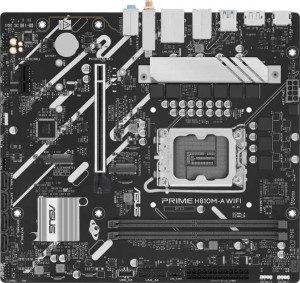
Asus Prime H810M-A WiFi
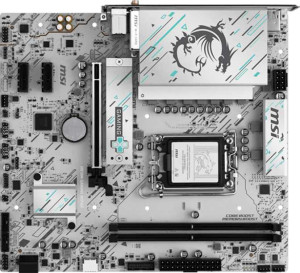
MSI H810M Gaming Wi-Fi6E

Asus Prime H810M-A WiFi MSI H810M Gaming Wi-Fi6E

Overview

Welcome to our detailed spec comparison between the Asus Prime H810M-A WiFi and the MSI H810M Gaming Wi-Fi6E — two Micro-ATX motherboards built on the LGA 1851 socket. While they share a surprising amount of common ground, key battlegrounds emerge around RAM speed and M.2 storage slots, wireless connectivity standards, USB port configurations, and next-generation PCIe slot generations. Read on to find out which board best matches your build goals.

Common Features

  • Both motherboards use the LGA 1851 CPU socket.
  • Both boards share the Micro-ATX form factor.
  • Wi-Fi support is available on both products.
  • Bluetooth is available on both products.
  • Both boards share Bluetooth version 5.3.
  • Both boards use HDMI 2.1.
  • Overclocking is not supported on either product.
  • RGB lighting is present on both products.
  • Both boards support a maximum of 128GB of RAM.
  • Both boards have 2 memory slots.
  • Both boards use DDR5 memory.
  • Both boards support 2 memory channels.
  • ECC memory is not supported on either product.
  • Neither board has USB 3.2 Gen 1 ports of Type-C on the rear panel.
  • Both boards provide 4 USB 2.0 rear ports.
  • Neither board features USB 3.2 Gen 2x2, USB 4, Thunderbolt 3, or Thunderbolt 4 ports.
  • An HDMI output is present on both products.
  • Both boards provide 2 USB 3.2 Gen 1 ports through expansion.
  • Both boards feature 4 SATA 3 connectors.
  • Both boards have 3 fan headers.
  • Neither board has an mSATA connector.
  • Neither board has SATA 2 connectors.
  • Neither board includes U.2 sockets.
  • Both boards offer 7.1 audio channels.
  • S/PDIF Out port is not available on either product.
  • Both boards have 3 audio connectors.
  • RAID 0+1 is not supported on either product.
  • Neither board has PCIe 3.0 x16, PCIe 2.0 x16, PCIe x4, PCIe x8, or legacy PCI slots.

Main Differences

  • Wi-Fi 6E (802.11ax) support is present on MSI H810M Gaming Wi-Fi6E but not available on Asus Prime H810M-A WiFi.
  • Easy BIOS reset is available on Asus Prime H810M-A WiFi but not on MSI H810M Gaming Wi-Fi6E.
  • Dual BIOS is present on MSI H810M Gaming Wi-Fi6E but not available on Asus Prime H810M-A WiFi.
  • Height is 222 mm on Asus Prime H810M-A WiFi and 220 mm on MSI H810M Gaming Wi-Fi6E.
  • Width is 244 mm on Asus Prime H810M-A WiFi and 243.8 mm on MSI H810M Gaming Wi-Fi6E.
  • Maximum RAM speed is 6400 MHz on Asus Prime H810M-A WiFi and 4800 MHz on MSI H810M Gaming Wi-Fi6E.
  • USB 3.2 Gen 2 ports (USB-A) count is 2 on Asus Prime H810M-A WiFi and 0 on MSI H810M Gaming Wi-Fi6E.
  • USB 3.2 Gen 1 ports (USB-A) count is 0 on Asus Prime H810M-A WiFi and 2 on MSI H810M Gaming Wi-Fi6E.
  • USB 3.2 Gen 2 ports (USB-C) count is 0 on Asus Prime H810M-A WiFi and 1 on MSI H810M Gaming Wi-Fi6E.
  • USB Type-C is present on MSI H810M Gaming Wi-Fi6E but not available on Asus Prime H810M-A WiFi.
  • A PS/2 port is available on Asus Prime H810M-A WiFi but not present on MSI H810M Gaming Wi-Fi6E.
  • USB 2.0 ports through expansion total 2 on Asus Prime H810M-A WiFi and 4 on MSI H810M Gaming Wi-Fi6E.
  • M.2 sockets count is 2 on Asus Prime H810M-A WiFi and 1 on MSI H810M Gaming Wi-Fi6E.
  • A TPM connector is present on Asus Prime H810M-A WiFi but not available on MSI H810M Gaming Wi-Fi6E.
  • PCIe 4.0 x16 slot count is 1 on Asus Prime H810M-A WiFi and 0 on MSI H810M Gaming Wi-Fi6E.
  • PCIe 5.0 x16 slot count is 0 on Asus Prime H810M-A WiFi and 1 on MSI H810M Gaming Wi-Fi6E.
  • PCIe x1 slot count is 1 on Asus Prime H810M-A WiFi and 2 on MSI H810M Gaming Wi-Fi6E.
Specs Comparison
Asus Prime H810M-A WiFi

Asus Prime H810M-A WiFi

MSI H810M Gaming Wi-Fi6E

MSI H810M Gaming Wi-Fi6E

General info:
CPU socket LGA 1851 LGA 1851
form factor Micro-ATX Micro-ATX
release date January 2025 May 2025
supports Wi-Fi
Wi-Fi version Wi-Fi 4 (802.11n), Wi-Fi 5 (802.11ac), Wi-Fi 6 (802.11ax) Wi-Fi 4 (802.11n), Wi-Fi 5 (802.11ac), Wi-Fi 6 (802.11ax), Wi-Fi 6E (802.11ax)
Has Bluetooth
Bluetooth version 5.3 5.3
HDMI version HDMI 2.1 HDMI 2.1
Easy to overclock
has RGB lighting
Easy to reset BIOS
Has dual BIOS
has aptX
CPU sockets 1 1
Has integrated graphics
warranty period 3 years 3 years
height 222 mm 220 mm
width 244 mm 243.8 mm
Has integrated CPU

Both the Asus Prime H810M-A WiFi and the MSI H810M Gaming Wi-Fi6E share the same LGA 1851 socket, Micro-ATX form factor, Bluetooth 5.3, and HDMI 2.1 output, making them broadly comparable as platforms. Their physical dimensions are virtually identical, and both carry a 3-year warranty — so neither stands out on fundamentals alone.

The most meaningful general-info differentiator is wireless connectivity. The MSI extends its Wi-Fi support to Wi-Fi 6E (802.11ax), which unlocks the 6 GHz band — delivering less congestion and lower latency in dense wireless environments — while the Asus tops out at Wi-Fi 6. For users with a Wi-Fi 6E router, the MSI will tangibly benefit from that investment; for everyone else, the difference is moot today but relevant for future-proofing. The second notable split is in BIOS resilience: the Asus offers an easy BIOS reset mechanism (handy for quick recovery after a failed update or misconfiguration), whereas the MSI counters with a dual BIOS — a backup chip that automatically restores firmware if the primary becomes corrupted, which is arguably a more robust long-term safeguard.

Overall, the MSI H810M Gaming Wi-Fi6E holds a narrow edge in this group: its Wi-Fi 6E support and dual BIOS offer more forward-looking connectivity and stronger firmware redundancy. The Asus's easy BIOS reset is a convenience feature, but it is a lesser safety net compared to having a full backup BIOS chip. Users who already own or plan to buy a Wi-Fi 6E router, or who prioritize firmware resilience, will find the MSI the more capable choice on these general specifications.
Memory:
maximum memory amount 128GB 128GB
RAM speed (max) 6400 MHz 4800 MHz
memory slots 2 2
DDR memory version 5 5
memory channels 2 2
Supports ECC memory

On paper, the memory configurations of these two boards look nearly identical: both support DDR5, cap out at 128 GB across 2 slots in a dual-channel arrangement, and neither accommodates ECC memory. For the vast majority of users, this means the day-to-day build experience will feel the same at the memory shelf.

The single but meaningful split is maximum RAM speed. The Asus Prime H810M-A WiFi supports modules up to 6400 MHz, while the MSI H810M Gaming Wi-Fi6E peaks at 4800 MHz — a gap of 1600 MHz. In practice, faster RAM speeds reduce latency in memory-bandwidth-sensitive workloads like video editing, large dataset processing, and certain games that benefit from tighter CPU-to-memory throughput. The difference between 4800 MHz and 6400 MHz is not transformative for everyday computing, but it is a tangible headroom advantage for users who want to push high-speed DDR5 kits or anticipate upgrading their RAM tier over the board's lifespan.

The Asus takes a clear edge in this group purely on the basis of its higher certified RAM speed ceiling. If memory performance is a priority — or if you plan to pair the board with a premium DDR5 kit — the Asus gives you meaningfully more runway. For users running standard 4800 MHz DDR5, the MSI is perfectly adequate, but it leaves no room to grow beyond that threshold.

Ports:
USB 3.2 Gen 2 ports (USB-A) 2 0
USB 3.2 Gen 1 ports (USB-A) 0 2
USB 3.2 Gen 2 ports (USB-C) 0 1
USB 3.2 Gen 1 ports (USB-C) 0 0
USB 2.0 ports 4 4
USB 3.2 Gen 2x2 ports 0 0
USB 4 40Gbps ports 0 0
USB 4 20Gbps ports 0 0
Thunderbolt 4 ports 0 0
Thunderbolt 3 ports 0 0
has an HDMI output
DisplayPort outputs 1 1
RJ45 ports 1 1
Has USB Type-C
eSATA ports 0 0
DVI outputs 0 0
has a VGA connector
PS/2 ports 1 0

The display and networking outputs are a wash — both boards offer HDMI, one DisplayPort, and a single RJ45 ethernet jack. Where the rear I/O panels genuinely diverge is in USB implementation. The Asus Prime H810M-A WiFi equips its two high-speed Type-A ports as USB 3.2 Gen 2, delivering up to 10 Gbps per port — double the throughput of the USB 3.2 Gen 1 ports found on the MSI H810M Gaming Wi-Fi6E. For users regularly moving large files to fast external SSDs or high-bandwidth peripherals, that speed gap is real and noticeable.

The MSI counters with a USB 3.2 Gen 2 Type-C port — something the Asus lacks entirely. USB-C is increasingly the connector of choice for modern peripherals, external displays, and smartphones, so its presence on the MSI adds day-to-day versatility even if the two Gen 1 Type-A ports are slower. The Asus, by contrast, includes a PS/2 port — a legacy input favored by users with older keyboards or mice who need interrupt-driven input for specific use cases, but largely irrelevant to modern builds.

This group comes down to a deliberate trade-off: the Asus prioritizes raw USB-A throughput, while the MSI sacrifices some Type-A speed in exchange for modern USB-C connectivity. For users heavily invested in current-generation peripherals and devices, the MSI's Type-C port is the more forward-looking choice. For those moving large data volumes via fast USB-A drives and with no need for Type-C, the Asus holds the practical throughput advantage. Neither board dominates cleanly — the right pick depends entirely on the user's peripheral ecosystem.

Connectors:
USB 3.2 Gen 1 ports (through expansion) 2 2
USB 2.0 ports (through expansion) 2 4
SATA 3 connectors 4 4
fan headers 3 3
USB 3.0 ports (through expansion) 2 2
M.2 sockets 2 1
Has TPM connector
U.2 sockets 0 0
Has mSATA connector
SATA 2 connectors 0 0

Much of the internal connector layout is shared ground: both boards offer 4 SATA 3 ports, 3 fan headers, and the same USB expansion headers for front-panel connectivity. For a standard Micro-ATX build, this foundation is perfectly serviceable on either board.

The most impactful divergence here is M.2 storage. The Asus Prime H810M-A WiFi provides 2 M.2 sockets versus just 1 on the MSI H810M Gaming Wi-Fi6E. In practical terms, a second M.2 slot means users can run two NVMe SSDs simultaneously — useful for separating an OS drive from a high-speed scratch or game storage drive — without consuming any SATA ports. On the MSI, achieving a two-SSD setup means falling back on SATA, which is slower. For storage-forward builds, this is a meaningful limitation. The Asus also includes a TPM connector, which the MSI omits; this header enables discrete TPM modules, relevant for enterprise security requirements and Windows 11 compliance in scenarios where firmware TPM alone is insufficient.

The Asus holds a clear advantage in this group. Its additional M.2 slot directly expands high-speed storage flexibility, and the TPM header adds a security option the MSI simply cannot offer. The MSI's extra internal USB 2.0 headers are a minor convenience but do not offset these gaps. Users who anticipate multi-drive NVMe configurations or need hardware TPM support will find the Asus considerably better equipped.

Expansion slots:
PCIe 4.0 x16 slots 1 0
PCIe 5.0 x16 slots 0 1
PCIe 3.0 x16 slots 0 0
PCIe x1 slots 1 2
PCI slots 0 0
PCIe 2.0 x16 slots 0 0
PCIe x4 slots 0 0
PCIe x8 slots 0 0

The primary GPU slot is where these two boards make a definitive statement about their generational positioning. The MSI H810M Gaming Wi-Fi6E equips a PCIe 5.0 x16 slot, while the Asus Prime H810M-A WiFi offers a PCIe 4.0 x16 slot instead. PCIe 5.0 doubles the theoretical bandwidth of PCIe 4.0 — from roughly 64 GB/s to 128 GB/s at x16 — which matters most for next-generation GPUs and high-throughput devices designed to saturate that interface. Current mainstream graphics cards do not yet fully exploit PCIe 5.0, but as GPU generations advance, the MSI's slot will remain relevant longer.

The secondary slot count also differs slightly: the MSI provides 2 PCIe x1 slots versus 1 on the Asus. In a Micro-ATX context where physical space is already constrained, a second x1 slot adds a useful expansion option — accommodating an additional sound card, network adapter, or capture card alongside the primary GPU without conflict.

The MSI takes a meaningful edge in this group on both counts. Its PCIe 5.0 primary slot offers greater longevity for high-end GPU pairings, and the extra x1 slot provides marginally more expansion flexibility. Users building a system they intend to keep and upgrade over several GPU generations will find the MSI's expansion lane configuration the more future-proof foundation.

Audio:
audio channels 7.1 7.1
Has S/PDIF Out port
audio connectors 3 3

Audio is the rare category where these two boards are in complete lockstep. Both the Asus Prime H810M-A WiFi and the MSI H810M Gaming Wi-Fi6E deliver 7.1-channel onboard audio through 3 analog connectors, and neither includes an S/PDIF optical output. There is nothing in the provided data to separate them here.

The 7.1-channel capability is worth contextualizing: it supports full surround-sound speaker configurations, which is useful for home theater setups or immersive gaming audio — provided the user has the appropriate speaker system. The absence of S/PDIF on both boards means users who rely on optical digital audio output to connect to an AV receiver or soundbar will need to look at a discrete sound card or USB DAC on either platform.

This group is a complete tie. The audio specifications are identical across every provided data point, and neither board offers any advantage over the other in this category. Audio quality differences, if any exist, would stem from the specific codec implementations — data that is not provided here — so the decision between these boards should rest entirely on the other specification groups.

Storage:
Supports RAID 0+1

The only storage specification provided for this group is RAID 0+1 support, and both the Asus Prime H810M-A WiFi and the MSI H810M Gaming Wi-Fi6E share the same answer: neither supports it. This means users looking to configure mirrored-and-striped RAID arrays directly through the motherboard will find both platforms equally unsuitable for that purpose — an external RAID controller or software-based solution would be required on either board.

This group is a complete tie based on the available data. With only a single shared data point, there is no differentiator to analyze, and neither board holds any storage-related advantage over the other within the scope of these specs. For a fuller picture of each board's storage capabilities — such as M.2 slots and SATA port count — the Connectors group provides considerably more meaningful differentiation.

Comparison Summary & Verdict

Both boards are solid Micro-ATX options for LGA 1851 builds with DDR5 memory, Bluetooth 5.3, HDMI 2.1, and 7.1 audio — but they cater to different priorities. The Asus Prime H810M-A WiFi stands out with its higher 6400 MHz max RAM speed, two M.2 sockets, a PCIe 4.0 x16 slot, two USB 3.2 Gen 2 Type-A rear ports, a TPM connector, and an easy BIOS reset feature, making it the stronger pick for users who value memory performance and storage expandability. The MSI H810M Gaming Wi-Fi6E counters with Wi-Fi 6E support, a PCIe 5.0 x16 slot for future-ready GPU bandwidth, a USB Type-C rear port, dual BIOS protection, and more USB 2.0 expansion headers. Choose the Asus if fast RAM and dual M.2 slots are your priority; opt for the MSI if cutting-edge wireless and PCIe 5.0 headroom matter most to you.

Asus Prime H810M-A WiFi
Buy Asus Prime H810M-A WiFi if...

Buy the Asus Prime H810M-A WiFi if you want faster DDR5 RAM support up to 6400 MHz, two M.2 slots for extra storage, and a TPM connector with easy BIOS reset capability.

MSI H810M Gaming Wi-Fi6E
Buy MSI H810M Gaming Wi-Fi6E if...

Buy the MSI H810M Gaming Wi-Fi6E if you need Wi-Fi 6E connectivity, a PCIe 5.0 x16 slot for next-generation GPUs, or a USB Type-C rear port backed by dual BIOS protection.