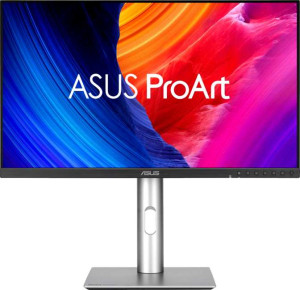
Asus ProArt Display 6K PA32QCV 32"
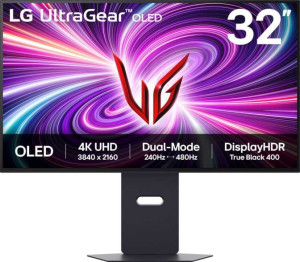
LG UltraGear OLED 32GS95UV-B 32"

Asus ProArt Display 6K PA32QCV 32" LG UltraGear OLED 32GS95UV-B 32"

Common Features

  • Both products have anti-glare coating.
  • Both products have a maximum horizontal viewing angle of 178º.
  • Both products have a maximum vertical viewing angle of 178º.
  • Both products have a matte panel.
  • Both products do not have a glossy panel.
  • Both products do not have a touch screen.
  • Both products support total tilt.
  • Both products have a swivel stand.
  • Both products support VESA mount.
  • Both products support portrait mode.
  • Both products support color calibration.
  • Both products have a 10-bit bit depth.
  • Both products have a 3.5 mm audio jack.
  • Both products have HDMI 2.1.
  • Both products have a USB version of 3.1.
  • Both products have a standby power consumption of 0.5W.
  • Both products have PiP support.
  • Both products have stereo speakers.
  • Both products have an ambient light sensor.

Main Differences

  • The display type on Asus ProArt Display 6K PA32QCV 32″ is IPS, LCD, LED-backlit, while the display type on LG UltraGear OLED 32GS95UV-B 32″ is OLED/AMOLED.
  • The response time is 5 ms on Asus ProArt Display 6K PA32QCV 32″ and 0.03 ms on LG UltraGear OLED 32GS95UV-B 32″.
  • The screen size is 31.5″ on Asus ProArt Display 6K PA32QCV 32″ and 32″ on LG UltraGear OLED 32GS95UV-B 32″.
  • The resolution is 6016 x 3384 px on Asus ProArt Display 6K PA32QCV 32″ and 3840 x 2160 px on LG UltraGear OLED 32GS95UV-B 32″.
  • The pixel density is 218 ppi on Asus ProArt Display 6K PA32QCV 32″ and 139 ppi on LG UltraGear OLED 32GS95UV-B 32″.
  • The adaptive synchronization technology is VESA Adaptive Sync on Asus ProArt Display 6K PA32QCV 32″ and Nvidia G-Sync, AMD FreeSync, Nvidia G-Sync Compatible on LG UltraGear OLED 32GS95UV-B 32″.
  • The refresh rate is 60Hz on Asus ProArt Display 6K PA32QCV 32″ and 240Hz on LG UltraGear OLED 32GS95UV-B 32″.
  • The product type is photo/video editing for Asus ProArt Display 6K PA32QCV 32″ and gaming for LG UltraGear OLED 32GS95UV-B 32″.
  • The EU energy label is G for Asus ProArt Display 6K PA32QCV 32″ and F for LG UltraGear OLED 32GS95UV-B 32″.
  • The height is 419.7 mm on Asus ProArt Display 6K PA32QCV 32″ and 411.8 mm on LG UltraGear OLED 32GS95UV-B 32″.
  • The thickness is 46.9 mm on Asus ProArt Display 6K PA32QCV 32″ and 65 mm on LG UltraGear OLED 32GS95UV-B 32″.
  • The weight is 9300 g on Asus ProArt Display 6K PA32QCV 32″ and 9800 g on LG UltraGear OLED 32GS95UV-B 32″.
  • The volume is 14058.26 cm³ on Asus ProArt Display 6K PA32QCV 32″ and 19114.31 cm³ on LG UltraGear OLED 32GS95UV-B 32″.
  • The brightness (typical) is 400 nits on Asus ProArt Display 6K PA32QCV 32″ and 275 nits on LG UltraGear OLED 32GS95UV-B 32″.
  • The display colors are 1073 million on Asus ProArt Display 6K PA32QCV 32″ and 1070 million on LG UltraGear OLED 32GS95UV-B 32″.
  • The contrast ratio is 1500:1 on Asus ProArt Display 6K PA32QCV 32″ and 1500000:1 on LG UltraGear OLED 32GS95UV-B 32″.
  • The HDMI ports are 1 on Asus ProArt Display 6K PA32QCV 32″ and 2 on LG UltraGear OLED 32GS95UV-B 32″.
  • Thunderbolt support is available on Asus ProArt Display 6K PA32QCV 32″ but not on LG UltraGear OLED 32GS95UV-B 32″.
  • The DisplayPort version is DisplayPort 1.4 on Asus ProArt Display 6K PA32QCV 32″ and DisplayPort 2.1 on LG UltraGear OLED 32GS95UV-B 32″.
  • The USB ports are 9 on Asus ProArt Display 6K PA32QCV 32″ and 0 on LG UltraGear OLED 32GS95UV-B 32″.
  • USB Type-C is available on Asus ProArt Display 6K PA32QCV 32″ but not on LG UltraGear OLED 32GS95UV-B 32″.
  • The operating power consumption is 49.49W on Asus ProArt Display 6K PA32QCV 32″ and 55W on LG UltraGear OLED 32GS95UV-B 32″.
  • The audio output power is 2 x 2W on Asus ProArt Display 6K PA32QCV 32″ and 2 x 7W on LG UltraGear OLED 32GS95UV-B 32″.
Specs Comparison
Asus ProArt Display 6K PA32QCV 32"

Asus ProArt Display 6K PA32QCV 32"

LG UltraGear OLED 32GS95UV-B 32"

LG UltraGear OLED 32GS95UV-B 32"

Display:
Display type IPS, LCD, LED-backlit OLED/AMOLED
response time 5 ms 0.03 ms
screen size 31.5" 32"
resolution 6016 x 3384 px 3840 x 2160 px
pixel density 218 ppi 139 ppi
Adaptive synchronization VESA Adaptive Sync Nvidia G-Sync, AMD FreeSync, Nvidia G-Sync Compatible
has anti-glare coating
refresh rate 60Hz 240Hz
maximum horizontal viewing angle 178º 178º
maximum vertical viewing angle 178º 178º
has a matte panel
has a glossy panel
has a touch screen

The Asus ProArt Display 6K PA32QCV 32″ and the LG UltraGear OLED 32GS95UV-B 32″ differ significantly in display technology and resolution. The Asus uses an IPS LCD panel with LED backlighting, while the LG features an OLED/AMOLED panel. In terms of resolution, the Asus offers 6016 x 3384 px at 218 ppi, whereas the LG provides 3840 x 2160 px at 139 ppi. Both displays have similar physical sizes, with the Asus at 31.5″ and the LG at 32″.

Response time and refresh rate also differ. The Asus has a 5 ms response time and 60Hz refresh rate, compared to the LG's extremely fast 0.03 ms response time and 240Hz refresh rate. Both monitors support adaptive synchronization, but Asus lists VESA Adaptive Sync, while LG supports Nvidia G-Sync, AMD FreeSync, and Nvidia G-Sync Compatible. Horizontal and vertical viewing angles are the same at 178º for both models.

Regarding coatings and panel types, both monitors have anti-glare coatings and matte panels, and neither has a glossy panel or touch screen. Overall, the main differences lie in panel type, resolution, pixel density, response time, refresh rate, and the adaptive sync technologies supported.

General info:
Type Photo/video editing Gaming
release date July 2025 March 2025
EU energy label G F
supports total tilt
Has a swivel stand
Supports VESA mount
height 419.7 mm 411.8 mm
width 714.2 mm 714.1 mm
thickness 46.9 mm 65 mm
weight 9300 g 9800 g
supports portrait mode
volume 14058.262806 cm³ 19114.3147 cm³

The Asus ProArt Display 6K PA32QCV 32″ and the LG UltraGear OLED 32GS95UV-B 32″ are designed with different primary use cases. The Asus is intended for photo and video editing, while the LG is geared towards gaming. Despite these differences, both displays share several common features such as support for tilt adjustments, swivel stands, VESA mounts, and portrait mode.

In terms of physical dimensions, the Asus is slightly taller at 419.7 mm, compared to the LG's 411.8 mm. Both have similar widths at 714.2 mm (Asus) and 714.1 mm (LG). However, the LG is thicker, with a 65 mm depth, compared to the Asus's 46.9 mm. The weight of the LG is also higher at 9800 g, versus the Asus at 9300 g.

When it comes to energy efficiency, the Asus has a better EU energy label of G, while the LG has a rating of F. Additionally, the volume of the Asus is smaller at 14058.26 cm³, while the LG has a larger volume at 19114.31 cm³.

Colors:
brightness (typical) 400 nits 275 nits
supports color calibration
display colors 1073 million 1070 million
bit depth 10-bit 10-bit
contrast ratio 1500:1 1500000:1

The Asus ProArt Display 6K PA32QCV 32″ and the LG UltraGear OLED 32GS95UV-B 32″ both support color calibration, which is important for accurate color representation. However, there are some key differences in their color-related specifications. The Asus offers a typical brightness of 400 nits, while the LG has a lower typical brightness of 275 nits. Both displays feature a 10-bit bit depth, allowing for smooth color transitions.

In terms of display colors, the Asus supports 1073 million colors, slightly more than the LG, which supports 1070 million colors. The contrast ratio also differs significantly: the Asus has a contrast ratio of 1500:1, while the LG boasts a much higher contrast ratio of 1500000:1.

These differences highlight that while both displays are suitable for professional and immersive use, the Asus may provide a brighter, slightly more colorful display, whereas the LG offers a much higher contrast ratio for deeper blacks and enhanced visual detail.

Connectivity:
HDMI ports 1 2
supports Thunderbolt
DisplayPort outputs 1 1
DisplayPort version DisplayPort 1.4 DisplayPort 2.1
has a socket for a 3.5 mm audio jack
has a DVI connector
USB ports 9 0
USB version 3.1 3.1
Has USB Type-C
HDMI version HDMI 2.1 HDMI 2.1
supports Ethernet
supports Wi-Fi
has AirPlay
mini DisplayPort outputs 0 0
has a VGA connector

The Asus ProArt Display 6K PA32QCV 32″ and the LG UltraGear OLED 32GS95UV-B 32″ offer different connectivity options. The Asus includes one HDMI port and supports HDMI 2.1, while the LG has two HDMI ports, also supporting HDMI 2.1. Both displays have one DisplayPort output, but the Asus uses DisplayPort 1.4, while the LG uses the newer DisplayPort 2.1. The Asus also supports Thunderbolt, which the LG does not.

In terms of USB connectivity, the Asus provides 9 USB ports with USB 3.1 support and includes a USB Type-C port, while the LG has no USB ports and lacks USB Type-C support. Both monitors feature a 3.5 mm audio jack and do not include DVI, VGA, or mini DisplayPort connectors.

Neither display supports Ethernet, Wi-Fi, or AirPlay, with both offering similar audio connectivity but different USB and display output options.

Power:
operating power consumption 49.49W 55W
standby power consumption 0.5W 0.5W

Both the Asus ProArt Display 6K PA32QCV 32″ and the LG UltraGear OLED 32GS95UV-B 32″ have low standby power consumption of 0.5W. However, their operating power consumption differs slightly. The Asus has an operating power consumption of 49.49W, while the LG consumes a bit more at 55W.

Overall, the difference in operating power consumption between the two is minimal, with the LG drawing slightly more power during use compared to the Asus.

Features:
has PiP
has stereo speakers
has built-in smart TV
audio output power 2 x 2W 2 x 7W
has a remote control
supports Dolby Digital
supports Dolby Digital Plus
has DTS Surround
has an ambient light sensor
has a front camera

Both the Asus ProArt Display 6K PA32QCV 32″ and the LG UltraGear OLED 32GS95UV-B 32″ include Picture-in-Picture (PiP) functionality and stereo speakers. Neither display has built-in smart TV features or a remote control. Both also lack support for Dolby Digital, Dolby Digital Plus, and DTS Surround. Additionally, neither display has a front camera.

The audio output power, however, differs between the two: the Asus has 2 x 2W audio output, while the LG provides a more powerful 2 x 7W audio output. Both displays are equipped with ambient light sensors, which can help adjust the screen brightness based on the surrounding light conditions.

In terms of features, while the core functionalities are similar, the LG offers more powerful audio output compared to the Asus.

Comparison Summary

This is a specification comparison between the Asus ProArt Display 6K PA32QCV 32″ and the LG UltraGear OLED 32GS95UV-B 32″. Both displays feature a matte panel, support color calibration, and include a 3.5 mm audio jack. The Asus model offers an IPS, LCD, LED-backlit display with a resolution of 6016 x 3384 px, while the LG model features an OLED/AMOLED display with a 3840 x 2160 px resolution. The Asus ProArt Display has a 5 ms response time, compared to the LG UltraGear's ultra-fast 0.03 ms. Additionally, the Asus model operates at 60Hz, while the LG model supports a high 240Hz refresh rate. The LG UltraGear OLED has a higher contrast ratio of 1500000:1 compared to the Asus ProArt's 1500:1.