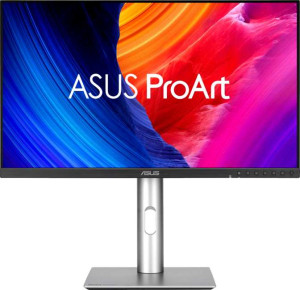
Asus ProArt Display 6K PA32QCV 32"
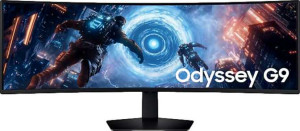
Samsung Odyssey G9 49" (G91F)

Asus ProArt Display 6K PA32QCV 32" Samsung Odyssey G9 49" (G91F)

Common Features

  • Both products have a 178º maximum horizontal viewing angle.
  • Both products have a 178º maximum vertical viewing angle.
  • Neither product has a touch screen.
  • Both products have DisplayPort 1.4.
  • Both products have a 3.5 mm audio jack socket.
  • Both products have HDMI 2.1.
  • Both products support VESA mount.
  • Both products have a 0.5W standby power consumption.
  • Both products support color calibration.
  • Both products support picture-in-picture (PiP).
  • Both products lack built-in smart TV features.
  • Both products lack a remote control.
  • Both products lack support for Dolby Digital.
  • Both products lack support for Dolby Digital Plus.
  • Both products lack DTS Surround.
  • Both products lack a front camera.
  • Both products have a 1 DisplayPort output.
  • Both products have a USB Type-C port.
  • Both products have 1 HDMI port.

Main Differences

  • The Asus ProArt Display 6K PA32QCV 32″ has an IPS, LCD, LED-backlit display, while the Samsung Odyssey G9 49″ (G91F) uses a LED-backlit, LCD, VA display.
  • The response time is 5 ms on the Asus ProArt Display 6K PA32QCV 32″ and 1 ms on the Samsung Odyssey G9 49″ (G91F).
  • The screen size is 31.5″ on the Asus ProArt Display 6K PA32QCV 32″ and 49″ on the Samsung Odyssey G9 49″ (G91F).
  • The resolution is 6016 x 3384 px on the Asus ProArt Display 6K PA32QCV 32″ and 5120 x 1440 px on the Samsung Odyssey G9 49″ (G91F).
  • The pixel density is 218 ppi on the Asus ProArt Display 6K PA32QCV 32″ and 108 ppi on the Samsung Odyssey G9 49″ (G91F).
  • The Asus ProArt Display 6K PA32QCV 32″ supports VESA Adaptive Sync, while the Samsung Odyssey G9 49″ (G91F) supports AMD FreeSync Premium Pro.
  • The Asus ProArt Display 6K PA32QCV 32″ has an anti-glare coating, whereas the Samsung Odyssey G9 49″ (G91F) does not.
  • The refresh rate is 60Hz on the Asus ProArt Display 6K PA32QCV 32″ and 144Hz on the Samsung Odyssey G9 49″ (G91F).
  • The Asus ProArt Display 6K PA32QCV 32″ has a matte panel, while the Samsung Odyssey G9 49″ (G91F) has a glossy panel.
  • The Asus ProArt Display 6K PA32QCV 32″ supports portrait mode, but the Samsung Odyssey G9 49″ (G91F) does not.
  • The Asus ProArt Display 6K PA32QCV 32″ has a height of 419.7 mm, while the Samsung Odyssey G9 49″ (G91F) has a height of 363 mm.
  • The Asus ProArt Display 6K PA32QCV 32″ has a width of 714.2 mm, while the Samsung Odyssey G9 49″ (G91F) has a width of 1147 mm.
  • The thickness is 46.9 mm on the Asus ProArt Display 6K PA32QCV 32″ and 293 mm on the Samsung Odyssey G9 49″ (G91F).
  • The weight is 9300 g on the Asus ProArt Display 6K PA32QCV 32″ and 15600 g on the Samsung Odyssey G9 49″ (G91F).
  • The Asus ProArt Display 6K PA32QCV 32″ has 9 USB ports, while the Samsung Odyssey G9 49″ (G91F) has 3 USB ports.
  • The Asus ProArt Display 6K PA32QCV 32″ supports Thunderbolt, but the Samsung Odyssey G9 49″ (G91F) does not.
  • The Asus ProArt Display 6K PA32QCV 32″ has 1 USB Type-C port, while the Samsung Odyssey G9 49″ (G91F) does not have any.
  • The operating power consumption is 49.49W on the Asus ProArt Display 6K PA32QCV 32″ and 45W on the Samsung Odyssey G9 49″ (G91F).
  • The Asus ProArt Display 6K PA32QCV 32″ has stereo speakers, but the Samsung Odyssey G9 49″ (G91F) does not.
  • The Asus ProArt Display 6K PA32QCV 32″ has an ambient light sensor, while the Samsung Odyssey G9 49″ (G91F) does not.
Specs Comparison
Asus ProArt Display 6K PA32QCV 32"

Asus ProArt Display 6K PA32QCV 32"

Samsung Odyssey G9 49" (G91F)

Samsung Odyssey G9 49" (G91F)

Display:
Display type IPS, LCD, LED-backlit LED-backlit, LCD, VA
response time 5 ms 1 ms
screen size 31.5" 49"
resolution 6016 x 3384 px 5120 x 1440 px
pixel density 218 ppi 108 ppi
Adaptive synchronization VESA Adaptive Sync AMD FreeSync Premium Pro
has anti-glare coating
refresh rate 60Hz 144Hz
maximum horizontal viewing angle 178º 178º
maximum vertical viewing angle 178º 178º
has a matte panel
has a glossy panel
has a touch screen

The Asus ProArt Display 6K PA32QCV 32″ uses an IPS, LED-backlit LCD panel, while the Samsung Odyssey G9 49″ (G91F) features a VA, LED-backlit LCD panel. Both displays have a 178º maximum horizontal and vertical viewing angle, ensuring wide viewing flexibility. However, the Asus display has a matte finish with an anti-glare coating, whereas the Samsung display has a glossy finish and lacks an anti-glare coating, which may affect how reflections are handled in different lighting environments.

In terms of size, the Asus ProArt has a 31.5″ screen, which is smaller than the 49″ ultra-wide screen of the Samsung Odyssey. The resolution also differs: the Asus offers a higher 6016 x 3384 px resolution, giving it a pixel density of 218 ppi, while the Samsung has a 5120 x 1440 px resolution and a lower pixel density of 108 ppi, reflecting the difference in screen size and resolution.

The Asus display has a 60Hz refresh rate, which is lower than the Samsung Odyssey's 144Hz refresh rate, offering smoother motion on the Samsung screen for gaming or fast-moving content. Response time is another key difference: the Asus display has a 5 ms response time, while the Samsung has a faster 1 ms response time. In terms of adaptive synchronization, the Asus supports VESA Adaptive Sync, and the Samsung supports AMD FreeSync Premium Pro, which may offer varying levels of synchronization depending on the user’s GPU.

General info:
Type Photo/video editing Gaming, Curved, Ultrawide
release date July 2025 April 2025
EU energy label G G
supports total tilt
Has a swivel stand
Supports VESA mount
height 419.7 mm 363 mm
width 714.2 mm 1147 mm
thickness 46.9 mm 293 mm
weight 9300 g 15600 g
supports portrait mode
volume 14058.262806 cm³ 121993.773 cm³

The Asus ProArt Display 6K PA32QCV 32″ is designed for photo and video editing, while the Samsung Odyssey G9 49″ (G91F) is geared towards gaming and features a curved, ultrawide display. Both monitors share the same EU energy label of G, indicating their energy efficiency, and they both support total tilt adjustments, have swivel stands, and are compatible with VESA mounts for easy installation.

In terms of size and weight, the Asus ProArt Display is more compact, measuring 419.7 mm in height, 714.2 mm in width, and 46.9 mm in thickness, with a weight of 9300 g. In contrast, the Samsung Odyssey is much larger, standing at 363 mm in height, 1147 mm in width, and 293 mm in thickness, and it weighs 15600 g. This makes the Samsung considerably bulkier and heavier.

One notable difference is the portrait mode support: the Asus ProArt Display supports portrait mode, allowing for versatile display orientation, while the Samsung Odyssey G9 does not. The volume of the two monitors also differs significantly: the Asus has a volume of 14058.26 cm³, while the Samsung has a much larger volume of 121993.77 cm³, which is reflective of its larger screen size and bulkier build.

Colors:
brightness (typical) 400 nits 350 nits
supports color calibration
display colors 1073 million 1070 million
contrast ratio 1500:1 2500:1

The Asus ProArt Display 6K PA32QCV 32″ and the Samsung Odyssey G9 49″ (G91F) both support color calibration, ensuring accurate colors for their respective uses. The Asus display offers a typical brightness of 400 nits, slightly brighter than the Samsung, which has a typical brightness of 350 nits. In terms of display colors, the Asus supports 1073 million colors, while the Samsung supports 1070 million colors, a small difference that may not be immediately noticeable in practical use.

When it comes to contrast ratio, the Samsung Odyssey G9 has a higher ratio of 2500:1, compared to the Asus ProArt's 1500:1. This suggests that the Samsung may produce deeper blacks and a more pronounced difference between light and dark areas on the screen, which could be beneficial for gaming or immersive content. The Asus, however, might offer slightly more consistent brightness and color accuracy for professional creative work.

Overall, both monitors offer excellent color performance, but the Asus excels in brightness and color range, while the Samsung stands out with a higher contrast ratio.

Connectivity:
HDMI ports 1 2
supports Thunderbolt
DisplayPort outputs 1 1
DisplayPort version DisplayPort 1.4 DisplayPort 1.4
has a socket for a 3.5 mm audio jack
has a DVI connector
USB ports 9 3
Has USB Type-C
HDMI version HDMI 2.1 HDMI 2.1
supports Ethernet
supports Wi-Fi
has AirPlay
mini DisplayPort outputs 0 0
has a VGA connector

The Asus ProArt Display 6K PA32QCV 32″ and the Samsung Odyssey G9 49″ (G91F) both offer a range of connectivity options, though there are some differences. The Asus display has 1 HDMI port and 1 DisplayPort 1.4 output, along with 9 USB ports and USB Type-C support. It also features a 3.5 mm audio jack. In comparison, the Samsung Odyssey G9 has 2 HDMI ports, 1 DisplayPort 1.4 output, and 3 USB ports, but lacks USB Type-C support.

Both monitors include a 3.5 mm audio jack, but neither has a DVI connector, mini DisplayPort outputs, or VGA connector. Additionally, neither supports Ethernet, Wi-Fi, or AirPlay. The Asus ProArt Display stands out by supporting Thunderbolt, whereas the Samsung Odyssey does not.

Overall, the Asus ProArt Display provides more USB ports and advanced Thunderbolt support, while the Samsung Odyssey G9 offers more HDMI ports but lacks USB Type-C and Thunderbolt capabilities.

Power:
operating power consumption 49.49W 45W
standby power consumption 0.5W 0.5W

In terms of power consumption, the Asus ProArt Display 6K PA32QCV 32″ has a slightly higher operating power consumption at 49.49W, compared to the Samsung Odyssey G9 49″ (G91F), which consumes 45W during operation. Both monitors have the same standby power consumption of 0.5W, indicating similar energy usage when not actively in use.

Overall, the difference in operating power consumption is minimal, with the Asus drawing slightly more power, likely due to its higher resolution and additional features.

Features:
has PiP
has stereo speakers
has built-in smart TV
has a remote control
supports Dolby Digital
supports Dolby Digital Plus
has DTS Surround
has an ambient light sensor
has a front camera

Both the Asus ProArt Display 6K PA32QCV 32″ and the Samsung Odyssey G9 49″ (G91F) support Picture-in-Picture (PiP), allowing for multitasking with multiple inputs on screen. The Asus display includes stereo speakers, while the Samsung does not, meaning the Asus provides built-in audio while the Samsung requires external speakers for sound output.

Neither monitor features a built-in smart TV, a remote control, Dolby Digital or Dolby Digital Plus support, or DTS Surround sound. Additionally, both displays lack a front camera. However, the Asus ProArt Display does have an ambient light sensor, which the Samsung Odyssey G9 does not, potentially providing automatic brightness adjustments based on the surrounding lighting conditions.

In summary, while both monitors offer PiP and lack certain entertainment-focused features like Dolby support, the Asus ProArt Display includes stereo speakers and an ambient light sensor, which the Samsung Odyssey G9 lacks.

Comparison Summary

This is a specification comparison between the Asus ProArt Display 6K PA32QCV 32″ and the Samsung Odyssey G9 49″ (G91F). Both displays share a 178º maximum horizontal and vertical viewing angle and have a 3.5 mm audio jack socket. The Asus ProArt Display 6K PA32QCV 32″ features an IPS, LCD, LED-backlit display, while the Samsung Odyssey G9 49″ (G91F) uses a VA panel with LED-backlighting. The Asus ProArt Display 6K PA32QCV 32″ has a higher pixel density of 218 ppi compared to 108 ppi on the Samsung Odyssey G9 49″ (G91F). Additionally, the refresh rate is 60Hz on the Asus model and 144Hz on the Samsung model. The Asus ProArt Display 6K PA32QCV 32″ also supports portrait mode, unlike the Samsung Odyssey G9 49″ (G91F). Lastly, the operating power consumption is slightly higher on the Asus model at 49.49W compared to 45W on the Samsung model.