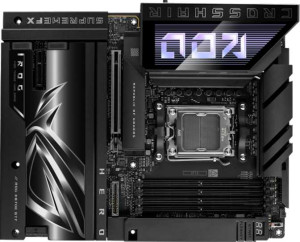
Asus ROG Crosshair X870E Hero BTF
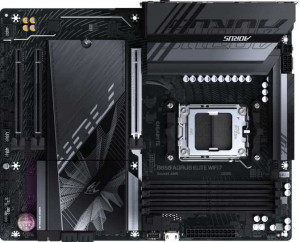
Gigabyte B850 Aorus Elite WiFi7

Asus ROG Crosshair X870E Hero BTF Gigabyte B850 Aorus Elite WiFi7

Overview

Welcome to our in-depth spec comparison between the Asus ROG Crosshair X870E Hero BTF and the Gigabyte B850 Aorus Elite WiFi7, two compelling AM5 motherboards targeting different tiers of the AMD platform. Both boards share a strong connectivity foundation, but key battlegrounds emerge around chipset capability, rear port selection, M.2 storage capacity, and expansion slot flexibility. Read on to see which board best suits your build goals.

Common Features

  • Both products use the AM5 CPU socket.
  • Both products have an ATX form factor.
  • Wi-Fi is supported on both products, covering Wi-Fi 4, Wi-Fi 5, Wi-Fi 6, Wi-Fi 6E, and Wi-Fi 7.
  • Bluetooth 5.4 is present on both products.
  • Overclocking support is available on both products.
  • RGB lighting is present on both products.
  • Both products support up to 256GB of maximum memory.
  • Both products support an overclocked RAM speed of up to 8200 MHz.
  • Both products have 4 memory slots.
  • Both products use DDR5 memory.
  • Both products have 2 memory channels.
  • ECC memory is not supported on either product.
  • Neither product has USB 3.2 Gen 1 ports (USB-C) on the rear.
  • Neither product has USB 3.2 Gen 2x2 ports on the rear.
  • Neither product has USB 4 20Gbps ports.
  • Neither product has Thunderbolt 3 ports.
  • USB Type-C connectivity is available on both products.
  • Neither product has eSATA ports, DVI outputs, or a VGA connector.
  • Both products have 4 USB 2.0 ports through expansion and 4 SATA 3 connectors.
  • Both products have 6 fan headers.
  • mSATA connectors are not present on either product.
  • Neither product has U.2 sockets or SATA 2 connectors.
  • Both products have 1 PCIe 5.0 x16 slot.
  • Neither product has PCIe 3.0 x16, PCIe 2.0 x16, PCI, PCIe x4, or PCIe x8 slots.
  • Both products support 7.1 audio channels.
  • An S/PDIF Out port is present on both products.
  • Both products have 2 audio connectors.
  • Both products support RAID 0, RAID 1, RAID 5, and RAID 10.
  • RAID 0+1 is not supported on either product.

Main Differences

  • The chipset is X870 on the Asus ROG Crosshair X870E Hero BTF and B850 on the Gigabyte B850 Aorus Elite WiFi7.
  • Easy BIOS reset is supported on the Asus ROG Crosshair X870E Hero BTF but not available on the Gigabyte B850 Aorus Elite WiFi7.
  • USB 3.2 Gen 2 ports (USB-A) count is 6 on the Asus ROG Crosshair X870E Hero BTF and 2 on the Gigabyte B850 Aorus Elite WiFi7.
  • USB 3.2 Gen 1 ports (USB-A) count is 0 on the Asus ROG Crosshair X870E Hero BTF and 5 on the Gigabyte B850 Aorus Elite WiFi7.
  • USB 3.2 Gen 2 ports (USB-C) count is 2 on the Asus ROG Crosshair X870E Hero BTF and 1 on the Gigabyte B850 Aorus Elite WiFi7.
  • USB 2.0 rear ports count is 0 on the Asus ROG Crosshair X870E Hero BTF and 4 on the Gigabyte B850 Aorus Elite WiFi7.
  • USB 4 40Gbps ports are available on the Asus ROG Crosshair X870E Hero BTF (2 ports) but absent on the Gigabyte B850 Aorus Elite WiFi7.
  • Thunderbolt 4 ports are present on the Asus ROG Crosshair X870E Hero BTF (2 ports) but not available on the Gigabyte B850 Aorus Elite WiFi7.
  • An HDMI output is present on the Asus ROG Crosshair X870E Hero BTF but not available on the Gigabyte B850 Aorus Elite WiFi7.
  • DisplayPort outputs count is 0 on the Asus ROG Crosshair X870E Hero BTF and 1 on the Gigabyte B850 Aorus Elite WiFi7.
  • RJ45 ports count is 2 on the Asus ROG Crosshair X870E Hero BTF and 1 on the Gigabyte B850 Aorus Elite WiFi7.
  • USB 3.2 Gen 1 ports through expansion count is 4 on the Asus ROG Crosshair X870E Hero BTF and 2 on the Gigabyte B850 Aorus Elite WiFi7.
  • USB 3.2 Gen 2x2 ports through expansion count is 2 on the Asus ROG Crosshair X870E Hero BTF and 1 on the Gigabyte B850 Aorus Elite WiFi7.
  • USB 3.0 ports through expansion count is 4 on the Asus ROG Crosshair X870E Hero BTF and 2 on the Gigabyte B850 Aorus Elite WiFi7.
  • M.2 sockets count is 5 on the Asus ROG Crosshair X870E Hero BTF and 3 on the Gigabyte B850 Aorus Elite WiFi7.
  • A TPM connector is present on the Gigabyte B850 Aorus Elite WiFi7 but not available on the Asus ROG Crosshair X870E Hero BTF.
  • A PCIe 4.0 x16 slot is present on the Asus ROG Crosshair X870E Hero BTF but absent on the Gigabyte B850 Aorus Elite WiFi7.
  • PCIe x1 slots count is 0 on the Asus ROG Crosshair X870E Hero BTF and 2 on the Gigabyte B850 Aorus Elite WiFi7.
Specs Comparison
Asus ROG Crosshair X870E Hero BTF

Asus ROG Crosshair X870E Hero BTF

Gigabyte B850 Aorus Elite WiFi7

Gigabyte B850 Aorus Elite WiFi7

General info:
CPU socket AM5 AM5
chipset X870 B850
form factor ATX ATX
release date August 2025 January 2025
supports Wi-Fi
Wi-Fi version Wi-Fi 4 (802.11n), Wi-Fi 5 (802.11ac), Wi-Fi 6 (802.11ax), Wi-Fi 6E (802.11ax), Wi-Fi 7 (802.11be) Wi-Fi 4 (802.11n), Wi-Fi 5 (802.11ac), Wi-Fi 6 (802.11ax), Wi-Fi 6E (802.11ax), Wi-Fi 7 (802.11be)
Has Bluetooth
Bluetooth version 5.4 5.4
Easy to overclock
has RGB lighting
Easy to reset BIOS
Has dual BIOS
has aptX
CPU sockets 1 1
Has integrated graphics
warranty period 3 years 3 years
height 244 mm 244 mm
width 305 mm 305 mm
Has integrated CPU

At a foundational level, both boards share a remarkably similar profile: identical ATX form factor, the same AM5 socket, matching dimensions (244 × 305 mm), identical wireless connectivity up to Wi-Fi 7 (802.11be) and Bluetooth 5.4, a 3-year warranty, dual BIOS, and RGB lighting. For buyers focused purely on platform compatibility or wireless capability, these two boards are effectively tied — neither offers anything the other does not in those areas.

The most significant general differentiator is the chipset. The Asus ROG Crosshair X870E Hero BTF runs AMD's flagship X870 chipset, while the Gigabyte B850 Aorus Elite WiFi7 uses the mid-range B850. In practice, this matters most for users who need maximum PCIe lane availability, USB bandwidth headroom, and more granular control over memory and CPU tuning — areas where X870 has architectural advantages by design. That said, both boards are listed as easy to overclock, so casual tuners are not locked out on the B850 side.

A smaller but notable practical edge goes to the Asus: it supports easy BIOS reset, while the Gigabyte does not. This is a quality-of-life feature that matters most during overclocking experiments or system troubleshooting, where a failed POST can otherwise become a frustrating recovery process. Overall, the Asus ROG Crosshair X870E Hero BTF holds a clear advantage in this group — both through its higher-tier chipset and its more recovery-friendly BIOS handling — making it the stronger choice for power users and enthusiasts.
Memory:
maximum memory amount 256GB 256GB
overclocked RAM speed 8200 MHz 8200 MHz
memory slots 4 4
DDR memory version 5 5
memory channels 2 2
Supports ECC memory

When it comes to memory, these two boards are in complete lockstep. Both support DDR5 with 4 slots, a maximum capacity of 256GB, dual-channel architecture, and a peak overclocked speed of 8200 MHz — leaving no daylight between them on any measurable spec in this category.

The shared ceiling of 8200 MHz is worth contextualizing: that puts both boards squarely in high-performance DDR5 territory, well beyond the standard JEDEC speeds most kits ship at. For users who invest in fast DDR5 kits and want to push memory clocks via EXPO or XMP profiles, neither board imposes an artificial limit over the other. The dual-channel setup, standard for consumer AM5 platforms, ensures healthy bandwidth for gaming, content creation, and general workloads alike. The 256GB ceiling is also generous enough to satisfy even demanding professional use cases.

This group is a straight tie. Every memory specification listed is identical across both boards, so memory capability alone gives buyers no reason to favor one over the other. The decision will need to rest on other specification groups.

Ports:
USB 3.2 Gen 2 ports (USB-A) 6 2
USB 3.2 Gen 1 ports (USB-A) 0 5
USB 3.2 Gen 2 ports (USB-C) 2 1
USB 3.2 Gen 1 ports (USB-C) 0 0
USB 2.0 ports 0 4
USB 3.2 Gen 2x2 ports 0 0
USB 4 40Gbps ports 2 0
USB 4 20Gbps ports 0 0
Thunderbolt 4 ports 2 0
Thunderbolt 3 ports 0 0
has an HDMI output
DisplayPort outputs 0 1
RJ45 ports 2 1
Has USB Type-C
eSATA ports 0 0
DVI outputs 0 0
has a VGA connector
PS/2 ports 0 0

The port selection is where the gap between these two boards becomes impossible to ignore. The Asus ROG Crosshair X870E Hero BTF arrives with a dramatically more capable rear I/O: 2 USB4 40Gbps ports, 2 Thunderbolt 4 ports, 6 USB 3.2 Gen 2 Type-A ports, and 2 USB 3.2 Gen 2 Type-C ports. The Gigabyte B850 Aorus Elite WiFi7, by contrast, offers no USB4 or Thunderbolt connectivity at all, and leans more heavily on older-generation ports — including 5 USB 3.2 Gen 1 and 4 USB 2.0 ports — which top out at 5Gbps and 480Mbps respectively.

The practical implications here are significant. Thunderbolt 4 and USB4 40Gbps enable use cases like external GPU enclosures, ultra-fast NVMe docks, and daisy-chaining high-resolution displays — none of which are possible on the Gigabyte. The Asus also wins on networking with dual RJ45 ports (enabling link aggregation or dedicated LAN connections for separate devices), versus a single port on the Gigabyte. For display output, the boards diverge again: the Asus offers HDMI while the Gigabyte provides a DisplayPort output instead — a distinction that matters depending on which monitors or TVs a user needs to connect to the iGPU fallback.

The Asus ROG Crosshair X870E Hero BTF wins this group decisively. Its port roster is faster, more versatile, and more future-proof across nearly every category, making it the clear choice for users with demanding peripheral setups, high-speed storage, or professional connectivity needs.

Connectors:
USB 3.2 Gen 1 ports (through expansion) 4 2
USB 3.2 Gen 2x2 ports (through expansion) 2 1
USB 2.0 ports (through expansion) 4 4
SATA 3 connectors 4 4
fan headers 6 6
USB 3.0 ports (through expansion) 4 2
M.2 sockets 5 3
Has TPM connector
U.2 sockets 0 0
Has mSATA connector
SATA 2 connectors 0 0

Storage expandability tells a clear story here. The Asus ROG Crosshair X870E Hero BTF offers 5 M.2 sockets versus just 3 on the Gigabyte B850 Aorus Elite WiFi7 — a meaningful difference for users building NAS-adjacent workstations, high-speed scratch drive setups, or simply anyone who wants to avoid relying on SATA for secondary storage. Both boards provide 4 SATA 3 connectors, so traditional drive arrays are equally supported, but the M.2 advantage firmly belongs to the Asus.

Internal USB expansion follows the same pattern. The Asus provides more headers for routing USB ports through a case front panel or add-in card, including 2 USB 3.2 Gen 2x2 internal connectors versus the Gigabyte's single one — relevant for users with high-speed front-panel USB-C ports on their chassis. Fan headers are tied at 6 on both boards, which is adequate for most builds with multi-fan cooling setups. One area where the Gigabyte counters is its inclusion of a TPM connector, absent on the Asus — a consideration for enterprise or security-conscious users who rely on discrete TPM modules for drive encryption or secure boot workflows.

On balance, the Asus ROG Crosshair X870E Hero BTF edges ahead in this group, primarily due to its significantly larger M.2 count and broader internal USB expansion. The Gigabyte's TPM connector is a genuine advantage in specific use cases, but for the majority of enthusiast and prosumer builders, more M.2 slots carry greater day-to-day relevance.

Expansion slots:
PCIe 4.0 x16 slots 1 0
PCIe 5.0 x16 slots 1 1
PCIe 3.0 x16 slots 0 0
PCIe x1 slots 0 2
PCI slots 0 0
PCIe 2.0 x16 slots 0 0
PCIe x4 slots 0 0
PCIe x8 slots 0 0

Both boards lead with a single PCIe 5.0 x16 slot for the primary GPU — the expected configuration for a modern AM5 platform and sufficient for even the most demanding discrete graphics cards available today. Beyond that shared foundation, however, their expansion philosophies diverge. The Asus ROG Crosshair X870E Hero BTF adds a second slot in the form of a PCIe 4.0 x16, while the Gigabyte B850 Aorus Elite WiFi7 instead provides 2 PCIe x1 slots with no second full-bandwidth slot.

The real-world implications depend heavily on the user's intended build. The Asus's additional PCIe 4.0 x16 slot opens the door to a second discrete GPU, a high-bandwidth capture card, a 10GbE NIC, or any other add-in card that benefits from x16 physical bandwidth — significantly more headroom than a x1 slot can offer. The Gigabyte's two x1 slots are more suited to modest expansion needs like a basic sound card or a low-end wireless adapter, but they cannot serve the same role as a full x16 lane slot for bandwidth-hungry peripherals.

The Asus takes this group. For users who plan to go beyond a single GPU or need robust PCIe expansion, a second PCIe 4.0 x16 slot is a meaningfully more capable offering than two x1 slots. The Gigabyte's configuration is perfectly functional for single-GPU builds with light peripheral expansion, but it leaves less room to grow.

Audio:
audio channels 7.1 7.1
Has S/PDIF Out port
audio connectors 2 2

Audio is another category where both boards land on exactly the same footing. Each supports 7.1-channel surround sound output, includes an S/PDIF optical output for connecting to external DACs or AV receivers, and offers 2 audio connectors on the rear I/O. There is no differentiator to analyze here — the spec sheet is a mirror image.

The 7.1 configuration is worth noting for buyers coming from budget boards: it supports full surround sound setups without requiring a discrete sound card, which covers the majority of gaming headsets, speaker systems, and home theater configurations. The S/PDIF out adds flexibility for users who prefer to handle digital-to-analog conversion through dedicated external hardware for cleaner signal quality.

This group is a complete tie. Neither board offers anything in audio that the other does not, so sound requirements should play no part in choosing between them. Users with more demanding audio needs — such as studio-grade output — would likely be looking at a dedicated sound card regardless of which board they choose.

Storage:
Supports RAID 1
Supports RAID 10 (1+0)
Supports RAID 5
Supports RAID 0
Supports RAID 0+1

RAID support is identical across both boards. Each covers the four configurations that matter most for consumer and prosumer use: RAID 0 for striped performance, RAID 1 for mirrored redundancy, RAID 5 for parity-based fault tolerance with usable capacity, and RAID 10 for a combined stripe-and-mirror setup. Neither board supports RAID 0+1, though in practice this omission is inconsequential — RAID 10 is the functionally superior alternative and the more commonly implemented standard.

Having RAID 5 available is worth highlighting for users building small file servers or workstations where data integrity matters but capacity efficiency is also a concern. It requires at least three drives and allows one to fail without data loss, making it a practical middle ground between raw redundancy and storage utilization. That said, both boards are equally equipped to support this and every other listed configuration.

This group is a straight tie — no differentiation exists between the two boards on any RAID metric provided. Buyers prioritizing storage redundancy or performance array setups will find no reason to prefer one over the other based on this data alone.

Comparison Summary & Verdict

After examining every specification, these two boards serve clearly distinct audiences. The Asus ROG Crosshair X870E Hero BTF stands out for power users and enthusiasts who demand the most from their system: its 5 M.2 sockets, dual USB 4 40Gbps and Thunderbolt 4 ports, 6 USB 3.2 Gen 2 Type-A rear ports, dual RJ45 LAN, PCIe 4.0 x16 slot, and easy BIOS reset capability make it a top-tier choice for demanding workstation and gaming builds. The Gigabyte B850 Aorus Elite WiFi7, on the other hand, offers a more accessible and balanced package: its B850 chipset keeps costs in check while still delivering solid connectivity, a TPM connector, 2 PCIe x1 slots, and a DisplayPort output on the rear panel. Both boards share identical memory support, audio, RAID options, and Wi-Fi 7, making either a capable daily driver depending on your priorities.

Asus ROG Crosshair X870E Hero BTF
Buy Asus ROG Crosshair X870E Hero BTF if...

Buy the Asus ROG Crosshair X870E Hero BTF if you need maximum connectivity with Thunderbolt 4, USB 4 40Gbps ports, 5 M.2 sockets, dual LAN, and a PCIe 4.0 x16 slot for a high-end enthusiast or workstation build.

Gigabyte B850 Aorus Elite WiFi7
Buy Gigabyte B850 Aorus Elite WiFi7 if...

Buy the Gigabyte B850 Aorus Elite WiFi7 if you want a capable and well-rounded B850-based board that includes a TPM connector, PCIe x1 slots, and a rear DisplayPort output at a more mainstream price point.