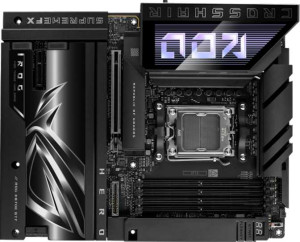
Asus ROG Crosshair X870E Hero BTF
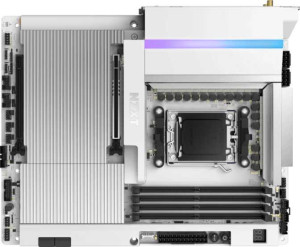
NZXT N9 X870E

Asus ROG Crosshair X870E Hero BTF NZXT N9 X870E

Overview

Welcome to our detailed spec comparison between the Asus ROG Crosshair X870E Hero BTF and the NZXT N9 X870E, two high-end AM5 motherboards built on the X870 chipset. Both boards share a strong foundation of Wi-Fi 7, Bluetooth 5.4, and PCIe 5.0 support, but diverge meaningfully when it comes to connectivity options, expansion potential, and advanced features. Read on to see which board best suits your build.

Common Features

  • Both boards use the AM5 CPU socket.
  • Both boards feature the X870 chipset.
  • Both boards have an ATX form factor.
  • Wi-Fi is supported on both boards.
  • Both boards support Wi-Fi 4 (802.11n), Wi-Fi 5 (802.11ac), Wi-Fi 6 (802.11ax), Wi-Fi 6E (802.11ax), and Wi-Fi 7 (802.11be).
  • Bluetooth is present on both boards, with version 5.4.
  • Both boards support overclocking.
  • Both boards have 4 memory slots.
  • Both boards use DDR5 memory.
  • Both boards have 2 memory channels.
  • ECC memory is not supported on either board.
  • Neither board has any USB 3.2 Gen 1 Type-C ports.
  • Neither board has any USB 3.2 Gen 2x2 ports on the rear panel.
  • Both boards include 2 USB 4 40Gbps ports.
  • Both boards include 2 Thunderbolt 4 ports.
  • Neither board has any DisplayPort outputs.
  • USB Type-C connectivity is present on both boards.
  • Both boards provide 4 USB 3.2 Gen 1 ports through expansion headers.
  • Both boards provide 4 USB 2.0 ports through expansion headers.
  • Both boards have 4 SATA 3 connectors.
  • Neither board has a TPM connector.
  • Neither board includes an mSATA connector.
  • Neither board has any SATA 2 connectors.
  • Both boards have 1 PCIe 5.0 x16 slot.
  • Neither board includes any PCIe x1, PCIe x4, PCIe x8, or PCI slots.
  • Both boards have a 130 dB signal-to-noise ratio on the DAC.
  • Both boards support 7.1 audio channels.
  • Both boards include an S/PDIF Out port.
  • Both boards have 2 audio connectors.
  • Both boards support RAID 0, RAID 1, and RAID 10 (1+0).
  • RAID 0+1 is not supported on either board.

Main Differences

  • Dual BIOS is present on the Asus ROG Crosshair X870E Hero BTF but not available on the NZXT N9 X870E.
  • Maximum memory capacity is 256GB on the Asus ROG Crosshair X870E Hero BTF and 192GB on the NZXT N9 X870E.
  • USB 3.2 Gen 2 Type-A ports number 6 on the Asus ROG Crosshair X870E Hero BTF and 5 on the NZXT N9 X870E.
  • USB 3.2 Gen 1 Type-A ports number 0 on the Asus ROG Crosshair X870E Hero BTF and 3 on the NZXT N9 X870E.
  • USB 3.2 Gen 2 Type-C ports number 2 on the Asus ROG Crosshair X870E Hero BTF and 0 on the NZXT N9 X870E.
  • USB 2.0 ports number 0 on the Asus ROG Crosshair X870E Hero BTF and 2 on the NZXT N9 X870E.
  • An HDMI output is present on the Asus ROG Crosshair X870E Hero BTF but not available on the NZXT N9 X870E.
  • RJ45 ports number 2 on the Asus ROG Crosshair X870E Hero BTF and 1 on the NZXT N9 X870E.
  • USB 3.2 Gen 2x2 ports through expansion number 2 on the Asus ROG Crosshair X870E Hero BTF and 1 on the NZXT N9 X870E.
  • Fan headers number 6 on the Asus ROG Crosshair X870E Hero BTF and 4 on the NZXT N9 X870E.
  • M.2 sockets number 5 on the Asus ROG Crosshair X870E Hero BTF and 4 on the NZXT N9 X870E.
  • A PCIe 4.0 x16 slot is present on the Asus ROG Crosshair X870E Hero BTF but absent on the NZXT N9 X870E.
  • A PCIe 3.0 x16 slot is present on the NZXT N9 X870E but absent on the Asus ROG Crosshair X870E Hero BTF.
  • RAID 5 support is available on the Asus ROG Crosshair X870E Hero BTF but not on the NZXT N9 X870E.
Specs Comparison
Asus ROG Crosshair X870E Hero BTF

Asus ROG Crosshair X870E Hero BTF

NZXT N9 X870E

NZXT N9 X870E

General info:
CPU socket AM5 AM5
chipset X870 X870
form factor ATX ATX
release date August 2025 March 2025
supports Wi-Fi
Wi-Fi version Wi-Fi 4 (802.11n), Wi-Fi 5 (802.11ac), Wi-Fi 6 (802.11ax), Wi-Fi 6E (802.11ax), Wi-Fi 7 (802.11be) Wi-Fi 4 (802.11n), Wi-Fi 5 (802.11ac), Wi-Fi 6 (802.11ax), Wi-Fi 6E (802.11ax), Wi-Fi 7 (802.11be)
Has Bluetooth
Bluetooth version 5.4 5.4
Easy to overclock
has RGB lighting
Easy to reset BIOS
Has dual BIOS
has aptX
CPU sockets 1 1
Has integrated graphics
warranty period 3 years 3 years
height 244 mm 244 mm
width 305 mm 305 mm
Has integrated CPU

At the platform level, the Asus ROG Crosshair X870E Hero BTF and the NZXT N9 X870E are built on identical foundations: both use the AM5 socket with the X870 chipset, adopt the standard ATX form factor (244 × 305 mm), and include full Wi-Fi 7 support alongside Bluetooth 5.4. Both boards are also rated easy to overclock and easy to reset the BIOS, include RGB lighting, and carry a 3-year warranty. For the vast majority of general-use and gaming build criteria, these two boards are functionally equivalent out of the box.

The one meaningful differentiator in this group is dual BIOS: the ROG Crosshair X870E Hero BTF has it, the NZXT N9 X870E does not. Dual BIOS means a secondary firmware chip acts as a hardware-level failsafe — if a BIOS flash goes wrong or corruption occurs, the board can automatically recover without user intervention or specialized tools. For enthusiasts who frequently update firmware or push overclocking limits, this is a genuine safety net rather than a marketing checkbox.

Edge: Asus ROG Crosshair X870E Hero BTF, strictly on the basis of dual BIOS. In a group where both boards are otherwise spec-for-spec identical, that single feature gives the Asus a tangible reliability advantage for users who tinker with firmware. Builders who plan to leave BIOS updates to a minimum will find the two boards effectively tied on all general specifications.

Memory:
maximum memory amount 256GB 192GB
memory slots 4 4
DDR memory version 5 5
memory channels 2 2
Supports ECC memory

Both boards share the same physical memory architecture: 4 DIMM slots, dual-channel DDR5, and no ECC support — meaning the memory configuration experience will feel identical during a build. The real distinction emerges at the ceiling: the ROG Crosshair X870E Hero BTF supports up to 256 GB of RAM, while the NZXT N9 X870E tops out at 192 GB.

In practical terms, 192 GB across 4 slots implies a maximum of 48 GB per DIMM, whereas 256 GB implies support for 64 GB modules. For the overwhelming majority of gaming and mainstream workstation builds using 16 GB or 32 GB sticks, neither ceiling is ever approached. However, for memory-intensive professional workloads — video editing with large raw footage buffers, virtual machine stacking, or in-memory databases — that extra 64 GB of headroom on the Asus could be the difference between a board that scales with future needs and one that hits a wall.

Edge: Asus ROG Crosshair X870E Hero BTF. With a higher maximum memory capacity and an otherwise identical memory subsystem, the Asus holds a forward-looking advantage for power users and content creators. Gamers and general builders will never notice the difference, but anyone planning to maximize RAM well into the future should factor this gap into their decision.

Ports:
USB 3.2 Gen 2 ports (USB-A) 6 5
USB 3.2 Gen 1 ports (USB-A) 0 3
USB 3.2 Gen 2 ports (USB-C) 2 0
USB 3.2 Gen 1 ports (USB-C) 0 0
USB 2.0 ports 0 2
USB 3.2 Gen 2x2 ports 0 0
USB 4 40Gbps ports 2 2
USB 4 20Gbps ports 0 0
Thunderbolt 4 ports 2 2
Thunderbolt 3 ports 0 0
has an HDMI output
DisplayPort outputs 0 0
RJ45 ports 2 1
Has USB Type-C
eSATA ports 0 0
DVI outputs 0 0
has a VGA connector
PS/2 ports 0 0

Where these two boards diverge most sharply is in the quality and modernity of their USB ecosystems. The ROG Crosshair X870E Hero BTF goes all-in on high-speed connectivity — every USB-A and USB-C port runs at Gen 2 (10 Gbps) or faster, with two USB-C Gen 2 ports rounding out a rear I/O that has zero legacy bandwidth bottlenecks. The NZXT N9 X870E, by contrast, mixes in 3 USB-A Gen 1 (5 Gbps) and 2 USB 2.0 ports alongside its faster connections — older standards that cap out at speeds more appropriate for mice and keyboards than modern storage or peripherals. Critically, the NZXT offers no USB-C ports at the rear whatsoever, which is a notable omission given how many current devices rely on USB-C.

Both boards match on their headline connectivity: 2× USB 4 40 Gbps and 2× Thunderbolt 4 ports give each the same top-tier bandwidth ceiling for fast NVMe enclosures, docks, and displays. But the Asus pulls further ahead in two additional areas: it includes an HDMI output (useful with APUs or for quick display connections) that the NZXT lacks entirely, and it doubles up on RJ45 Ethernet ports versus the NZXT's single port — a meaningful advantage for users running NAS connections, dual-network setups, or 2.5G + 10G simultaneously.

Edge: Asus ROG Crosshair X870E Hero BTF, and it is not particularly close. The Asus delivers a more modern, higher-bandwidth rear I/O with USB-C presence, no legacy USB dragging down the port count, an HDMI output, and dual Ethernet. The NZXT's inclusion of USB 2.0 and Gen 1 ports feels out of place at this price tier and limits its appeal for users who want a clean, future-facing connectivity suite.
Connectors:
USB 3.2 Gen 1 ports (through expansion) 4 4
USB 3.2 Gen 2x2 ports (through expansion) 2 1
USB 2.0 ports (through expansion) 4 4
SATA 3 connectors 4 4
fan headers 6 4
USB 3.0 ports (through expansion) 4 4
M.2 sockets 5 4
Has TPM connector
U.2 sockets 0 0
Has mSATA connector
SATA 2 connectors 0 0

Internal connectivity tells a similar story to the rear I/O: the ROG Crosshair X870E Hero BTF offers more expansion headroom across the board. The most impactful gap is in M.2 sockets — the Asus provides 5 versus the NZXT N9 X870E's 4. At a time when NVMe SSDs dominate storage builds and users increasingly run dedicated drives for OS, games, and creative projects simultaneously, that extra M.2 slot is a genuine future-proofing advantage rather than a paper spec.

Fan header count is another practical differentiator. The Asus ships with 6 fan headers compared to the NZXT's 4, which matters in builds with high airflow demands — multiple case fans, pump headers for custom loops, or AIO radiator fans can quickly exhaust a 4-header board and force the use of splitters, adding complexity and reducing per-fan control granularity. The Asus also edges out the NZXT with 2 USB 3.2 Gen 2x2 internal headers versus 1, offering greater bandwidth for front-panel USB-C connections on supported cases. SATA 3 connectors and USB expansion headers are identical across both boards.

Edge: Asus ROG Crosshair X870E Hero BTF. The additional M.2 slot, extra fan headers, and second Gen 2x2 internal connector collectively paint a picture of a board designed with more demanding, expansion-heavy builds in mind. The NZXT N9 X870E's connector spec is respectable for mainstream builds, but users planning multi-drive NVMe arrays or complex cooling setups will find the Asus the more capable platform.

Expansion slots:
PCIe 4.0 x16 slots 1 0
PCIe 5.0 x16 slots 1 1
PCIe 3.0 x16 slots 0 1
PCIe x1 slots 0 0
PCI slots 0 0
PCIe 2.0 x16 slots 0 0
PCIe x4 slots 0 0
PCIe x8 slots 0 0

Both boards lead with a single PCIe 5.0 x16 slot as the primary GPU lane — the current gold standard for discrete graphics cards, delivering up to 128 GB/s of bandwidth and ensuring full compatibility with today's and tomorrow's high-end GPUs. Neither board will bottleneck a modern graphics card in this primary slot, so for single-GPU gaming builds the two are effectively equal at the top.

The divergence comes in the secondary x16 slot, which is where the choice of generation has real implications for multi-device builds. The ROG Crosshair X870E Hero BTF pairs its PCIe 5.0 slot with a PCIe 4.0 x16 secondary, while the NZXT N9 X870E drops to a PCIe 3.0 x16. In practice, this secondary slot is most commonly used for capture cards, high-speed networking cards, or secondary GPUs for compute workloads — not another gaming card. For capture cards and most add-in cards, PCIe 3.0 is entirely sufficient. However, for bandwidth-hungry secondary devices like 100 GbE NICs or GPU compute cards, the Asus's PCIe 4.0 secondary slot provides meaningfully more headroom.

Edge: Asus ROG Crosshair X870E Hero BTF, narrowly. For the overwhelming majority of single-GPU builds the two boards are indistinguishable. But for users who plan to populate that secondary slot with a bandwidth-sensitive device, the generational gap between PCIe 4.0 and PCIe 3.0 gives the Asus a tangible and future-proof advantage.

Audio:
Signal-to-Noise ratio (DAC) 130 dB 130 dB
audio channels 7.1 7.1
Has S/PDIF Out port
audio connectors 2 2

Audio is the rare category where these two boards arrive at a complete dead heat. Both the ROG Crosshair X870E Hero BTF and the NZXT N9 X870E deliver a 130 dB signal-to-noise ratio from their DACs, support 7.1 channel surround output, include an S/PDIF optical out port for connecting to external receivers or DACs, and offer the same number of analog audio connectors.

A 130 dB SNR is a strong figure for onboard audio — it sits at the upper end of what integrated motherboard codecs typically achieve, meaning background noise and interference are kept well below audible thresholds. In practical listening terms, this translates to clean headphone output and accurate speaker reproduction without the need for a dedicated sound card in most use cases. The S/PDIF output further extends both boards' compatibility with home theater systems and external DAC/amp setups that bypass the onboard analog stage entirely.

Verdict: Tied. Every measurable audio specification is identical across both boards. The audio subsystem should play no role in differentiating these two products for any buyer.

Storage:
Supports RAID 1
Supports RAID 10 (1+0)
Supports RAID 5
Supports RAID 0
Supports RAID 0+1

RAID support is largely consistent across both boards, with RAID 0, 1, and 10 available on each — covering the most commonly used configurations for performance striping, mirroring, and combined redundancy. The single point of difference is RAID 5: the ROG Crosshair X870E Hero BTF supports it, the NZXT N9 X870E does not.

RAID 5 is a distributed parity configuration that stripes data across three or more drives while maintaining fault tolerance against a single drive failure — all without sacrificing as much total capacity as RAID 1 mirroring. It has historically been a preferred choice for small NAS-style setups and workstation storage arrays where balancing usable capacity, read performance, and redundancy matters. Its absence on the NZXT narrows that board's storage configuration options for users running multi-drive arrays with those priorities in mind.

Edge: Asus ROG Crosshair X870E Hero BTF. For gamers and mainstream builders who will never venture beyond RAID 0 or 1, this distinction is irrelevant. But for power users managing multi-drive storage pools where RAID 5's capacity efficiency is a factor, the Asus is the only option here that covers that use case.

Comparison Summary & Verdict

Both the Asus ROG Crosshair X870E Hero BTF and the NZXT N9 X870E are compelling X870-based ATX motherboards that share a strong feature set, including Wi-Fi 7, Bluetooth 5.4, dual USB 4 40Gbps ports, and 7.1 audio with a 130 dB SNR. However, their differences are meaningful. The Asus ROG Crosshair X870E Hero BTF pulls ahead with dual BIOS, a higher maximum memory capacity of 256GB, more M.2 sockets (5 vs 4), a greater number of fan headers, RAID 5 support, and a richer rear I/O including an HDMI output and dual RJ45 ports. It is the clear choice for power users, overclockers, and enthusiasts who demand maximum expandability. The NZXT N9 X870E, on the other hand, offers a cleaner, more streamlined experience with its PCIe 3.0 x16 legacy slot, making it a solid option for builders who prioritize simplicity and a tidier connectivity layout over raw feature count.

Asus ROG Crosshair X870E Hero BTF
Buy Asus ROG Crosshair X870E Hero BTF if...

Buy the Asus ROG Crosshair X870E Hero BTF if you want maximum expandability, including dual BIOS, 256GB max memory support, 5 M.2 sockets, RAID 5, and a richer rear I/O with dual LAN and HDMI output.

NZXT N9 X870E
Buy NZXT N9 X870E if...

Buy the NZXT N9 X870E if you prefer a streamlined build with a legacy PCIe 3.0 x16 slot for added device compatibility and a cleaner, more straightforward feature set.