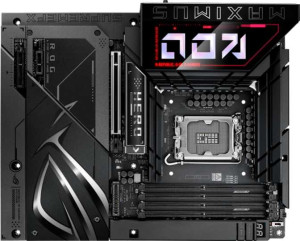
Asus ROG Maximus Z890 Hero BTF
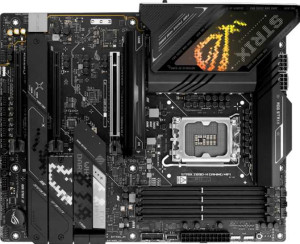
Asus ROG Strix Z890-H Gaming Wi-Fi

Asus ROG Maximus Z890 Hero BTF Asus ROG Strix Z890-H Gaming Wi-Fi

Overview

Choosing between the Asus ROG Maximus Z890 Hero BTF and the Asus ROG Strix Z890-H Gaming Wi-Fi is no simple task — both are high-end ATX motherboards built on the Z890 chipset, sharing Wi-Fi 7, DDR5 memory support, and 7.1 audio. Yet meaningful differences surface when examining their connectivity portfolios, storage expansion, and PCIe slot configurations, making the right choice highly dependent on how you intend to build and use your system.

Common Features

  • Both products use the LGA 1851 CPU socket.
  • Both products feature the Z890 chipset.
  • Both products have an ATX form factor.
  • Wi-Fi is available on both products, supporting Wi-Fi 4, Wi-Fi 5, Wi-Fi 6, Wi-Fi 6E, and Wi-Fi 7.
  • Bluetooth 5.4 is present on both products.
  • Both products have an HDMI 2.1 output.
  • Both products support a maximum memory amount of 256GB.
  • Both products have 4 memory slots.
  • Both products use DDR5 memory.
  • Both products support 2 memory channels.
  • ECC memory is not supported on either product.
  • Both products have 4 USB 3.2 Gen 2 ports (USB-A).
  • Both products have 4 USB 3.2 Gen 1 ports (USB-A).
  • USB 3.2 Gen 1 ports (USB-C) are not present on either product.
  • USB 2.0 rear ports are not present on either product.
  • USB 4 20Gbps ports are not present on either product.
  • Thunderbolt 3 ports are not present on either product.
  • A USB Type-C port is available on both products.
  • Both products have 4 SATA 3 connectors.
  • Both products provide 4 USB 2.0 ports through expansion.
  • Both products provide 2 USB 3.2 Gen 1 ports through expansion.
  • Both products provide 1 USB 3.2 Gen 2x2 port through expansion.
  • A TPM connector is not present on either product.
  • An mSATA connector is not present on either product.
  • U.2 sockets are not present on either product.
  • SATA 2 connectors are not present on either product.
  • Both products have 1 PCIe 5.0 x16 slot.
  • PCIe 3.0 x16 slots are not present on either product.
  • PCI slots are not present on either product.
  • PCIe 2.0 x16 slots are not present on either product.
  • PCIe x8 slots are not present on either product.
  • Both products have a signal-to-noise ratio (DAC) of 120 dB.
  • Both products support 7.1 audio channels.
  • An S/PDIF Out port is available on both products.
  • Both products have 2 audio connectors.
  • Both products support RAID 0, RAID 1, RAID 5, and RAID 10.
  • RAID 0+1 is not supported on either product.

Main Differences

  • Overclocked RAM speed is 9200 MHz on Asus ROG Maximus Z890 Hero BTF and 9066 MHz on Asus ROG Strix Z890-H Gaming Wi-Fi.
  • USB 3.2 Gen 2 ports (USB-C) count is 1 on Asus ROG Maximus Z890 Hero BTF and none are present on Asus ROG Strix Z890-H Gaming Wi-Fi.
  • USB 3.2 Gen 2x2 ports are not present on Asus ROG Maximus Z890 Hero BTF, while Asus ROG Strix Z890-H Gaming Wi-Fi has 2.
  • USB 4 40Gbps ports count is 2 on Asus ROG Maximus Z890 Hero BTF, while none are present on Asus ROG Strix Z890-H Gaming Wi-Fi.
  • Thunderbolt 4 ports count is 2 on Asus ROG Maximus Z890 Hero BTF, while none are present on Asus ROG Strix Z890-H Gaming Wi-Fi.
  • A DisplayPort output is not present on Asus ROG Maximus Z890 Hero BTF, while Asus ROG Strix Z890-H Gaming Wi-Fi has 1.
  • RJ45 ports count is 2 on Asus ROG Maximus Z890 Hero BTF and 1 on Asus ROG Strix Z890-H Gaming Wi-Fi.
  • Fan headers count is 6 on Asus ROG Maximus Z890 Hero BTF and 7 on Asus ROG Strix Z890-H Gaming Wi-Fi.
  • USB 3.0 ports through expansion count is 4 on Asus ROG Maximus Z890 Hero BTF and 2 on Asus ROG Strix Z890-H Gaming Wi-Fi.
  • M.2 sockets count is 6 on Asus ROG Maximus Z890 Hero BTF and 4 on Asus ROG Strix Z890-H Gaming Wi-Fi.
  • PCIe 4.0 x16 slots are not present on Asus ROG Maximus Z890 Hero BTF, while Asus ROG Strix Z890-H Gaming Wi-Fi has 2.
  • PCIe x1 slots count is 1 on Asus ROG Maximus Z890 Hero BTF, while none are present on Asus ROG Strix Z890-H Gaming Wi-Fi.
  • PCIe x4 slots count is 1 on Asus ROG Maximus Z890 Hero BTF, while none are present on Asus ROG Strix Z890-H Gaming Wi-Fi.
Specs Comparison
Asus ROG Maximus Z890 Hero BTF

Asus ROG Maximus Z890 Hero BTF

Asus ROG Strix Z890-H Gaming Wi-Fi

Asus ROG Strix Z890-H Gaming Wi-Fi

General info:
CPU socket LGA 1851 LGA 1851
chipset Z890 Z890
form factor ATX ATX
release date January 2025 January 2025
supports Wi-Fi
Wi-Fi version Wi-Fi 4 (802.11n), Wi-Fi 5 (802.11ac), Wi-Fi 6 (802.11ax), Wi-Fi 6E (802.11ax), Wi-Fi 7 (802.11be) Wi-Fi 4 (802.11n), Wi-Fi 5 (802.11ac), Wi-Fi 6 (802.11ax), Wi-Fi 6E (802.11ax), Wi-Fi 7 (802.11be)
Has Bluetooth
Bluetooth version 5.4 5.4
HDMI version HDMI 2.1 HDMI 2.1
Easy to overclock
has RGB lighting
Easy to reset BIOS
Has dual BIOS
has aptX
CPU sockets 1 1
Has integrated graphics
warranty period 3 years 3 years
height 244 mm 244 mm
width 305 mm 305 mm
Has integrated CPU

In terms of general specifications, the Asus ROG Maximus Z890 Hero BTF and the Asus ROG Strix Z890-H Gaming Wi-Fi are essentially identical across every data point in this group. Both use the LGA 1851 socket with the Z890 chipset, share the standard ATX form factor (244 × 305 mm), and come with a 3-year warranty. This means neither board holds a platform-level advantage — both are equally compatible with the same generation of Intel processors and will fit in the same range of ATX cases.

On the connectivity front, both boards offer Wi-Fi 7 (802.11be) alongside backward-compatible Wi-Fi 4/5/6/6E, and Bluetooth 5.4 — the current generational standard delivering improved range, lower latency, and better coexistence in crowded wireless environments. Both also output video via HDMI 2.1, supporting high-bandwidth display connections. Neither board includes aptX audio, but that omission is shared equally and is rarely a deciding factor in a desktop motherboard context.

Both boards also share quality-of-life features like easy overclocking, easy BIOS reset, dual BIOS, and RGB lighting. The dual BIOS in particular is a meaningful safeguard — it provides a backup firmware chip, protecting against failed updates or corruption. In this group, the two products are completely evenly matched; no advantage can be declared for either based solely on these general specifications.

Memory:
maximum memory amount 256GB 256GB
overclocked RAM speed 9200 MHz 9066 MHz
memory slots 4 4
DDR memory version 5 5
memory channels 2 2
Supports ECC memory

The memory configurations of these two boards are nearly identical at the foundation: both support DDR5, offer 4 DIMM slots across 2 channels, cap out at 256GB of maximum RAM, and exclude ECC memory support. For the vast majority of users — including enthusiast gamers and content creators — this shared baseline is more than sufficient, and the dual-channel DDR5 architecture ensures strong memory bandwidth regardless of which board you choose.

The only differentiator in this group is the maximum overclocked RAM speed. The ROG Maximus Z890 Hero BTF pushes to 9200 MHz, while the ROG Strix Z890-H Gaming Wi-Fi tops out at 9066 MHz. That 134 MHz gap is relatively modest in absolute terms, but it does signal that the Hero BTF is tuned for slightly more aggressive memory overclocking — meaningful for users chasing peak benchmark performance or running memory-sensitive workloads where every bit of bandwidth counts.

For most real-world use cases, the practical difference between 9066 and 9200 MHz will be imperceptible. However, on the basis of the data provided, the ROG Maximus Z890 Hero BTF holds a narrow edge in this group, strictly due to its higher overclocking ceiling — an advantage that matters primarily to dedicated overclockers rather than mainstream users.

Ports:
USB 3.2 Gen 2 ports (USB-A) 4 4
USB 3.2 Gen 1 ports (USB-A) 4 4
USB 3.2 Gen 2 ports (USB-C) 1 0
USB 3.2 Gen 1 ports (USB-C) 0 0
USB 2.0 ports 0 0
USB 3.2 Gen 2x2 ports 0 2
USB 4 40Gbps ports 2 0
USB 4 20Gbps ports 0 0
Thunderbolt 4 ports 2 0
Thunderbolt 3 ports 0 0
has an HDMI output
DisplayPort outputs 0 1
RJ45 ports 2 1
Has USB Type-C
eSATA ports 0 0
DVI outputs 0 0
has a VGA connector
PS/2 ports 0 0

The rear I/O port selection is where these two boards diverge most sharply. Both share a solid common base — 4× USB 3.2 Gen 2 (USB-A) and 4× USB 3.2 Gen 1 (USB-A) — but the ROG Maximus Z890 Hero BTF goes considerably further with 2× USB4 40Gbps ports and 2× Thunderbolt 4 ports. These are not incremental upgrades: Thunderbolt 4 delivers up to 40Gbps of bandwidth, supports daisy-chaining peripherals, enables external GPU enclosures, and guarantees compatibility with a wide ecosystem of professional docks and high-speed storage devices. For power users who rely on such peripherals, this is a significant real-world advantage.

The ROG Strix Z890-H Gaming Wi-Fi takes a different approach, offering 2× USB 3.2 Gen 2x2 ports (20Gbps each) in place of the higher-tier connectivity. While useful for fast external SSDs, Gen 2x2 is a more limited standard that lacks the broader device ecosystem and feature set of Thunderbolt 4. The Strix-H does add a DisplayPort output that the Hero BTF omits, giving it a slight edge for users connecting multiple displays via integrated graphics. Conversely, the Hero BTF counters with 2× RJ45 ethernet ports versus the Strix-H's single port — a meaningful perk for network-intensive setups or those wanting a dedicated connection for gaming and file transfers simultaneously.

Taken together, the ROG Maximus Z890 Hero BTF holds a clear advantage in this group. Its combination of dual Thunderbolt 4, dual USB4 40Gbps, and dual ethernet ports points to a substantially richer I/O ecosystem — one that caters to professionals and enthusiasts with demanding peripheral needs, not just mainstream desktop users.

Connectors:
USB 3.2 Gen 1 ports (through expansion) 2 2
USB 3.2 Gen 2x2 ports (through expansion) 1 1
USB 2.0 ports (through expansion) 4 4
SATA 3 connectors 4 4
fan headers 6 7
USB 3.0 ports (through expansion) 4 2
M.2 sockets 6 4
Has TPM connector
U.2 sockets 0 0
Has mSATA connector
SATA 2 connectors 0 0

Storage expansion is where the ROG Maximus Z890 Hero BTF pulls ahead most clearly: it offers 6× M.2 sockets compared to on the ROG Strix Z890-H Gaming Wi-Fi. In practical terms, two additional M.2 slots means significantly more headroom for NVMe SSDs — whether for a large primary drive, dedicated game storage, or a fast scratch disk for creative workloads — all without touching the 4× SATA 3 connectors that both boards share equally. For storage-heavy builds, this gap is genuinely consequential.

Fan header counts flip the advantage slightly toward the Strix-H, which provides 7 fan headers versus 6 on the Hero BTF. One extra header is a modest but real benefit for builders running elaborate cooling setups — particularly those with multiple case fans, a large radiator, and a CPU cooler pump all competing for direct motherboard control. That said, the difference is narrow enough that a fan hub would easily compensate on the Hero BTF. On internal USB expansion, the Hero BTF offers 4× USB 3.0 internal ports versus on the Strix-H, giving it more flexibility for front-panel headers or internal USB hubs.

Weighing the differences, the ROG Maximus Z890 Hero BTF holds the advantage in this group. Two additional M.2 slots represent a more impactful and harder-to-workaround advantage than the Strix-H's single extra fan header, making the Hero BTF the stronger choice for storage-intensive or expandable builds.

Expansion slots:
PCIe 4.0 x16 slots 0 2
PCIe 5.0 x16 slots 1 1
PCIe 3.0 x16 slots 0 0
PCIe x1 slots 1 0
PCI slots 0 0
PCIe 2.0 x16 slots 0 0
PCIe x4 slots 1 0
PCIe x8 slots 0 0

Both boards lead with a single PCIe 5.0 x16 slot — the current generational standard for discrete GPUs, offering the bandwidth headroom that next-generation graphics cards demand. That shared foundation ensures neither board bottlenecks a high-end GPU. Beyond that anchor slot, however, the two boards take noticeably different approaches to additional expansion.

The ROG Strix Z890-H Gaming Wi-Fi adds 2× PCIe 4.0 x16 slots, giving it three physical x16-sized slots in total. These additional slots are well-suited for high-bandwidth add-in cards — such as capture cards, high-speed networking adapters, or future expansion devices — that benefit from a full-width physical connector even when running at reduced lane counts. The ROG Maximus Z890 Hero BTF instead includes a PCIe x1 and a PCIe x4 slot, which accommodate a broader range of compact add-in cards like sound cards or low-profile adapters, but with inherently lower bandwidth ceilings than x16 physical slots.

For users planning to install multiple large add-in cards, the ROG Strix Z890-H Gaming Wi-Fi holds the edge in this group, thanks to its additional PCIe 4.0 x16 physical slots providing more versatile high-bandwidth expansion. The Hero BTF's smaller slots serve niche use cases but represent a narrower expansion ceiling overall.

Audio:
Signal-to-Noise ratio (DAC) 120 dB 120 dB
audio channels 7.1 7.1
Has S/PDIF Out port
audio connectors 2 2

Audio is a category where these two boards offer no grounds for differentiation whatsoever. Both deliver a 120 dB signal-to-noise ratio (SNR) from their DAC, support 7.1 surround sound, include an S/PDIF optical output, and provide 2 analog audio connectors on the rear I/O. Every data point is an exact match.

The 120 dB SNR figure is worth contextualizing: it sits at the high end of what integrated motherboard audio typically offers, meaning background noise and interference are kept well below audible thresholds even on sensitive headphones. The S/PDIF output adds flexibility for users routing audio to an external receiver or DAC/amp, while 7.1 channel support covers even the most expansive surround sound setups for gaming or home theater use.

With every audio specification identical, this group is a complete tie. Neither the ROG Maximus Z890 Hero BTF nor the ROG Strix Z890-H Gaming Wi-Fi holds any advantage here — audio quality and capability will be indistinguishable between the two boards based on the provided data.

Storage:
Supports RAID 1
Supports RAID 10 (1+0)
Supports RAID 5
Supports RAID 0
Supports RAID 0+1

RAID support is identical across both boards. The ROG Maximus Z890 Hero BTF and the ROG Strix Z890-H Gaming Wi-Fi both support RAID 0, 1, 5, and 10, while neither supports RAID 0+1 — a distinction that is largely academic given that RAID 10 covers the same fault-tolerance-plus-performance use case in a more robust implementation.

The supported RAID modes represent a well-rounded set for enthusiast and prosumer use. RAID 0 stripes data across drives for maximum throughput, RAID 1 mirrors drives for redundancy, RAID 5 balances storage efficiency with fault tolerance using parity, and RAID 10 combines mirroring and striping for both performance and resilience. Together, these options cover virtually every practical desktop RAID scenario from speed-focused gaming storage arrays to reliability-oriented personal backup setups.

With no differences present anywhere in this group, the verdict is a complete tie. Users can expect exactly the same RAID flexibility from either board, and storage configuration choices will not be a factor in distinguishing between them.

Comparison Summary & Verdict

Both boards occupy the premium Z890 tier and share a strong common foundation — Wi-Fi 7, Bluetooth 5.4, DDR5 up to 256GB across four slots, 7.1 audio at 120 dB, and comprehensive RAID support. However, their strengths diverge in important ways. The Asus ROG Maximus Z890 Hero BTF pulls ahead for power users with its 2 Thunderbolt 4 ports, 2 USB 4 40Gbps ports, 6 M.2 slots, dual RJ45 ports, and the highest overclocked RAM speed at 9200 MHz — making it ideal for bandwidth-intensive workstations and enthusiast rigs. The Asus ROG Strix Z890-H Gaming Wi-Fi counters with 2 PCIe 4.0 x16 slots, a dedicated DisplayPort output, an extra fan header for more advanced thermal management, and 2 USB 3.2 Gen 2x2 ports — a well-rounded package for gamers and builders seeking flexible GPU and cooling configurations without needing cutting-edge Thunderbolt connectivity.

Asus ROG Maximus Z890 Hero BTF
Buy Asus ROG Maximus Z890 Hero BTF if...

Buy the Asus ROG Maximus Z890 Hero BTF if you need maximum high-speed connectivity, including 2 Thunderbolt 4 ports, 2 USB 4 40Gbps ports, dual RJ45, and 6 M.2 slots for a demanding workstation or enthusiast build.

Asus ROG Strix Z890-H Gaming Wi-Fi
Buy Asus ROG Strix Z890-H Gaming Wi-Fi if...

Buy the Asus ROG Strix Z890-H Gaming Wi-Fi if you prioritize flexible PCIe 4.0 x16 expansion, a built-in DisplayPort output, and an extra fan header for more advanced cooling in a gaming-oriented system.