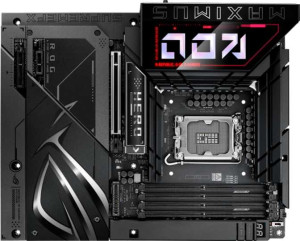
Asus ROG Maximus Z890 Hero BTF
MSI MAG B850 Tomahawk Max WiFi

Asus ROG Maximus Z890 Hero BTF MSI MAG B850 Tomahawk Max WiFi

Overview

Welcome to our in-depth spec comparison between the Asus ROG Maximus Z890 Hero BTF and the MSI MAG B850 Tomahawk Max WiFi. These two ATX motherboards cater to different ecosystems and ambitions, with one targeting Intel’s LGA 1851 platform and the other built around AMD’s AM5. Key battlegrounds include connectivity and rear I/O options, M.2 storage expansion, memory overclocking headroom, and overall feature set for enthusiast builders.

Common Features

  • Both boards use the ATX form factor.
  • Wi-Fi is supported on both products, covering Wi-Fi 4, Wi-Fi 5, Wi-Fi 6, Wi-Fi 6E, and Wi-Fi 7.
  • Bluetooth 5.4 is available on both products.
  • Both products include an HDMI 2.1 output.
  • Overclocking support is available on both products.
  • RGB lighting is present on both products.
  • Both boards support up to 256 GB of maximum memory.
  • Both products have 4 memory slots.
  • Both boards use DDR5 memory.
  • Both products support dual-channel memory.
  • ECC memory is not supported on either product.
  • Neither product has USB 3.2 Gen 1 ports (USB-C) on the rear I/O.
  • Neither product has USB 3.2 Gen 2x2 ports on the rear I/O.
  • Neither product has USB 4 20 Gbps ports.
  • Neither product has Thunderbolt 3 ports.
  • USB Type-C connectivity is available on both products.
  • Neither product has DisplayPort outputs.
  • Neither product has eSATA ports.
  • Both boards include 1 USB 3.2 Gen 2x2 port through expansion.
  • Both boards provide 4 USB 2.0 ports through expansion.
  • Both boards have 4 SATA 3 connectors.
  • Both boards provide 4 USB 3.0 ports through expansion.
  • Neither product has a U.2 socket.
  • An mSATA connector is not present on either product.
  • Neither product has SATA 2 connectors.
  • Both products feature 1 PCIe 5.0 x16 slot.
  • Neither product has PCIe 3.0 x16 slots.
  • Both products include 1 PCIe x1 slot.
  • Neither product has PCI slots.
  • Neither product has PCIe 2.0 x16 slots.
  • Neither product has PCIe x8 slots.
  • Both boards deliver a 120 dB signal-to-noise ratio on the DAC.
  • Both products support 7.1 audio channels.
  • An S/PDIF output port is present on both products.
  • Both boards have 2 audio connectors.
  • RAID 0 is supported on both products.
  • RAID 1 is supported on both products.
  • RAID 10 (1+0) is supported on both products.
  • RAID 0+1 is not supported on either product.

Main Differences

  • The CPU socket is LGA 1851 on the Asus ROG Maximus Z890 Hero BTF and AM5 on the MSI MAG B850 Tomahawk Max WiFi.
  • The chipset is Z890 on the Asus ROG Maximus Z890 Hero BTF and B850 on the MSI MAG B850 Tomahawk Max WiFi.
  • The board height is 244 mm on the Asus ROG Maximus Z890 Hero BTF and 243.8 mm on the MSI MAG B850 Tomahawk Max WiFi.
  • The board width is 305 mm on the Asus ROG Maximus Z890 Hero BTF and 304.8 mm on the MSI MAG B850 Tomahawk Max WiFi.
  • The maximum supported overclocked RAM speed is 9200 MHz on the Asus ROG Maximus Z890 Hero BTF and 8400 MHz on the MSI MAG B850 Tomahawk Max WiFi.
  • USB 3.2 Gen 2 ports (USB-A) number 4 on the Asus ROG Maximus Z890 Hero BTF and 2 on the MSI MAG B850 Tomahawk Max WiFi.
  • USB 3.2 Gen 1 ports (USB-A) number 4 on the Asus ROG Maximus Z890 Hero BTF and 1 on the MSI MAG B850 Tomahawk Max WiFi.
  • USB 3.2 Gen 2 ports (USB-C) number 1 on the Asus ROG Maximus Z890 Hero BTF and 3 on the MSI MAG B850 Tomahawk Max WiFi.
  • USB 2.0 ports are absent on the Asus ROG Maximus Z890 Hero BTF but 4 are present on the MSI MAG B850 Tomahawk Max WiFi.
  • USB 4 40 Gbps ports number 2 on the Asus ROG Maximus Z890 Hero BTF but are not present on the MSI MAG B850 Tomahawk Max WiFi.
  • Thunderbolt 4 ports number 2 on the Asus ROG Maximus Z890 Hero BTF but are not present on the MSI MAG B850 Tomahawk Max WiFi.
  • RJ45 ports number 2 on the Asus ROG Maximus Z890 Hero BTF and 1 on the MSI MAG B850 Tomahawk Max WiFi.
  • USB 3.2 Gen 1 ports through expansion number 2 on the Asus ROG Maximus Z890 Hero BTF and 4 on the MSI MAG B850 Tomahawk Max WiFi.
  • Fan headers number 6 on the Asus ROG Maximus Z890 Hero BTF and 8 on the MSI MAG B850 Tomahawk Max WiFi.
  • M.2 sockets number 6 on the Asus ROG Maximus Z890 Hero BTF and 4 on the MSI MAG B850 Tomahawk Max WiFi.
  • A TPM connector is not present on the Asus ROG Maximus Z890 Hero BTF but is available on the MSI MAG B850 Tomahawk Max WiFi.
  • A PCIe 4.0 x16 slot is absent on the Asus ROG Maximus Z890 Hero BTF but 1 is present on the MSI MAG B850 Tomahawk Max WiFi.
  • A PCIe x4 slot is present on the Asus ROG Maximus Z890 Hero BTF but is not available on the MSI MAG B850 Tomahawk Max WiFi.
  • RAID 5 support is available on the Asus ROG Maximus Z890 Hero BTF but is not supported on the MSI MAG B850 Tomahawk Max WiFi.
Specs Comparison
Asus ROG Maximus Z890 Hero BTF

Asus ROG Maximus Z890 Hero BTF

MSI MAG B850 Tomahawk Max WiFi

MSI MAG B850 Tomahawk Max WiFi

General info:
CPU socket LGA 1851 AM5
chipset Z890 B850
form factor ATX ATX
release date January 2025 January 2025
supports Wi-Fi
Wi-Fi version Wi-Fi 4 (802.11n), Wi-Fi 5 (802.11ac), Wi-Fi 6 (802.11ax), Wi-Fi 6E (802.11ax), Wi-Fi 7 (802.11be) Wi-Fi 4 (802.11n), Wi-Fi 5 (802.11ac), Wi-Fi 6 (802.11ax), Wi-Fi 6E (802.11ax), Wi-Fi 7 (802.11be)
Has Bluetooth
Bluetooth version 5.4 5.4
HDMI version HDMI 2.1 HDMI 2.1
Easy to overclock
has RGB lighting
Easy to reset BIOS
Has dual BIOS
has aptX
CPU sockets 1 1
Has integrated graphics
warranty period 3 years 3 years
height 244 mm 243.8 mm
width 305 mm 304.8 mm
Has integrated CPU

The most fundamental difference between these two boards lies in their CPU platform: the Asus ROG Maximus Z890 Hero BTF targets Intel's LGA 1851 ecosystem paired with the flagship Z890 chipset, while the MSI MAG B850 Tomahawk Max WiFi is built for AMD's AM5 platform with a B850 chipset. In practice, this means the two boards are not interchangeable — your CPU choice locks you into one or the other. Beyond platform allegiance, the chipset tier also signals intent: Z890 is Intel's top-tier desktop chipset, designed for enthusiast-grade overclocking headroom and maximum I/O expansion, whereas B850 sits in AMD's upper-mid range, offering solid feature coverage without the full premium of the X870E flagship.

Where the two boards converge is striking. Both ship as full ATX form factors with near-identical dimensions (roughly 305 × 244 mm), so case compatibility is essentially the same. Wireless connectivity is a dead heat: both include Wi-Fi 7 (802.11be) and Bluetooth 5.4, meaning neither has any advantage in wireless throughput, range, or latency. Shared amenities like HDMI 2.1, RGB lighting, dual BIOS, easy BIOS reset, and a 3-year warranty further level the playing field on day-to-day usability and peace of mind.

For this spec group, there is no meaningful winner on features — both boards are remarkably well-matched in connectivity, size, and build amenities. The decision comes down entirely to your CPU platform choice: Intel 200-series with enthusiast-tier Z890 headroom, or AMD Ryzen with the capable and cost-friendlier B850. If you are already committed to a CPU ecosystem, that single variable makes the choice for you.
Memory:
maximum memory amount 256GB 256GB
overclocked RAM speed 9200 MHz 8400 MHz
memory slots 4 4
DDR memory version 5 5
memory channels 2 2
Supports ECC memory

On paper, the memory specifications for these two boards look nearly identical — both support DDR5, offer 4 slots in a dual-channel configuration, cap out at 256 GB maximum, and neither supports ECC memory. For the vast majority of users, these shared traits mean equivalent day-to-day memory flexibility and upgrade headroom.

The one concrete differentiator is overclocked RAM speed. The ROG Maximus Z890 Hero BTF tops out at 9200 MHz, while the MSI MAG B850 Tomahawk Max WiFi reaches 8400 MHz. That 800 MHz gap matters most to enthusiasts who push XMP/EXPO profiles to their absolute ceiling — in bandwidth-sensitive workloads like video editing, 3D rendering, or high-framerate gaming, the Z890 Hero BTF's higher ceiling can translate into a measurable, if incremental, performance edge. For everyday computing, the practical difference is negligible.

The Z890 Hero BTF holds a clear edge in this group strictly due to its higher overclocking ceiling. That said, 8400 MHz is already a very high bar for the B850 Tomahawk Max WiFi, and unless you are specifically chasing peak memory bandwidth with top-tier DDR5 kits, neither board will feel limiting in real-world use.

Ports:
USB 3.2 Gen 2 ports (USB-A) 4 2
USB 3.2 Gen 1 ports (USB-A) 4 1
USB 3.2 Gen 2 ports (USB-C) 1 3
USB 3.2 Gen 1 ports (USB-C) 0 0
USB 2.0 ports 0 4
USB 3.2 Gen 2x2 ports 0 0
USB 4 40Gbps ports 2 0
USB 4 20Gbps ports 0 0
Thunderbolt 4 ports 2 0
Thunderbolt 3 ports 0 0
has an HDMI output
DisplayPort outputs 0 0
RJ45 ports 2 1
Has USB Type-C
eSATA ports 0 0
DVI outputs 0 0
has a VGA connector
PS/2 ports 0 0

This is where the gap between a flagship enthusiast board and a mid-range option becomes most tangible. The ROG Maximus Z890 Hero BTF brings 2x Thunderbolt 4 ports and 2x USB 4 40Gbps to its rear I/O — features entirely absent on the MSI MAG B850 Tomahawk Max WiFi. Thunderbolt 4 enables daisy-chaining of high-speed peripherals, external GPUs, and 40Gbps storage devices, while USB 4 at 40Gbps matches that throughput for compatible accessories. For content creators, video editors, or power users with demanding external storage or display setups, this is a significant real-world advantage.

The broader USB layout also tells two different stories. The Z890 Hero BTF leans heavily into high-speed USB-A connectivity — 4x USB 3.2 Gen 2 and 4x Gen 1 ports — with no USB 2.0 at all, signaling a clean break from legacy peripherals. The B850 Tomahawk Max WiFi counters with 3x USB 3.2 Gen 2 USB-C ports (versus just one on the Z890), making it friendlier for modern USB-C peripherals and cables, but it also includes 4x USB 2.0 ports, catering to users with older keyboards, mice, or dongles. Networking also diverges: the Z890 Hero BTF includes 2x RJ45 ethernet ports, which is valuable for users who need simultaneous connections to two networks, while the B850 offers a single port.

The Z890 Hero BTF wins this group decisively, driven by its Thunderbolt 4 and USB 4 support — capabilities that open doors to a class of high-performance peripherals the B850 Tomahawk Max WiFi simply cannot access. The B850's extra USB-C ports are a convenience perk, but they do not offset the throughput and ecosystem advantages on the other side.

Connectors:
USB 3.2 Gen 1 ports (through expansion) 2 4
USB 3.2 Gen 2x2 ports (through expansion) 1 1
USB 2.0 ports (through expansion) 4 4
SATA 3 connectors 4 4
fan headers 6 8
USB 3.0 ports (through expansion) 4 4
M.2 sockets 6 4
Has TPM connector
U.2 sockets 0 0
Has mSATA connector
SATA 2 connectors 0 0

The headline differentiator here is M.2 socket count. The ROG Maximus Z890 Hero BTF offers 6x M.2 sockets, compared to 4x on the MSI MAG B850 Tomahawk Max WiFi. For users building high-capacity NVMe storage arrays — think video production workstations, large game libraries, or tiered storage setups — two extra M.2 slots can eliminate the need for an add-in card entirely. Both boards match on 4x SATA 3 connectors, so traditional 2.5″ and 3.5″ drive support is equivalent.

Cooling management flips the advantage to the B850 Tomahawk Max WiFi, which provides 8 fan headers versus 6 on the Z890 Hero BTF. In a large ATX chassis with multiple case fans, radiator pumps, and AIO headers, two extra headers reduce reliance on fan hubs and simplify wiring. The B850 also includes a TPM connector, which the Z890 Hero BTF lacks — a relevant detail for enterprise or security-conscious users who need hardware-based TPM for BitLocker or similar trusted platform requirements.

This group produces a split verdict. The Z890 Hero BTF wins on internal storage expansion with its two additional M.2 slots, making it the stronger choice for storage-heavy builds. The B850 Tomahawk Max WiFi counters with superior fan header count and TPM connector support, giving it an edge for thermally complex builds and security-oriented deployments. Neither board dominates outright — the right pick depends on whether internal storage or cooling and security infrastructure matters more to your specific build.

Expansion slots:
PCIe 4.0 x16 slots 0 1
PCIe 5.0 x16 slots 1 1
PCIe 3.0 x16 slots 0 0
PCIe x1 slots 1 1
PCI slots 0 0
PCIe 2.0 x16 slots 0 0
PCIe x4 slots 1 0
PCIe x8 slots 0 0

Both boards lead with a PCIe 5.0 x16 primary slot, ensuring full-bandwidth support for current and next-generation discrete GPUs. For most single-GPU gaming or workstation builds, this shared foundation means neither board holds an advantage where it counts most. The meaningful split comes in secondary slot configuration: the MSI MAG B850 Tomahawk Max WiFi adds a PCIe 4.0 x16 slot, while the ROG Maximus Z890 Hero BTF instead provides a PCIe x4 slot in that position.

In practice, the B850 Tomahawk Max WiFi's second x16 physical slot — running at PCIe 4.0 — is better suited for high-bandwidth add-in cards such as capture cards, fast NVMe expansion cards, or a secondary GPU, since it offers more lane bandwidth than an x4 connection. The Z890 Hero BTF's PCIe x4 slot still handles a wide range of expansion cards, but bandwidth-hungry devices will hit its ceiling faster. Both boards include a single PCIe x1 slot for low-profile accessories like sound cards or network adapters.

The B850 Tomahawk Max WiFi has a clear edge in expansion flexibility for this group. Its PCIe 4.0 x16 secondary slot offers meaningfully more bandwidth for a second high-performance card than the Z890 Hero BTF's x4 alternative — an advantage that matters for users planning multi-card or bandwidth-intensive expansion builds.

Audio:
Signal-to-Noise ratio (DAC) 120 dB 120 dB
audio channels 7.1 7.1
Has S/PDIF Out port
audio connectors 2 2

Audio is the one group in this comparison where there is simply nothing to separate the two boards. Both deliver a 120 dB signal-to-noise ratio from their onboard DAC — a figure that represents clean, low-noise audio output well-suited to quality headphones and speakers. Both support 7.1 surround channel output, include an S/PDIF optical out port for connecting to external receivers or DACs, and offer the same number of analog audio connectors.

This is a complete tie. Users prioritizing onboard audio quality will find no advantage on either side based on the provided specifications.

Storage:
Supports RAID 1
Supports RAID 10 (1+0)
Supports RAID 5
Supports RAID 0
Supports RAID 0+1

RAID support between these two boards is nearly identical, with one notable exception. Both handle the most common consumer configurations — RAID 0 for striped performance, RAID 1 for mirroring and redundancy, and RAID 10 for a combination of both. Where they diverge is RAID 5: the ROG Maximus Z890 Hero BTF supports it, while the MSI MAG B850 Tomahawk Max WiFi does not.

RAID 5 distributes parity data across three or more drives, offering a balance of read performance, storage efficiency, and fault tolerance that RAID 1 and RAID 10 cannot match at the same capacity cost. For home servers, NAS-style desktop builds, or prosumer workstations managing large data sets with redundancy requirements, its absence on the B850 Tomahawk Max WiFi is a genuine limitation — though it is worth noting that such use cases are relatively niche in a typical consumer desktop context.

The Z890 Hero BTF takes a narrow win here on account of its RAID 5 support. For the majority of users who rely on RAID 0, 1, or 10, both boards are equally capable. But for anyone specifically planning a multi-drive redundant array with storage efficiency in mind, the Z890 Hero BTF is the only option of the two that covers that configuration.

Comparison Summary & Verdict

After examining the full spec sheet, both boards share a strong foundation: ATX form factor, Wi-Fi 7, Bluetooth 5.4, DDR5 support, and 7.1 audio with a 120 dB SNR. However, their differences reveal clearly distinct audiences. The Asus ROG Maximus Z890 Hero BTF stands out for power users who demand maximum connectivity, offering 6 M.2 slots, 2 Thunderbolt 4 and 2 USB4 40 Gbps ports, dual RJ45, and support for RAM speeds up to 9200 MHz alongside RAID 5. The MSI MAG B850 Tomahawk Max WiFi appeals to AMD enthusiasts who value 8 fan headers, a TPM connector, more USB-C rear ports, and a more accessible price-to-performance profile on the AM5 platform with RAM speeds up to 8400 MHz. Choose based on your CPU platform preference and how heavily you rely on premium I/O and storage expansion.

Asus ROG Maximus Z890 Hero BTF
Buy Asus ROG Maximus Z890 Hero BTF if...

Buy the Asus ROG Maximus Z890 Hero BTF if you need maximum storage expansion with 6 M.2 slots, top-tier connectivity including Thunderbolt 4 and USB4 40 Gbps ports, dual LAN, and the highest overclocked RAM speeds on the Intel LGA 1851 platform.

MSI MAG B850 Tomahawk Max WiFi
Buy MSI MAG B850 Tomahawk Max WiFi if...

Buy the MSI MAG B850 Tomahawk Max WiFi if you are building on the AMD AM5 platform and prioritize more fan headers, a TPM connector, additional USB-C rear ports, and solid DDR5 performance at a more mainstream chipset tier.