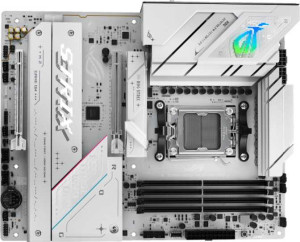
Asus ROG Strix B850-A Gaming WiFi
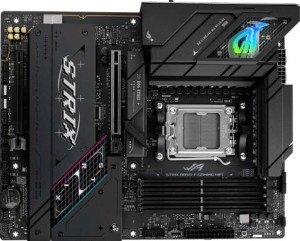
Asus ROG Strix B850-F Gaming WiFi

Asus ROG Strix B850-A Gaming WiFi Asus ROG Strix B850-F Gaming WiFi

Overview

Welcome to our in-depth specification comparison between the Asus ROG Strix B850-A Gaming WiFi and the Asus ROG Strix B850-F Gaming WiFi. Both are AM5 motherboards built on the B850 chipset, sharing a remarkably similar feature set across connectivity, memory, expansion, and audio. In this comparison, we examine exactly where these two boards align and where they diverge, with a close look at their rear USB port configurations to help you decide which model best suits your build.

Common Features

  • Both boards use the AM5 CPU socket.
  • Both boards feature the B850 chipset.
  • Both boards use the ATX form factor.
  • Wi-Fi is supported on both boards, covering Wi-Fi 4 (802.11n), Wi-Fi 5 (802.11ac), Wi-Fi 6 (802.11ax), Wi-Fi 6E (802.11ax), and Wi-Fi 7 (802.11be).
  • Bluetooth 5.4 is available on both boards.
  • Both boards include an HDMI 2.1 port.
  • Both boards support a maximum memory capacity of 192GB.
  • Both boards support overclocked RAM speeds up to 8000 MHz.
  • Both boards have 4 memory slots and 2 memory channels.
  • Both boards use DDR5 memory.
  • ECC memory is not supported on either board.
  • Both boards provide 2 USB 3.2 Gen 2 Type-A ports and 4 USB 3.2 Gen 1 Type-A ports.
  • Both boards include 1 USB 3.2 Gen 2 Type-C port and 1 USB 3.2 Gen 2x2 port.
  • Both boards offer 4 M.2 sockets and 2 SATA 3 connectors.
  • Both boards include 6 fan headers.
  • A TPM connector is not present on either board.
  • Both boards feature 1 PCIe 5.0 x16 slot and 1 PCIe 4.0 x16 slot.
  • Both boards deliver a 120 dB signal-to-noise ratio (DAC) with 7.1 audio channels and 2 audio connectors.
  • An S/PDIF Out port is present on both boards.
  • Both boards support RAID 0, RAID 1, RAID 5, and RAID 10, but neither supports RAID 0+1.

Main Differences

  • The rear USB 2.0 port count is 2 on the Asus ROG Strix B850-A Gaming WiFi and 4 on the Asus ROG Strix B850-F Gaming WiFi.
Specs Comparison
Asus ROG Strix B850-A Gaming WiFi

Asus ROG Strix B850-A Gaming WiFi

Asus ROG Strix B850-F Gaming WiFi

Asus ROG Strix B850-F Gaming WiFi

General info:
CPU socket AM5 AM5
chipset B850 B850
form factor ATX ATX
release date January 2025 January 2025
supports Wi-Fi
Wi-Fi version Wi-Fi 4 (802.11n), Wi-Fi 5 (802.11ac), Wi-Fi 6 (802.11ax), Wi-Fi 6E (802.11ax), Wi-Fi 7 (802.11be) Wi-Fi 4 (802.11n), Wi-Fi 5 (802.11ac), Wi-Fi 6 (802.11ax), Wi-Fi 6E (802.11ax), Wi-Fi 7 (802.11be)
Has Bluetooth
Bluetooth version 5.4 5.4
HDMI version HDMI 2.1 HDMI 2.1
Easy to overclock
has RGB lighting
Easy to reset BIOS
Has dual BIOS
has aptX
CPU sockets 1 1
Has integrated graphics
warranty period 3 years 3 years
height 244 mm 244 mm
width 305 mm 305 mm
Has integrated CPU

The Asus ROG Strix B850-A Gaming WiFi and Asus ROG Strix B850-F Gaming WiFi share an identical general specification profile. Both are ATX form factor motherboards built on the AM5 socket with the B850 chipset, measuring exactly 305 × 244 mm — meaning they will fit the same cases and target the same platform of AMD processors.

On the connectivity and feature front, the two boards are again completely matched: both support the full Wi-Fi 7 (802.11be) stack down through Wi-Fi 4, pair with Bluetooth 5.4, output video via HDMI 2.1, and include quality-of-life features like dual BIOS, easy BIOS reset, RGB lighting, and overclocking support. Neither board carries an integrated CPU or integrated graphics, and both are backed by a 3-year warranty.

Based strictly on the general info specs provided, these two motherboards are completely tied — there is not a single differentiating data point in this group. A buyer choosing between them on general specifications alone has no objective basis to prefer one over the other; the distinction will need to come from other spec groups such as connectivity ports, audio, or power delivery.

Memory:
maximum memory amount 192GB 192GB
overclocked RAM speed 8000 MHz 8000 MHz
memory slots 4 4
DDR memory version 5 5
memory channels 2 2
Supports ECC memory

Both the Asus ROG Strix B850-A Gaming WiFi and the Asus ROG Strix B850-F Gaming WiFi offer identical memory specifications. They both support a maximum memory amount of 192GB, feature 4 memory slots, and support DDR5 memory. Additionally, both products are capable of overclocking RAM up to 8000 MHz, and both support dual memory channels.

Neither product supports ECC (Error-Correcting Code) memory, as both have this feature listed as false. Therefore, in terms of memory capacity, speed, and slot configuration, the two motherboards are exactly the same.

With no differences between these two models in this group of specifications, users can expect the same memory performance and configuration options from both the B850-A and B850-F variants.

Ports:
USB 3.2 Gen 2 ports (USB-A) 2 2
USB 3.2 Gen 1 ports (USB-A) 4 4
USB 3.2 Gen 2 ports (USB-C) 1 1
USB 3.2 Gen 1 ports (USB-C) 0 0
USB 2.0 ports 2 4
USB 3.2 Gen 2x2 ports 1 1
USB 4 40Gbps ports 0 0
USB 4 20Gbps ports 0 0
Thunderbolt 4 ports 0 0
Thunderbolt 3 ports 0 0
has an HDMI output
DisplayPort outputs 1 1
RJ45 ports 1 1
Has USB Type-C
eSATA ports 0 0
DVI outputs 0 0
has a VGA connector
PS/2 ports 0 0

The Asus ROG Strix B850-A Gaming WiFi and the Asus ROG Strix B850-F Gaming WiFi share most of the same ports, with only a few subtle differences. Both models offer 2 USB 3.2 Gen 2 (USB-A) ports, 4 USB 3.2 Gen 1 (USB-A) ports, and 1 USB 3.2 Gen 2 (USB-C) port. Each motherboard also includes 2 USB 2.0 ports, 1 USB 3.2 Gen 2x2 port, and an HDMI output. Additionally, both feature 1 DisplayPort output and 1 RJ45 port for wired network connectivity. They also both have USB Type-C support and lack eSATA, DVI, and VGA connectors, as well as PS/2 ports.

The main difference between the two models is the number of USB 2.0 ports. The ROG Strix B850-A offers 2, while the ROG Strix B850-F provides 4, giving the latter model a slight edge for those who require more legacy USB ports.

In conclusion, the port configuration is nearly identical, with the only difference being the additional USB 2.0 ports on the B850-F, making it a better choice for users who need more of these legacy connections.

Connectors:
USB 3.2 Gen 1 ports (through expansion) 2 2
USB-C 3.2 Gen 2 ports (through expansion) 1 1
USB 2.0 ports (through expansion) 4 4
SATA 3 connectors 2 2
fan headers 6 6
USB 3.0 ports (through expansion) 2 2
M.2 sockets 4 4
Has TPM connector
U.2 sockets 0 0
Has mSATA connector
SATA 2 connectors 0 0

The Asus ROG Strix B850-A Gaming WiFi and the Asus ROG Strix B850-F Gaming WiFi have identical specifications in terms of connectors. Both motherboards provide 2 USB 3.2 Gen 1 ports, 1 USB-C 3.2 Gen 2 port, and 4 USB 2.0 ports through expansion. Each model also offers 2 SATA 3 connectors, 6 fan headers, 2 USB 3.0 ports through expansion, and 4 M.2 sockets. Additionally, neither motherboard includes a TPM connector, mSATA connector, or U.2 sockets, and both lack SATA 2 connectors.

Since the specifications for both motherboards are exactly the same across all connector-related aspects, users will experience no difference in connectivity or expansion options between the two models.

Overall, the connector options provided by both the B850-A and B850-F are identical, offering ample expansion and connection possibilities without any variation between the two models in this category.

Expansion slots:
PCIe 4.0 x16 slots 1 1
PCIe 5.0 x16 slots 1 1
PCIe 3.0 x16 slots 0 0
PCIe x1 slots 0 0
PCI slots 0 0
PCIe 2.0 x16 slots 0 0
PCIe x4 slots 0 0
PCIe x8 slots 0 0

The Asus ROG Strix B850-A Gaming WiFi and the Asus ROG Strix B850-F Gaming WiFi have identical specifications when it comes to expansion slots. Both models feature 1 PCIe 4.0 x16 slot and 1 PCIe 5.0 x16 slot. Neither motherboard includes PCIe 3.0 x16 slots, PCIe x1 slots, PCI slots, PCIe 2.0 x16 slots, PCIe x4 slots, or PCIe x8 slots.

With the same expansion slot configuration in both models, users can expect identical expansion options for graphics and other PCIe-based components. There are no differences between the two products in this area.

Overall, the expansion slot setup is the same on both the B850-A and B850-F, offering users the same capabilities for adding additional hardware components.

Audio:
Signal-to-Noise ratio (DAC) 120 dB 120 dB
audio channels 7.1 7.1
Has S/PDIF Out port
audio connectors 2 2

The Asus ROG Strix B850-A Gaming WiFi and the Asus ROG Strix B850-F Gaming WiFi share identical audio specifications. Both motherboards feature a Signal-to-Noise Ratio (DAC) of 120 dB, supporting 7.1 audio channels. Each model also includes an S/PDIF Out port and has 2 audio connectors.

There are no differences between the two products in this category. Users can expect the same audio performance and connectivity options from both the B850-A and B850-F.

Overall, the audio specifications are identical across both models, offering the same high-quality sound capabilities for users.

Storage:
Supports RAID 1
Supports RAID 10 (1+0)
Supports RAID 5
Supports RAID 0
Supports RAID 0+1

Both the Asus ROG Strix B850-A Gaming WiFi and the Asus ROG Strix B850-F Gaming WiFi support the same RAID configurations. Both models are compatible with RAID 1, RAID 10 (1+0), RAID 5, and RAID 0, providing versatile options for data redundancy and performance. Neither product supports RAID 0+1.

There are no differences between the two models in terms of storage capabilities and RAID support. Both offer the same features for users looking to set up RAID arrays for improved storage performance or data protection.

In summary, both the B850-A and B850-F provide the same RAID options, ensuring equivalent storage functionality on both motherboards.

Comparison Summary & Verdict

After a thorough comparison, the Asus ROG Strix B850-A Gaming WiFi and the Asus ROG Strix B850-F Gaming WiFi are nearly identical boards, sharing the same AM5 socket, B850 chipset, DDR5 support up to 192GB, four M.2 sockets, Wi-Fi 7, and a strong audio solution with a 120 dB SNR DAC. The sole distinguishing factor is the number of rear USB 2.0 ports: the B850-A offers 2, while the B850-F provides 4. This makes the B850-F the better pick for users who rely on multiple legacy USB 2.0 peripherals, whereas the B850-A remains an equally capable board for builders who have little need for additional USB 2.0 connectivity. For most users, the choice will ultimately come down to this single, practical difference.

Asus ROG Strix B850-A Gaming WiFi
Buy Asus ROG Strix B850-A Gaming WiFi if...

Buy the Asus ROG Strix B850-A Gaming WiFi if you do not rely on multiple legacy USB 2.0 devices and want a highly capable B850 motherboard at what may be a more accessible price point.

Asus ROG Strix B850-F Gaming WiFi
Buy Asus ROG Strix B850-F Gaming WiFi if...

Buy the Asus ROG Strix B850-F Gaming WiFi if you need more rear USB 2.0 ports to connect multiple legacy peripherals simultaneously without relying on a hub.