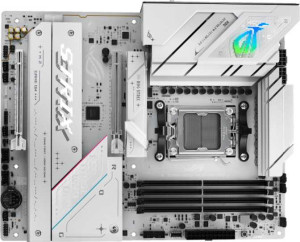
Asus ROG Strix B850-A Gaming WiFi
Asus TUF Gaming B850-BTF Wi-Fi W

Asus ROG Strix B850-A Gaming WiFi Asus TUF Gaming B850-BTF Wi-Fi W

Overview

Welcome to this in-depth specification comparison between the Asus ROG Strix B850-A Gaming WiFi and the Asus TUF Gaming B850-BTF Wi-Fi W, two AM5 motherboards built on the B850 chipset and aimed at enthusiast builders. While they share a strong common foundation, key battlegrounds emerge around storage configuration, memory ceiling, USB connectivity, and audio output options. Read on to discover which board aligns best with your build goals.

Common Features

  • Both motherboards use the AM5 CPU socket.
  • Both motherboards feature the B850 chipset.
  • Both motherboards have an ATX form factor.
  • Wi-Fi is supported on both motherboards, covering Wi-Fi 4 (802.11n), Wi-Fi 5 (802.11ac), Wi-Fi 6 (802.11ax), Wi-Fi 6E (802.11ax), and Wi-Fi 7 (802.11be).
  • Bluetooth 5.4 is available on both motherboards.
  • Both motherboards include an HDMI 2.1 port.
  • Both motherboards support a maximum overclocked RAM speed of 8000 MHz.
  • Both motherboards have 4 memory slots.
  • Both motherboards use DDR5 memory.
  • Both motherboards support dual-channel memory.
  • ECC memory is not supported on either motherboard.
  • Both motherboards have 4 USB 3.2 Gen 1 Type-A ports.
  • Neither motherboard has any USB 3.2 Gen 1 Type-C ports.
  • Both motherboards have 2 USB 2.0 ports.
  • Both motherboards have 1 USB 3.2 Gen 2x2 port.
  • Neither motherboard has USB 4 (40Gbps or 20Gbps) or Thunderbolt 3/4 ports.
  • Both motherboards provide 2 USB 3.2 Gen 1 ports and 2 USB 3.0 ports through expansion.
  • Both motherboards provide 1 USB-C 3.2 Gen 2 port and 4 USB 2.0 ports through expansion.
  • Both motherboards have 6 fan headers.
  • Neither motherboard has a TPM connector, mSATA connector, or U.2 socket.
  • Both motherboards have 1 PCIe 5.0 x16 slot and 1 PCIe 4.0 x16 slot.
  • Neither motherboard has PCIe 3.0 x16, PCIe 2.0 x16, PCI, PCIe x4, or PCIe x8 slots.
  • Both motherboards have a 120 dB signal-to-noise ratio (DAC).
  • Both motherboards support 7.1 audio channels.
  • Both motherboards include an S/PDIF Out port.
  • Both motherboards support RAID 0, RAID 1, RAID 5, and RAID 10 (1+0).
  • RAID 0+1 is not supported on either motherboard.

Main Differences

  • Maximum memory capacity is 192 GB on Asus ROG Strix B850-A Gaming WiFi and 256 GB on Asus TUF Gaming B850-BTF Wi-Fi W.
  • USB 3.2 Gen 2 Type-A ports total 2 on Asus ROG Strix B850-A Gaming WiFi and 3 on Asus TUF Gaming B850-BTF Wi-Fi W.
  • USB 3.2 Gen 2 Type-C port is present on Asus ROG Strix B850-A Gaming WiFi (1 port) but not available on Asus TUF Gaming B850-BTF Wi-Fi W.
  • SATA 3 connectors number 2 on Asus ROG Strix B850-A Gaming WiFi and 4 on Asus TUF Gaming B850-BTF Wi-Fi W.
  • M.2 sockets total 4 on Asus ROG Strix B850-A Gaming WiFi and 3 on Asus TUF Gaming B850-BTF Wi-Fi W.
  • PCIe x1 slot is absent on Asus ROG Strix B850-A Gaming WiFi but 1 slot is present on Asus TUF Gaming B850-BTF Wi-Fi W.
  • Audio connectors number 2 on Asus ROG Strix B850-A Gaming WiFi and 5 on Asus TUF Gaming B850-BTF Wi-Fi W.
Specs Comparison
Asus ROG Strix B850-A Gaming WiFi

Asus ROG Strix B850-A Gaming WiFi

Asus TUF Gaming B850-BTF Wi-Fi W

Asus TUF Gaming B850-BTF Wi-Fi W

General info:
CPU socket AM5 AM5
chipset B850 B850
form factor ATX ATX
release date January 2025 May 2025
supports Wi-Fi
Wi-Fi version Wi-Fi 4 (802.11n), Wi-Fi 5 (802.11ac), Wi-Fi 6 (802.11ax), Wi-Fi 6E (802.11ax), Wi-Fi 7 (802.11be) Wi-Fi 4 (802.11n), Wi-Fi 5 (802.11ac), Wi-Fi 6 (802.11ax), Wi-Fi 6E (802.11ax), Wi-Fi 7 (802.11be)
Has Bluetooth
Bluetooth version 5.4 5.4
HDMI version HDMI 2.1 HDMI 2.1
Easy to overclock
has RGB lighting
Easy to reset BIOS
Has dual BIOS
has aptX
CPU sockets 1 1
Has integrated graphics
warranty period 3 years 3 years
height 244 mm 244 mm
width 305 mm 305 mm
Has integrated CPU

In terms of general specifications, the Asus ROG Strix B850-A Gaming WiFi and the Asus TUF Gaming B850-BTF Wi-Fi W are virtually identical twins. Both boards are built on the AM5 socket with the B850 chipset, adopt the standard ATX form factor at exactly 244 × 305 mm, and carry a 3-year warranty. For a user focused purely on platform compatibility or physical fit, there is nothing to choose between them.

Connectivity and convenience features are equally matched: both offer Wi-Fi 7 (backward-compatible through Wi-Fi 4), Bluetooth 5.4 for low-latency and stable wireless peripherals, and HDMI 2.1 for high-bandwidth display output. Both also support overclocking, include RGB lighting, offer easy BIOS reset, and crucially feature dual BIOS — a meaningful safety net that lets users recover from a failed firmware update without sending the board in for service. Neither board integrates a CPU or onboard graphics, which is expected for enthusiast AM5 platforms relying on discrete GPUs or Ryzen APUs.

Based strictly on the general info group, these two motherboards are in a complete tie. Every spec — from chipset and form factor to wireless standards, dimensions, and warranty — is identical. The meaningful differences between these two products, if any, will lie in other specification groups such as ports, power delivery, or audio. For this category alone, neither board holds an advantage.

Memory:
maximum memory amount 192GB 256GB
overclocked RAM speed 8000 MHz 8000 MHz
memory slots 4 4
DDR memory version 5 5
memory channels 2 2
Supports ECC memory

The memory configurations of these two boards are nearly identical on the surface — both feature 4 DDR5 slots, dual-channel architecture, and support for overclocked speeds up to 8000 MHz. That overclocking ceiling is notable: DDR5 at 8000 MHz delivers substantially higher bandwidth than standard JEDEC speeds, which benefits memory-intensive workloads like video editing, 3D rendering, and large dataset processing.

The single differentiator here is the maximum supported memory capacity. The ROG Strix B850-A caps out at 192 GB, while the TUF Gaming B850-BTF raises that ceiling to 256 GB. In practical terms, most gaming and everyday productivity workloads top out well below 64 GB, so this gap is irrelevant for typical users. However, for professionals running virtual machines, AI inference workloads, or large in-memory databases, the extra headroom on the TUF board becomes a tangible long-term advantage — especially as DDR5 module densities continue to grow.

The TUF Gaming B850-BTF holds a clear edge in this group strictly due to its higher maximum memory capacity. For mainstream users the difference is academic, but for anyone planning a high-density memory build or future-proofing against increasingly RAM-hungry workloads, the TUF board is the stronger choice here.

Ports:
USB 3.2 Gen 2 ports (USB-A) 2 3
USB 3.2 Gen 1 ports (USB-A) 4 4
USB 3.2 Gen 2 ports (USB-C) 1 0
USB 3.2 Gen 1 ports (USB-C) 0 0
USB 2.0 ports 2 2
USB 3.2 Gen 2x2 ports 1 1
USB 4 40Gbps ports 0 0
USB 4 20Gbps ports 0 0
Thunderbolt 4 ports 0 0
Thunderbolt 3 ports 0 0
has an HDMI output
DisplayPort outputs 1 1
RJ45 ports 1 1
Has USB Type-C
eSATA ports 0 0
DVI outputs 0 0
has a VGA connector
PS/2 ports 0 0

The rear I/O panels of these two boards are largely equivalent — both offer 4 USB 3.2 Gen 1 Type-A ports, one USB 3.2 Gen 2x2 port, two USB 2.0 ports, a single RJ45 jack, HDMI, and a DisplayPort output. The shared video outputs are relevant mainly for users leveraging integrated Ryzen graphics, and the networking setup is identical. Where things diverge is in the high-speed USB implementation.

The ROG Strix B850-A opts for 2 USB 3.2 Gen 2 Type-A ports alongside 1 USB 3.2 Gen 2 Type-C, while the TUF Gaming B850-BTF goes with 3 USB 3.2 Gen 2 Type-A ports and no rear USB-C at all. Both approaches deliver the same total count of 10 Gbps-capable ports, but the ROG Strix's USB-C inclusion is meaningful in practice — it natively supports modern peripherals, fast external NVMe enclosures, and direct smartphone charging without an adapter, all at full Gen 2 speeds.

The ROG Strix B850-A has a modest but real edge here. Swapping one Type-A port for a USB 3.2 Gen 2 Type-C is the more forward-looking configuration, given the rapid proliferation of USB-C devices. Users heavily reliant on legacy Type-A peripherals may not feel the difference, but anyone with a modern device ecosystem will appreciate the ROG's rear panel flexibility.

Connectors:
USB 3.2 Gen 1 ports (through expansion) 2 2
USB-C 3.2 Gen 2 ports (through expansion) 1 1
USB 2.0 ports (through expansion) 4 4
SATA 3 connectors 2 4
fan headers 6 6
USB 3.0 ports (through expansion) 2 2
M.2 sockets 4 3
Has TPM connector
U.2 sockets 0 0
Has mSATA connector
SATA 2 connectors 0 0

Internal connectivity is where these two boards make a clear trade-off. The shared foundation is solid — both provide identical expansion USB headers, 6 fan headers for thorough thermal management, and a front-panel USB-C Gen 2 header, which is increasingly essential for modern cases. The divergence lies in how each board prioritizes storage.

The ROG Strix B850-A leads with 4 M.2 sockets, giving users the ability to build an entirely NVMe-based storage array — ideal for maximizing bandwidth and keeping cable clutter minimal. The trade-off is only 2 SATA 3 connectors, which limits legacy drive connectivity. The TUF Gaming B850-BTF flips this balance: it offers 4 SATA 3 connectors but steps down to 3 M.2 sockets. That extra SATA port meaningfully benefits users with existing HDDs, SATA SSDs, or optical drive setups who want to migrate gradually rather than rebuild from scratch.

There is no universal winner here — it comes down entirely to use case. For a clean, NVMe-forward build, the ROG Strix B850-A has the edge with its additional M.2 slot. For users with an established SATA drive ecosystem or needing more mechanical storage bays, the TUF Gaming B850-BTF's extra SATA connectors are the more practical choice.

Expansion slots:
PCIe 4.0 x16 slots 1 1
PCIe 5.0 x16 slots 1 1
PCIe 3.0 x16 slots 0 0
PCIe x1 slots 0 1
PCI slots 0 0
PCIe 2.0 x16 slots 0 0
PCIe x4 slots 0 0
PCIe x8 slots 0 0

Both boards share the same high-bandwidth foundation: a PCIe 5.0 x16 slot for the primary GPU and a PCIe 4.0 x16 slot for a secondary card or other full-length device. The PCIe 5.0 primary slot is future-proof for next-generation graphics cards and high-throughput add-in cards, while the 4.0 x16 slot provides ample bandwidth for a current-gen GPU running as a secondary, a capture card, or a high-speed networking card.

The only difference is the TUF Gaming B850-BTF's additional PCIe x1 slot, which the ROG Strix B850-A entirely omits. While x1 slots are modest in bandwidth, they remain the standard interface for a range of add-in cards — sound cards, USB expansion controllers, additional network adapters, and similar accessories. For users who rely on one of these cards, the TUF's extra slot removes the need to sacrifice the x16 slot for a low-bandwidth peripheral.

The TUF Gaming B850-BTF holds a narrow but practical edge here. For pure GPU-focused builds, both boards are equally capable. But the TUF's extra PCIe x1 slot adds genuine flexibility for users who need to populate the board with supplementary add-in cards alongside their primary GPU.

Audio:
Signal-to-Noise ratio (DAC) 120 dB 120 dB
audio channels 7.1 7.1
Has S/PDIF Out port
audio connectors 2 5

On audio quality metrics, these two boards are perfectly matched: both deliver a 120 dB signal-to-noise ratio from the DAC, support 7.1 surround sound, and include an S/PDIF optical output for routing audio to an external receiver or DAC. A 120 dB SNR is genuinely high-fidelity territory — clean enough that the onboard audio will satisfy all but the most demanding audiophiles without requiring a dedicated sound card.

The meaningful gap opens up with analog connectivity. The TUF Gaming B850-BTF provides 5 audio connectors on the rear panel, while the ROG Strix B850-A offers just 2. In practical terms, 5 jacks typically means a full complement of inputs and outputs — front, rear, center/sub, side surround, and microphone — enabling a true analog 7.1 speaker setup to be wired directly to the board. With only 2 connectors, the ROG Strix is realistically limited to stereo headphone and microphone use on the analog side, pushing 7.1 users toward the S/PDIF output or a USB audio solution.

The TUF Gaming B850-BTF wins this category clearly. Despite identical audio quality specs, its 5 analog connectors make the advertised 7.1 capability practically accessible for users with multi-speaker setups, whereas the ROG Strix's 2-connector layout significantly constrains analog audio flexibility.

Storage:
Supports RAID 1
Supports RAID 10 (1+0)
Supports RAID 5
Supports RAID 0
Supports RAID 0+1

RAID support is identical across both boards. Each supports RAID 0 (striping for maximum performance), RAID 1 (mirroring for redundancy), RAID 5 (distributed parity balancing speed and fault tolerance across three or more drives), and RAID 10 (a combined stripe-and-mirror array requiring four drives for both speed and redundancy). Neither board supports RAID 0+1, though this omission is inconsequential in practice — RAID 10 is the preferred and more resilient implementation of the same concept.

The presence of RAID 5 is worth highlighting for users considering a multi-drive NAS-style build: it allows one drive to fail without data loss while still delivering read performance gains, making it a compelling option for a secondary storage array. Both boards unlock this capability equally, so no advantage exists on either side.

This group is a complete tie. Every supported and unsupported RAID level is identical between the two boards. Storage redundancy and performance configuration options will not be a differentiating factor in this comparison.

Comparison Summary & Verdict

Both boards deliver a solid, feature-rich B850 platform with Wi-Fi 7, Bluetooth 5.4, DDR5 support up to 8000 MHz, and identical RAID capabilities. However, their differences reveal distinct strengths. The Asus ROG Strix B850-A Gaming WiFi stands out with 4 M.2 sockets and a rear USB 3.2 Gen 2 Type-C port, making it ideal for builders who prioritize NVMe storage expansion and modern USB-C connectivity. The Asus TUF Gaming B850-BTF Wi-Fi W counters with a higher 256 GB memory ceiling, 4 SATA 3 connectors, 5 audio connectors, and an extra PCIe x1 slot, suiting users who need more traditional storage, richer analog audio, and greater RAM headroom for demanding workloads.

Asus ROG Strix B850-A Gaming WiFi
Buy Asus ROG Strix B850-A Gaming WiFi if...

Buy the Asus ROG Strix B850-A Gaming WiFi if you want more M.2 NVMe slots and a rear USB 3.2 Gen 2 Type-C port for modern peripheral connectivity.

Asus TUF Gaming B850-BTF Wi-Fi W
Buy Asus TUF Gaming B850-BTF Wi-Fi W if...

Buy the Asus TUF Gaming B850-BTF Wi-Fi W if you need a higher maximum memory capacity of 256 GB, more SATA 3 ports, or a richer analog audio setup with 5 audio connectors.