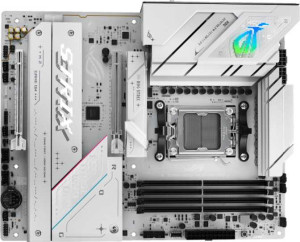
Asus ROG Strix B850-A Gaming WiFi
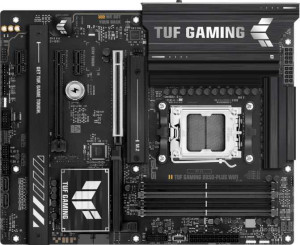
Asus TUF Gaming B850-Plus WiFi

Asus ROG Strix B850-A Gaming WiFi Asus TUF Gaming B850-Plus WiFi

Overview

When choosing between the Asus ROG Strix B850-A Gaming WiFi and the Asus TUF Gaming B850-Plus WiFi, builders face a nuanced decision within AMD's B850 ecosystem. Both motherboards share the same AM5 socket, ATX form factor, and Wi-Fi 7 support, yet they diverge in meaningful ways across memory configuration, storage connectivity, USB port selection, and audio features — making the right choice highly dependent on your specific build priorities.

Common Features

  • Both motherboards use the AM5 CPU socket.
  • Both motherboards feature the B850 chipset.
  • Both motherboards have an ATX form factor.
  • Wi-Fi is supported on both motherboards, covering Wi-Fi 4, Wi-Fi 5, Wi-Fi 6, Wi-Fi 6E, and Wi-Fi 7.
  • Bluetooth 5.4 is available on both motherboards.
  • Both motherboards include an HDMI 2.1 port.
  • Both motherboards support a maximum memory amount of 192GB.
  • Both motherboards support overclocked RAM speeds up to 8000 MHz.
  • Both motherboards have 4 memory slots.
  • Both motherboards use DDR5 memory.
  • Both motherboards have 2 memory channels.
  • ECC memory is not supported on either motherboard.
  • Both motherboards have 4 USB 3.2 Gen 1 Type-A ports.
  • Neither motherboard has any USB 3.2 Gen 1 Type-C ports.
  • Both motherboards have 2 USB 2.0 ports.
  • Both motherboards have 1 USB 3.2 Gen 2x2 port.
  • Neither motherboard has any USB 4, Thunderbolt 3, or Thunderbolt 4 ports.
  • Both motherboards provide 2 USB 3.2 Gen 1 ports and 1 USB-C 3.2 Gen 2 port through expansion, along with 4 USB 2.0 ports through expansion.
  • Both motherboards have 6 fan headers.
  • A TPM connector is not present on either motherboard.
  • Both motherboards have 1 PCIe 5.0 x16 slot and 1 PCIe 4.0 x16 slot.
  • Neither motherboard has any PCIe 3.0 x16, PCIe 2.0 x16, PCIe x8, PCIe x4, or legacy PCI slots.
  • Both motherboards have a Signal-to-Noise ratio of 120 dB on the DAC.
  • Both motherboards support 7.1 audio channels.
  • Both motherboards support RAID 0, RAID 1, RAID 5, and RAID 10, but neither supports RAID 0+1.

Main Differences

  • Easy BIOS reset is available on the Asus ROG Strix B850-A Gaming WiFi but not on the Asus TUF Gaming B850-Plus WiFi.
  • The maximum native RAM speed is 8000 MHz on the Asus ROG Strix B850-A Gaming WiFi and 4000 MHz on the Asus TUF Gaming B850-Plus WiFi.
  • USB 3.2 Gen 2 Type-A ports number 2 on the Asus ROG Strix B850-A Gaming WiFi and 3 on the Asus TUF Gaming B850-Plus WiFi.
  • A USB 3.2 Gen 2 Type-C port is present on the Asus ROG Strix B850-A Gaming WiFi but not available on the Asus TUF Gaming B850-Plus WiFi.
  • SATA 3 connectors number 2 on the Asus ROG Strix B850-A Gaming WiFi and 4 on the Asus TUF Gaming B850-Plus WiFi.
  • M.2 sockets number 4 on the Asus ROG Strix B850-A Gaming WiFi and 3 on the Asus TUF Gaming B850-Plus WiFi.
  • PCIe x1 slots are absent on the Asus ROG Strix B850-A Gaming WiFi, while the Asus TUF Gaming B850-Plus WiFi has 2.
  • An S/PDIF Out port is present on the Asus ROG Strix B850-A Gaming WiFi but not available on the Asus TUF Gaming B850-Plus WiFi.
  • Audio connectors number 2 on the Asus ROG Strix B850-A Gaming WiFi and 5 on the Asus TUF Gaming B850-Plus WiFi.
Specs Comparison
Asus ROG Strix B850-A Gaming WiFi

Asus ROG Strix B850-A Gaming WiFi

Asus TUF Gaming B850-Plus WiFi

Asus TUF Gaming B850-Plus WiFi

General info:
CPU socket AM5 AM5
chipset B850 B850
form factor ATX ATX
release date January 2025 January 2025
supports Wi-Fi
Wi-Fi version Wi-Fi 4 (802.11n), Wi-Fi 5 (802.11ac), Wi-Fi 6 (802.11ax), Wi-Fi 6E (802.11ax), Wi-Fi 7 (802.11be) Wi-Fi 4 (802.11n), Wi-Fi 5 (802.11ac), Wi-Fi 6 (802.11ax), Wi-Fi 6E (802.11ax), Wi-Fi 7 (802.11be)
Has Bluetooth
Bluetooth version 5.4 5.4
HDMI version HDMI 2.1 HDMI 2.1
Easy to overclock
has RGB lighting
Easy to reset BIOS
Has dual BIOS
has aptX
CPU sockets 1 1
Has integrated graphics
warranty period 3 years 3 years
height 244 mm 244 mm
width 305 mm 305 mm
Has integrated CPU

At a foundational level, the Asus ROG Strix B850-A Gaming WiFi and the Asus TUF Gaming B850-Plus WiFi are built on the same platform: both use the AM5 socket with a B850 chipset, share an ATX form factor (244 × 305 mm), and offer identical connectivity credentials — Wi-Fi 7 (backwards-compatible through Wi-Fi 4), Bluetooth 5.4, and HDMI 2.1. Both also support overclocking, carry RGB lighting, include dual BIOS, and back the buyer with a 3-year warranty. For most builders, these shared traits define the core experience.

The only meaningful differentiator in this group is the ROG Strix's Easy BIOS Reset feature, which the TUF Gaming lacks. In practice this matters most when a failed overclock or a bad update leaves the system unbootable — the ROG Strix lets you recover without needing spare hardware like a compatible CPU or a POST card, which is a genuine convenience advantage for enthusiasts who push their systems hard or who upgrade firmware frequently.

Overall, the two boards are nearly identical in general specifications. The ROG Strix earns a narrow edge in this category solely because of its easy BIOS reset capability — a small but real quality-of-life advantage for overclockers and tinkerers. Buyers who never touch BIOS settings will find both boards effectively equivalent here.

Memory:
maximum memory amount 192GB 192GB
RAM speed (max) 8000 MHz 4000 MHz
overclocked RAM speed 8000 MHz 8000 MHz
memory slots 4 4
DDR memory version 5 5
memory channels 2 2
Supports ECC memory

The Asus ROG Strix B850-A Gaming WiFi and Asus TUF Gaming B850-Plus WiFi both support a maximum memory capacity of 192GB, with four memory slots each and two memory channels. Both motherboards also use DDR5 memory, but there is a notable difference in their supported memory speeds. The ROG Strix model supports a maximum RAM speed of 8000 MHz, while the TUF Gaming model has a lower maximum RAM speed of 4000 MHz. Both motherboards can handle overclocked RAM speeds up to 8000 MHz.

Neither product supports ECC (Error-Correcting Code) memory, which may be important for certain types of workloads or systems requiring high reliability.

In summary, while both motherboards offer similar memory slot configurations and capacity, the ROG Strix B850-A Gaming WiFi supports significantly faster memory speeds, especially in its maximum RAM speed, compared to the TUF Gaming B850-Plus WiFi.

Ports:
USB 3.2 Gen 2 ports (USB-A) 2 3
USB 3.2 Gen 1 ports (USB-A) 4 4
USB 3.2 Gen 2 ports (USB-C) 1 0
USB 3.2 Gen 1 ports (USB-C) 0 0
USB 2.0 ports 2 2
USB 3.2 Gen 2x2 ports 1 1
USB 4 40Gbps ports 0 0
USB 4 20Gbps ports 0 0
Thunderbolt 4 ports 0 0
Thunderbolt 3 ports 0 0
has an HDMI output
DisplayPort outputs 1 1
RJ45 ports 1 1
Has USB Type-C
eSATA ports 0 0
DVI outputs 0 0
has a VGA connector
PS/2 ports 0 0

The Asus ROG Strix B850-A Gaming WiFi and Asus TUF Gaming B850-Plus WiFi motherboards have similar port configurations, with both offering an HDMI output, DisplayPort output, and a single RJ45 port. They also feature the same number of USB 3.2 Gen 1 USB-A ports (4) and USB 2.0 ports (2). However, there are some key differences between the two models in terms of USB and Type-C support.

The ROG Strix B850-A Gaming WiFi provides two USB 3.2 Gen 2 USB-A ports, one USB 3.2 Gen 2x2 port, and one USB 3.2 Gen 2 USB-C port, giving it slightly more versatility in terms of high-speed USB connectivity. In contrast, the TUF Gaming B850-Plus WiFi offers only three USB 3.2 Gen 2 USB-A ports and lacks a USB 3.2 Gen 2 USB-C port but matches the ROG Strix with a USB 3.2 Gen 2x2 port.

Both motherboards do not include any Thunderbolt ports, eSATA, DVI, or VGA connectors, and neither features a PS/2 port. Additionally, the ROG Strix model has the advantage of an extra USB Type-C port, making it a slightly more flexible option for users needing that specific connection type.

Connectors:
USB 3.2 Gen 1 ports (through expansion) 2 2
USB-C 3.2 Gen 2 ports (through expansion) 1 1
USB 2.0 ports (through expansion) 4 4
SATA 3 connectors 2 4
fan headers 6 6
USB 3.0 ports (through expansion) 2 2
M.2 sockets 4 3
Has TPM connector
U.2 sockets 0 0
Has mSATA connector
SATA 2 connectors 0 0

The Asus ROG Strix B850-A Gaming WiFi and Asus TUF Gaming B850-Plus WiFi motherboards share a similar set of connectors, but there are a few differences in terms of their capabilities. Both models include 2 USB 3.2 Gen 1 ports, 1 USB-C 3.2 Gen 2 port, and 4 USB 2.0 ports through expansion. Additionally, both motherboards feature 2 USB 3.0 ports through expansion and 6 fan headers. Both models also lack mSATA connectors and U.2 sockets.

When it comes to storage connections, the ROG Strix B850-A Gaming WiFi offers 2 SATA 3 connectors, while the TUF Gaming B850-Plus WiFi has 4 SATA 3 connectors, providing a slight advantage for those requiring additional SATA connections. In terms of M.2 sockets, the ROG Strix B850-A Gaming WiFi has 4 M.2 sockets, while the TUF Gaming B850-Plus WiFi has 3, giving the ROG Strix model an edge for M.2 expansion.

Both motherboards do not have a TPM connector, and neither model features SATA 2 connectors. In summary, while both motherboards are quite similar, the ROG Strix B850-A Gaming WiFi offers more M.2 sockets and fewer SATA 3 connectors, while the TUF Gaming B850-Plus WiFi provides additional SATA 3 connectors at the expense of one M.2 socket.

Expansion slots:
PCIe 4.0 x16 slots 1 1
PCIe 5.0 x16 slots 1 1
PCIe 3.0 x16 slots 0 0
PCIe x1 slots 0 2
PCI slots 0 0
PCIe 2.0 x16 slots 0 0
PCIe x4 slots 0 0
PCIe x8 slots 0 0

Both the Asus ROG Strix B850-A Gaming WiFi and Asus TUF Gaming B850-Plus WiFi feature similar high-speed expansion slots, with one PCIe 4.0 x16 slot and one PCIe 5.0 x16 slot. However, the main difference between the two models lies in the availability of additional PCIe x1 slots. The ROG Strix B850-A Gaming WiFi does not have any PCIe x1 slots, while the TUF Gaming B850-Plus WiFi offers 2 PCIe x1 slots.

Both motherboards do not include any PCI slots, PCIe 2.0 x16 slots, or PCIe x4 slots, and neither supports PCIe x8 slots. Therefore, while both offer the same high-performance PCIe x16 slots for graphics cards, the TUF Gaming B850-Plus WiFi provides more flexibility for adding smaller expansion cards with its two PCIe x1 slots.

In summary, the key difference between the two models in terms of expansion slots is the extra PCIe x1 slots on the TUF Gaming B850-Plus WiFi, giving it an edge for users who require more expansion options.

Audio:
Signal-to-Noise ratio (DAC) 120 dB 120 dB
audio channels 7.1 7.1
Has S/PDIF Out port
audio connectors 2 5

Both the Asus ROG Strix B850-A Gaming WiFi and Asus TUF Gaming B850-Plus WiFi motherboards feature a high Signal-to-Noise Ratio (SNR) of 120 dB for the DAC, ensuring clear and detailed audio output. Both models support 7.1 audio channels, making them suitable for immersive sound experiences. However, there is a difference in the S/PDIF Out port availability. The ROG Strix model includes an S/PDIF Out port, while the TUF Gaming model does not.

Another difference lies in the number of audio connectors. The ROG Strix B850-A Gaming WiFi provides 2 audio connectors, while the TUF Gaming B850-Plus WiFi offers 5 audio connectors. This gives the TUF Gaming model more options for connecting audio devices.

In summary, both motherboards offer excellent audio quality with the same SNR and 7.1 channels, but the ROG Strix B850-A Gaming WiFi includes an S/PDIF Out port, while the TUF Gaming B850-Plus WiFi offers more audio connectors.

Storage:
Supports RAID 1
Supports RAID 10 (1+0)
Supports RAID 5
Supports RAID 0
Supports RAID 0+1

Both the Asus ROG Strix B850-A Gaming WiFi and Asus TUF Gaming B850-Plus WiFi motherboards offer robust RAID support. Both models support RAID 1, RAID 10 (1+0), RAID 5, and RAID 0, providing a variety of options for storage configurations that ensure redundancy and performance. However, neither motherboard supports RAID 0+1, which is a mirrored and striped configuration.

As the specifications are identical in this storage category, both models offer the same RAID capabilities with no differences between them.

In summary, the storage capabilities in terms of RAID support are identical across both motherboards, with both supporting RAID 1, RAID 10 (1+0), RAID 5, and RAID 0, while excluding RAID 0+1.

Comparison Summary & Verdict

After a thorough comparison, both boards prove to be capable B850 platforms sharing strong fundamentals like Wi-Fi 7, DDR5 support up to 192GB, and full RAID capability. However, their differences reveal distinct personalities. The Asus ROG Strix B850-A Gaming WiFi stands out with a higher native RAM speed of 8000 MHz, one extra M.2 socket, a USB 3.2 Gen 2 Type-C rear port, an S/PDIF Out connector, and a convenient easy BIOS reset feature — making it the stronger pick for enthusiasts who demand flexibility and cutting-edge connectivity. The Asus TUF Gaming B850-Plus WiFi, on the other hand, counters with 4 SATA 3 connectors, an extra USB 3.2 Gen 2 Type-A port, 2 additional PCIe x1 slots, and 5 audio connectors, appealing to builders who prioritize traditional storage expansion and a richer analog audio setup.

Asus ROG Strix B850-A Gaming WiFi
Buy Asus ROG Strix B850-A Gaming WiFi if...

Buy the Asus ROG Strix B850-A Gaming WiFi if you want faster native RAM speeds, more M.2 slots, a rear USB-C port, S/PDIF audio output, and the convenience of easy BIOS reset.

Asus TUF Gaming B850-Plus WiFi
Buy Asus TUF Gaming B850-Plus WiFi if...

Buy the Asus TUF Gaming B850-Plus WiFi if you need more SATA 3 connectors for traditional storage drives, extra PCIe x1 expansion slots, or a greater number of analog audio connectors.