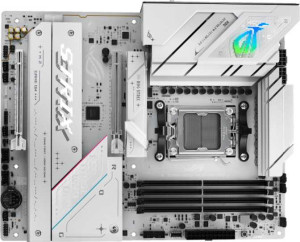
Asus ROG Strix B850-A Gaming WiFi
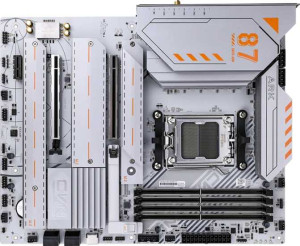
Colorful CVN X870 Ark Frozen V14

Asus ROG Strix B850-A Gaming WiFi Colorful CVN X870 Ark Frozen V14

Overview

Welcome to our detailed spec breakdown of the Asus ROG Strix B850-A Gaming WiFi versus the Colorful CVN X870 Ark Frozen V14 — two AM5 motherboards targeting enthusiast builders. Both share a strong feature foundation, yet diverge in meaningful ways across chipset tier, USB connectivity, storage options, and BIOS flexibility. Read on to discover which board best matches your build priorities.

Common Features

  • Both boards use the AM5 CPU socket.
  • Both boards have an ATX form factor.
  • Wi-Fi is supported on both boards, covering Wi-Fi 4, Wi-Fi 5, Wi-Fi 6, Wi-Fi 6E, and Wi-Fi 7.
  • Bluetooth 5.4 is available on both boards.
  • Overclocking support is present on both boards.
  • RGB lighting is featured on both boards.
  • Both boards support a maximum of 192GB of RAM.
  • Both boards have 4 memory slots.
  • Both boards use DDR5 memory.
  • Both boards operate in dual-channel memory mode.
  • ECC memory is not supported on either board.
  • Both boards have 4 USB 3.2 Gen 1 Type-A ports.
  • Neither board has any USB 3.2 Gen 1 Type-C ports.
  • Both boards have 2 USB 2.0 ports.
  • Neither board has any USB 4 20Gbps ports.
  • Neither board has any Thunderbolt 3 ports.
  • Both boards have an HDMI output.
  • Both boards have 1 DisplayPort output.
  • Both boards have 1 RJ45 port.
  • Both boards have a signal-to-noise ratio of 120 dB on the DAC.
  • Both boards support 7.1 audio channels.
  • An S/PDIF Out port is present on both boards.
  • Both boards support RAID 0, RAID 1, RAID 5, and RAID 10.
  • RAID 0+1 is not supported on either board.
  • Both boards have 1 PCIe 5.0 x16 slot.
  • Neither board has any PCIe 3.0 x16, PCIe 2.0 x16, PCIe x8, or PCI slots.
  • Both boards provide 2 USB 3.2 Gen 1 ports through expansion.
  • Both boards provide 1 USB-C 3.2 Gen 2 port through expansion.
  • Both boards provide 4 USB 2.0 ports through expansion.
  • Both boards provide 2 USB 3.0 ports through expansion.
  • Neither board has any U.2 sockets.
  • An mSATA connector is not present on either board.
  • Neither board has any SATA 2 connectors.

Main Differences

  • The chipset is B850 on the Asus ROG Strix B850-A Gaming WiFi and X870 on the Colorful CVN X870 Ark Frozen V14.
  • The HDMI version is 2.1 on the Asus ROG Strix B850-A Gaming WiFi and 2.0 on the Colorful CVN X870 Ark Frozen V14.
  • Easy BIOS reset is available on the Asus ROG Strix B850-A Gaming WiFi but not on the Colorful CVN X870 Ark Frozen V14.
  • Dual BIOS is present on the Asus ROG Strix B850-A Gaming WiFi but not on the Colorful CVN X870 Ark Frozen V14.
  • The board height is 244 mm on the Asus ROG Strix B850-A Gaming WiFi and 245 mm on the Colorful CVN X870 Ark Frozen V14.
  • The maximum RAM speed is 8000 MHz on the Asus ROG Strix B850-A Gaming WiFi and 5000 MHz on the Colorful CVN X870 Ark Frozen V14.
  • The maximum overclocked RAM speed is 8000 MHz on the Asus ROG Strix B850-A Gaming WiFi and 8200 MHz on the Colorful CVN X870 Ark Frozen V14.
  • USB 3.2 Gen 2 Type-A ports number 2 on the Asus ROG Strix B850-A Gaming WiFi and 1 on the Colorful CVN X870 Ark Frozen V14.
  • USB 3.2 Gen 2 Type-C ports number 1 on the Asus ROG Strix B850-A Gaming WiFi, while the Colorful CVN X870 Ark Frozen V14 has none.
  • USB 3.2 Gen 2x2 ports number 1 on the Asus ROG Strix B850-A Gaming WiFi, while the Colorful CVN X870 Ark Frozen V14 has none.
  • A USB 4 40Gbps port is present on the Colorful CVN X870 Ark Frozen V14 but not on the Asus ROG Strix B850-A Gaming WiFi.
  • A Thunderbolt 4 port is present on the Colorful CVN X870 Ark Frozen V14 but not on the Asus ROG Strix B850-A Gaming WiFi.
  • SATA 3 connectors number 2 on the Asus ROG Strix B850-A Gaming WiFi and 4 on the Colorful CVN X870 Ark Frozen V14.
  • Fan headers number 6 on the Asus ROG Strix B850-A Gaming WiFi and 5 on the Colorful CVN X870 Ark Frozen V14.
  • M.2 sockets number 4 on the Asus ROG Strix B850-A Gaming WiFi and 3 on the Colorful CVN X870 Ark Frozen V14.
  • A TPM connector is present on the Colorful CVN X870 Ark Frozen V14 but not on the Asus ROG Strix B850-A Gaming WiFi.
  • A PCIe 4.0 x16 slot is present on the Asus ROG Strix B850-A Gaming WiFi, while the Colorful CVN X870 Ark Frozen V14 has none.
  • PCIe x1 slots number 0 on the Asus ROG Strix B850-A Gaming WiFi and 1 on the Colorful CVN X870 Ark Frozen V14.
  • PCIe x4 slots number 0 on the Asus ROG Strix B850-A Gaming WiFi and 1 on the Colorful CVN X870 Ark Frozen V14.
  • Audio connectors number 2 on the Asus ROG Strix B850-A Gaming WiFi and 5 on the Colorful CVN X870 Ark Frozen V14.
Specs Comparison
Asus ROG Strix B850-A Gaming WiFi

Asus ROG Strix B850-A Gaming WiFi

Colorful CVN X870 Ark Frozen V14

Colorful CVN X870 Ark Frozen V14

General info:
CPU socket AM5 AM5
chipset B850 X870
form factor ATX ATX
release date January 2025 April 2025
supports Wi-Fi
Wi-Fi version Wi-Fi 4 (802.11n), Wi-Fi 5 (802.11ac), Wi-Fi 6 (802.11ax), Wi-Fi 6E (802.11ax), Wi-Fi 7 (802.11be) Wi-Fi 4 (802.11n), Wi-Fi 5 (802.11ac), Wi-Fi 6 (802.11ax), Wi-Fi 6E (802.11ax), Wi-Fi 7 (802.11be)
Has Bluetooth
Bluetooth version 5.4 5.4
HDMI version HDMI 2.1 HDMI 2.0
Easy to overclock
has RGB lighting
Easy to reset BIOS
Has dual BIOS
has aptX
CPU sockets 1 1
Has integrated graphics
warranty period 3 years 3 years
height 244 mm 245 mm
width 305 mm 305 mm
Has integrated CPU

Both the Asus ROG Strix B850-A and the Colorful CVN X870 Ark Frozen V14 share the same AM5 socket, ATX form factor, and near-identical dimensions, making them physically interchangeable in most standard cases. Both support Wi-Fi 7, Bluetooth 5.4, and feature RGB lighting, so on connectivity and aesthetics they are evenly matched. Neither board has integrated graphics or a built-in CPU, which is expected at this tier.

The most meaningful differentiator is the chipset: the Colorful runs the higher-end X870, which in principle offers more overclocking headroom and platform features, while the Asus uses the mid-range B850. However, the Asus counters this with a notably stronger firmware toolkit — it offers easy BIOS reset and a dual BIOS chip, both absent on the Colorful. Dual BIOS is a real safety net: if a failed flash or corrupted firmware bricks one BIOS, the board automatically falls back to the backup, which is a meaningful reliability advantage for overclockers and power users. The Colorful's lack of both features makes recovery from a bad flash riskier. Additionally, the Asus provides HDMI 2.1 versus the Colorful's HDMI 2.0, supporting higher-bandwidth video output (e.g., 4K@120Hz vs. 4K@60Hz) — relevant if you plan to use the video-out port directly.

On balance, the Colorful's X870 chipset gives it a platform-level edge on paper, but the Asus ROG Strix B850-A punches back with superior BIOS resilience via dual BIOS, easier recovery, and a more capable HDMI output. For users who value ease of maintenance and firmware safety, the Asus holds a practical advantage despite its lower-tier chipset. Both boards share a 3-year warranty, so neither has an edge there.
Memory:
maximum memory amount 192GB 192GB
RAM speed (max) 8000 MHz 5000 MHz
overclocked RAM speed 8000 MHz 8200 MHz
memory slots 4 4
DDR memory version 5 5
memory channels 2 2
Supports ECC memory

At a structural level, the two boards are identical: both offer 4 slots, dual-channel DDR5, and a maximum capacity of 192GB — more than enough headroom for even the most demanding workstations or high-core-count gaming rigs. Neither supports ECC memory, which is expected for consumer-grade motherboards.

The real story is in the speed figures. The Asus ROG Strix B850-A officially supports RAM up to 8000 MHz, meaning it can run high-speed kits at that frequency within its validated, stable profile — no manual tuning required. The Colorful CVN X870, by contrast, lists a native maximum of only 5000 MHz, which is close to base DDR5 JEDEC speeds and well below what enthusiast kits typically run. It does claim an overclocked ceiling of 8200 MHz, a hair above the Asus, but reaching that requires manual overclocking, which introduces instability risk and demands more user expertise. Essentially, the Colorful's ″native″ speed spec understates its potential, while the Asus delivers high-speed performance out of the box.

For most users who simply install an XMP/EXPO kit and move on, the Asus has a clear practical edge — its 8000 MHz native support means fast memory ″just works″ without touching BIOS overclocking settings. The Colorful can theoretically match or slightly exceed that ceiling, but only for users comfortable with manual tuning. If plug-and-play high-speed RAM is a priority, the Asus wins this category.

Ports:
USB 3.2 Gen 2 ports (USB-A) 2 1
USB 3.2 Gen 1 ports (USB-A) 4 4
USB 3.2 Gen 2 ports (USB-C) 1 0
USB 3.2 Gen 1 ports (USB-C) 0 0
USB 2.0 ports 2 2
USB 3.2 Gen 2x2 ports 1 0
USB 4 40Gbps ports 0 1
USB 4 20Gbps ports 0 0
Thunderbolt 4 ports 0 1
Thunderbolt 3 ports 0 0
has an HDMI output
DisplayPort outputs 1 1
RJ45 ports 1 1
Has USB Type-C
eSATA ports 0 0
DVI outputs 0 0
has a VGA connector
PS/2 ports 0 0

These two boards take noticeably different approaches to rear I/O. The Asus ROG Strix B850-A prioritizes sheer port count and high-speed USB versatility: it offers more USB 3.2 Gen 2 ports across both USB-A and USB-C, plus a USB 3.2 Gen 2x2 port delivering 20Gbps — useful for fast external SSDs or high-bandwidth peripherals that don't require Thunderbolt. The Colorful CVN X870, meanwhile, trades raw quantity for a premium connectivity tier, including a Thunderbolt 4 port and a USB 4 40Gbps port — both significantly more capable in terms of peak bandwidth and device compatibility.

The practical impact of Thunderbolt 4 should not be underestimated. At 40Gbps, it supports external GPU enclosures, ultra-fast NVMe enclosures, high-refresh-rate displays over a single cable, and daisy-chaining of multiple devices — none of which are possible through the Asus's USB 3.2 Gen 2x2. For creative professionals or power users with Thunderbolt-compatible peripherals, the Colorful's offering is meaningfully more capable. The Asus, however, wins for users who simply need more simultaneous high-speed USB connections without investing in a Thunderbolt ecosystem.

Both boards are otherwise evenly matched on display outputs (HDMI, DisplayPort) and networking (single RJ45). The edge here depends squarely on use case: the Asus suits users who want more ports and broad USB compatibility, while the Colorful is the stronger pick for anyone who can leverage Thunderbolt 4 — a feature that commands a clear bandwidth and versatility advantage at the top end.

Connectors:
USB 3.2 Gen 1 ports (through expansion) 2 2
USB-C 3.2 Gen 2 ports (through expansion) 1 1
USB 2.0 ports (through expansion) 4 4
SATA 3 connectors 2 4
fan headers 6 5
USB 3.0 ports (through expansion) 2 2
M.2 sockets 4 3
Has TPM connector
U.2 sockets 0 0
Has mSATA connector
SATA 2 connectors 0 0

Internal expansion connectors tell a clear story about each board's storage philosophy. The Asus ROG Strix B850-A leans into modern NVMe-first builds, offering 4 M.2 sockets — one more than the Colorful's 3 — making it the stronger choice for users planning an all-NVMe array. The Colorful CVN X870, by contrast, compensates with 4 SATA 3 connectors versus the Asus's 2, giving it a clear advantage for anyone still running SATA SSDs, HDDs, or optical drives. If your storage setup mixes older SATA devices with NVMe drives, the Colorful accommodates that more comfortably without needing an expansion card.

Thermal management slightly favors the Asus, which provides 6 fan headers compared to the Colorful's 5. In a high-airflow build with multiple case fans, a dedicated radiator, and separate CPU cooler headers, that extra header can matter — it reduces the need for splitters, which can complicate fan curve control. The Colorful partially offsets this with a TPM connector, absent on the Asus, which is relevant for enterprise environments or users who want hardware-based security features like BitLocker tied to a discrete TPM module rather than firmware TPM.

Internal USB expansion headers are identical on both boards, so no advantage there. Overall, the Asus edges ahead for pure NVMe-focused, high-fan-count builds, while the Colorful is the more practical option for mixed SATA/NVMe storage configurations and security-conscious deployments that benefit from a dedicated TPM connector. Neither board has a sweeping advantage — the right choice depends on your specific storage and cooling hardware.

Expansion slots:
PCIe 4.0 x16 slots 1 0
PCIe 5.0 x16 slots 1 1
PCIe 3.0 x16 slots 0 0
PCIe x1 slots 0 1
PCI slots 0 0
PCIe 2.0 x16 slots 0 0
PCIe x4 slots 0 1
PCIe x8 slots 0 0

Both boards anchor their expansion with a single PCIe 5.0 x16 slot for the primary GPU — the current standard for top-tier graphics cards and the highest-bandwidth consumer slot available. Where they diverge is in what sits alongside it. The Asus ROG Strix B850-A adds a second PCIe 4.0 x16 slot, which, while unlikely to run a second discrete GPU at full bandwidth, is a highly practical slot for add-in cards that can genuinely use x16 physical space — think high-end capture cards, RAID controllers, or networking cards that benefit from a full-length slot.

The Colorful CVN X870 takes a different approach, pairing its PCIe 5.0 x16 primary slot with a PCIe x4 and a PCIe x1 slot instead. The x4 slot is well-suited for NVMe expansion cards or 10GbE network adapters, while the x1 handles smaller, lower-bandwidth add-ins like sound cards or basic USB expansion cards. This configuration offers more simultaneous expansion options at lower bandwidths, which can be useful in a more accessory-heavy build.

For most single-GPU gaming builds, the primary PCIe 5.0 slot is all that matters, making both boards equal where it counts most. Beyond that, the Asus has an edge for users who need a second high-physical-bandwidth slot for a specific full-size add-in card, while the Colorful better accommodates builds with multiple smaller expansion cards. Neither board has a decisive overall advantage — the better fit depends entirely on which secondary slots align with your planned add-in hardware.

Audio:
Signal-to-Noise ratio (DAC) 120 dB 120 dB
audio channels 7.1 7.1
Has S/PDIF Out port
audio connectors 2 5

On the core audio quality metrics, these two boards are completely identical: both deliver a 120 dB signal-to-noise ratio, 7.1-channel surround output, and an S/PDIF optical output for passing digital audio to an external DAC or receiver. A 120 dB SNR is a strong figure for onboard audio, indicating a clean signal with minimal background noise — well above the threshold where most users would perceive any degradation, even on quality headphones or bookshelf speakers.

The one meaningful difference is the number of analog audio connectors: the Colorful CVN X870 provides 5 audio jacks versus the Asus ROG Strix B850-A's 2. This matters in practice for users running a full analog 7.1 surround speaker setup, which typically requires multiple 3.5mm jacks for front, rear, center, and side channels. With only 2 connectors, the Asus is better suited for stereo or headset use, while the Colorful can natively support a multi-speaker analog configuration without routing audio through a receiver or external interface.

For the majority of users — those on headsets, stereo speakers, or routing audio digitally via S/PDIF — both boards are effectively tied in audio capability. But for anyone building a dedicated analog surround sound setup connected directly to the motherboard, the Colorful's 5-jack rear panel gives it a clear and practical advantage in this category.

Storage:
Supports RAID 1
Supports RAID 10 (1+0)
Supports RAID 5
Supports RAID 0
Supports RAID 0+1

Storage redundancy support is a complete draw between these two boards. Both the Asus ROG Strix B850-A and the Colorful CVN X870 support the same four RAID modes — RAID 0, RAID 1, RAID 5, and RAID 10 — and neither supports RAID 0+1, which is a rarely used configuration that RAID 10 functionally supersedes in most implementations.

The practical coverage here is solid for a consumer motherboard. RAID 0 stripes data across drives for maximum throughput, RAID 1 mirrors for redundancy, RAID 5 balances storage efficiency with fault tolerance across three or more drives, and RAID 10 combines mirroring and striping for both speed and resilience. Having all four means users can tailor their storage array to prioritize performance, safety, or a balance of both — without needing a dedicated RAID controller card.

Since the spec data is identical across every dimension in this category, there is no differentiator to call out. Both boards are evenly matched on storage RAID support, and this group should not influence the buying decision either way.

Comparison Summary & Verdict

Both boards share a solid AM5 foundation with DDR5 support, Wi-Fi 7, Bluetooth 5.4, and up to 192GB of RAM, making either a capable choice for a modern build. However, their strengths differ clearly. The Asus ROG Strix B850-A Gaming WiFi stands out with dual BIOS, easy BIOS reset, more M.2 slots (4 vs 3), a wider USB 3.2 Gen 2 port selection including a Gen 2x2 port, and a PCIe 4.0 x16 slot — making it ideal for users who value storage expandability and reliability features. The Colorful CVN X870 Ark Frozen V14, on the other hand, brings the higher-tier X870 chipset, a Thunderbolt 4 port, a USB 4 40Gbps port, more SATA 3 connectors, a TPM connector, and more audio jacks, appealing to users who prioritize advanced connectivity and professional-grade I/O.

Asus ROG Strix B850-A Gaming WiFi
Buy Asus ROG Strix B850-A Gaming WiFi if...

Buy the Asus ROG Strix B850-A Gaming WiFi if you want dual BIOS protection, more M.2 slots for storage expansion, and a broader range of USB 3.2 Gen 2 ports including a Gen 2x2 connection.

Colorful CVN X870 Ark Frozen V14
Buy Colorful CVN X870 Ark Frozen V14 if...

Buy the Colorful CVN X870 Ark Frozen V14 if you need the premium X870 chipset, a Thunderbolt 4 port, USB 4 40Gbps connectivity, more SATA 3 connectors, or a richer audio jack selection.