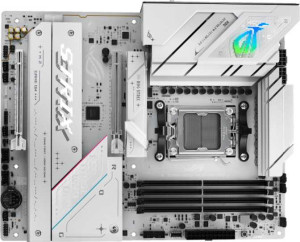
Asus ROG Strix B850-A Gaming WiFi
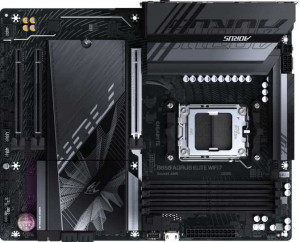
Gigabyte B850 Aorus Elite WiFi7

Asus ROG Strix B850-A Gaming WiFi Gigabyte B850 Aorus Elite WiFi7

Overview

When choosing between the Asus ROG Strix B850-A Gaming WiFi and the Gigabyte B850 Aorus Elite WiFi7, builders face two compelling AM5 motherboards sharing the same B850 chipset and DDR5 platform. Yet beneath that common foundation lie meaningful differences in memory capacity and speeds, storage options, rear I/O connectivity, and expansion slot configurations that could make one board a significantly better fit for your build than the other.

Common Features

  • Both boards use the AM5 CPU socket.
  • Both use the B850 chipset.
  • Both feature an ATX form factor.
  • Wi-Fi is supported on both products, covering Wi-Fi 4, Wi-Fi 5, Wi-Fi 6, Wi-Fi 6E, and Wi-Fi 7.
  • Bluetooth 5.4 is present on both products.
  • Overclocking is supported on both products.
  • Both boards have 4 memory slots.
  • Both use DDR5 memory.
  • Both support dual-channel memory.
  • ECC memory is not supported on either product.
  • Both have 2 USB 3.2 Gen 2 Type-A ports.
  • Both have 1 USB 3.2 Gen 2 Type-C port.
  • Neither product has a USB 3.2 Gen 1 Type-C port.
  • Neither product has USB 4 or Thunderbolt ports.
  • Both have 1 DisplayPort output.
  • Both provide 2 USB 3.2 Gen 1 ports and 4 USB 2.0 ports through expansion.
  • Both have 6 fan headers.
  • Neither product has an mSATA connector.
  • Both feature 1 PCIe 5.0 x16 slot.
  • Both support 7.1 audio channels with an S/PDIF Out port and 2 audio connectors.
  • Both support RAID 0, RAID 1, RAID 5, and RAID 10, but neither supports RAID 0+1.

Main Differences

  • Easy BIOS reset is available on Asus ROG Strix B850-A Gaming WiFi but not on Gigabyte B850 Aorus Elite WiFi7.
  • Maximum memory capacity is 192GB on Asus ROG Strix B850-A Gaming WiFi and 256GB on Gigabyte B850 Aorus Elite WiFi7.
  • Maximum native RAM speed is 8000 MHz on Asus ROG Strix B850-A Gaming WiFi and 5200 MHz on Gigabyte B850 Aorus Elite WiFi7.
  • Maximum overclocked RAM speed is 8000 MHz on Asus ROG Strix B850-A Gaming WiFi and 8200 MHz on Gigabyte B850 Aorus Elite WiFi7.
  • USB 3.2 Gen 1 Type-A port count is 4 on Asus ROG Strix B850-A Gaming WiFi and 5 on Gigabyte B850 Aorus Elite WiFi7.
  • USB 2.0 port count is 2 on Asus ROG Strix B850-A Gaming WiFi and 4 on Gigabyte B850 Aorus Elite WiFi7.
  • A USB 3.2 Gen 2x2 port is present on Asus ROG Strix B850-A Gaming WiFi but not on Gigabyte B850 Aorus Elite WiFi7.
  • An HDMI output is available on Asus ROG Strix B850-A Gaming WiFi but not on Gigabyte B850 Aorus Elite WiFi7.
  • SATA 3 connector count is 2 on Asus ROG Strix B850-A Gaming WiFi and 4 on Gigabyte B850 Aorus Elite WiFi7.
  • M.2 socket count is 4 on Asus ROG Strix B850-A Gaming WiFi and 3 on Gigabyte B850 Aorus Elite WiFi7.
  • A TPM connector is present on Gigabyte B850 Aorus Elite WiFi7 but not on Asus ROG Strix B850-A Gaming WiFi.
  • A PCIe 4.0 x16 slot is present on Asus ROG Strix B850-A Gaming WiFi but not on Gigabyte B850 Aorus Elite WiFi7.
  • PCIe x1 slot count is 0 on Asus ROG Strix B850-A Gaming WiFi and 2 on Gigabyte B850 Aorus Elite WiFi7.
Specs Comparison
Asus ROG Strix B850-A Gaming WiFi

Asus ROG Strix B850-A Gaming WiFi

Gigabyte B850 Aorus Elite WiFi7

Gigabyte B850 Aorus Elite WiFi7

General info:
CPU socket AM5 AM5
chipset B850 B850
form factor ATX ATX
release date January 2025 January 2025
supports Wi-Fi
Wi-Fi version Wi-Fi 4 (802.11n), Wi-Fi 5 (802.11ac), Wi-Fi 6 (802.11ax), Wi-Fi 6E (802.11ax), Wi-Fi 7 (802.11be) Wi-Fi 4 (802.11n), Wi-Fi 5 (802.11ac), Wi-Fi 6 (802.11ax), Wi-Fi 6E (802.11ax), Wi-Fi 7 (802.11be)
Has Bluetooth
Bluetooth version 5.4 5.4
Easy to overclock
has RGB lighting
Easy to reset BIOS
Has dual BIOS
has aptX
CPU sockets 1 1
Has integrated graphics
warranty period 3 years 3 years
height 244 mm 244 mm
width 305 mm 305 mm
Has integrated CPU

At the platform level, the Asus ROG Strix B850-A Gaming WiFi and the Gigabyte B850 Aorus Elite WiFi7 are built on identical foundations: both use the AM5 socket with the B850 chipset, share the standard ATX form factor (305 × 244 mm), and offer the same full wireless stack from Wi-Fi 4 through Wi-Fi 7 (802.11be) paired with Bluetooth 5.4. For users planning a Ryzen 7000/9000 series build, either board slots in without compromise on connectivity or compatibility. Both also support overclocking, feature RGB lighting, include dual BIOS for firmware redundancy, and carry identical 3-year warranties — so the ownership experience is largely mirrored.

The one concrete differentiator in this group is easy BIOS reset: the ROG Strix supports it, while the Aorus Elite does not. In practice, a dedicated BIOS reset mechanism — typically a physical button on the I/O panel or board — is genuinely useful when pushing memory overclocks or experimenting with settings that cause no-POST situations. Without it, recovering from a bad BIOS state on the Aorus Elite requires more manual steps, such as removing the CMOS battery, which is a minor but real inconvenience for enthusiast users who iterate frequently on their configurations.

Overall, these two boards are nearly indistinguishable in their general specifications. The ROG Strix B850-A holds a narrow but practical edge in this group solely due to its easy BIOS reset feature, making it marginally more user-friendly for builders who plan to overclock or tinker with firmware settings regularly. For users who never touch BIOS settings after initial setup, the two boards are effectively tied here.
Memory:
maximum memory amount 192GB 256GB
RAM speed (max) 8000 MHz 5200 MHz
overclocked RAM speed 8000 MHz 8200 MHz
memory slots 4 4
DDR memory version 5 5
memory channels 2 2
Supports ECC memory

The Asus ROG Strix B850-A Gaming WiFi and Gigabyte B850 Aorus Elite WiFi7 both support DDR5 memory with a maximum of 4 memory slots and 2 memory channels. Both motherboards also support overclocked RAM, with the Asus model supporting speeds up to 8000 MHz and the Gigabyte model capable of 8200 MHz. However, the maximum RAM speed for the Asus model is 8000 MHz, while the Gigabyte model is rated for a lower maximum of 5200 MHz.

Regarding maximum memory capacity, the Asus ROG Strix B850-A Gaming WiFi supports up to 192GB of RAM, whereas the Gigabyte B850 Aorus Elite WiFi7 can handle up to 256GB, providing a significantly higher maximum capacity.

Neither motherboard supports ECC memory, which is a feature typically found in specialized workstations or servers, and both share the same DDR5 memory version and 4 memory slots configuration.

Ports:
USB 3.2 Gen 2 ports (USB-A) 2 2
USB 3.2 Gen 1 ports (USB-A) 4 5
USB 3.2 Gen 2 ports (USB-C) 1 1
USB 3.2 Gen 1 ports (USB-C) 0 0
USB 2.0 ports 2 4
USB 3.2 Gen 2x2 ports 1 0
USB 4 40Gbps ports 0 0
USB 4 20Gbps ports 0 0
Thunderbolt 4 ports 0 0
Thunderbolt 3 ports 0 0
has an HDMI output
DisplayPort outputs 1 1
RJ45 ports 1 1
Has USB Type-C
eSATA ports 0 0
DVI outputs 0 0
has a VGA connector
PS/2 ports 0 0

The Asus ROG Strix B850-A Gaming WiFi and Gigabyte B850 Aorus Elite WiFi7 share many similar port options, but there are some key differences. Both motherboards offer two USB 3.2 Gen 2 ports (USB-A) and one USB 3.2 Gen 2 port (USB-C). However, the Asus model provides four USB 3.2 Gen 1 ports (USB-A), while the Gigabyte model offers five. The Asus board has two USB 2.0 ports, while the Gigabyte version has four.

In terms of high-speed USB options, the Asus model supports one USB 3.2 Gen 2x2 port, while the Gigabyte motherboard does not include this feature. Both motherboards lack USB 4 (40Gbps and 20Gbps) ports and Thunderbolt 3 or 4 ports, which are common features in premium boards.

For display options, the Asus ROG Strix B850-A Gaming WiFi includes an HDMI output and a DisplayPort output, while the Gigabyte B850 Aorus Elite WiFi7 only includes a DisplayPort output and lacks HDMI. Both motherboards include one RJ45 port for Ethernet and have no eSATA, DVI, VGA, or PS/2 ports.

Connectors:
USB 3.2 Gen 1 ports (through expansion) 2 2
USB 2.0 ports (through expansion) 4 4
SATA 3 connectors 2 4
fan headers 6 6
USB 3.0 ports (through expansion) 2 2
M.2 sockets 4 3
Has TPM connector
U.2 sockets 0 0
Has mSATA connector
SATA 2 connectors 0 0

The Asus ROG Strix B850-A Gaming WiFi and Gigabyte B850 Aorus Elite WiFi7 have similar connector configurations, but there are some differences worth noting. Both motherboards provide two USB 3.2 Gen 1 ports, four USB 2.0 ports, and two USB 3.0 ports through expansion. Additionally, both include six fan headers for system cooling, ensuring ample support for multiple fans.

In terms of storage connectors, the Asus model has two SATA 3 connectors, while the Gigabyte version offers four, providing more options for connecting storage devices. The Asus motherboard is equipped with four M.2 sockets, while the Gigabyte motherboard has three M.2 sockets. Both motherboards lack U.2 sockets and mSATA connectors, but the Gigabyte model adds a TPM connector, which the Asus model does not have.

Neither motherboard includes SATA 2 connectors, as both models focus on SATA 3 for modern storage setups.

Expansion slots:
PCIe 4.0 x16 slots 1 0
PCIe 5.0 x16 slots 1 1
PCIe 3.0 x16 slots 0 0
PCIe x1 slots 0 2
PCI slots 0 0
PCIe 2.0 x16 slots 0 0
PCIe x4 slots 0 0
PCIe x8 slots 0 0

The Asus ROG Strix B850-A Gaming WiFi and Gigabyte B850 Aorus Elite WiFi7 differ in their expansion slot configurations. The Asus model includes one PCIe 4.0 x16 slot and one PCIe 5.0 x16 slot, with no additional PCIe slots available. In contrast, the Gigabyte motherboard provides one PCIe 5.0 x16 slot, but it does not have a PCIe 4.0 x16 slot. Instead, the Gigabyte model offers two PCIe x1 slots, which are typically used for smaller expansion cards such as sound or network cards.

Neither motherboard includes PCI, PCIe 2.0 x16, PCIe x4, or PCIe x8 slots, both limiting their expansion to modern PCIe 3.0 and 5.0 standards. Additionally, both motherboards lack PCI slots entirely, meaning they do not support older expansion cards.

While both motherboards offer a PCIe x16 slot for a graphics card, the Asus model supports PCIe 4.0 and PCIe 5.0, giving it an edge in terms of future-proofing for high-bandwidth devices, while the Gigabyte model offers more flexibility with the inclusion of two PCIe x1 slots for additional low-profile expansion cards.

Audio:
audio channels 7.1 7.1
Has S/PDIF Out port
audio connectors 2 2

Both the Asus ROG Strix B850-A Gaming WiFi and the Gigabyte B850 Aorus Elite WiFi7 offer similar audio capabilities. Each motherboard supports 7.1 audio channels, providing a high-quality sound experience suitable for gaming and multimedia. Additionally, both motherboards are equipped with an S/PDIF Out port for digital audio output.

In terms of audio connectors, both models offer two connectors, which are typically used for headphone or microphone connections. There are no significant differences between the two products in the audio specifications provided.

Storage:
Supports RAID 1
Supports RAID 10 (1+0)
Supports RAID 5
Supports RAID 0
Supports RAID 0+1

Both the Asus ROG Strix B850-A Gaming WiFi and the Gigabyte B850 Aorus Elite WiFi7 offer identical storage capabilities in terms of RAID support. Each motherboard supports RAID 1, RAID 10 (1+0), RAID 5, and RAID 0 configurations, providing flexibility for data redundancy and performance optimization. Neither motherboard supports RAID 0+1, a RAID configuration typically used for mirroring and striping combined.

There are no differences between the two products in the RAID configurations they support, and both provide comprehensive options for users looking to set up advanced storage arrays.

Comparison Summary & Verdict

Both the Asus ROG Strix B850-A Gaming WiFi and the Gigabyte B850 Aorus Elite WiFi7 deliver a strong AM5 foundation with Wi-Fi 7, Bluetooth 5.4, and DDR5 support. The Asus ROG Strix B850-A Gaming WiFi stands out with its 4 M.2 slots, a USB 3.2 Gen 2x2 port, an HDMI output, a PCIe 4.0 x16 slot, and the convenience of easy BIOS reset — making it an excellent choice for users who prioritize fast storage expansion and versatile rear connectivity. The Gigabyte B850 Aorus Elite WiFi7, on the other hand, offers a higher maximum memory capacity of 256GB, 4 SATA 3 connectors, a TPM connector, and a slightly higher overclocked RAM ceiling of 8200 MHz, appealing to power users who need more system memory headroom and additional legacy storage connections.

Asus ROG Strix B850-A Gaming WiFi
Buy Asus ROG Strix B850-A Gaming WiFi if...

Buy the Asus ROG Strix B850-A Gaming WiFi if you want more M.2 slots for NVMe storage, a USB 3.2 Gen 2x2 port, an HDMI output, and the added convenience of easy BIOS reset.

Gigabyte B850 Aorus Elite WiFi7
Buy Gigabyte B850 Aorus Elite WiFi7 if...

Buy the Gigabyte B850 Aorus Elite WiFi7 if you need a higher maximum memory capacity of 256GB, more SATA 3 connectors, or a slightly higher overclocked RAM speed ceiling of 8200 MHz.