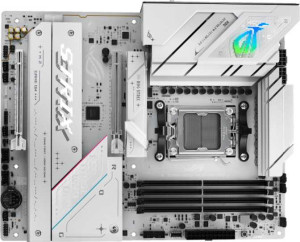
Asus ROG Strix B850-A Gaming WiFi
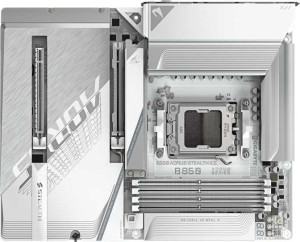
Gigabyte B850 Aorus Stealth Ice

Asus ROG Strix B850-A Gaming WiFi Gigabyte B850 Aorus Stealth Ice

Overview

When choosing between the Asus ROG Strix B850-A Gaming WiFi and the Gigabyte B850 Aorus Stealth Ice, enthusiasts face a compelling AM5 platform decision. Both boards share the B850 chipset and ATX form factor, yet they diverge in meaningful ways across memory capacity and speed, connectivity options, and expansion flexibility. This head-to-head comparison examines every key specification to help you identify which motherboard best suits your build.

Common Features

  • Both motherboards use the AM5 CPU socket.
  • Both motherboards feature the B850 chipset.
  • Both motherboards have an ATX form factor.
  • Wi-Fi is supported on both motherboards, covering Wi-Fi 4, Wi-Fi 5, Wi-Fi 6, Wi-Fi 6E, and Wi-Fi 7.
  • Bluetooth 5.4 is available on both motherboards.
  • Both motherboards include an HDMI 2.1 port.
  • Both motherboards have 4 memory slots.
  • Both motherboards support DDR5 memory.
  • Both motherboards feature 2 memory channels.
  • ECC memory is not supported on either motherboard.
  • Both motherboards include 2 USB 3.2 Gen 2 Type-A ports.
  • Both motherboards include 4 USB 3.2 Gen 1 Type-A ports.
  • Both motherboards include 1 USB 3.2 Gen 2 Type-C port.
  • Neither motherboard includes a USB 3.2 Gen 1 Type-C port.
  • Neither motherboard includes USB 4 or Thunderbolt ports.
  • Both motherboards provide 2 internal USB 3.2 Gen 1 expansion headers and 4 USB 2.0 expansion headers.
  • Both motherboards include 2 SATA 3 connectors and 4 M.2 sockets.
  • Both motherboards feature 1 PCIe 5.0 x16 slot.
  • Both motherboards have a 7.1-channel audio output with a 120 dB signal-to-noise ratio, an S/PDIF Out port, and 2 audio connectors.
  • Both motherboards support RAID 0, RAID 1, RAID 5, and RAID 10, but neither supports RAID 0+1.

Main Differences

  • Easy BIOS reset is available on the Asus ROG Strix B850-A Gaming WiFi but not on the Gigabyte B850 Aorus Stealth Ice.
  • Maximum memory capacity is 192 GB on the Asus ROG Strix B850-A Gaming WiFi and 256 GB on the Gigabyte B850 Aorus Stealth Ice.
  • Maximum official RAM speed is 8000 MHz on the Asus ROG Strix B850-A Gaming WiFi and 5200 MHz on the Gigabyte B850 Aorus Stealth Ice.
  • Maximum overclocked RAM speed is 8000 MHz on the Asus ROG Strix B850-A Gaming WiFi and 8200 MHz on the Gigabyte B850 Aorus Stealth Ice.
  • USB 2.0 rear ports total 2 on the Asus ROG Strix B850-A Gaming WiFi and 4 on the Gigabyte B850 Aorus Stealth Ice.
  • A USB 3.2 Gen 2x2 port is present on the Asus ROG Strix B850-A Gaming WiFi but not available on the Gigabyte B850 Aorus Stealth Ice.
  • A DisplayPort output is included on the Asus ROG Strix B850-A Gaming WiFi but absent on the Gigabyte B850 Aorus Stealth Ice.
  • Fan headers total 6 on the Asus ROG Strix B850-A Gaming WiFi and 8 on the Gigabyte B850 Aorus Stealth Ice.
  • A TPM connector is present on the Gigabyte B850 Aorus Stealth Ice but not available on the Asus ROG Strix B850-A Gaming WiFi.
  • A PCIe 4.0 x16 slot is included on the Asus ROG Strix B850-A Gaming WiFi but not on the Gigabyte B850 Aorus Stealth Ice.
  • A PCIe x4 slot is present on the Gigabyte B850 Aorus Stealth Ice but not available on the Asus ROG Strix B850-A Gaming WiFi.
Specs Comparison
Asus ROG Strix B850-A Gaming WiFi

Asus ROG Strix B850-A Gaming WiFi

Gigabyte B850 Aorus Stealth Ice

Gigabyte B850 Aorus Stealth Ice

General info:
CPU socket AM5 AM5
chipset B850 B850
form factor ATX ATX
release date January 2025 May 2025
supports Wi-Fi
Wi-Fi version Wi-Fi 4 (802.11n), Wi-Fi 5 (802.11ac), Wi-Fi 6 (802.11ax), Wi-Fi 6E (802.11ax), Wi-Fi 7 (802.11be) Wi-Fi 4 (802.11n), Wi-Fi 5 (802.11ac), Wi-Fi 6 (802.11ax), Wi-Fi 6E (802.11ax), Wi-Fi 7 (802.11be)
Has Bluetooth
Bluetooth version 5.4 5.4
HDMI version HDMI 2.1 HDMI 2.1
Easy to overclock
has RGB lighting
Easy to reset BIOS
Has dual BIOS
has aptX
CPU sockets 1 1
Has integrated graphics
warranty period 3 years 3 years
height 244 mm 244 mm
width 305 mm 305 mm
Has integrated CPU

At a high level, the Asus ROG Strix B850-A Gaming WiFi and the Gigabyte B850 Aorus Stealth Ice are remarkably similar boards. Both share the same AM5 socket and B850 chipset, sit in a standard ATX form factor with identical 244 × 305 mm dimensions, and offer the same modern wireless stack — Wi-Fi 7 and Bluetooth 5.4 — alongside HDMI 2.1 output, RGB lighting, dual BIOS, and a matching 3-year warranty. For the vast majority of general platform features, choosing between them on paper looks like a coin flip.

The one meaningful differentiator in this group is easy BIOS reset: the ROG Strix supports it, while the Aorus Stealth Ice does not. In practice this matters most during failed overclocks or bad firmware flashes — a dedicated reset mechanism (typically a physical button or a clear-CMOS header with a button on the rear I/O) lets you recover the board without hunting for a jumper or pulling the coin-cell battery. Both boards are listed as easy to overclock, so the absence of a convenient reset option on the Gigabyte is a minor but real usability gap for enthusiasts who push memory or CPU limits regularly.

Overall, this group is nearly a tie, with the ROG Strix holding a slight practical edge thanks to its easier BIOS reset — a small but welcome quality-of-life advantage for anyone who intends to tune the platform aggressively.

Memory:
maximum memory amount 192GB 256GB
RAM speed (max) 8000 MHz 5200 MHz
overclocked RAM speed 8000 MHz 8200 MHz
memory slots 4 4
DDR memory version 5 5
memory channels 2 2
Supports ECC memory

Both boards share the same DDR5 foundation — 4 slots, dual-channel, no ECC support — so the structural memory architecture is identical. The meaningful story is in the numbers that diverge. The Gigabyte Aorus Stealth Ice supports a higher maximum capacity of 256 GB versus the ROG Strix's 192 GB, a gap that matters for memory-intensive workloads like large virtual machines, professional video editing, or data-heavy applications that can actually saturate tens of gigabytes of RAM.

The speed picture is more nuanced. The ROG Strix lists its native maximum and overclocked ceiling at the same 8000 MHz, implying that is simply its hard cap regardless of XMP/EXPO profiles. The Aorus Stealth Ice, by contrast, shows a conservative native ceiling of 5200 MHz but a higher overclocked peak of 8200 MHz — a 200 MHz advantage at the top end for users running aggressive EXPO kits. That gap is marginal in real-world bandwidth terms, but it does indicate the Gigabyte's memory controller has slightly more headroom for enthusiast tuning.

Taken together, the Aorus Stealth Ice holds the edge in this group: it offers more total capacity and a fractionally higher overclocked frequency ceiling. The ROG Strix is competitive for typical gaming or prosumer use where 192 GB is never a constraint, but anyone planning high-density memory configurations or chasing the absolute top of DDR5 speeds will find the Gigabyte the more capable platform here.

Ports:
USB 3.2 Gen 2 ports (USB-A) 2 2
USB 3.2 Gen 1 ports (USB-A) 4 4
USB 3.2 Gen 2 ports (USB-C) 1 1
USB 3.2 Gen 1 ports (USB-C) 0 0
USB 2.0 ports 2 4
USB 3.2 Gen 2x2 ports 1 0
USB 4 40Gbps ports 0 0
USB 4 20Gbps ports 0 0
Thunderbolt 4 ports 0 0
Thunderbolt 3 ports 0 0
has an HDMI output
DisplayPort outputs 1 0
RJ45 ports 1 1
Has USB Type-C
eSATA ports 0 0
DVI outputs 0 0
has a VGA connector
PS/2 ports 0 0

The high-speed USB layout is identical between the two boards — both offer the same count of USB 3.2 Gen 2 and Gen 1 ports across Type-A and Type-C — so day-to-day peripheral connectivity feels comparable. The divergence emerges in three specific areas. First, the ROG Strix B850-A includes a USB 3.2 Gen 2x2 port, which doubles the bandwidth ceiling to 20 Gbps compared to a standard Gen 2 port. This is directly relevant for owners of high-speed external NVMe enclosures or fast docking stations that can actually saturate that bandwidth. The Aorus Stealth Ice has no equivalent.

Second, the ROG Strix adds a DisplayPort output alongside its HDMI 2.1, giving users two independent video outputs for driving dual monitors directly from the board — useful in systems using AMD's integrated graphics via APU or for specific multi-display productivity setups. The Aorus Stealth Ice provides only the single HDMI port in this regard, which is a tangible limitation for anyone relying on rear I/O display outputs. The Gigabyte counters modestly with 4 USB 2.0 ports versus the ROG Strix's 2, but at this tier USB 2.0 is largely legacy territory useful mainly for dongles or older peripherals — a real but minor advantage.

This group goes decisively to the ROG Strix B850-A. The Gen 2x2 port and the additional DisplayPort output are both practically meaningful upgrades over what the Aorus Stealth Ice offers, addressing real use cases in fast external storage and multi-display flexibility that the Gigabyte simply cannot match from its rear I/O.

Connectors:
USB 3.2 Gen 1 ports (through expansion) 2 2
USB 2.0 ports (through expansion) 4 4
SATA 3 connectors 2 2
fan headers 6 8
USB 3.0 ports (through expansion) 2 2
M.2 sockets 4 4
Has TPM connector
U.2 sockets 0 0
Has mSATA connector
SATA 2 connectors 0 0

Internal connector parity between these two boards is striking — both provide 4 M.2 sockets, 2 SATA 3 ports, and identical expansion USB headers. With four M.2 slots, either board can support a fully NVMe-based storage configuration without touching the SATA ports, which is the direction most modern builds are heading. The shared foundation here is strong and leaves little to separate them for typical storage or front-panel connectivity needs.

Where the Aorus Stealth Ice pulls ahead is in two specific areas. Its 8 fan headers versus the ROG Strix's 6 give builders more direct PWM or DC control points without resorting to splitter cables or external fan hubs — particularly relevant in large cases with high airflow demands or custom liquid cooling loops featuring multiple pumps and radiator fans. It also includes a TPM connector, which the ROG Strix lacks entirely. A TPM header enables the addition of a discrete TPM module, which can be meaningful for enterprise environments, Windows 11 compliance in edge cases, or users with specific hardware security requirements.

This group edges toward the Aorus Stealth Ice. The two additional fan headers and the presence of a TPM connector are both genuinely useful differentiators — the former for thermal management flexibility, the latter for security-conscious or business-oriented builds — while the ROG Strix offers no compensating connector advantage in this category.

Expansion slots:
PCIe 4.0 x16 slots 1 0
PCIe 5.0 x16 slots 1 1
PCIe 3.0 x16 slots 0 0
PCIe x1 slots 0 0
PCI slots 0 0
PCIe 2.0 x16 slots 0 0
PCIe x4 slots 0 1
PCIe x8 slots 0 0

Both boards anchor their expansion layouts with a single PCIe 5.0 x16 slot, which is the primary GPU slot on either platform and currently the fastest available interface for discrete graphics cards. For gaming or single-GPU workstation builds, this shared capability means neither board has an inherent advantage at the primary slot — a modern GPU will run at full bandwidth on both.

The secondary slot is where the designs diverge meaningfully. The ROG Strix B850-A adds a PCIe 4.0 x16 slot, which — even if electrically wired at fewer lanes — still offers substantially higher peak bandwidth than a PCIe x4 connection. This makes it a capable home for a second GPU, a high-throughput capture card, a 10GbE NIC, or other bandwidth-hungry add-in cards. The Aorus Stealth Ice instead provides a PCIe x4 slot, which is more suited to lower-bandwidth expansion cards like basic network adapters or USB controllers, but is a noticeably narrower pipe for anything demanding.

This group favors the ROG Strix B850-A. Its secondary PCIe 4.0 x16 slot is a more versatile and higher-bandwidth expansion option compared to the Gigabyte's x4 slot, giving builders greater flexibility for multi-card or high-throughput peripheral configurations.

Audio:
Signal-to-Noise ratio (DAC) 120 dB 120 dB
audio channels 7.1 7.1
Has S/PDIF Out port
audio connectors 2 2

Audio is the rare category where these two boards are in complete lockstep. Both deliver a 120 dB signal-to-noise ratio from their onboard DAC — a figure that represents clean, low-noise output well above the threshold where most listeners and even most audio equipment can detect a difference. Paired with 7.1 channel support and S/PDIF output for passthrough to an external receiver or DAC, the feature set is identical down to the number of rear audio connectors.

A 120 dB SNR is a strong result for integrated audio, comfortably usable with quality headphones or powered monitors without introducing audible hiss or interference for the vast majority of users. The S/PDIF output on both boards also means those who prefer an external audio solution — like a dedicated DAC or AV receiver — have a clean digital handoff available regardless of which board they choose.

This group is a dead tie. Every measurable audio specification is identical between the ROG Strix B850-A and the Aorus Stealth Ice, so audio performance should play no role in the decision between these two boards.

Storage:
Supports RAID 1
Supports RAID 10 (1+0)
Supports RAID 5
Supports RAID 0
Supports RAID 0+1

Storage configuration support is identical across both boards. Each offers RAID 0, 1, 5, and 10, covering the full practical range of consumer and prosumer array types — from pure performance striping (RAID 0) to mirrored redundancy (RAID 1), parity-based protection (RAID 5), and the combined stripe-with-mirror setup of RAID 10. Neither board supports RAID 0+1, but given that RAID 10 achieves a functionally similar outcome with better fault tolerance, its absence is inconsequential for most users.

Having RAID 5 available is worth noting for builds with three or more drives, as it allows a balance of usable capacity and redundancy without the 50% storage overhead of RAID 1 or 10 — useful in small NAS-adjacent workstation configurations. That said, this capability is equally available on both platforms.

Like the audio category, storage is a complete tie. The RAID support matrix is a perfect match between the ROG Strix B850-A and the Aorus Stealth Ice, and this group offers no basis for choosing one board over the other.

Comparison Summary & Verdict

Both the Asus ROG Strix B850-A Gaming WiFi and the Gigabyte B850 Aorus Stealth Ice are capable B850 platform motherboards sharing strong foundations: DDR5 support, Wi-Fi 7, Bluetooth 5.4, and robust RAID and audio features. However, their differences reveal distinct personalities. The Asus board stands out with its higher official RAM speed ceiling of 8000 MHz, a USB 3.2 Gen 2x2 port, a DisplayPort output, and a convenient easy BIOS reset feature, making it a strong pick for users who value tuning flexibility and richer rear I/O. The Gigabyte board counters with a larger maximum memory capacity of 256 GB, a slightly higher overclocked RAM speed of 8200 MHz, more fan headers, a TPM connector, and extra USB 2.0 ports, suiting builders who prioritize headroom for memory-intensive workloads and thorough system management.

Asus ROG Strix B850-A Gaming WiFi
Buy Asus ROG Strix B850-A Gaming WiFi if...

Buy the Asus ROG Strix B850-A Gaming WiFi if you want a higher official RAM speed rating, a USB 3.2 Gen 2x2 port, a DisplayPort output, and the convenience of an easy BIOS reset button.

Gigabyte B850 Aorus Stealth Ice
Buy Gigabyte B850 Aorus Stealth Ice if...

Buy the Gigabyte B850 Aorus Stealth Ice if you need a larger maximum memory capacity of 256 GB, more fan headers for complex cooling setups, or a built-in TPM connector for enhanced security.