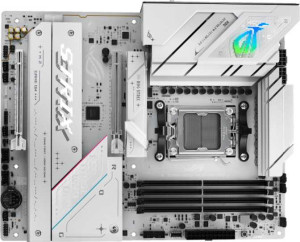
Asus ROG Strix B850-A Gaming WiFi
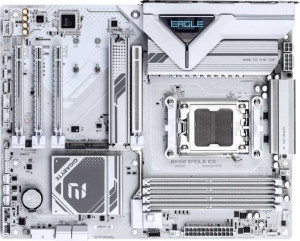
Gigabyte B850 Eagle Ice

Asus ROG Strix B850-A Gaming WiFi Gigabyte B850 Eagle Ice

Overview

When choosing between the Asus ROG Strix B850-A Gaming WiFi and the Gigabyte B850 Eagle Ice, two compelling AM5 motherboards built on the B850 chipset come head to head. Both offer ATX form factors, DDR5 memory support, and PCIe 5.0 connectivity, yet they diverge sharply on wireless connectivity, memory capacity, storage options, and expansion flexibility. This comparison breaks down every key specification to help you find the right board for your build.

Common Features

  • Both motherboards use the AM5 CPU socket.
  • Both motherboards feature the B850 chipset.
  • Both motherboards have an ATX form factor.
  • Both motherboards support HDMI 2.1.
  • Overclocking is supported on both motherboards.
  • RGB lighting is present on both motherboards.
  • Dual BIOS is available on both motherboards.
  • Both motherboards have a single CPU socket.
  • Both motherboards have 4 memory slots.
  • Both motherboards use DDR5 memory.
  • Both motherboards support 2 memory channels.
  • ECC memory is not supported on either motherboard.
  • Both motherboards have 2 USB 3.2 Gen 2 ports (USB-A).
  • Neither motherboard has USB 4 40Gbps ports.
  • Neither motherboard has USB 4 20Gbps ports.
  • Neither motherboard has Thunderbolt 4 or Thunderbolt 3 ports.
  • Both motherboards have an HDMI output.
  • Both motherboards have 1 DisplayPort output.
  • Both motherboards have 1 RJ45 port.
  • Both motherboards provide 2 USB 3.2 Gen 1 ports through expansion.
  • Both motherboards provide 4 USB 2.0 ports through expansion.
  • Both motherboards have 6 fan headers.
  • Neither motherboard has an mSATA connector.
  • Neither motherboard has U.2 sockets.
  • Both motherboards have 1 PCIe 5.0 x16 slot.
  • Both motherboards support 7.1 audio channels.
  • Both motherboards support RAID 0, RAID 1, RAID 5, and RAID 10.
  • RAID 0+1 is not supported on either motherboard.

Main Differences

  • Wi-Fi is built into the Asus ROG Strix B850-A Gaming WiFi but is not available on the Gigabyte B850 Eagle Ice.
  • Bluetooth is present on the Asus ROG Strix B850-A Gaming WiFi but not available on the Gigabyte B850 Eagle Ice.
  • Easy BIOS reset is supported on the Asus ROG Strix B850-A Gaming WiFi but not on the Gigabyte B850 Eagle Ice.
  • Maximum memory capacity is 192GB on the Asus ROG Strix B850-A Gaming WiFi and 256GB on the Gigabyte B850 Eagle Ice.
  • Maximum RAM speed is 8000 MHz on the Asus ROG Strix B850-A Gaming WiFi and 5200 MHz on the Gigabyte B850 Eagle Ice.
  • Maximum overclocked RAM speed is 8000 MHz on the Asus ROG Strix B850-A Gaming WiFi and 8200 MHz on the Gigabyte B850 Eagle Ice.
  • USB 3.2 Gen 1 ports (USB-A) total 4 on the Asus ROG Strix B850-A Gaming WiFi and 2 on the Gigabyte B850 Eagle Ice.
  • The Asus ROG Strix B850-A Gaming WiFi has 1 USB 3.2 Gen 2 port (USB-C) while the Gigabyte B850 Eagle Ice has none.
  • The Gigabyte B850 Eagle Ice has 1 USB 3.2 Gen 1 port (USB-C) while the Asus ROG Strix B850-A Gaming WiFi has none.
  • USB 2.0 ports number 2 on the Asus ROG Strix B850-A Gaming WiFi and 4 on the Gigabyte B850 Eagle Ice.
  • The Asus ROG Strix B850-A Gaming WiFi has 1 USB 3.2 Gen 2x2 port while the Gigabyte B850 Eagle Ice has none.
  • The Gigabyte B850 Eagle Ice has 1 PS/2 port while the Asus ROG Strix B850-A Gaming WiFi has none.
  • SATA 3 connectors number 2 on the Asus ROG Strix B850-A Gaming WiFi and 4 on the Gigabyte B850 Eagle Ice.
  • M.2 sockets total 4 on the Asus ROG Strix B850-A Gaming WiFi and 3 on the Gigabyte B850 Eagle Ice.
  • A TPM connector is present on the Gigabyte B850 Eagle Ice but not on the Asus ROG Strix B850-A Gaming WiFi.
  • The Asus ROG Strix B850-A Gaming WiFi has 1 PCIe 4.0 x16 slot while the Gigabyte B850 Eagle Ice has none.
  • The Gigabyte B850 Eagle Ice has 2 PCIe x1 slots while the Asus ROG Strix B850-A Gaming WiFi has none.
  • The Gigabyte B850 Eagle Ice has 1 PCIe x4 slot while the Asus ROG Strix B850-A Gaming WiFi has none.
  • An S/PDIF Out port is present on the Asus ROG Strix B850-A Gaming WiFi but not on the Gigabyte B850 Eagle Ice.
  • Audio connectors total 2 on the Asus ROG Strix B850-A Gaming WiFi and 3 on the Gigabyte B850 Eagle Ice.
Specs Comparison
Asus ROG Strix B850-A Gaming WiFi

Asus ROG Strix B850-A Gaming WiFi

Gigabyte B850 Eagle Ice

Gigabyte B850 Eagle Ice

General info:
CPU socket AM5 AM5
chipset B850 B850
form factor ATX ATX
release date January 2025 April 2025
supports Wi-Fi
Has Bluetooth
HDMI version HDMI 2.1 HDMI 2.1
Easy to overclock
has RGB lighting
Easy to reset BIOS
Has dual BIOS
CPU sockets 1 1
Has integrated graphics
warranty period 3 years 3 years
height 244 mm 244 mm
width 305 mm 305 mm
Has integrated CPU

Both the Asus ROG Strix B850-A Gaming WiFi and the Gigabyte B850 Eagle Ice share the same foundational platform: the AM5 socket, B850 chipset, and standard ATX form factor (244 × 305 mm). They both support overclocking, feature dual BIOS, include RGB lighting, output video via HDMI 2.1, and carry a 3-year warranty. For users focused purely on core build compatibility, either board slots into the same cases and pairs with the same CPUs and memory.

The most meaningful differences emerge in connectivity and usability features. The ROG Strix includes built-in Wi-Fi and Bluetooth, which eliminates the need for a separate wireless adapter — a real convenience for clean builds or desks where running an Ethernet cable is impractical. The Eagle Ice offers neither Wi-Fi nor Bluetooth, meaning wireless connectivity requires an add-in card or USB dongle. On the usability side, the ROG Strix also supports easy BIOS reset, which simplifies recovery from a failed overclock or bad flash — a notably absent feature on the Eagle Ice.

Overall, the ROG Strix B850-A Gaming WiFi holds a clear advantage in this category. Its integrated wireless stack and easier BIOS management deliver tangible real-world benefits without any offsetting disadvantage visible in these specs. The Eagle Ice is a competitive match on paper for the fundamentals, but buyers who want a more self-contained, user-friendly board will find the ROG Strix the stronger choice here.

Memory:
maximum memory amount 192GB 256GB
RAM speed (max) 8000 MHz 5200 MHz
overclocked RAM speed 8000 MHz 8200 MHz
memory slots 4 4
DDR memory version 5 5
memory channels 2 2
Supports ECC memory

At the structural level, these two boards are identical in memory architecture: both use DDR5, offer 4 DIMM slots across 2 channels, and drop ECC support — standard fare for consumer B850 platforms. The meaningful story is in how they diverge on capacity and speed tuning.

The Gigabyte B850 Eagle Ice has the edge on raw capacity, supporting up to 256 GB versus the ROG Strix's 192 GB ceiling. That 64 GB gap is largely irrelevant for gaming or everyday use, but it matters for memory-hungry workloads like large virtual machines, video editing with heavy timelines, or professional simulation software. On speed, the picture is more nuanced: the ROG Strix lists its maximum at 8000 MHz, which is also its overclocked ceiling — suggesting that figure reflects real-world XMP/EXPO headroom. The Eagle Ice quotes a much lower native max of 5200 MHz, but pushes to 8200 MHz when overclocked, a slight lead at the very top. In practice, the gap between 8000 and 8200 MHz delivers negligible real-world performance difference in most scenarios.

The verdict here depends on use case. For users who might eventually populate all four slots with high-capacity DIMMs for professional workloads, the Eagle Ice's 256 GB ceiling is a genuine, if niche, advantage. For everyone else, the ROG Strix's cleaner, more consistent speed specification makes it the easier board to configure out of the box. On balance, this group is close to a tie, with each board holding a specific edge that only certain users will actually benefit from.
Ports:
USB 3.2 Gen 2 ports (USB-A) 2 2
USB 3.2 Gen 1 ports (USB-A) 4 2
USB 3.2 Gen 2 ports (USB-C) 1 0
USB 3.2 Gen 1 ports (USB-C) 0 1
USB 2.0 ports 2 4
USB 3.2 Gen 2x2 ports 1 0
USB 4 40Gbps ports 0 0
USB 4 20Gbps ports 0 0
Thunderbolt 4 ports 0 0
Thunderbolt 3 ports 0 0
has an HDMI output
DisplayPort outputs 1 1
RJ45 ports 1 1
Has USB Type-C
eSATA ports 0 0
DVI outputs 0 0
has a VGA connector
PS/2 ports 0 1

Video output and networking are identical between the two boards — both carry HDMI, a single DisplayPort, and one RJ45 ethernet jack — so the real differentiation happens across the USB lineup. The ROG Strix pulls ahead meaningfully here: it includes a USB 3.2 Gen 2x2 port delivering up to 20 Gbps, which the Eagle Ice omits entirely. It also offers a USB 3.2 Gen 2 Type-C on the rear I/O versus none on the Eagle Ice, and four Gen 1 Type-A ports compared to just two. That translates to more bandwidth-rich connections for fast external SSDs, docking stations, or high-speed peripherals.

The Eagle Ice counters with a different philosophy: it favors legacy compatibility over modern throughput. It ships with 4 USB 2.0 ports (versus 2 on the ROG Strix) and uniquely includes a PS/2 port — useful for niche users with older keyboards or mice, but irrelevant to most modern builds. Its single USB-C on the rear panel is a slower Gen 1 connection, capped at 5 Gbps, which limits its utility for high-speed transfers compared to the ROG Strix's Gen 2 Type-C.

For modern builds, the ROG Strix B850-A Gaming WiFi holds a clear advantage in this category. Its Gen 2x2 port and faster Type-C connection better serve current and near-future peripherals, while the Eagle Ice's trade-off toward USB 2.0 and PS/2 only benefits users with specific legacy hardware needs.

Connectors:
USB 3.2 Gen 1 ports (through expansion) 2 2
USB 2.0 ports (through expansion) 4 4
SATA 3 connectors 2 4
fan headers 6 6
USB 3.0 ports (through expansion) 2 2
M.2 sockets 4 3
Has TPM connector
U.2 sockets 0 0
Has mSATA connector
SATA 2 connectors 0 0

Internal connectivity tells an interesting story about each board's intended audience. The ROG Strix leads with 4 M.2 sockets compared to the Eagle Ice's 3, giving it an extra slot for NVMe drives — a genuine advantage for users building high-speed storage arrays or wanting to avoid SATA entirely. The Eagle Ice flips the script on traditional storage, however, offering 4 SATA 3 ports versus just 2 on the ROG Strix. That extra pair matters if you're housing multiple HDDs or SSDs in a media server, NAS-style build, or any setup that relies heavily on 2.5″ or 3.5″ drives.

Where the Eagle Ice quietly stands out is its inclusion of a TPM connector, which the ROG Strix lacks. A dedicated TPM header allows for a discrete TPM module, relevant for enterprise environments, Windows 11 compliance in security-sensitive setups, or BitLocker users who prefer hardware-based encryption over firmware TPM. It's a niche but non-trivial feature for the right user. Fan headers are matched at 6 each, and internal USB expansion is identical across both boards, so thermal management and case connectivity present no differentiation.

This category is a genuine split depending on storage philosophy. The ROG Strix is the stronger pick for NVMe-centric builds, while the Eagle Ice suits users who need more SATA ports or a hardware TPM connector. Neither board holds an across-the-board edge here.

Expansion slots:
PCIe 4.0 x16 slots 1 0
PCIe 5.0 x16 slots 1 1
PCIe 3.0 x16 slots 0 0
PCIe x1 slots 0 2
PCI slots 0 0
PCIe 2.0 x16 slots 0 0
PCIe x4 slots 0 1
PCIe x8 slots 0 0

Both boards share the essential foundation: a single PCIe 5.0 x16 slot for a primary GPU, delivering the full bandwidth of the latest graphics cards and NVMe adapters. Beyond that shared slot, the two boards diverge sharply in how they handle additional expansion — and the difference reflects distinctly different build philosophies.

The ROG Strix adds a second PCIe 4.0 x16 slot, which is well-suited for a secondary GPU, a high-bandwidth capture card, or a multi-port networking card that needs more than a narrow lane. The Eagle Ice takes a broader accessory-friendly approach instead, offering 2 PCIe x1 slots and a PCIe x4 slot. Those smaller slots are ideal for adding sound cards, low-profile network adapters, USB expansion cards, or other single-function peripherals — the kind of cards that don't need x16 bandwidth but still need a physical home on the board.

Which layout wins depends entirely on what you plan to plug in. The ROG Strix is the stronger choice for builds that demand a second high-bandwidth card in an x16 slot, while the Eagle Ice offers more flexibility for users looking to populate the board with multiple smaller expansion cards simultaneously. For a clean single-GPU gaming build with no accessories, the two are effectively tied on what matters most.

Audio:
audio channels 7.1 7.1
Has S/PDIF Out port
audio connectors 2 3

Onboard audio is competitive between these two boards, with both supporting 7.1-channel surround sound — more than adequate for gaming headsets, speaker systems, and most home studio setups. The split comes down to two specific features: analog jack count and digital output support.

The Eagle Ice edges ahead with 3 audio connectors versus the ROG Strix's 2, offering more simultaneous analog connections — handy if you want to plug in both speakers and a headset without swapping cables. The ROG Strix counters with an S/PDIF optical output, which the Eagle Ice omits. S/PDIF matters for users routing audio digitally to an AV receiver, external DAC, or home theater system, as it passes a clean digital signal that bypasses the motherboard's analog circuitry entirely — useful for audiophiles or anyone whose equipment supports optical input.

This group is essentially a tie shaped by use case. The Eagle Ice suits users who rely purely on analog connections and want more jacks available at once, while the ROG Strix is the better fit for anyone with digital audio equipment in their setup. Neither board holds a universal advantage here.

Storage:
Supports RAID 1
Supports RAID 10 (1+0)
Supports RAID 5
Supports RAID 0
Supports RAID 0+1

RAID support is an exact match between these two boards. Both offer RAID 0 (striping for performance), RAID 1 (mirroring for redundancy), RAID 5 (distributed parity for a balance of speed and fault tolerance), and RAID 10 (striped mirrors for both performance and redundancy) — and neither supports RAID 0+1. There is nothing to separate them here.

This is a clear tie. Users planning any RAID configuration — whether for a home NAS, a workstation with redundant storage, or a performance-focused striped array — will find identical capability on both boards. The storage RAID decision should play no role in choosing between these two products.

Comparison Summary & Verdict

Both boards share a strong B850 foundation, but each caters to a different type of builder. The Asus ROG Strix B850-A Gaming WiFi stands out with its built-in Wi-Fi and Bluetooth, more M.2 slots, a USB 3.2 Gen 2x2 port, and superior high-speed RAM support up to 8000 MHz, making it the stronger choice for feature-rich, wireless-ready gaming rigs. The Gigabyte B850 Eagle Ice, on the other hand, offers a higher maximum memory capacity of 256GB, more SATA 3 connectors, additional PCIe expansion slots, and a TPM connector, giving it an edge for users who prioritize storage density and expandability. Neither board is objectively superior; your decision should hinge on whether seamless wireless connectivity and speed or raw expandability and storage headroom matter most to your specific workload or gaming setup.

Asus ROG Strix B850-A Gaming WiFi
Buy Asus ROG Strix B850-A Gaming WiFi if...

Buy the Asus ROG Strix B850-A Gaming WiFi if you want built-in Wi-Fi and Bluetooth, more M.2 slots, and faster RAM speeds out of the box for a fully wireless-ready gaming build.

Gigabyte B850 Eagle Ice
Buy Gigabyte B850 Eagle Ice if...

Buy the Gigabyte B850 Eagle Ice if you need a higher maximum memory capacity of 256GB, more SATA 3 connectors, and greater PCIe expansion options for a storage-heavy or heavily expanded system.