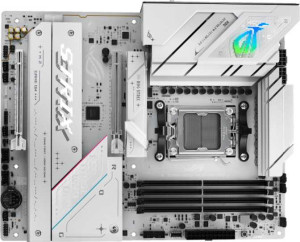
Asus ROG Strix B850-A Gaming WiFi
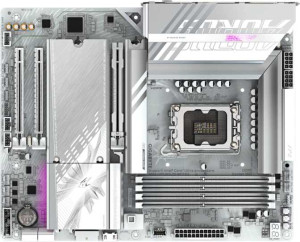
Gigabyte B860 Aorus Elite WiFi7 Ice

Asus ROG Strix B850-A Gaming WiFi Gigabyte B860 Aorus Elite WiFi7 Ice

Overview

Welcome to our in-depth specification comparison between the Asus ROG Strix B850-A Gaming WiFi and the Gigabyte B860 Aorus Elite WiFi7 Ice. Both are ATX motherboards equipped with Wi-Fi 7 and Bluetooth 5.4, yet they target different platform ecosystems and diverge notably in areas like memory capacity and speed, connectivity options, and expansion slot configurations. Read on to see which board best fits your next build.

Common Features

  • Both boards use the ATX form factor.
  • Wi-Fi is supported on both products, covering Wi-Fi 4, Wi-Fi 5, Wi-Fi 6, Wi-Fi 6E, and Wi-Fi 7.
  • Bluetooth 5.4 is present on both products.
  • Both products include an HDMI 2.1 output.
  • Overclocking support is available on both products.
  • Dual BIOS is present on both products.
  • Both boards have 4 memory slots.
  • Both products use DDR5 memory.
  • Both products support 2 memory channels.
  • ECC memory is not supported on either product.
  • Both products include 2 USB 3.2 Gen 2 ports (USB-A).
  • Both products include 4 USB 3.2 Gen 1 ports (USB-A).
  • Neither product has a USB 3.2 Gen 1 port (USB-C).
  • Neither product has a USB 4 20Gbps port.
  • Neither product has Thunderbolt 3 ports.
  • Both products have an HDMI output.
  • Both products have 1 DisplayPort output.
  • Both products have 1 RJ45 port.
  • Both products have 6 fan headers.
  • Neither product has an mSATA connector.
  • Both products have 1 PCIe 5.0 x16 slot.
  • 7.1 audio channels are supported on both products.
  • An S/PDIF Out port is present on both products.
  • Both products have 2 audio connectors.
  • RAID 0, RAID 1, RAID 5, and RAID 10 are supported on both products.
  • RAID 0+1 is not supported on either product.

Main Differences

  • The CPU socket is AM5 on Asus ROG Strix B850-A Gaming WiFi and LGA 1851 on Gigabyte B860 Aorus Elite WiFi7 Ice.
  • The chipset is B850 on Asus ROG Strix B850-A Gaming WiFi and B860 on Gigabyte B860 Aorus Elite WiFi7 Ice.
  • RGB lighting is present on Asus ROG Strix B850-A Gaming WiFi but not available on Gigabyte B860 Aorus Elite WiFi7 Ice.
  • Easy BIOS reset is supported on Asus ROG Strix B850-A Gaming WiFi but not available on Gigabyte B860 Aorus Elite WiFi7 Ice.
  • Maximum memory capacity is 192GB on Asus ROG Strix B850-A Gaming WiFi and 256GB on Gigabyte B860 Aorus Elite WiFi7 Ice.
  • Maximum RAM speed is 8000 MHz on Asus ROG Strix B850-A Gaming WiFi and 6400 MHz on Gigabyte B860 Aorus Elite WiFi7 Ice.
  • Maximum overclocked RAM speed is 8000 MHz on Asus ROG Strix B850-A Gaming WiFi and 9200 MHz on Gigabyte B860 Aorus Elite WiFi7 Ice.
  • USB 3.2 Gen 2 ports (USB-C) count is 1 on Asus ROG Strix B850-A Gaming WiFi and 0 on Gigabyte B860 Aorus Elite WiFi7 Ice.
  • USB 2.0 port count is 2 on Asus ROG Strix B850-A Gaming WiFi and 4 on Gigabyte B860 Aorus Elite WiFi7 Ice.
  • USB 3.2 Gen 2x2 port count is 1 on Asus ROG Strix B850-A Gaming WiFi and 0 on Gigabyte B860 Aorus Elite WiFi7 Ice.
  • A USB 4 40Gbps port is present on Gigabyte B860 Aorus Elite WiFi7 Ice but not available on Asus ROG Strix B850-A Gaming WiFi.
  • A Thunderbolt 4 port is present on Gigabyte B860 Aorus Elite WiFi7 Ice but not available on Asus ROG Strix B850-A Gaming WiFi.
  • SATA 3 connector count is 2 on Asus ROG Strix B850-A Gaming WiFi and 4 on Gigabyte B860 Aorus Elite WiFi7 Ice.
  • M.2 socket count is 4 on Asus ROG Strix B850-A Gaming WiFi and 3 on Gigabyte B860 Aorus Elite WiFi7 Ice.
  • A TPM connector is present on Gigabyte B860 Aorus Elite WiFi7 Ice but not available on Asus ROG Strix B850-A Gaming WiFi.
  • PCIe 4.0 x16 slot count is 1 on Asus ROG Strix B850-A Gaming WiFi and 0 on Gigabyte B860 Aorus Elite WiFi7 Ice.
  • PCIe x1 slot count is 0 on Asus ROG Strix B850-A Gaming WiFi and 2 on Gigabyte B860 Aorus Elite WiFi7 Ice.
Specs Comparison
Asus ROG Strix B850-A Gaming WiFi

Asus ROG Strix B850-A Gaming WiFi

Gigabyte B860 Aorus Elite WiFi7 Ice

Gigabyte B860 Aorus Elite WiFi7 Ice

General info:
CPU socket AM5 LGA 1851
chipset B850 B860
form factor ATX ATX
release date January 2025 January 2025
supports Wi-Fi
Wi-Fi version Wi-Fi 4 (802.11n), Wi-Fi 5 (802.11ac), Wi-Fi 6 (802.11ax), Wi-Fi 6E (802.11ax), Wi-Fi 7 (802.11be) Wi-Fi 4 (802.11n), Wi-Fi 5 (802.11ac), Wi-Fi 6 (802.11ax), Wi-Fi 6E (802.11ax), Wi-Fi 7 (802.11be)
Has Bluetooth
Bluetooth version 5.4 5.4
HDMI version HDMI 2.1 HDMI 2.1
Easy to overclock
has RGB lighting
Easy to reset BIOS
Has dual BIOS
has aptX
CPU sockets 1 1
Has integrated graphics
warranty period 3 years 3 years
height 244 mm 244 mm
width 305 mm 305 mm
Has integrated CPU

The most fundamental difference between these two boards is platform alignment: the Asus ROG Strix B850-A pairs with AMD's AM5 socket and a B850 chipset, while the Gigabyte B860 Aorus Elite WiFi7 Ice targets Intel's LGA 1851 socket with a B860 chipset. This means the choice between them is, first and foremost, a decision about CPU ecosystem — AMD Ryzen 9000/7000 series versus Intel Core Ultra 200 series. Neither platform is inherently superior from these specs alone, but they lock you into very different upgrade paths and CPU pricing landscapes.

Both boards share a strong common foundation: identical ATX form factor and physical dimensions (305 × 244 mm), full Wi-Fi 7 support across all generations back to Wi-Fi 4, Bluetooth 5.4, HDMI 2.1 output, dual BIOS for recovery resilience, and a 3-year warranty. These are meaningful checkboxes — Wi-Fi 7 future-proofs wireless connectivity, and dual BIOS is a genuine safety net when flashing firmware. Where they diverge in features: the Asus board adds RGB lighting and a dedicated easy BIOS reset mechanism, both absent on the Gigabyte. The BIOS reset omission on the Gigabyte is a minor but real usability gap for builders who overclock or experiment with settings.

For this general info group, the Asus ROG Strix B850-A holds a slight edge in usability conveniences — RGB aesthetics for those who value them, and especially the easy BIOS reset, which is a practical quality-of-life feature. However, the deciding factor for most buyers will simply be which CPU platform they are committed to, making platform choice the true axis of this comparison rather than any feature gap between the boards themselves.

Memory:
maximum memory amount 192GB 256GB
RAM speed (max) 8000 MHz 6400 MHz
overclocked RAM speed 8000 MHz 9200 MHz
memory slots 4 4
DDR memory version 5 5
memory channels 2 2
Supports ECC memory

The Asus ROG Strix B850-A Gaming WiFi and Gigabyte B860 Aorus Elite WiFi7 Ice both feature 4 memory slots and support DDR5 memory with two memory channels. However, there are differences in their memory specifications. The Asus board supports a maximum memory amount of 192GB, while the Gigabyte model supports up to 256GB. Additionally, the maximum supported RAM speed on the Asus motherboard is 8000 MHz, which is higher than the Gigabyte board's maximum of 6400 MHz. However, when overclocked, the Gigabyte board can reach an impressive 9200 MHz, while the Asus board's overclocked RAM speed also maxes out at 8000 MHz.

Both motherboards do not support ECC memory, and both use DDR5 memory, ensuring compatibility with the latest memory technologies. The memory slots and memory channels are identical across both models, making them equally capable in terms of the number of modules that can be installed and the architecture used.

In summary, the Gigabyte B860 Aorus Elite WiFi7 Ice offers a larger maximum memory capacity and higher overclocked RAM speed, whereas the Asus ROG Strix B850-A Gaming WiFi excels with a higher base RAM speed. Both boards are very similar in terms of memory channels, slots, and the type of memory supported, but the Gigabyte board has the edge when it comes to overclocking potential and overall memory capacity.

Ports:
USB 3.2 Gen 2 ports (USB-A) 2 2
USB 3.2 Gen 1 ports (USB-A) 4 4
USB 3.2 Gen 2 ports (USB-C) 1 0
USB 3.2 Gen 1 ports (USB-C) 0 0
USB 2.0 ports 2 4
USB 3.2 Gen 2x2 ports 1 0
USB 4 40Gbps ports 0 1
USB 4 20Gbps ports 0 0
Thunderbolt 4 ports 0 1
Thunderbolt 3 ports 0 0
has an HDMI output
DisplayPort outputs 1 1
RJ45 ports 1 1
Has USB Type-C
eSATA ports 0 0
DVI outputs 0 0
has a VGA connector
PS/2 ports 0 0

The Asus ROG Strix B850-A Gaming WiFi and Gigabyte B860 Aorus Elite WiFi7 Ice offer a range of ports for various connectivity needs, though there are some key differences. Both boards provide two USB 3.2 Gen 2 (USB-A) ports, four USB 3.2 Gen 1 (USB-A) ports, and a single RJ45 port for Ethernet. The Asus board has two USB 2.0 ports, while the Gigabyte model offers four. The Asus motherboard also features one USB 3.2 Gen 2x2 port, which the Gigabyte board lacks, but the Gigabyte board compensates with one USB 4 40Gbps port and one Thunderbolt 4 port, both of which are absent on the Asus model.

Both boards have an HDMI output and one DisplayPort output. Neither features an eSATA port, DVI outputs, VGA connector, or PS/2 ports. While the Asus board supports USB Type-C, the Gigabyte model also does, but with no USB 3.2 Gen 2 (USB-C) ports like the Asus motherboard, it only provides USB Type-C via Thunderbolt 4.

In summary, while both motherboards offer similar USB 3.2 and Ethernet ports, the Gigabyte board stands out with its USB 4 40Gbps port, Thunderbolt 4 support, and additional USB 2.0 ports. The Asus ROG Strix B850-A Gaming WiFi has more diverse USB 3.2 options, including the USB 3.2 Gen 2x2 port, but lacks the high-speed ports and Thunderbolt support found on the Gigabyte model.

Connectors:
USB 3.2 Gen 1 ports (through expansion) 2 2
USB 2.0 ports (through expansion) 4 4
SATA 3 connectors 2 4
fan headers 6 6
USB 3.0 ports (through expansion) 2 2
M.2 sockets 4 3
Has TPM connector
U.2 sockets 0 0
Has mSATA connector
SATA 2 connectors 0 0

The Asus ROG Strix B850-A Gaming WiFi and Gigabyte B860 Aorus Elite WiFi7 Ice share several common connectors but differ in a few important areas. Both motherboards offer two USB 3.2 Gen 1 ports (through expansion), four USB 2.0 ports (through expansion), and two USB 3.0 ports (through expansion). They also both feature six fan headers, allowing ample cooling options. In terms of storage connectors, the Asus model has two SATA 3 connectors, while the Gigabyte model provides four SATA 3 connectors. The Asus motherboard has four M.2 sockets, whereas the Gigabyte board has three M.2 sockets.

One notable difference is that the Gigabyte B860 Aorus Elite WiFi7 Ice includes a TPM connector, while the Asus ROG Strix B850-A Gaming WiFi does not. Both boards lack U.2 and mSATA connectors, and neither has SATA 2 connectors, which are standard on modern boards.

In summary, the Gigabyte board offers more SATA 3 connectors and includes a TPM connector, while the Asus board provides one extra M.2 socket. Both motherboards are fairly similar in terms of fan headers, expansion USB ports, and other storage connectors, with the key differences lying in the number of SATA and M.2 connectors, as well as the inclusion of the TPM connector on the Gigabyte model.

Expansion slots:
PCIe 4.0 x16 slots 1 0
PCIe 5.0 x16 slots 1 1
PCIe 3.0 x16 slots 0 0
PCIe x1 slots 0 2
PCI slots 0 0
PCIe 2.0 x16 slots 0 0
PCIe x4 slots 0 0
PCIe x8 slots 0 0

The Asus ROG Strix B850-A Gaming WiFi and Gigabyte B860 Aorus Elite WiFi7 Ice offer different configurations for their expansion slots. The Asus board features one PCIe 4.0 x16 slot and one PCIe 5.0 x16 slot, but it lacks any PCIe x1, x4, x8, or PCI slots. On the other hand, the Gigabyte board offers one PCIe 5.0 x16 slot, but it does not have any PCIe 4.0 x16 slots. Instead, it provides two PCIe x1 slots, while the Asus board does not include any PCIe x1 slots.

Neither motherboard includes PCI slots, PCIe 2.0 x16 slots, or PCIe x4 or x8 slots, making them similar in terms of older expansion slot options. The main difference is the Asus ROG Strix B850-A Gaming WiFi's inclusion of a PCIe 4.0 x16 slot, while the Gigabyte B860 Aorus Elite WiFi7 Ice includes two PCIe x1 slots but lacks a PCIe 4.0 x16 slot.

In summary, the Asus motherboard provides one PCIe 4.0 x16 slot and one PCIe 5.0 x16 slot, focusing on high-speed expansion for graphics cards, while the Gigabyte board offers more flexibility with two PCIe x1 slots, though it lacks the PCIe 4.0 x16 slot.

Audio:
audio channels 7.1 7.1
Has S/PDIF Out port
audio connectors 2 2

Both the Asus ROG Strix B850-A Gaming WiFi and the Gigabyte B860 Aorus Elite WiFi7 Ice feature identical audio specifications. They both support 7.1 audio channels, ensuring immersive sound for gaming and multimedia experiences. Each motherboard includes an S/PDIF Out port for digital audio output and provides two audio connectors for additional audio device connectivity.

Since both motherboards share the same audio capabilities, there are no differences in terms of the number of audio channels, the presence of an S/PDIF Out port, or the number of audio connectors offered. Both boards deliver the same audio performance and connectivity options.

In summary, the audio specifications for the Asus and Gigabyte motherboards are identical, with both offering 7.1-channel audio, S/PDIF Out support, and two audio connectors.

Storage:
Supports RAID 1
Supports RAID 10 (1+0)
Supports RAID 5
Supports RAID 0
Supports RAID 0+1

The Asus ROG Strix B850-A Gaming WiFi and the Gigabyte B860 Aorus Elite WiFi7 Ice offer the same RAID support features. Both motherboards support RAID 1, RAID 10 (1+0), RAID 5, and RAID 0, providing flexibility for various storage configurations. However, neither motherboard supports RAID 0+1, which is a mirrored RAID configuration that also offers data redundancy.

Since the RAID support features are identical between the two models, there is no difference in terms of supported RAID levels for either motherboard.

In summary, both the Asus and Gigabyte boards provide the same RAID options, with support for RAID 1, RAID 10 (1+0), RAID 5, and RAID 0, but neither supports RAID 0+1.

Comparison Summary & Verdict

After examining every specification, both boards prove themselves as capable ATX platforms with Wi-Fi 7, Bluetooth 5.4, and solid RAID support, but each shines in a different direction. The Asus ROG Strix B850-A Gaming WiFi stands out for AMD AM5 builders who want more M.2 slots, RGB aesthetics, a convenient BIOS reset button, and high-frequency DDR5 support up to 8000 MHz out of the box. The Gigabyte B860 Aorus Elite WiFi7 Ice is the stronger choice for Intel LGA 1851 systems that demand a higher memory ceiling of 256GB, faster overclocked RAM at 9200 MHz, more SATA 3 ports, and cutting-edge connectivity via its Thunderbolt 4 and USB 4 40Gbps port. Choose the Asus if you value RGB, platform flexibility, and M.2 abundance; opt for the Gigabyte if raw memory headroom and premium high-speed I/O are your top priorities.

Asus ROG Strix B850-A Gaming WiFi
Buy Asus ROG Strix B850-A Gaming WiFi if...

Buy the Asus ROG Strix B850-A Gaming WiFi if you are building an AMD AM5 system and want four M.2 slots, RGB lighting, an easy BIOS reset option, and strong out-of-the-box DDR5 speeds.

Gigabyte B860 Aorus Elite WiFi7 Ice
Buy Gigabyte B860 Aorus Elite WiFi7 Ice if...

Buy the Gigabyte B860 Aorus Elite WiFi7 Ice if you need an Intel LGA 1851 platform with a larger maximum memory capacity of 256GB, Thunderbolt 4, a USB 4 40Gbps port, and higher overclocked RAM speeds.