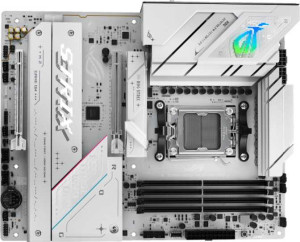
Asus ROG Strix B850-A Gaming WiFi
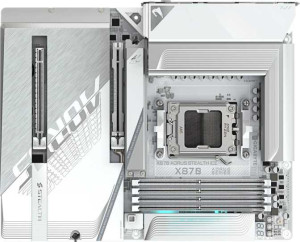
Gigabyte X870 Aorus Stealth Ice

Asus ROG Strix B850-A Gaming WiFi Gigabyte X870 Aorus Stealth Ice

Overview

Welcome to our in-depth specification comparison between the Asus ROG Strix B850-A Gaming WiFi and the Gigabyte X870 Aorus Stealth Ice, two compelling AM5 motherboards targeting enthusiast builders. Both share a strong foundation of DDR5 memory support, Wi-Fi 7 connectivity, and PCIe 5.0, but they diverge notably in areas such as chipset tier, memory capacity and speed, and high-speed connectivity options. Read on to discover which board best suits your build.

Common Features

  • Both boards use the AM5 CPU socket.
  • Both boards have an ATX form factor.
  • Wi-Fi is supported on both boards, covering Wi-Fi 4, Wi-Fi 5, Wi-Fi 6, Wi-Fi 6E, and Wi-Fi 7.
  • Bluetooth is present on both boards.
  • Both boards include an HDMI 2.1 output.
  • Overclocking is supported on both boards.
  • RGB lighting is present on both boards.
  • Both boards have 4 memory slots with DDR5 support across 2 memory channels.
  • ECC memory is not supported on either board.
  • Both boards provide 2 USB 3.2 Gen 2 ports (USB-A), 4 USB 3.2 Gen 1 ports (USB-A), and 1 USB 3.2 Gen 2 port (USB-C).
  • Neither board has a USB 3.2 Gen 1 port (USB-C), USB 4 20Gbps port, or Thunderbolt 3 port.
  • Both boards have a single RJ45 port.
  • Both boards provide 2 USB 3.2 Gen 1 ports and 4 USB 2.0 ports through expansion, along with 2 USB 3.0 ports through expansion.
  • Both boards have 2 SATA 3 connectors, no SATA 2 connectors, and 4 M.2 sockets.
  • Neither board has a U.2 socket or an mSATA connector.
  • Both boards feature 1 PCIe 5.0 x16 slot and no PCIe 3.0 x16, PCIe 2.0 x16, PCIe x8, PCIe x1, or PCI slots.
  • Both boards have a 120 dB signal-to-noise ratio (DAC), 7.1 audio channels, an S/PDIF Out port, and 2 audio connectors.
  • Both boards support RAID 0, RAID 1, RAID 5, and RAID 10, but neither supports RAID 0+1.

Main Differences

  • The chipset is B850 on the Asus ROG Strix B850-A Gaming WiFi and X870 on the Gigabyte X870 Aorus Stealth Ice.
  • Bluetooth version is 5.4 on the Asus ROG Strix B850-A Gaming WiFi and 5.3 on the Gigabyte X870 Aorus Stealth Ice.
  • Easy BIOS reset is supported on the Asus ROG Strix B850-A Gaming WiFi but not available on the Gigabyte X870 Aorus Stealth Ice.
  • Dual BIOS is present on the Asus ROG Strix B850-A Gaming WiFi but not available on the Gigabyte X870 Aorus Stealth Ice.
  • Maximum memory capacity is 192GB on the Asus ROG Strix B850-A Gaming WiFi and 256GB on the Gigabyte X870 Aorus Stealth Ice.
  • Maximum RAM speed is 8000 MHz on the Asus ROG Strix B850-A Gaming WiFi and 5200 MHz on the Gigabyte X870 Aorus Stealth Ice.
  • Overclocked RAM speed is 8000 MHz on the Asus ROG Strix B850-A Gaming WiFi and 8200 MHz on the Gigabyte X870 Aorus Stealth Ice.
  • USB 2.0 ports total 2 on the Asus ROG Strix B850-A Gaming WiFi and 4 on the Gigabyte X870 Aorus Stealth Ice.
  • A USB 3.2 Gen 2x2 port is present on the Asus ROG Strix B850-A Gaming WiFi but not available on the Gigabyte X870 Aorus Stealth Ice.
  • USB 4 40Gbps ports are not present on the Asus ROG Strix B850-A Gaming WiFi, while the Gigabyte X870 Aorus Stealth Ice has 2.
  • Thunderbolt 4 ports are not present on the Asus ROG Strix B850-A Gaming WiFi, while the Gigabyte X870 Aorus Stealth Ice has 2.
  • A DisplayPort output is present on the Asus ROG Strix B850-A Gaming WiFi but not available on the Gigabyte X870 Aorus Stealth Ice.
  • Fan headers total 6 on the Asus ROG Strix B850-A Gaming WiFi and 8 on the Gigabyte X870 Aorus Stealth Ice.
  • A TPM connector is not present on the Asus ROG Strix B850-A Gaming WiFi but is available on the Gigabyte X870 Aorus Stealth Ice.
  • A PCIe 4.0 x16 slot is present on the Asus ROG Strix B850-A Gaming WiFi but not available on the Gigabyte X870 Aorus Stealth Ice.
  • A PCIe x4 slot is not present on the Asus ROG Strix B850-A Gaming WiFi, while the Gigabyte X870 Aorus Stealth Ice has 1.
Specs Comparison
Asus ROG Strix B850-A Gaming WiFi

Asus ROG Strix B850-A Gaming WiFi

Gigabyte X870 Aorus Stealth Ice

Gigabyte X870 Aorus Stealth Ice

General info:
CPU socket AM5 AM5
chipset B850 X870
form factor ATX ATX
release date January 2025 May 2025
supports Wi-Fi
Wi-Fi version Wi-Fi 4 (802.11n), Wi-Fi 5 (802.11ac), Wi-Fi 6 (802.11ax), Wi-Fi 6E (802.11ax), Wi-Fi 7 (802.11be) Wi-Fi 4 (802.11n), Wi-Fi 5 (802.11ac), Wi-Fi 6 (802.11ax), Wi-Fi 6E (802.11ax), Wi-Fi 7 (802.11be)
Has Bluetooth
Bluetooth version 5.4 5.3
HDMI version HDMI 2.1 HDMI 2.1
Easy to overclock
has RGB lighting
Easy to reset BIOS
Has dual BIOS
has aptX
CPU sockets 1 1
Has integrated graphics
warranty period 3 years 3 years
height 244 mm 244 mm
width 305 mm 305 mm
Has integrated CPU

Both boards share the same AM5 socket, ATX form factor, and identical dimensions (244 × 305 mm), meaning they fit the same cases and target the same AMD Ryzen platform. Connectivity is also evenly matched at the top end: both support Wi-Fi 7 (802.11be) with the full legacy stack, Bluetooth, HDMI 2.1, and RGB lighting — so neither board gives ground on modern I/O fundamentals. The three-year warranty is identical as well.

The most meaningful split in this group is the chipset: the Gigabyte runs on X870 while the Asus uses B850. In AMD's hierarchy, X870 sits above B850, typically unlocking more PCIe lanes, greater overclocking headroom, and broader feature exposure — though how much of that translates to real-world gains depends on the specific implementation. On the flip side, the Asus counters with Bluetooth 5.4 versus the Gigabyte's 5.3, a marginal but technically newer revision offering slightly improved connection stability and lower power consumption in compatible peripherals.

Where the Asus ROG Strix B850-A pulls a clear practical advantage is in firmware resilience: it offers both easy BIOS reset and a dual BIOS chip, features the Gigabyte X870 Aorus Stealth Ice lacks entirely. Dual BIOS is a genuine safety net — if a bad flash or corruption renders one BIOS unusable, the board automatically falls back to the backup, avoiding a potentially unbootable system. For users who overclock or flash firmware updates regularly, this is a meaningful differentiator. Overall, the Gigabyte holds the chipset tier advantage, but the Asus offers notably better real-world resilience and recoverability out of the box.
Memory:
maximum memory amount 192GB 256GB
RAM speed (max) 8000 MHz 5200 MHz
overclocked RAM speed 8000 MHz 8200 MHz
memory slots 4 4
DDR memory version 5 5
memory channels 2 2
Supports ECC memory

The memory topology is largely identical between the two boards — both use DDR5, offer 4 slots in a dual-channel configuration, and drop ECC support, making them squarely consumer-focused platforms. The meaningful divergence emerges when you look at capacity ceiling and speed handling. The Gigabyte X870 Aorus Stealth Ice tops out at 256GB of total RAM versus the Asus ROG Strix B850-A's 192GB — a 33% larger ceiling that matters for memory-intensive workloads like large virtual machines, professional video editing timelines, or RAM-heavy databases.

The speed story is more nuanced. The Asus lists a native RAM speed of 8000 MHz, matching its overclocked ceiling — suggesting that 8000 MHz is its validated upper limit with no headroom beyond it. The Gigabyte, by contrast, shows a native rated speed of 5200 MHz but pushes its overclocked ceiling to 8200 MHz, edging slightly past the Asus at the absolute top. The lower native speed on the Gigabyte simply reflects how AMD's JEDEC baseline is reported, and the X870 chipset's greater overclocking latitude is what opens that extra headroom. In daily use at stock settings, the difference in raw MHz is unlikely to produce perceptible performance gaps for most users.

On balance, the Gigabyte X870 Aorus Stealth Ice holds a tangible edge in this group. Its higher maximum capacity gives it longevity and workload flexibility that the Asus cannot match, and its slightly higher overclocked ceiling — however slim the margin — means it technically offers more tuning range for enthusiasts chasing peak DDR5 performance.

Ports:
USB 3.2 Gen 2 ports (USB-A) 2 2
USB 3.2 Gen 1 ports (USB-A) 4 4
USB 3.2 Gen 2 ports (USB-C) 1 1
USB 3.2 Gen 1 ports (USB-C) 0 0
USB 2.0 ports 2 4
USB 3.2 Gen 2x2 ports 1 0
USB 4 40Gbps ports 0 2
USB 4 20Gbps ports 0 0
Thunderbolt 4 ports 0 2
Thunderbolt 3 ports 0 0
has an HDMI output
DisplayPort outputs 1 0
RJ45 ports 1 1
Has USB Type-C
eSATA ports 0 0
DVI outputs 0 0
has a VGA connector
PS/2 ports 0 0

At the mainstream port level, the two boards are closely matched — identical counts of USB 3.2 Gen 2 and Gen 1 Type-A ports, one Gen 2 Type-C each, HDMI, and a single RJ45. The divergence becomes dramatic once you move to the high-bandwidth tier. The Gigabyte X870 Aorus Stealth Ice brings 2x Thunderbolt 4 ports alongside 2x USB4 40Gbps — a combination the Asus ROG Strix B850-A lacks entirely. Thunderbolt 4 at 40Gbps enables daisy-chaining multiple peripherals, connecting external GPU enclosures, and driving high-resolution displays through a single cable, making the Gigabyte significantly more capable as a hub for professional peripherals and creative workflows.

The Asus answers in two narrower ways. Its USB 3.2 Gen 2x2 port (20Gbps) fills a gap the Gigabyte leaves open, useful for fast NVMe enclosures or high-speed docks that target that specific protocol. It also includes a DisplayPort output alongside HDMI, giving it two independent display outputs on the rear I/O — the Gigabyte offers only HDMI, which limits simultaneous display connectivity from the board's own outputs without additional hardware.

The verdict in this group firmly favors the Gigabyte. The presence of Thunderbolt 4 and USB4 40Gbps represents a generational leap in rear I/O capability that the Asus simply cannot match, and those ports carry real-world value for anyone using high-speed storage, external displays over USB-C, or Thunderbolt docks. The Asus's DisplayPort and Gen 2x2 port are useful additions, but they don't offset that gap for users who prioritize future-proof, high-bandwidth connectivity.

Connectors:
USB 3.2 Gen 1 ports (through expansion) 2 2
USB 2.0 ports (through expansion) 4 4
SATA 3 connectors 2 2
fan headers 6 8
USB 3.0 ports (through expansion) 2 2
M.2 sockets 4 4
Has TPM connector
U.2 sockets 0 0
Has mSATA connector
SATA 2 connectors 0 0

Internal connector parity is striking here — both boards offer identical counts of USB expansion headers, 4x M.2 sockets, and 2x SATA 3 ports. Four M.2 slots is a strong result for either board, giving builders ample room to load up on NVMe drives without sacrificing SATA ports for storage expansion. The shared SATA count is modest, but in an era where M.2 dominates, two ports comfortably covers optical drives or legacy HDDs for most builds.

The two differentiators worth noting are fan headers and TPM. The Gigabyte X870 Aorus Stealth Ice ships with 8 fan headers versus the Asus ROG Strix B850-A's 6 — a meaningful gap for builders running high-airflow cases with multiple case fans, radiator pumps, and AIO headers simultaneously. Daisy-chaining fans through splitters degrades individual control granularity, so having two extra native headers keeps thermal management cleaner and more precise. The Gigabyte also includes a dedicated TPM connector, which the Asus omits. For users deploying Windows 11 in enterprise environments or those who rely on hardware-based security features like BitLocker with a discrete TPM module, this header adds tangible value.

This group goes to the Gigabyte by a slim but clear margin. Neither board surprises on storage connectivity, but the extra fan headers give it a practical edge in thermal-heavy builds, and the TPM connector addresses a security requirement the Asus simply cannot accommodate without workarounds.

Expansion slots:
PCIe 4.0 x16 slots 1 0
PCIe 5.0 x16 slots 1 1
PCIe 3.0 x16 slots 0 0
PCIe x1 slots 0 0
PCI slots 0 0
PCIe 2.0 x16 slots 0 0
PCIe x4 slots 0 1
PCIe x8 slots 0 0

Both boards lead with a single PCIe 5.0 x16 slot for the primary GPU — the current standard for flagship graphics cards and a prerequisite for extracting maximum bandwidth from next-generation hardware. That shared foundation means neither board disadvantages users on the primary GPU slot, which is the slot that matters most for gaming and compute workloads.

The split comes in secondary expansion. The Asus ROG Strix B850-A adds a PCIe 4.0 x16 slot, which while half a generation behind the primary slot, still delivers substantial bandwidth for add-in cards — capture cards, high-speed networking cards, or a secondary GPU. The Gigabyte X870 Aorus Stealth Ice instead offers a PCIe x4 slot, which carries far less bandwidth and is better suited to lower-demand expansion cards. For users who need a capable second full-size slot, the Asus provides more headroom there.

On balance, this group leans toward the Asus. The primary PCIe 5.0 x16 slot is a wash, but the secondary PCIe 4.0 x16 slot gives the ROG Strix B850-A meaningfully more flexibility for high-bandwidth add-in cards compared to the Gigabyte's x4 secondary slot — a real advantage for builders who plan to populate more than just a GPU.

Audio:
Signal-to-Noise ratio (DAC) 120 dB 120 dB
audio channels 7.1 7.1
Has S/PDIF Out port
audio connectors 2 2

Rarely does a spec group align this completely: the Asus ROG Strix B850-A and the Gigabyte X870 Aorus Stealth Ice are point-for-point identical across every audio specification provided. Both deliver a 120 dB signal-to-noise ratio from their onboard DAC, support 7.1 surround output, include an S/PDIF optical output for connecting to external receivers or DACs, and offer the same number of rear audio connectors.

The 120 dB SNR figure is worth contextualizing: it represents a high-quality result for integrated motherboard audio, sitting at a level where background hiss and interference are effectively inaudible in typical listening conditions. Combined with 7.1 channel support, both boards can drive a full surround sound setup without requiring a discrete sound card — a capable baseline for gaming and casual listening alike. S/PDIF out adds further flexibility for users who prefer to route audio through an AV receiver or external DAC for higher-fidelity output.

This group is a clean tie. There is no data here that distinguishes one board from the other, and neither holds any audio advantage based on the provided specifications.

Storage:
Supports RAID 1
Supports RAID 10 (1+0)
Supports RAID 5
Supports RAID 0
Supports RAID 0+1

Storage redundancy support is identical across both boards. The Asus ROG Strix B850-A and the Gigabyte X870 Aorus Stealth Ice each support RAID 0, 1, 5, and 10, while neither supports RAID 0+1 — a distinction that is largely academic since RAID 10 (1+0) achieves the same mirroring-plus-striping outcome through a more widely implemented standard.

The practical takeaway is that both boards are equally equipped for users who want to configure redundant or performance-oriented storage arrays. RAID 1 covers straightforward mirroring for data protection, RAID 0 enables striping for maximum throughput at the cost of redundancy, RAID 5 balances performance with fault tolerance across three or more drives, and RAID 10 combines the benefits of both mirroring and striping for workloads that demand both speed and resilience.

There is nothing to separate these two boards here — this group is a complete tie, and storage redundancy should play no role in choosing between them.

Comparison Summary & Verdict

After examining every specification, these two boards emerge as strong but distinctly different choices. The Asus ROG Strix B850-A Gaming WiFi stands out with its dual BIOS and easy BIOS reset support, a higher rated native RAM speed of 8000 MHz, a DisplayPort output, and a USB 3.2 Gen 2x2 port, making it an excellent pick for builders who value system resilience and broad display connectivity. On the other hand, the Gigabyte X870 Aorus Stealth Ice impresses with its X870 chipset, a larger maximum memory capacity of 256GB, two Thunderbolt 4 and two USB 4 40Gbps ports, a higher overclocked RAM ceiling of 8200 MHz, more fan headers, and a TPM connector, positioning it as the stronger platform for power users, content creators, and security-conscious professionals who demand cutting-edge connectivity and scalability.

Asus ROG Strix B850-A Gaming WiFi
Buy Asus ROG Strix B850-A Gaming WiFi if...

Buy the Asus ROG Strix B850-A Gaming WiFi if you want built-in dual BIOS protection, easy BIOS reset, and a board that offers both a DisplayPort output and a USB 3.2 Gen 2x2 port for versatile connectivity.

Gigabyte X870 Aorus Stealth Ice
Buy Gigabyte X870 Aorus Stealth Ice if...

Buy the Gigabyte X870 Aorus Stealth Ice if you need a higher maximum memory capacity of 256GB, Thunderbolt 4 and USB 4 40Gbps ports, more fan headers for complex cooling setups, and a TPM connector for enhanced security.