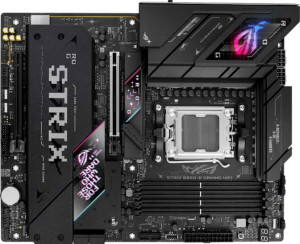
Asus ROG Strix B850-E Gaming WiFi
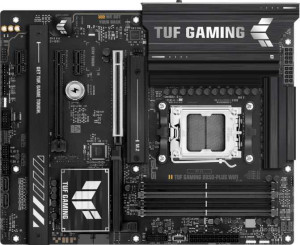
Asus TUF Gaming B850-Plus WiFi

Asus ROG Strix B850-E Gaming WiFi Asus TUF Gaming B850-Plus WiFi

Overview

Choosing between the Asus ROG Strix B850-E Gaming WiFi and the Asus TUF Gaming B850-Plus WiFi means deciding between two feature-rich AM5 motherboards that share the same B850 chipset, Wi-Fi 7, and DDR5 support, yet diverge in some important areas. This comparison examines their USB connectivity, M.2 storage options, audio capabilities, and expansion slot configurations to help you find the right board for your next build.

Common Features

  • Both boards use the AM5 CPU socket.
  • Both boards feature the B850 chipset.
  • Both boards have an ATX form factor.
  • Wi-Fi is supported on both boards, covering Wi-Fi 4, Wi-Fi 5, Wi-Fi 6, Wi-Fi 6E, and Wi-Fi 7.
  • Bluetooth 5.4 is available on both boards.
  • Both boards include an HDMI 2.1 output.
  • Both boards support a maximum memory amount of 192GB.
  • Both boards support overclocked RAM speeds up to 8000 MHz.
  • Both boards have 4 memory slots and 2 memory channels.
  • Both boards use DDR5 memory.
  • ECC memory is not supported on either board.
  • Neither board has USB 3.2 Gen 2 ports in USB-C format on the rear panel.
  • Neither board has USB 3.2 Gen 1 ports in USB-C format on the rear panel.
  • Both boards have 1 USB 3.2 Gen 2x2 port.
  • Neither board includes USB 4 20Gbps or Thunderbolt 3 ports.
  • Both boards include 1 DisplayPort output and 1 RJ45 port.
  • Both boards provide 4 SATA 3 connectors.
  • Both boards offer 2 USB 3.2 Gen 1 ports and 2 USB 3.0 ports through expansion, 1 USB-C 3.2 Gen 2 port through expansion, and 4 USB 2.0 ports through expansion.
  • A TPM connector is not present on either board.
  • Both boards include 1 PCIe 5.0 x16 slot and 1 PCIe 4.0 x16 slot.
  • Both boards deliver 7.1 audio channels with a 120 dB signal-to-noise ratio.
  • Both boards support RAID 0, RAID 1, RAID 5, and RAID 10, but neither supports RAID 0+1.

Main Differences

  • Easy BIOS reset is available on the Asus ROG Strix B850-E Gaming WiFi but not on the Asus TUF Gaming B850-Plus WiFi.
  • USB 3.2 Gen 2 ports (USB-A) number 6 on the Asus ROG Strix B850-E Gaming WiFi and 3 on the Asus TUF Gaming B850-Plus WiFi.
  • USB 3.2 Gen 1 ports (USB-A) number 0 on the Asus ROG Strix B850-E Gaming WiFi and 4 on the Asus TUF Gaming B850-Plus WiFi.
  • USB 2.0 ports number 4 on the Asus ROG Strix B850-E Gaming WiFi and 2 on the Asus TUF Gaming B850-Plus WiFi.
  • A USB 4 40Gbps port is present on the Asus ROG Strix B850-E Gaming WiFi but not available on the Asus TUF Gaming B850-Plus WiFi.
  • A Thunderbolt 4 port is present on the Asus ROG Strix B850-E Gaming WiFi but not available on the Asus TUF Gaming B850-Plus WiFi.
  • Fan headers number 7 on the Asus ROG Strix B850-E Gaming WiFi and 6 on the Asus TUF Gaming B850-Plus WiFi.
  • M.2 sockets number 5 on the Asus ROG Strix B850-E Gaming WiFi and 3 on the Asus TUF Gaming B850-Plus WiFi.
  • PCIe x1 slots number 0 on the Asus ROG Strix B850-E Gaming WiFi and 2 on the Asus TUF Gaming B850-Plus WiFi.
  • An S/PDIF Out port is present on the Asus ROG Strix B850-E Gaming WiFi but not available on the Asus TUF Gaming B850-Plus WiFi.
  • Audio connectors number 2 on the Asus ROG Strix B850-E Gaming WiFi and 5 on the Asus TUF Gaming B850-Plus WiFi.
Specs Comparison
Asus ROG Strix B850-E Gaming WiFi

Asus ROG Strix B850-E Gaming WiFi

Asus TUF Gaming B850-Plus WiFi

Asus TUF Gaming B850-Plus WiFi

General info:
CPU socket AM5 AM5
chipset B850 B850
form factor ATX ATX
release date January 2025 January 2025
supports Wi-Fi
Wi-Fi version Wi-Fi 4 (802.11n), Wi-Fi 5 (802.11ac), Wi-Fi 6 (802.11ax), Wi-Fi 6E (802.11ax), Wi-Fi 7 (802.11be) Wi-Fi 4 (802.11n), Wi-Fi 5 (802.11ac), Wi-Fi 6 (802.11ax), Wi-Fi 6E (802.11ax), Wi-Fi 7 (802.11be)
Has Bluetooth
Bluetooth version 5.4 5.4
HDMI version HDMI 2.1 HDMI 2.1
Easy to overclock
has RGB lighting
Easy to reset BIOS
Has dual BIOS
has aptX
CPU sockets 1 1
Has integrated graphics
warranty period 3 years 3 years
height 244 mm 244 mm
width 305 mm 305 mm
Has integrated CPU

Both the Asus ROG Strix B850-E Gaming WiFi and the Asus TUF Gaming B850-Plus WiFi share a remarkably similar foundation in their general specifications. Both use the AM5 socket with the B850 chipset, adopt the standard ATX form factor (244 × 305 mm), and support the full modern wireless stack up to Wi-Fi 7 (802.11be) alongside Bluetooth 5.4 — ensuring future-proof connectivity for both boards. They also both carry HDMI 2.1 output, dual BIOS, RGB lighting, overclocking support, and a 3-year warranty, meaning the core feature set at this tier is essentially identical.

The only functional difference within this group is that the ROG Strix B850-E includes an easy BIOS reset mechanism, while the TUF Gaming B850-Plus does not. In practice, this matters most in edge-case troubleshooting scenarios — such as a failed overclock or a corrupted BIOS update — where a dedicated reset button or mechanism lets users recover without needing to clear the CMOS manually by shorting pins or removing the battery. For users who push their systems aggressively, this is a meaningful quality-of-life advantage.

Overall, the two boards are nearly tied in general configuration, but the ROG Strix B850-E holds a slight edge in this group solely due to its easier BIOS reset capability, which adds a layer of convenience and resilience for enthusiast users.

Memory:
maximum memory amount 192GB 192GB
overclocked RAM speed 8000 MHz 8000 MHz
memory slots 4 4
DDR memory version 5 5
memory channels 2 2
Supports ECC memory

Both the Asus ROG Strix B850-E Gaming WiFi and the Asus TUF Gaming B850-Plus WiFi offer very similar memory capabilities. Both motherboards support a maximum memory amount of 192GB and feature four memory slots. They also both support DDR5 memory and have dual memory channels. Furthermore, both products are capable of overclocking RAM to speeds up to 8000 MHz.

Additionally, neither motherboard supports ECC memory, which is consistent across both models.

In summary, the memory specifications are identical for both the ROG Strix and TUF Gaming boards, with no differences in the key features like maximum memory, memory slots, or overclocking capability.

Ports:
USB 3.2 Gen 2 ports (USB-A) 6 3
USB 3.2 Gen 1 ports (USB-A) 0 4
USB 3.2 Gen 2 ports (USB-C) 0 0
USB 3.2 Gen 1 ports (USB-C) 0 0
USB 2.0 ports 4 2
USB 3.2 Gen 2x2 ports 1 1
USB 4 40Gbps ports 1 0
USB 4 20Gbps ports 0 0
Thunderbolt 4 ports 1 0
Thunderbolt 3 ports 0 0
has an HDMI output
DisplayPort outputs 1 1
RJ45 ports 1 1
Has USB Type-C
eSATA ports 0 0
DVI outputs 0 0
has a VGA connector
PS/2 ports 0 0

The Asus ROG Strix B850-E Gaming WiFi and Asus TUF Gaming B850-Plus WiFi differ in the number and types of USB ports available. The ROG Strix model has 6 USB 3.2 Gen 2 ports (USB-A), while the TUF Gaming model offers only 3. The TUF Gaming motherboard also has 4 USB 3.2 Gen 1 (USB-A) ports, while the ROG Strix has none. Both motherboards include 4 USB 2.0 ports, 1 USB 3.2 Gen 2x2 port, and 1 DisplayPort output. Additionally, the ROG Strix supports 1 USB 4 40Gbps port and 1 Thunderbolt 4 port, which the TUF Gaming model lacks.

When it comes to HDMI output, both motherboards include 1 HDMI port. They also both feature 1 RJ45 Ethernet port and 1 USB Type-C port, with no differences in these areas. The TUF Gaming motherboard has fewer USB 3.2 Gen 2 ports (USB-A), but it compensates with more USB 3.2 Gen 1 (USB-A) ports. Additionally, neither motherboard has eSATA ports, DVI outputs, or VGA connectors.

In summary, the Asus ROG Strix B850-E offers more advanced USB and Thunderbolt ports, while the Asus TUF Gaming B850-Plus focuses on providing a higher number of USB 3.2 Gen 1 ports. Both motherboards have similar basic ports like HDMI, RJ45, and USB Type-C.

Connectors:
USB 3.2 Gen 1 ports (through expansion) 2 2
USB-C 3.2 Gen 2 ports (through expansion) 1 1
USB 2.0 ports (through expansion) 4 4
SATA 3 connectors 4 4
fan headers 7 6
USB 3.0 ports (through expansion) 2 2
M.2 sockets 5 3
Has TPM connector
U.2 sockets 0 0
Has mSATA connector
SATA 2 connectors 0 0

The Asus ROG Strix B850-E Gaming WiFi and Asus TUF Gaming B850-Plus WiFi offer very similar connector configurations with a few notable differences. Both motherboards provide 2 USB 3.2 Gen 1 ports, 1 USB-C 3.2 Gen 2 port, and 4 USB 2.0 ports through expansion. They also both have 4 SATA 3 connectors, 2 USB 3.0 ports through expansion, and 0 U.2 sockets. Neither motherboard has an mSATA connector or a TPM connector, and both lack SATA 2 connectors.

The main difference lies in the number of fan headers and M.2 sockets. The ROG Strix model includes 7 fan headers, while the TUF Gaming model has 6. For M.2 sockets, the ROG Strix has 5, whereas the TUF Gaming offers 3. These differences could impact expandability and cooling options for users, with the ROG Strix offering more options in both areas.

Overall, while the basic connectors are the same, the ROG Strix B850-E Gaming WiFi offers more flexibility in terms of cooling and storage expansion, thanks to its extra fan headers and M.2 sockets.

Expansion slots:
PCIe 4.0 x16 slots 1 1
PCIe 5.0 x16 slots 1 1
PCIe 3.0 x16 slots 0 0
PCIe x1 slots 0 2
PCI slots 0 0
PCIe 2.0 x16 slots 0 0
PCIe x4 slots 0 0
PCIe x8 slots 0 0

The Asus ROG Strix B850-E Gaming WiFi and Asus TUF Gaming B850-Plus WiFi have similar PCIe slot configurations with a few differences in the number of x1 slots. Both motherboards feature 1 PCIe 4.0 x16 slot and 1 PCIe 5.0 x16 slot. Neither model includes any PCIe 3.0 x16, PCIe 2.0 x16, PCIe x4, or PCIe x8 slots, so the main differences lie in the x1 slots.

The ROG Strix motherboard has no PCIe x1 slots, while the TUF Gaming model includes 2 PCIe x1 slots. This gives the TUF Gaming motherboard a slight advantage in terms of adding expansion cards that require smaller PCIe lanes, like network cards or sound cards.

In summary, while both models provide strong support for high-speed x16 slots (PCIe 4.0 and PCIe 5.0), the TUF Gaming B850-Plus has the edge with its additional PCIe x1 slots for greater flexibility in expansion options.

Audio:
Signal-to-Noise ratio (DAC) 120 dB 120 dB
audio channels 7.1 7.1
Has S/PDIF Out port
audio connectors 2 5

The Asus ROG Strix B850-E Gaming WiFi and Asus TUF Gaming B850-Plus WiFi share some similarities in their audio specifications. Both motherboards have a signal-to-noise ratio (DAC) of 120 dB and support 7.1 audio channels, ensuring high-quality sound output for immersive audio experiences.

The key difference between the two models is in the presence of an S/PDIF Out port. The ROG Strix B850-E has this port, while the TUF Gaming B850-Plus does not. Additionally, the TUF Gaming model has 5 audio connectors, whereas the ROG Strix only includes 2. This could provide more flexibility for audio setups in the TUF Gaming board, with more options for connecting various audio devices.

In summary, both motherboards offer excellent audio quality with the same DAC signal-to-noise ratio and audio channels, but the TUF Gaming B850-Plus provides more audio connectors, while the ROG Strix B850-E includes the S/PDIF Out port for additional connectivity.

Storage:
Supports RAID 1
Supports RAID 10 (1+0)
Supports RAID 5
Supports RAID 0
Supports RAID 0+1

The Asus ROG Strix B850-E Gaming WiFi and Asus TUF Gaming B850-Plus WiFi offer identical support for RAID configurations. Both motherboards support RAID 1, RAID 10 (1+0), RAID 5, and RAID 0. Neither motherboard supports RAID 0+1, making their storage capabilities for redundancy and performance enhancement nearly identical.

In summary, both motherboards provide the same set of RAID support options, allowing users to configure their storage setup with various levels of redundancy and speed according to their needs.

Comparison Summary & Verdict

Both boards are solid B850 foundations with DDR5, Wi-Fi 7, PCIe 5.0, and identical memory support up to 192GB, but their differences reveal distinct target audiences. The Asus ROG Strix B850-E Gaming WiFi is the stronger choice for power users who demand maximum connectivity: it offers Thunderbolt 4, USB 4 40Gbps, six USB 3.2 Gen 2 Type-A ports, five M.2 sockets, seven fan headers, an S/PDIF output, and an easy BIOS reset button. The Asus TUF Gaming B850-Plus WiFi, meanwhile, appeals to builders who prioritize audio flexibility and expansion versatility, delivering five audio connectors, two PCIe x1 slots for add-in cards, and four USB 3.2 Gen 1 Type-A ports. Neither board is objectively superior for every use case, making the right pick entirely dependent on your workflow and peripherals.

Asus ROG Strix B850-E Gaming WiFi
Buy Asus ROG Strix B850-E Gaming WiFi if...

Buy the Asus ROG Strix B850-E Gaming WiFi if you need maximum connectivity, including Thunderbolt 4, USB 4 40Gbps, five M.2 slots, and an easy BIOS reset for a high-end, future-proof build.

Asus TUF Gaming B850-Plus WiFi
Buy Asus TUF Gaming B850-Plus WiFi if...

Buy the Asus TUF Gaming B850-Plus WiFi if you value a richer audio setup with five connectors, two PCIe x1 expansion slots, and a solid USB port selection for a well-rounded mainstream build.