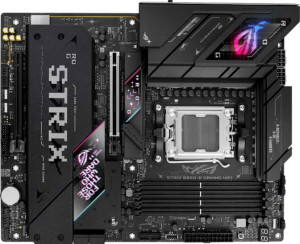
Asus ROG Strix B850-E Gaming WiFi
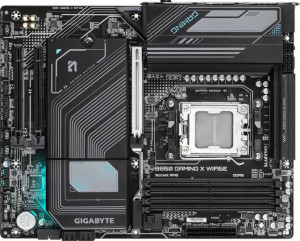
Gigabyte B850 Gaming X WiFi6E

Asus ROG Strix B850-E Gaming WiFi Gigabyte B850 Gaming X WiFi6E

Overview

Welcome to our in-depth specification showdown between the Asus ROG Strix B850-E Gaming WiFi and the Gigabyte B850 Gaming X WiFi6E, two capable AM5 motherboards built on the B850 chipset. Both boards target enthusiast builders, but they take notably different approaches when it comes to connectivity options, storage expansion, and wireless standards. Read on to see how they stack up across every key specification.

Common Features

  • Both boards use the AM5 CPU socket.
  • Both boards feature the B850 chipset.
  • Both boards use the ATX form factor.
  • Wi-Fi connectivity is available on both boards.
  • Bluetooth is available on both boards.
  • Both boards have an HDMI 2.1 output.
  • Overclocking support is available on both boards.
  • RGB lighting is present on both boards.
  • Both boards have 4 memory slots.
  • Both boards support DDR5 memory.
  • Both boards have 2 memory channels.
  • ECC memory is not supported on either board.
  • Neither board has USB 3.2 Gen 1 Type-C ports on the rear panel.
  • Neither board has USB 4 20Gbps ports.
  • Neither board has Thunderbolt 3 ports.
  • Both boards have a DisplayPort output.
  • Both boards have one RJ45 port.
  • USB Type-C connectivity is available on both boards.
  • Neither board has eSATA ports.
  • Both boards have 2 USB 3.2 Gen 1 ports and 2 USB 3.0 ports available through expansion headers.
  • Both boards have 4 USB 2.0 ports available through expansion headers.
  • Both boards include 4 SATA 3 connectors.
  • Neither board has U.2 sockets.
  • Neither board has an mSATA connector.
  • Both boards have no SATA 2 connectors.
  • Both boards include one PCIe 5.0 x16 slot.
  • Neither board has PCIe 3.0 x16, PCIe 2.0 x16, PCIe x4, or PCIe x8 slots.
  • Both boards support 7.1 audio channels.
  • Both boards support RAID 0, RAID 1, RAID 5, and RAID 10.
  • RAID 0+1 is not supported on either board.

Main Differences

  • Wi-Fi 7 support is present on the Asus ROG Strix B850-E Gaming WiFi but not available on the Gigabyte B850 Gaming X WiFi6E.
  • Bluetooth version is 5.4 on the Asus ROG Strix B850-E Gaming WiFi and 5.3 on the Gigabyte B850 Gaming X WiFi6E.
  • Easy BIOS reset is supported on the Asus ROG Strix B850-E Gaming WiFi but not available on the Gigabyte B850 Gaming X WiFi6E.
  • Maximum memory capacity is 192GB on the Asus ROG Strix B850-E Gaming WiFi and 256GB on the Gigabyte B850 Gaming X WiFi6E.
  • Maximum overclocked RAM speed is 8000 MHz on the Asus ROG Strix B850-E Gaming WiFi and 8200 MHz on the Gigabyte B850 Gaming X WiFi6E.
  • USB 3.2 Gen 2 Type-A ports number 6 on the Asus ROG Strix B850-E Gaming WiFi and 1 on the Gigabyte B850 Gaming X WiFi6E.
  • USB 3.2 Gen 1 Type-A ports number 0 on the Asus ROG Strix B850-E Gaming WiFi and 3 on the Gigabyte B850 Gaming X WiFi6E.
  • USB 3.2 Gen 2 Type-C ports number 0 on the Asus ROG Strix B850-E Gaming WiFi and 1 on the Gigabyte B850 Gaming X WiFi6E.
  • USB 2.0 ports number 4 on the Asus ROG Strix B850-E Gaming WiFi and 3 on the Gigabyte B850 Gaming X WiFi6E.
  • A USB 3.2 Gen 2x2 port is present on the Asus ROG Strix B850-E Gaming WiFi but not available on the Gigabyte B850 Gaming X WiFi6E.
  • A USB 4 40Gbps port is present on the Asus ROG Strix B850-E Gaming WiFi but not available on the Gigabyte B850 Gaming X WiFi6E.
  • A Thunderbolt 4 port is present on the Asus ROG Strix B850-E Gaming WiFi but not available on the Gigabyte B850 Gaming X WiFi6E.
  • A PS/2 port is present on the Gigabyte B850 Gaming X WiFi6E but not available on the Asus ROG Strix B850-E Gaming WiFi.
  • Fan headers number 7 on the Asus ROG Strix B850-E Gaming WiFi and 6 on the Gigabyte B850 Gaming X WiFi6E.
  • M.2 sockets number 5 on the Asus ROG Strix B850-E Gaming WiFi and 3 on the Gigabyte B850 Gaming X WiFi6E.
  • A TPM connector is present on the Gigabyte B850 Gaming X WiFi6E but not available on the Asus ROG Strix B850-E Gaming WiFi.
  • A PCIe 4.0 x16 slot is present on the Asus ROG Strix B850-E Gaming WiFi but not available on the Gigabyte B850 Gaming X WiFi6E.
  • PCIe x1 slots number 0 on the Asus ROG Strix B850-E Gaming WiFi and 2 on the Gigabyte B850 Gaming X WiFi6E.
  • An S/PDIF Out port is present on the Asus ROG Strix B850-E Gaming WiFi but not available on the Gigabyte B850 Gaming X WiFi6E.
  • Audio connectors number 2 on the Asus ROG Strix B850-E Gaming WiFi and 3 on the Gigabyte B850 Gaming X WiFi6E.
Specs Comparison
Asus ROG Strix B850-E Gaming WiFi

Asus ROG Strix B850-E Gaming WiFi

Gigabyte B850 Gaming X WiFi6E

Gigabyte B850 Gaming X WiFi6E

General info:
CPU socket AM5 AM5
chipset B850 B850
form factor ATX ATX
release date January 2025 January 2025
supports Wi-Fi
Wi-Fi version Wi-Fi 4 (802.11n), Wi-Fi 5 (802.11ac), Wi-Fi 6 (802.11ax), Wi-Fi 6E (802.11ax), Wi-Fi 7 (802.11be) Wi-Fi 4 (802.11n), Wi-Fi 5 (802.11ac), Wi-Fi 6 (802.11ax), Wi-Fi 6E (802.11ax)
Has Bluetooth
Bluetooth version 5.4 5.3
HDMI version HDMI 2.1 HDMI 2.1
Easy to overclock
has RGB lighting
Easy to reset BIOS
Has dual BIOS
has aptX
CPU sockets 1 1
Has integrated graphics
warranty period 3 years 3 years
height 244 mm 244 mm
width 305 mm 305 mm
Has integrated CPU

Both the Asus ROG Strix B850-E Gaming WiFi and the Gigabyte B850 Gaming X WiFi6E share a strong common foundation: identical AM5 socket / B850 chipset pairing, standard ATX dimensions (244 × 305 mm), HDMI 2.1 output, dual BIOS, RGB lighting, overclocking support, and a matching 3-year warranty. For a buyer focused purely on platform fit and build compatibility, either board is effectively interchangeable at this level.

The meaningful splits appear in wireless connectivity and usability features. The ROG Strix extends its Wi-Fi stack all the way to Wi-Fi 7 (802.11be), while the Gigabyte tops out at Wi-Fi 6E (802.11ax). In practical terms, Wi-Fi 7 delivers substantially higher theoretical throughput and lower latency — relevant today only if you own a Wi-Fi 7 router, but it future-proofs the board as that ecosystem matures. Similarly, the ROG Strix ships with Bluetooth 5.4 versus the Gigabyte's 5.3; the newer revision offers marginally improved connection stability and power efficiency, a modest but real benefit for wireless peripherals. The ROG Strix also supports easy BIOS reset, a convenience the Gigabyte lacks — a small but genuinely useful feature when troubleshooting overclocks or recovering from a bad flash.

Overall, the Asus ROG Strix B850-E holds a clear edge in this group. Its Wi-Fi 7 support is the single most impactful differentiator — it is the only board here that will not require an upgrade to take full advantage of next-generation networking hardware. The Gigabyte remains a competitive option for users who have no interest in Wi-Fi 7 and prioritize cost, but on a pure general-spec comparison, the ROG Strix is the more forward-looking choice.
Memory:
maximum memory amount 192GB 256GB
overclocked RAM speed 8000 MHz 8200 MHz
memory slots 4 4
DDR memory version 5 5
memory channels 2 2
Supports ECC memory

On the memory front, both boards share the same structural blueprint: 4 DIMM slots, dual-channel DDR5 architecture, and no ECC support — meaning the playing field is level for the vast majority of desktop builds. Where things diverge is in the ceiling each board sets for capacity and speed.

The Gigabyte B850 Gaming X WiFi6E supports up to 256 GB of RAM versus the ROG Strix's 192 GB cap. In practice, hitting even 192 GB requires four high-density DIMMs and represents an extreme edge case — workstation-class content creation, large in-memory datasets, or heavy virtualization workloads. For gaming or typical creative tasks, neither limit is remotely restrictive. The Gigabyte also nudges ahead on overclocked memory speed, rated to 8200 MHz compared to the ROG Strix's 8000 MHz. That 200 MHz gap is marginal in real-world performance terms, but it does signal slightly more aggressive XMP/EXPO profile support if you are chasing the absolute top of the DDR5 frequency ladder.

The Gigabyte takes the technical edge here on both capacity headroom and peak memory frequency. That said, the advantage is narrow for most users — the 192 GB ceiling of the ROG Strix is more than sufficient for virtually any consumer workload, and the speed delta is unlikely to be perceptible in everyday use. This group only becomes a genuine deciding factor for users who anticipate extreme memory configurations or who specifically plan to run the fastest DDR5 kits available.

Ports:
USB 3.2 Gen 2 ports (USB-A) 6 1
USB 3.2 Gen 1 ports (USB-A) 0 3
USB 3.2 Gen 2 ports (USB-C) 0 1
USB 3.2 Gen 1 ports (USB-C) 0 0
USB 2.0 ports 4 3
USB 3.2 Gen 2x2 ports 1 0
USB 4 40Gbps ports 1 0
USB 4 20Gbps ports 0 0
Thunderbolt 4 ports 1 0
Thunderbolt 3 ports 0 0
has an HDMI output
DisplayPort outputs 1 1
RJ45 ports 1 1
Has USB Type-C
eSATA ports 0 0
DVI outputs 0 0
has a VGA connector
PS/2 ports 0 1

This is arguably the starkest gap between the two boards anywhere in this comparison. The Asus ROG Strix B850-E arrives with a rear I/O panel that is genuinely premium: six USB 3.2 Gen 2 (10Gbps) Type-A ports, a USB 3.2 Gen 2x2 (20Gbps) port, a USB 4 40Gbps port, and a Thunderbolt 4 port. That combination means fast external SSDs, high-bandwidth docks, and Thunderbolt peripherals are all first-class citizens. The Gigabyte, by contrast, offers just one USB 3.2 Gen 2 Type-A port alongside three Gen 1 (5Gbps) ports, no USB 4, and no Thunderbolt — a noticeably more modest lineup.

The real-world gap is significant. Thunderbolt 4 alone opens up daisy-chaining high-resolution displays, connecting eGPUs, and using enterprise-grade docks — none of which the Gigabyte can accommodate. The ROG Strix's six Gen 2 Type-A ports also mean heavy USB users — those juggling external drives, audio interfaces, and capture cards simultaneously — will rarely feel pinched. One curiosity on the Gigabyte side: it retains a PS/2 port, a legacy inclusion that serves a narrow audience with older input devices but is irrelevant to the vast majority of modern builds.

The ROG Strix B850-E wins this group decisively. Its port selection is in a different tier — the presence of Thunderbolt 4 and USB 4 at 40Gbps alone would justify the comparison, and the sheer volume of high-speed Type-A ports adds further separation. For users who rely heavily on fast external peripherals or professional I/O, the Gigabyte's rear panel will feel limiting by comparison.

Connectors:
USB 3.2 Gen 1 ports (through expansion) 2 2
USB 2.0 ports (through expansion) 4 4
SATA 3 connectors 4 4
fan headers 7 6
USB 3.0 ports (through expansion) 2 2
M.2 sockets 5 3
Has TPM connector
U.2 sockets 0 0
Has mSATA connector
SATA 2 connectors 0 0

Internally, these two boards share a lot of common ground: identical USB expansion headers, four SATA 3 connectors, and no legacy SATA 2 or U.2 sockets to speak of. The divergence comes down to two specs that matter quite differently depending on the type of builder. The ROG Strix pulls ahead with five M.2 sockets versus the Gigabyte's three — a meaningful gap for anyone planning a high-density NVMe storage array, a content creation rig with fast scratch drives, or simply a system that will accumulate storage over time without resorting to SATA.

Fan and cooling header count is the other split: the ROG Strix offers seven fan headers to the Gigabyte's six. In a well-ventilated mid-tower with multiple case fans, radiator pumps, and a CPU cooler, that extra header can be the difference between needing a fan hub and not. The Gigabyte counters with a TPM connector, which the ROG Strix lacks — relevant for enterprise deployments, hardware-based encryption, or strict Windows 11 TPM compliance workflows, though most consumer builds will never notice its absence.

The ROG Strix B850-E takes the edge here, primarily on the strength of its five M.2 slots. For storage-hungry builds, that additional headroom is a concrete, lasting advantage. The Gigabyte's TPM header is a useful inclusion for a specific audience, but it does not offset the ROG Strix's broader internal connectivity lead.

Expansion slots:
PCIe 4.0 x16 slots 1 0
PCIe 5.0 x16 slots 1 1
PCIe 3.0 x16 slots 0 0
PCIe x1 slots 0 2
PCI slots 0 0
PCIe 2.0 x16 slots 0 0
PCIe x4 slots 0 0
PCIe x8 slots 0 0

Both boards provide a single PCIe 5.0 x16 slot as their primary GPU lane — the current standard for flagship discrete graphics cards, offering double the bandwidth of PCIe 4.0 and ensuring compatibility with next-generation GPUs. For the overwhelming majority of users, that shared slot is the only one that will ever matter. The fork comes in what each board offers beyond that primary slot.

The Gigabyte B850 Gaming X WiFi6E adds two PCIe x1 slots, useful for expansion cards like dedicated sound cards, capture cards, or additional network adapters — handy for builders who want to extend functionality without consuming the primary x16 lane. The ROG Strix B850-E takes a different approach, trading those x1 slots for a second full-size slot running at PCIe 4.0 x16. This is a more capable secondary slot — capable of hosting a second GPU, a high-bandwidth NVMe add-in card, or a professional capture solution that demands more than x1 bandwidth.

Which layout wins depends entirely on the use case. For a single-GPU gaming build that might add a sound card or Wi-Fi card later, the Gigabyte's x1 slots are perfectly serviceable. For users who need a second high-bandwidth expansion card, the ROG Strix's PCIe 4.0 x16 secondary slot is a meaningfully more versatile option. On balance, the ROG Strix B850-E holds a slight edge here — PCIe 4.0 x16 headroom is simply more flexible than a pair of x1 lanes for demanding secondary workloads.

Audio:
audio channels 7.1 7.1
Has S/PDIF Out port
audio connectors 2 3

Audio is a close contest between these two boards, with each holding one advantage over the other. Both deliver 7.1-channel surround support, meaning neither imposes a ceiling on multi-speaker or high-fidelity headphone setups at the codec level. The split comes down to connectivity format versus connector count.

The ROG Strix B850-E includes an S/PDIF optical output — a digital audio connection that passes a clean, interference-free signal to external DACs, AV receivers, or surround sound processors. For users with a dedicated audio setup downstream of the motherboard, this is a genuinely valuable port that the Gigabyte simply omits. The Gigabyte B850 Gaming X WiFi6E counters with three analog audio connectors versus the ROG Strix's two, offering slightly more flexibility for simultaneous analog connections — useful if front-panel audio, rear speakers, and a headset all need to coexist without a splitter.

The edge goes to the ROG Strix B850-E, but narrowly and conditionally. S/PDIF output is a more specialized advantage — it directly serves users with external DACs or home theater receivers, while the extra analog jack on the Gigabyte is a convenience benefit for a broader, more casual audience. If analog flexibility matters more than digital output, the two boards are effectively tied; if digital passthrough is on your requirements list, only the ROG Strix delivers it.

Storage:
Supports RAID 1
Supports RAID 10 (1+0)
Supports RAID 5
Supports RAID 0
Supports RAID 0+1

Storage configuration support is a dead heat between these two boards. Both the Asus ROG Strix B850-E and the Gigabyte B850 Gaming X WiFi6E support RAID 0, 1, 5, and 10, and neither supports RAID 0+1 — the spec sheet is a mirror image across every entry in this group.

The practical coverage here is solid for a consumer-grade platform. RAID 0 delivers striped performance gains across multiple drives, RAID 1 provides straightforward mirroring for redundancy, and RAID 5 and 10 offer more sophisticated balances of performance and fault tolerance suited to multi-drive arrays. The absence of RAID 0+1 is shared by both boards and is unlikely to matter — it is functionally superseded by RAID 10 in most real-world scenarios anyway.

This group is a complete tie. Neither board offers any storage configuration capability that the other does not, and the RAID feature set provided is identical in every respect. Storage redundancy and array type should play no part in choosing between these two boards.

Comparison Summary & Verdict

After examining every specification, both boards share a strong common foundation — AM5 socket, B850 chipset, DDR5 support, PCIe 5.0, and solid RAID capabilities — but their differences reveal distinct target audiences. The Asus ROG Strix B850-E Gaming WiFi stands out for power users who demand the best connectivity, offering Wi-Fi 7, a Thunderbolt 4 port, a USB 4 40Gbps port, five M.2 slots, and easy BIOS reset functionality. The Gigabyte B850 Gaming X WiFi6E, on the other hand, appeals to builders who prioritize higher maximum memory capacity (256GB), faster overclocked RAM speeds (8200 MHz), a TPM connector, and a more traditional port layout including a PS/2 port. Choose the Asus if feature density and cutting-edge wireless matter most; choose the Gigabyte if raw memory headroom and value-oriented connectivity suit your build better.

Asus ROG Strix B850-E Gaming WiFi
Buy Asus ROG Strix B850-E Gaming WiFi if...

Buy the Asus ROG Strix B850-E Gaming WiFi if you want the most advanced connectivity, including Wi-Fi 7, Thunderbolt 4, USB 4 40Gbps, and five M.2 slots, along with easy BIOS reset support.

Gigabyte B850 Gaming X WiFi6E
Buy Gigabyte B850 Gaming X WiFi6E if...

Buy the Gigabyte B850 Gaming X WiFi6E if you need a higher maximum memory capacity of 256GB and faster overclocked RAM speeds of 8200 MHz for memory-intensive workloads.