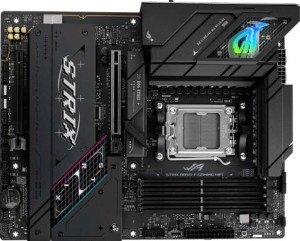
Asus ROG Strix B850-F Gaming WiFi
Asus ROG Strix B850-I Gaming WiFi

Asus ROG Strix B850-F Gaming WiFi Asus ROG Strix B850-I Gaming WiFi

Overview

Welcome to our in-depth spec comparison between the Asus ROG Strix B850-F Gaming WiFi and the Asus ROG Strix B850-I Gaming WiFi. Both boards share the same AM5 socket and B850 chipset, yet they take very different approaches to form factor, memory capacity, and port configuration. Whether you are planning a full-tower powerhouse or a compact small-form-factor build, understanding how these two ROG motherboards stack up is essential before making your decision.

Common Features

  • Both motherboards use the AM5 CPU socket.
  • Both motherboards feature the B850 chipset.
  • Wi-Fi is supported on both motherboards.
  • Both support Wi-Fi 4 (802.11n), Wi-Fi 5 (802.11ac), Wi-Fi 6 (802.11ax), Wi-Fi 6E (802.11ax), and Wi-Fi 7 (802.11be).
  • Bluetooth is available on both motherboards.
  • Both share Bluetooth version 5.4.
  • Both motherboards include HDMI 2.1 output.
  • Overclocking is supported on both motherboards.
  • Both use DDR5 memory.
  • Both motherboards have 2 memory channels.
  • ECC memory is not supported on either motherboard.
  • Both motherboards include 1 USB 3.2 Gen 2 port (USB-C).
  • Neither motherboard has any USB 3.2 Gen 1 ports (USB-C).
  • Both motherboards include 1 USB 3.2 Gen 2x2 port.
  • Neither motherboard has USB 4 40Gbps, USB 4 20Gbps, Thunderbolt 4, or Thunderbolt 3 ports.
  • An HDMI output is present on both motherboards.
  • Both motherboards provide 2 USB 3.2 Gen 1 ports through expansion.
  • Both motherboards include 2 SATA 3 connectors.
  • Both motherboards have 6 fan headers.
  • A TPM connector is not available on either motherboard.
  • Neither motherboard has U.2 sockets or an mSATA connector.
  • Neither motherboard includes SATA 2 connectors.
  • Both motherboards feature 1 PCIe 5.0 x16 slot and 1 PCIe 4.0 x16 slot.
  • Neither motherboard has PCIe 3.0 x16, PCIe 2.0 x16, PCIe x1, PCIe x4, PCIe x8, or PCI slots.
  • Both motherboards have a signal-to-noise ratio (DAC) of 120 dB.
  • Both motherboards support 7.1 audio channels.
  • An S/PDIF Out port is present on both motherboards.
  • Both motherboards support RAID 0, RAID 1, RAID 5, and RAID 10 (1+0).
  • RAID 0+1 is not supported on either motherboard.

Main Differences

  • The form factor is ATX on the Asus ROG Strix B850-F Gaming WiFi and Mini-ITX on the Asus ROG Strix B850-I Gaming WiFi.
  • The height is 244 mm on the Asus ROG Strix B850-F Gaming WiFi and 170 mm on the Asus ROG Strix B850-I Gaming WiFi.
  • The width is 305 mm on the Asus ROG Strix B850-F Gaming WiFi and 170 mm on the Asus ROG Strix B850-I Gaming WiFi.
  • Maximum memory capacity is 192 GB on the Asus ROG Strix B850-F Gaming WiFi and 96 GB on the Asus ROG Strix B850-I Gaming WiFi.
  • The maximum overclocked RAM speed is 8000 MHz on the Asus ROG Strix B850-F Gaming WiFi and 8400 MHz on the Asus ROG Strix B850-I Gaming WiFi.
  • The number of memory slots is 4 on the Asus ROG Strix B850-F Gaming WiFi and 2 on the Asus ROG Strix B850-I Gaming WiFi.
  • USB 3.2 Gen 2 ports (USB-A) number 2 on the Asus ROG Strix B850-F Gaming WiFi and 4 on the Asus ROG Strix B850-I Gaming WiFi.
  • USB 3.2 Gen 1 ports (USB-A) number 4 on the Asus ROG Strix B850-F Gaming WiFi and 0 on the Asus ROG Strix B850-I Gaming WiFi.
  • USB 2.0 ports number 4 on the Asus ROG Strix B850-F Gaming WiFi and 2 on the Asus ROG Strix B850-I Gaming WiFi.
  • A DisplayPort output is present on the Asus ROG Strix B850-F Gaming WiFi but not available on the Asus ROG Strix B850-I Gaming WiFi.
  • USB 2.0 ports through expansion number 4 on the Asus ROG Strix B850-F Gaming WiFi and 2 on the Asus ROG Strix B850-I Gaming WiFi.
  • M.2 sockets number 4 on the Asus ROG Strix B850-F Gaming WiFi and 2 on the Asus ROG Strix B850-I Gaming WiFi.
  • The number of audio connectors is 2 on the Asus ROG Strix B850-F Gaming WiFi and 3 on the Asus ROG Strix B850-I Gaming WiFi.
Specs Comparison
Asus ROG Strix B850-F Gaming WiFi

Asus ROG Strix B850-F Gaming WiFi

Asus ROG Strix B850-I Gaming WiFi

Asus ROG Strix B850-I Gaming WiFi

General info:
CPU socket AM5 AM5
chipset B850 B850
form factor ATX Mini-ITX
release date January 2025 January 2025
supports Wi-Fi
Wi-Fi version Wi-Fi 4 (802.11n), Wi-Fi 5 (802.11ac), Wi-Fi 6 (802.11ax), Wi-Fi 6E (802.11ax), Wi-Fi 7 (802.11be) Wi-Fi 4 (802.11n), Wi-Fi 5 (802.11ac), Wi-Fi 6 (802.11ax), Wi-Fi 6E (802.11ax), Wi-Fi 7 (802.11be)
Has Bluetooth
Bluetooth version 5.4 5.4
HDMI version HDMI 2.1 HDMI 2.1
Easy to overclock
has RGB lighting
Easy to reset BIOS
Has dual BIOS
has aptX
CPU sockets 1 1
Has integrated graphics
warranty period 3 years 3 years
height 244 mm 170 mm
width 305 mm 170 mm
Has integrated CPU

At their core, the Asus ROG Strix B850-F Gaming WiFi and the Asus ROG Strix B850-I Gaming WiFi share the same fundamental DNA: both use the AM5 socket with the B850 chipset, support overclocking, feature dual BIOS for safer firmware recovery, include RGB lighting, and carry an identical 3-year warranty. Their wireless connectivity stack is also identical, topping out at Wi-Fi 7 (802.11be) with Bluetooth 5.4, making both equally capable for high-throughput, low-latency wireless setups. In general feature terms, these two boards are essentially twins.

The single defining difference in this group is form factor. The B850-F is a full-size ATX board (305 × 244 mm), while the B850-I is a compact Mini-ITX board (170 × 170 mm) — less than a third of the ATX's total surface area. This is not a minor ergonomic nuance: it dictates which cases you can build in, how many expansion slots and M.2 connectors are physically possible, and how much airflow and component spacing you'll have to work with. The ATX format of the B850-F allows for a much richer layout with more VRM phases, more slots, and greater thermal headroom by design, while the B850-I trades all of that for a dramatically smaller footprint suited to SFF (small form factor) builds.

For this spec group, there is no overall winner — the right board depends entirely on your build goals. If you are building a compact, space-constrained system, the B850-I's Mini-ITX format is the clear choice and a meaningful advantage. If you want maximum expandability and easier thermal management in a standard mid-tower or larger case, the B850-F's ATX size gives it the structural edge. Everything else in this group is a dead tie.
Memory:
maximum memory amount 192GB 96GB
overclocked RAM speed 8000 MHz 8400 MHz
memory slots 4 2
DDR memory version 5 5
memory channels 2 2
Supports ECC memory

The Asus ROG Strix B850-F Gaming WiFi and Asus ROG Strix B850-I Gaming WiFi both support DDR5 memory, but there are a few differences in their memory configurations. The B850-F model offers a higher maximum memory capacity, supporting up to 192GB, while the B850-I supports a maximum of 96GB. Both motherboards feature two memory channels, which is standard for modern boards, but the number of memory slots varies. The B850-F has four memory slots, giving users more flexibility for adding memory sticks, while the B850-I has only two slots, which could limit future upgrades.

When it comes to overclocking, the B850-F supports memory speeds up to 8000 MHz, while the B850-I can push slightly higher speeds of up to 8400 MHz. However, both motherboards support DDR5 memory, ensuring compatibility with the latest high-performance RAM modules. Neither board supports ECC (Error-Correcting Code) memory, meaning they are not suited for environments where data integrity and error correction are critical.

Overall, the B850-F is more suited for users looking to install a larger amount of RAM, while the B850-I provides a higher maximum RAM speed and might appeal to those focused on memory performance in a more compact system.

Ports:
USB 3.2 Gen 2 ports (USB-A) 2 4
USB 3.2 Gen 1 ports (USB-A) 4 0
USB 3.2 Gen 2 ports (USB-C) 1 1
USB 3.2 Gen 1 ports (USB-C) 0 0
USB 2.0 ports 4 2
USB 3.2 Gen 2x2 ports 1 1
USB 4 40Gbps ports 0 0
USB 4 20Gbps ports 0 0
Thunderbolt 4 ports 0 0
Thunderbolt 3 ports 0 0
has an HDMI output
DisplayPort outputs 1 0
RJ45 ports 1 1
Has USB Type-C
eSATA ports 0 0
DVI outputs 0 0
has a VGA connector
PS/2 ports 0 0

The Asus ROG Strix B850-F Gaming WiFi and Asus ROG Strix B850-I Gaming WiFi offer a variety of USB ports, but with some notable differences. The B850-F features a broader selection of USB-A ports, including two USB 3.2 Gen 2 ports and four USB 3.2 Gen 1 ports, whereas the B850-I has four USB 3.2 Gen 2 USB-A ports, but no USB 3.2 Gen 1 ports. Both boards offer one USB 3.2 Gen 2 USB-C port, and neither provides USB 3.2 Gen 1 USB-C ports. The B850-F also includes four USB 2.0 ports, while the B850-I has just two.

Both models are equipped with one USB 3.2 Gen 2x2 port, providing fast data transfer speeds. Neither motherboard includes USB 4 40Gbps or USB 4 20Gbps ports. Additionally, neither product supports Thunderbolt 3 or Thunderbolt 4 ports. When it comes to video outputs, both motherboards feature an HDMI output, but the B850-F also includes a DisplayPort output, which the B850-I lacks.

For network connectivity, both motherboards are equipped with one RJ45 port, ensuring wired networking support. Neither motherboard includes eSATA ports, DVI outputs, or a VGA connector. Both models also do not feature PS/2 ports. Both motherboards include USB Type-C ports for modern peripheral compatibility, ensuring future-proof connectivity for devices that support this standard.

Connectors:
USB 3.2 Gen 1 ports (through expansion) 2 2
USB 2.0 ports (through expansion) 4 2
SATA 3 connectors 2 2
fan headers 6 6
USB 3.0 ports (through expansion) 2 2
M.2 sockets 4 2
Has TPM connector
U.2 sockets 0 0
Has mSATA connector
SATA 2 connectors 0 0

The Asus ROG Strix B850-F Gaming WiFi and Asus ROG Strix B850-I Gaming WiFi have several similar connector configurations, but also some differences. Both motherboards provide two USB 3.2 Gen 1 ports and two USB 3.0 ports through expansion, along with USB 2.0 ports through expansion. However, the B850-F offers four USB 2.0 ports through expansion, while the B850-I only provides two. This gives the B850-F slightly more flexibility for legacy USB devices.

Both models include two SATA 3 connectors, ensuring compatibility with modern storage devices. In terms of fan headers, both motherboards come with six, providing ample options for cooling solutions. The B850-F offers four M.2 sockets, which is double the two M.2 sockets available on the B850-I. This gives the B850-F an advantage if you plan to install multiple M.2 drives.

Neither motherboard includes a TPM connector, U.2 sockets, or an mSATA connector, so users looking for these specific features will not find them in either model. Overall, the B850-F offers more expansion possibilities, particularly with its additional USB 2.0 ports and M.2 sockets, while the B850-I might appeal to those who require a more compact setup with fewer expansion options.

Expansion slots:
PCIe 4.0 x16 slots 1 1
PCIe 5.0 x16 slots 1 1
PCIe 3.0 x16 slots 0 0
PCIe x1 slots 0 0
PCI slots 0 0
PCIe 2.0 x16 slots 0 0
PCIe x4 slots 0 0
PCIe x8 slots 0 0

The Asus ROG Strix B850-F Gaming WiFi and Asus ROG Strix B850-I Gaming WiFi share very similar expansion slot configurations. Both motherboards feature one PCIe 4.0 x16 slot and one PCIe 5.0 x16 slot, providing support for modern graphics cards and other expansion cards. Neither motherboard includes PCIe 3.0 x16 slots, PCIe x1 slots, PCI slots, PCIe 2.0 x16 slots, PCIe x4 slots, or PCIe x8 slots, so the expansion options are limited to the two x16 slots in both models.

Overall, the expansion slot setup is identical between the two motherboards, with both offering high-speed PCIe 4.0 and PCIe 5.0 x16 slots for expansion, but lacking additional smaller PCIe slots. These configurations are ideal for users focused on graphics card installation but offer no further PCIe options for other types of expansion cards.

Since the expansion slot specifications match between the two models, users can expect similar performance and capability in terms of installing graphics cards and other devices that utilize PCIe x16 slots.

Audio:
Signal-to-Noise ratio (DAC) 120 dB 120 dB
audio channels 7.1 7.1
Has S/PDIF Out port
audio connectors 2 3

The Asus ROG Strix B850-F Gaming WiFi and Asus ROG Strix B850-I Gaming WiFi share identical audio specifications in terms of signal-to-noise ratio and audio channels. Both motherboards feature a 120 dB signal-to-noise ratio (DAC), ensuring high-quality audio output, and support 7.1 audio channels for immersive sound experiences.

In terms of audio connectivity, both models include an S/PDIF Out port, enabling digital audio output. However, the B850-F provides two audio connectors, while the B850-I offers three. This gives the B850-I a slight advantage in terms of available physical audio connectors for external devices like speakers or headphones.

Overall, the audio capabilities of both motherboards are very similar, with the main difference being the number of audio connectors, with the B850-I offering one additional connector compared to the B850-F.

Storage:
Supports RAID 1
Supports RAID 10 (1+0)
Supports RAID 5
Supports RAID 0
Supports RAID 0+1

The Asus ROG Strix B850-F Gaming WiFi and Asus ROG Strix B850-I Gaming WiFi offer identical RAID support. Both motherboards support RAID 1, RAID 10 (1+0), RAID 5, and RAID 0, allowing users to configure their storage arrays for improved performance or redundancy. Neither motherboard supports RAID 0+1, which is another common RAID configuration.

Overall, both motherboards provide the same RAID functionality, ensuring that users can create reliable and high-performance storage setups with either model.

Comparison Summary & Verdict

After reviewing all specifications, the two boards reveal clear and distinct identities. The Asus ROG Strix B850-F Gaming WiFi is the stronger choice for builders who need room to grow: its ATX form factor, 4 memory slots supporting up to 192 GB, 4 M.2 sockets, and a dedicated DisplayPort output make it ideal for high-end desktop workstations and enthusiast gaming rigs. Conversely, the Asus ROG Strix B850-I Gaming WiFi is purpose-built for compact Mini-ITX systems, offering a higher overclocked RAM ceiling of 8400 MHz, more USB 3.2 Gen 2 Type-A ports, and an extra audio connector, making it a compelling pick for space-conscious builds where efficiency and connectivity density matter most.

Asus ROG Strix B850-F Gaming WiFi
Buy Asus ROG Strix B850-F Gaming WiFi if...

Buy the Asus ROG Strix B850-F Gaming WiFi if you need a full ATX board with maximum memory capacity up to 192 GB, 4 M.2 sockets, and a DisplayPort output for a feature-rich desktop build.

Asus ROG Strix B850-I Gaming WiFi
Buy Asus ROG Strix B850-I Gaming WiFi if...

Buy the Asus ROG Strix B850-I Gaming WiFi if you are building a compact Mini-ITX system and want higher overclocked RAM speeds of up to 8400 MHz alongside more USB 3.2 Gen 2 Type-A ports.