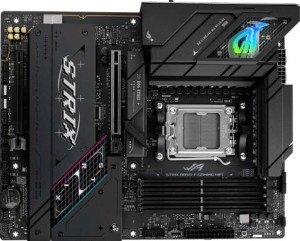
Asus ROG Strix B850-F Gaming WiFi
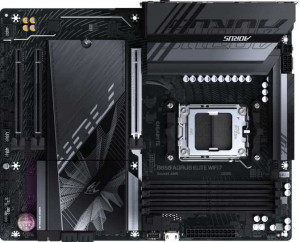
Gigabyte B850 Aorus Elite WiFi7

Asus ROG Strix B850-F Gaming WiFi Gigabyte B850 Aorus Elite WiFi7

Overview

Choosing between the Asus ROG Strix B850-F Gaming WiFi and the Gigabyte B850 Aorus Elite WiFi7 means navigating a tightly contested B850-chipset matchup built for the AM5 platform. Both boards arrive with DDR5 support, full Wi-Fi 7 connectivity, and solid RAID capabilities, yet they carve out distinct identities through their approaches to storage layout, memory ceiling, and rear I/O flexibility. Read on for a full spec-by-spec breakdown to find which board deserves a place in your next build.

Common Features

  • Both boards use the AM5 CPU socket.
  • Both boards feature the B850 chipset.
  • Both boards have an ATX form factor.
  • Wi-Fi is available on both boards, supporting Wi-Fi 4, Wi-Fi 5, Wi-Fi 6, Wi-Fi 6E, and Wi-Fi 7.
  • Bluetooth 5.4 is present on both boards.
  • Both boards support overclocking.
  • Both boards have 4 memory slots.
  • Both boards use DDR5 memory.
  • Both boards have 2 memory channels.
  • ECC memory is not supported on either board.
  • Both boards include 2 USB 3.2 Gen 2 Type-A ports.
  • Both boards include 1 USB 3.2 Gen 2 Type-C port.
  • Neither board has a USB 3.2 Gen 1 Type-C port.
  • Both boards have 4 USB 2.0 ports.
  • Neither board includes USB 4, Thunderbolt 3, or Thunderbolt 4 ports.
  • Both boards provide 2 USB 3.2 Gen 1 ports through expansion and 4 USB 2.0 ports through expansion.
  • Both boards have 6 fan headers.
  • Neither board has an mSATA connector.
  • Both boards have 1 PCIe 5.0 x16 slot.
  • Both boards support 7.1 audio channels, have an S/PDIF Out port, and include 2 audio connectors.
  • Both boards support RAID 0, RAID 1, RAID 5, and RAID 10, but neither supports RAID 0+1.

Main Differences

  • Easy BIOS reset is available on the Asus ROG Strix B850-F Gaming WiFi but not on the Gigabyte B850 Aorus Elite WiFi7.
  • Maximum memory capacity is 192GB on the Asus ROG Strix B850-F Gaming WiFi and 256GB on the Gigabyte B850 Aorus Elite WiFi7.
  • Maximum overclocked RAM speed is 8000 MHz on the Asus ROG Strix B850-F Gaming WiFi and 8200 MHz on the Gigabyte B850 Aorus Elite WiFi7.
  • USB 3.2 Gen 1 Type-A port count is 4 on the Asus ROG Strix B850-F Gaming WiFi and 5 on the Gigabyte B850 Aorus Elite WiFi7.
  • A USB 3.2 Gen 2x2 port is present on the Asus ROG Strix B850-F Gaming WiFi but not available on the Gigabyte B850 Aorus Elite WiFi7.
  • An HDMI output is present on the Asus ROG Strix B850-F Gaming WiFi but not available on the Gigabyte B850 Aorus Elite WiFi7.
  • SATA 3 connector count is 2 on the Asus ROG Strix B850-F Gaming WiFi and 4 on the Gigabyte B850 Aorus Elite WiFi7.
  • M.2 socket count is 4 on the Asus ROG Strix B850-F Gaming WiFi and 3 on the Gigabyte B850 Aorus Elite WiFi7.
  • A TPM connector is present on the Gigabyte B850 Aorus Elite WiFi7 but not available on the Asus ROG Strix B850-F Gaming WiFi.
  • A PCIe 4.0 x16 slot is present on the Asus ROG Strix B850-F Gaming WiFi but not available on the Gigabyte B850 Aorus Elite WiFi7.
  • PCIe x1 slot count is 0 on the Asus ROG Strix B850-F Gaming WiFi and 2 on the Gigabyte B850 Aorus Elite WiFi7.
Specs Comparison
Asus ROG Strix B850-F Gaming WiFi

Asus ROG Strix B850-F Gaming WiFi

Gigabyte B850 Aorus Elite WiFi7

Gigabyte B850 Aorus Elite WiFi7

General info:
CPU socket AM5 AM5
chipset B850 B850
form factor ATX ATX
release date January 2025 January 2025
supports Wi-Fi
Wi-Fi version Wi-Fi 4 (802.11n), Wi-Fi 5 (802.11ac), Wi-Fi 6 (802.11ax), Wi-Fi 6E (802.11ax), Wi-Fi 7 (802.11be) Wi-Fi 4 (802.11n), Wi-Fi 5 (802.11ac), Wi-Fi 6 (802.11ax), Wi-Fi 6E (802.11ax), Wi-Fi 7 (802.11be)
Has Bluetooth
Bluetooth version 5.4 5.4
Easy to overclock
has RGB lighting
Easy to reset BIOS
Has dual BIOS
has aptX
CPU sockets 1 1
Has integrated graphics
warranty period 3 years 3 years
height 244 mm 244 mm
width 305 mm 305 mm
Has integrated CPU

At the foundational level, the Asus ROG Strix B850-F Gaming WiFi and the Gigabyte B850 Aorus Elite WiFi7 are virtually identical twins. Both are full-size ATX boards built on the AM5/B850 platform, sharing the exact same physical footprint (244 × 305 mm), the same Wi-Fi 7 wireless stack (covering every generation from 802.11n through 802.11be), Bluetooth 5.4, RGB lighting, overclocking support, a three-year warranty, and no integrated CPU or graphics. For the vast majority of general use cases, these two boards start from an essentially equal position.

The one tangible differentiator in this group is easy BIOS reset: the ROG Strix supports it, the Aorus Elite does not. This is a quality-of-life feature that matters most when a bad overclock or a failed BIOS flash renders the system unbootable — on the Asus, a dedicated button or clear-CMOS mechanism lets you recover without disassembling the build. Both boards do offer dual BIOS, which provides a hardware-level fallback for corrupted firmware, so the Aorus Elite is not left without a safety net — but the process is less immediate and user-friendly compared to a dedicated reset mechanism.

Overall, this group is nearly a dead heat. The ROG Strix earns a narrow edge here solely because of its easier BIOS reset capability, which can save meaningful time and frustration during overclocking sessions or firmware updates. For builders who never touch the BIOS beyond initial setup, this distinction is inconsequential, and both boards stand on perfectly equal footing in every other general specification.
Memory:
maximum memory amount 192GB 256GB
overclocked RAM speed 8000 MHz 8200 MHz
memory slots 4 4
DDR memory version 5 5
memory channels 2 2
Supports ECC memory

The Asus ROG Strix B850-F Gaming WiFi and Gigabyte B850 Aorus Elite WiFi7 both offer 4 memory slots and support DDR5 memory. Both motherboards also feature dual memory channels, providing efficient memory bandwidth. The maximum supported memory differs between the two models: the Asus board supports up to 192GB, while the Gigabyte board supports a higher maximum of 256GB.

When it comes to overclocked RAM speeds, the Asus motherboard can handle up to 8000 MHz, whereas the Gigabyte motherboard supports a slightly faster 8200 MHz. Neither board supports ECC memory, which means error correction for memory is not available on either model.

Overall, while both motherboards offer strong memory performance with the latest DDR5 support and similar features, the Gigabyte B850 Aorus Elite WiFi7 stands out with a higher memory capacity and slightly faster overclocked RAM speed.

Ports:
USB 3.2 Gen 2 ports (USB-A) 2 2
USB 3.2 Gen 1 ports (USB-A) 4 5
USB 3.2 Gen 2 ports (USB-C) 1 1
USB 3.2 Gen 1 ports (USB-C) 0 0
USB 2.0 ports 4 4
USB 3.2 Gen 2x2 ports 1 0
USB 4 40Gbps ports 0 0
USB 4 20Gbps ports 0 0
Thunderbolt 4 ports 0 0
Thunderbolt 3 ports 0 0
has an HDMI output
DisplayPort outputs 1 1
RJ45 ports 1 1
Has USB Type-C
eSATA ports 0 0
DVI outputs 0 0
has a VGA connector
PS/2 ports 0 0

The Asus ROG Strix B850-F Gaming WiFi and Gigabyte B850 Aorus Elite WiFi7 offer similar port configurations with some differences. Both motherboards have 2 USB 3.2 Gen 2 ports (USB-A), 1 USB 3.2 Gen 2 port (USB-C), and 4 USB 2.0 ports. The Asus board also includes 4 USB 3.2 Gen 1 ports (USB-A), while the Gigabyte board has 5. The Asus model offers a USB 3.2 Gen 2x2 port, which the Gigabyte model does not have.

Both boards support DisplayPort outputs and have 1 RJ45 port for networking. However, the Asus ROG Strix board includes an HDMI output, while the Gigabyte board lacks HDMI support. Both motherboards do not feature USB 4, Thunderbolt ports, or eSATA ports, and neither includes DVI outputs or VGA connectors. Additionally, neither has PS/2 ports.

In summary, both boards provide similar port options, with slight differences in USB ports and the inclusion of HDMI on the Asus board. The Gigabyte board has one extra USB 3.2 Gen 1 port (USB-A) but lacks the USB 3.2 Gen 2x2 port found on the Asus model.

Connectors:
USB 3.2 Gen 1 ports (through expansion) 2 2
USB 2.0 ports (through expansion) 4 4
SATA 3 connectors 2 4
fan headers 6 6
USB 3.0 ports (through expansion) 2 2
M.2 sockets 4 3
Has TPM connector
U.2 sockets 0 0
Has mSATA connector
SATA 2 connectors 0 0

The Asus ROG Strix B850-F Gaming WiFi and Gigabyte B850 Aorus Elite WiFi7 both offer similar connector options, though there are a few differences. Both motherboards provide 2 USB 3.2 Gen 1 ports (through expansion), 4 USB 2.0 ports (through expansion), and 2 USB 3.0 ports (through expansion). Both also have 6 fan headers, ensuring sufficient cooling options for a variety of setups.

The Asus board features 2 SATA 3 connectors, while the Gigabyte board offers 4, giving it a greater capacity for storage devices. The Asus board supports 4 M.2 sockets, whereas the Gigabyte board supports 3, providing a slightly reduced number of M.2 connections. Additionally, the Gigabyte board includes a TPM (Trusted Platform Module) connector, a feature the Asus board lacks.

Neither board includes U.2 sockets or mSATA connectors, and both have 0 SATA 2 connectors. These connectors are similar in overall offerings, but the Gigabyte B850 Aorus Elite WiFi7 provides more SATA 3 connectors and includes a TPM connector, while the Asus ROG Strix B850-F Gaming WiFi has an extra M.2 socket.

Expansion slots:
PCIe 4.0 x16 slots 1 0
PCIe 5.0 x16 slots 1 1
PCIe 3.0 x16 slots 0 0
PCIe x1 slots 0 2
PCI slots 0 0
PCIe 2.0 x16 slots 0 0
PCIe x4 slots 0 0
PCIe x8 slots 0 0

The Asus ROG Strix B850-F Gaming WiFi and Gigabyte B850 Aorus Elite WiFi7 differ in their expansion slot configurations. The Asus motherboard provides 1 PCIe 4.0 x16 slot and 1 PCIe 5.0 x16 slot, offering high-speed connections for modern GPUs and other devices. In contrast, the Gigabyte motherboard only includes a PCIe 5.0 x16 slot, with no PCIe 4.0 x16 slot.

Additionally, the Asus model does not have any PCIe x1, PCIe x4, or PCIe x8 slots, while the Gigabyte motherboard offers 2 PCIe x1 slots, which can be used for additional expansion cards like network adapters or sound cards. Both motherboards lack PCI slots and PCIe 2.0 x16 slots.

In summary, the Asus board offers a combination of PCIe 4.0 and PCIe 5.0 x16 slots, while the Gigabyte board focuses solely on PCIe 5.0 x16 slots and includes additional PCIe x1 slots for more expansion options.

Audio:
audio channels 7.1 7.1
Has S/PDIF Out port
audio connectors 2 2

The Asus ROG Strix B850-F Gaming WiFi and Gigabyte B850 Aorus Elite WiFi7 both feature 7.1 audio channels, providing high-quality audio output for immersive sound experiences. Both motherboards also include an S/PDIF Out port, allowing for digital audio connections to external devices.

In terms of audio connectors, both the Asus and Gigabyte boards offer 2 connectors, giving users options to connect audio devices like speakers or headphones. There are no differences in the audio capabilities between the two models in this specification group.

Overall, the audio features are identical for both motherboards, with both supporting 7.1 audio channels, S/PDIF Out, and 2 audio connectors.

Storage:
Supports RAID 1
Supports RAID 10 (1+0)
Supports RAID 5
Supports RAID 0
Supports RAID 0+1

The Asus ROG Strix B850-F Gaming WiFi and Gigabyte B850 Aorus Elite WiFi7 both support the same RAID configurations, including RAID 1, RAID 10 (1+0), RAID 5, and RAID 0. This means both motherboards can provide redundancy and improved performance for storage setups with multiple drives. Neither motherboard supports RAID 0+1, so users looking for that specific configuration will need to explore other options.

Since the RAID support is identical between the two boards, there are no significant differences in terms of storage features within this group.

In summary, both motherboards offer the same RAID capabilities, making them equally suited for users who need advanced storage setups with redundancy and performance optimizations.

Comparison Summary & Verdict

Both the Asus ROG Strix B850-F Gaming WiFi and the Gigabyte B850 Aorus Elite WiFi7 are capable B850 motherboards sharing a strong common foundation: AM5 socket, DDR5 memory, Wi-Fi 7, and comprehensive RAID support. However, their differences reveal two distinct personalities. The Asus ROG Strix B850-F Gaming WiFi is the more versatile choice for builders who value an HDMI output for integrated graphics, a handy easy BIOS reset feature, a USB 3.2 Gen 2x2 port for blazing-fast peripherals, and a full four M.2 slots for NVMe expansion. The Gigabyte B850 Aorus Elite WiFi7, meanwhile, is better suited to those who need a higher 256GB memory ceiling, four SATA 3 connectors for traditional drive arrays, a built-in TPM connector for security-conscious deployments, and extra PCIe x1 slots for add-in cards. Neither board is the absolute winner; the right pick hinges entirely on your storage strategy and connectivity priorities.

Asus ROG Strix B850-F Gaming WiFi
Buy Asus ROG Strix B850-F Gaming WiFi if...

Buy the Asus ROG Strix B850-F Gaming WiFi if you want an HDMI output for integrated graphics, an easy one-touch BIOS reset, a USB 3.2 Gen 2x2 port, and four M.2 slots for maximum NVMe flexibility.

Gigabyte B850 Aorus Elite WiFi7
Buy Gigabyte B850 Aorus Elite WiFi7 if...

Choose the Gigabyte B850 Aorus Elite WiFi7 if you need a higher 256GB memory ceiling, more SATA 3 ports for traditional drives, or a built-in TPM connector for security-focused builds.