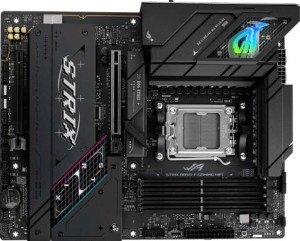
Asus ROG Strix B850-F Gaming WiFi
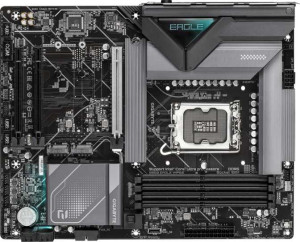
Gigabyte B860 Eagle WiFi6E

Asus ROG Strix B850-F Gaming WiFi Gigabyte B860 Eagle WiFi6E

Overview

Welcome to our in-depth comparison of the Asus ROG Strix B850-F Gaming WiFi and the Gigabyte B860 Eagle WiFi6E — two compelling ATX motherboards targeting different processor ecosystems. Both boards share a strong DDR5 foundation and solid connectivity, yet they diverge meaningfully on wireless capabilities, storage options, USB versatility, and platform choice. Read on to discover which board best fits your next build.

Common Features

  • Both boards use the ATX form factor.
  • Wi-Fi support is available on both products.
  • Bluetooth is available on both products.
  • Both products support HDMI 2.1.
  • Overclocking capability is present on both products.
  • A dual BIOS feature is present on both products.
  • aptX support is not available on either product.
  • Both products have a single CPU socket.
  • Both boards have 4 memory slots.
  • Both boards use DDR5 memory.
  • Both boards support 2 memory channels.
  • ECC memory support is not available on either product.
  • Neither board has USB 3.2 Gen 1 ports in USB-C form on the rear panel.
  • Both boards have 4 USB 2.0 rear ports.
  • Both boards have 1 USB 3.2 Gen 2x2 port.
  • Neither board has USB 4 40Gbps, USB 4 20Gbps, Thunderbolt 3, or Thunderbolt 4 ports.
  • An HDMI output is present on both products.
  • Both boards provide 2 USB 3.2 Gen 1 ports and 4 USB 2.0 ports through expansion headers.
  • Both boards have 6 fan headers.
  • Neither board has a U.2 socket or mSATA connector.
  • Both boards have 1 PCIe 5.0 x16 slot.
  • Neither board has PCIe 3.0 x16, PCI, PCIe 2.0 x16, PCIe x4, or PCIe x8 slots.
  • Both boards deliver 7.1 audio channels.
  • Both boards support RAID 0, RAID 1, RAID 5, and RAID 10.
  • RAID 0+1 support is not available on either product.

Main Differences

  • The CPU socket is AM5 on Asus ROG Strix B850-F Gaming WiFi and LGA 1851 on Gigabyte B860 Eagle WiFi6E.
  • The chipset is B850 on Asus ROG Strix B850-F Gaming WiFi and B860 on Gigabyte B860 Eagle WiFi6E.
  • Wi-Fi 7 (802.11be) support is present on Asus ROG Strix B850-F Gaming WiFi but not available on Gigabyte B860 Eagle WiFi6E.
  • The Bluetooth version is 5.4 on Asus ROG Strix B850-F Gaming WiFi and 5.3 on Gigabyte B860 Eagle WiFi6E.
  • RGB lighting is present on Asus ROG Strix B850-F Gaming WiFi but not available on Gigabyte B860 Eagle WiFi6E.
  • An easy BIOS reset feature is present on Asus ROG Strix B850-F Gaming WiFi but not available on Gigabyte B860 Eagle WiFi6E.
  • The maximum memory capacity is 192GB on Asus ROG Strix B850-F Gaming WiFi and 256GB on Gigabyte B860 Eagle WiFi6E.
  • The maximum overclocked RAM speed is 8000 MHz on Asus ROG Strix B850-F Gaming WiFi and 9066 MHz on Gigabyte B860 Eagle WiFi6E.
  • USB 3.2 Gen 2 ports in USB-A form number 2 on Asus ROG Strix B850-F Gaming WiFi and 1 on Gigabyte B860 Eagle WiFi6E.
  • USB 3.2 Gen 1 ports in USB-A form number 4 on Asus ROG Strix B850-F Gaming WiFi, while Gigabyte B860 Eagle WiFi6E has none.
  • A USB 3.2 Gen 2 port in USB-C form is present on Asus ROG Strix B850-F Gaming WiFi but not available on Gigabyte B860 Eagle WiFi6E.
  • A PS/2 port is present on Gigabyte B860 Eagle WiFi6E but not available on Asus ROG Strix B850-F Gaming WiFi.
  • SATA 3 connectors number 2 on Asus ROG Strix B850-F Gaming WiFi and 4 on Gigabyte B860 Eagle WiFi6E.
  • M.2 sockets number 4 on Asus ROG Strix B850-F Gaming WiFi and 3 on Gigabyte B860 Eagle WiFi6E.
  • A TPM connector is present on Gigabyte B860 Eagle WiFi6E but not available on Asus ROG Strix B850-F Gaming WiFi.
  • A PCIe 4.0 x16 slot is present on Asus ROG Strix B850-F Gaming WiFi but not available on Gigabyte B860 Eagle WiFi6E.
  • PCIe x1 slots number 0 on Asus ROG Strix B850-F Gaming WiFi and 2 on Gigabyte B860 Eagle WiFi6E.
  • An S/PDIF Out port is present on Asus ROG Strix B850-F Gaming WiFi but not available on Gigabyte B860 Eagle WiFi6E.
  • Audio connectors number 2 on Asus ROG Strix B850-F Gaming WiFi and 3 on Gigabyte B860 Eagle WiFi6E.
Specs Comparison
Asus ROG Strix B850-F Gaming WiFi

Asus ROG Strix B850-F Gaming WiFi

Gigabyte B860 Eagle WiFi6E

Gigabyte B860 Eagle WiFi6E

General info:
CPU socket AM5 LGA 1851
chipset B850 B860
form factor ATX ATX
release date January 2025 January 2025
supports Wi-Fi
Wi-Fi version Wi-Fi 4 (802.11n), Wi-Fi 5 (802.11ac), Wi-Fi 6 (802.11ax), Wi-Fi 6E (802.11ax), Wi-Fi 7 (802.11be) Wi-Fi 4 (802.11n), Wi-Fi 5 (802.11ac), Wi-Fi 6 (802.11ax), Wi-Fi 6E (802.11ax)
Has Bluetooth
Bluetooth version 5.4 5.3
HDMI version HDMI 2.1 HDMI 2.1
Easy to overclock
has RGB lighting
Easy to reset BIOS
Has dual BIOS
has aptX
CPU sockets 1 1
Has integrated graphics
warranty period 3 years 3 years
height 244 mm 244 mm
width 305 mm 305 mm
Has integrated CPU

The most fundamental difference between these two boards is platform: the Asus ROG Strix B850-F uses the AM5 socket for AMD processors, while the Gigabyte B860 Eagle uses LGA 1851 for Intel's current-generation CPUs. This means they are not interchangeable — your CPU choice entirely dictates which board is even relevant to you. Both pair a mid-range chipset (B850 and B860 respectively) with an ATX form factor and identical physical dimensions, so they occupy the same market tier on their respective platforms.

Where the Asus pulls ahead in connectivity is wireless: it supports Wi-Fi 7 (802.11be), while the Gigabyte tops out at Wi-Fi 6E. In practice, Wi-Fi 7 delivers significantly higher theoretical throughput and lower latency, and is future-proof for next-generation routers — a meaningful edge for users who rely on wireless rather than Ethernet. The Asus also ships with Bluetooth 5.4 versus 5.3 on the Gigabyte, a minor but real improvement in connection stability and efficiency.

On usability and aesthetics, the Asus again differentiates itself: it includes RGB lighting and a dedicated easy BIOS reset mechanism, neither of which the Gigabyte offers. RGB is purely cosmetic, but the BIOS reset feature has real practical value — it simplifies recovery from a failed overclock or bad update without needing a spare CPU or POST kit. Both boards share dual BIOS, HDMI 2.1 output, a 3-year warranty, and are rated easy to overclock. Overall, the Asus ROG Strix B850-F holds a clear general-features edge — particularly in wireless capability and ease of maintenance — though the ″right″ board ultimately depends on your CPU platform choice.

Memory:
maximum memory amount 192GB 256GB
overclocked RAM speed 8000 MHz 9066 MHz
memory slots 4 4
DDR memory version 5 5
memory channels 2 2
Supports ECC memory

Both boards run DDR5 memory in a dual-channel configuration across four slots — a shared foundation that puts them on equal footing for everyday multitasking and gaming workloads. The meaningful divergence lies in capacity ceiling and overclocking headroom. The Gigabyte B860 Eagle supports up to 256GB of RAM versus 192GB on the Asus ROG Strix B850-F — a 33% higher ceiling that matters most for memory-intensive professional workloads like large virtual machines, video editing with heavy cache demands, or AI/ML inference tasks.

The speed gap is equally notable: the Gigabyte allows overclocked RAM speeds up to 9066 MHz, compared to 8000 MHz on the Asus. In practice, the real-world performance delta between these frequencies is incremental for most users — latency tuning often matters more than raw MHz — but the higher ceiling does give enthusiasts more room to push their kits on the Gigabyte platform.

Neither board supports ECC memory, so error-correcting use cases like servers or workstations requiring data integrity guarantees are off the table for both. On balance, the Gigabyte B860 Eagle holds a clear memory advantage in this group: more headroom in both maximum capacity and overclocked speed. For mainstream gaming or general use, the gap is unlikely to be felt day-to-day, but for power users planning large memory configurations or aggressive XMP/EXPO profiles, the Gigabyte is the stronger option here.

Ports:
USB 3.2 Gen 2 ports (USB-A) 2 1
USB 3.2 Gen 1 ports (USB-A) 4 0
USB 3.2 Gen 2 ports (USB-C) 1 0
USB 3.2 Gen 1 ports (USB-C) 0 0
USB 2.0 ports 4 4
USB 3.2 Gen 2x2 ports 1 1
USB 4 40Gbps ports 0 0
USB 4 20Gbps ports 0 0
Thunderbolt 4 ports 0 0
Thunderbolt 3 ports 0 0
has an HDMI output
DisplayPort outputs 1 1
RJ45 ports 1 1
Has USB Type-C
eSATA ports 0 0
DVI outputs 0 0
has a VGA connector
PS/2 ports 0 1

Rear I/O density is where the Asus ROG Strix B850-F establishes a decisive lead. It offers 4 USB 3.2 Gen 1 and 2 USB 3.2 Gen 2 Type-A ports alongside a dedicated USB 3.2 Gen 2 Type-C, giving users a total of seven high-speed USB-A/C connections before even counting the shared Gen 2x2 port. The Gigabyte B860 Eagle, by contrast, provides just a single USB 3.2 Gen 2 Type-A and no standalone Gen 2 Type-C — a noticeably leaner rear panel that could mean reaching for a hub sooner in a well-populated desk setup.

Both boards match on the fundamentals that most users care about: one HDMI output, one DisplayPort, and a single RJ45 Ethernet port. The shared USB 3.2 Gen 2x2 port (20 Gbps) is also present on each, which covers fast external SSD transfers or high-bandwidth peripherals. One unusual inclusion on the Gigabyte is a PS/2 port — a legacy connector that serves a niche audience using older keyboards or mice, but is irrelevant to the vast majority of modern builds.

Taken together, the Asus holds a clear advantage in this category purely on port count and versatility. More high-speed USB-A ports and an extra Gen 2 Type-C translate directly to fewer dongles and adapters needed at the back of the case — a practical, everyday benefit for users with multiple peripherals, external drives, or USB audio devices.

Connectors:
USB 3.2 Gen 1 ports (through expansion) 2 2
USB 2.0 ports (through expansion) 4 4
SATA 3 connectors 2 4
fan headers 6 6
USB 3.0 ports (through expansion) 2 2
M.2 sockets 4 3
Has TPM connector
U.2 sockets 0 0
Has mSATA connector
SATA 2 connectors 0 0

Storage connectivity is where these two boards make different trade-offs. The Asus ROG Strix B850-F prioritizes NVMe with 4 M.2 sockets, making it the stronger choice for builds centered around fast solid-state storage — think high-speed game libraries, content creation scratch drives, or tiered NVMe arrays. The Gigabyte B860 Eagle counters with 4 SATA 3 connectors versus only 2 on the Asus, giving it an edge for users who still rely on SATA SSDs, traditional hard drives, or optical drive setups. It also has one fewer M.2 slot at 3 sockets, so users planning an all-NVMe build may feel the constraint sooner.

A noteworthy inclusion on the Gigabyte is a dedicated TPM connector, which the Asus lacks. A physical TPM header allows users to add a discrete TPM module — relevant for enterprise environments, BitLocker encryption workflows, or stricter security compliance scenarios. For most home users this is a non-issue, but in a professional or business context it is a tangible advantage. Both boards are otherwise identical in internal expansion USB headers and fan headers — six fan/pump headers each, which is a healthy allocation for thermally demanding builds.

The verdict here depends entirely on intended use. The Asus B850-F is the better fit for NVMe-heavy, modern storage configurations, while the Gigabyte B860 Eagle suits users with mixed or legacy storage needs and anyone who values hardware-level security features. Neither board dominates outright — it is a meaningful trade-off rather than a clear winner.
Expansion slots:
PCIe 4.0 x16 slots 1 0
PCIe 5.0 x16 slots 1 1
PCIe 3.0 x16 slots 0 0
PCIe x1 slots 0 2
PCI slots 0 0
PCIe 2.0 x16 slots 0 0
PCIe x4 slots 0 0
PCIe x8 slots 0 0

For the primary GPU slot, both boards are on equal footing — each provides one PCIe 5.0 x16 slot, which is the current gold standard for graphics card connectivity. PCIe 5.0 doubles the bandwidth of PCIe 4.0, and while today's GPUs don't fully saturate even PCIe 4.0 speeds, this slot ensures neither board will bottleneck current or near-future graphics cards.

The divergence comes in secondary expansion. The Asus ROG Strix B850-F adds a PCIe 4.0 x16 slot — useful for a second GPU, a high-bandwidth capture card, a 10GbE networking card, or other x16-form-factor expansion cards that benefit from more than minimal bandwidth. The Gigabyte B860 Eagle instead offers 2 PCIe x1 slots, which are better suited for lower-bandwidth add-in cards like sound cards, basic network adapters, or USB expansion cards, but cannot accommodate the wider range of devices that an x16 mechanical slot supports.

For most single-GPU gaming builds, this distinction is academic — one PCIe 5.0 x16 slot is all that's needed. But for users planning a more complex build with high-bandwidth secondary cards, the Asus holds a meaningful edge. The Gigabyte's x1 slots are useful for simple peripheral expansion but represent a narrower set of use cases. On balance, the Asus B850-F offers more versatile expansion capability in this group.

Audio:
audio channels 7.1 7.1
Has S/PDIF Out port
audio connectors 2 3

Audio is a rare category where these two boards split the advantage rather than one pulling clearly ahead. Both support 7.1 surround sound, meaning neither limits users to stereo output — a welcome baseline for gamers and home theater enthusiasts alike. The differences emerge in how they handle analog and digital output.

The Gigabyte B860 Eagle offers 3 analog audio connectors versus 2 on the Asus ROG Strix B850-F, giving it slightly more flexibility for analog multi-channel speaker setups or simultaneous input/output configurations without requiring a splitter. The Asus counters with an S/PDIF optical output, which the Gigabyte lacks entirely. S/PDIF is the preferred connection for AV receivers, soundbars, and certain DAC/amp setups — it carries a clean digital signal that bypasses the motherboard's analog circuitry, which can matter to users who prioritize audio fidelity through external hardware.

The right choice here is user-dependent. Those routing audio through a receiver or external DAC via optical will find the Asus more accommodating, while users relying on analog speaker systems may appreciate the extra connector on the Gigabyte. Neither board dominates outright — this is a genuine trade-off between digital output flexibility and analog connector count, and the deciding factor is simply how you plan to connect your audio hardware.

Storage:
Supports RAID 1
Supports RAID 10 (1+0)
Supports RAID 5
Supports RAID 0
Supports RAID 0+1

Storage redundancy support is identical across both boards — the Asus ROG Strix B850-F and the Gigabyte B860 Eagle each support RAID 0, 1, 5, and 10, while neither supports RAID 0+1. This covers the full practical spectrum for consumer and prosumer use: RAID 0 for striped performance, RAID 1 for simple mirroring and redundancy, RAID 5 for a balance of storage efficiency and fault tolerance, and RAID 10 for combined performance and redundancy across four or more drives.

The absence of RAID 0+1 on both is inconsequential in practice — RAID 10 achieves a functionally similar outcome with better fault tolerance, making RAID 0+1 largely redundant in modern configurations. Any user planning a multi-drive array for a NAS-adjacent workstation build, video editing storage pool, or simply a mirrored backup setup will find both boards equally capable.

This group is a straightforward tie. There is no differentiator here — both boards offer the same RAID capabilities, and the storage decision between these two products should rest entirely on the physical connector counts and M.2 slot differences covered in the Connectors group.

Comparison Summary & Verdict

After examining the full specification set, both boards prove to be capable ATX platforms with DDR5 memory, PCIe 5.0 support, and solid RAID functionality. The Asus ROG Strix B850-F Gaming WiFi stands out for AMD AM5 users who want Wi-Fi 7, more M.2 slots, greater USB rear-panel variety, RGB aesthetics, and a convenient one-click BIOS reset. The Gigabyte B860 Eagle WiFi6E, designed for Intel LGA 1851, earns its place with a higher maximum memory capacity of 256GB, faster overclocked RAM support at 9066 MHz, more SATA 3 connectors, and a TPM header for security-conscious builds. Choose the Asus for a feature-rich AMD experience; choose the Gigabyte for an Intel platform that prioritizes memory headroom and storage expansion.

Asus ROG Strix B850-F Gaming WiFi
Buy Asus ROG Strix B850-F Gaming WiFi if...

Buy the Asus ROG Strix B850-F Gaming WiFi if you are building on the AMD AM5 platform and want Wi-Fi 7, more M.2 slots, wider USB connectivity, and RGB lighting with an easy BIOS reset feature.

Gigabyte B860 Eagle WiFi6E
Buy Gigabyte B860 Eagle WiFi6E if...

Buy the Gigabyte B860 Eagle WiFi6E if you are building on the Intel LGA 1851 platform and prioritize a higher maximum memory capacity of 256GB, faster overclocked RAM speeds, and more SATA 3 connectors.