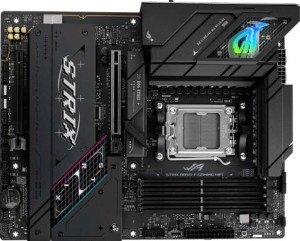
Asus ROG Strix B850-F Gaming WiFi
MSI MAG B850 Tomahawk Max WiFi

Asus ROG Strix B850-F Gaming WiFi MSI MAG B850 Tomahawk Max WiFi

Overview

When choosing between the Asus ROG Strix B850-F Gaming WiFi and the MSI MAG B850 Tomahawk Max WiFi, builders are faced with two capable AM5 motherboards sharing the same B850 chipset and Wi-Fi 7 support. Yet beneath their common foundation lie meaningful distinctions in memory capacity, USB port configuration, storage connectivity, and expansion options that could tip the scales depending on your build requirements.

Common Features

  • Both boards use the AM5 CPU socket.
  • Both boards feature the B850 chipset.
  • Both boards have an ATX form factor.
  • Wi-Fi is supported on both boards, covering Wi-Fi 4, Wi-Fi 5, Wi-Fi 6, Wi-Fi 6E, and Wi-Fi 7.
  • Bluetooth 5.4 is present on both boards.
  • Both boards include an HDMI 2.1 output.
  • Both boards have 4 memory slots supporting DDR5 in a dual-channel configuration.
  • ECC memory is not supported on either board.
  • Both boards provide 2 USB 3.2 Gen 1 ports (USB-C) — specifically, neither board has any such ports.
  • Both boards include 2 USB 3.2 Gen 2 ports (USB-A) and 4 USB 2.0 ports.
  • Neither board has USB 4 (40Gbps or 20Gbps), Thunderbolt 3, or Thunderbolt 4 ports.
  • An HDMI output is present on both boards.
  • Both boards provide 4 USB 2.0 ports through expansion and 4 M.2 sockets.
  • Neither board has a U.2 socket, mSATA connector, or SATA 2 connectors.
  • Both boards include one PCIe 5.0 x16 slot and one PCIe 4.0 x16 slot.
  • Neither board has PCIe 3.0 x16, PCIe 2.0 x16, PCIe x8, PCIe x4, or legacy PCI slots.
  • Both boards deliver a 120 dB signal-to-noise ratio (DAC) with 7.1 audio channels, an S/PDIF Out port, and 2 audio connectors.
  • RAID 0, RAID 1, and RAID 10 (1+0) are supported on both boards.
  • RAID 0+1 is not supported on either board.

Main Differences

  • Maximum supported memory is 192 GB on Asus ROG Strix B850-F Gaming WiFi and 256 GB on MSI MAG B850 Tomahawk Max WiFi.
  • Maximum overclocked RAM speed is 8000 MHz on Asus ROG Strix B850-F Gaming WiFi and 8400 MHz on MSI MAG B850 Tomahawk Max WiFi.
  • USB 3.2 Gen 1 ports (USB-A) count is 4 on Asus ROG Strix B850-F Gaming WiFi and 1 on MSI MAG B850 Tomahawk Max WiFi.
  • USB 3.2 Gen 2 ports (USB-C) count is 1 on Asus ROG Strix B850-F Gaming WiFi and 3 on MSI MAG B850 Tomahawk Max WiFi.
  • A USB 3.2 Gen 2x2 port is present on Asus ROG Strix B850-F Gaming WiFi but not available on MSI MAG B850 Tomahawk Max WiFi.
  • A DisplayPort output is available on Asus ROG Strix B850-F Gaming WiFi but not on MSI MAG B850 Tomahawk Max WiFi.
  • USB 3.2 Gen 1 ports through expansion number 2 on Asus ROG Strix B850-F Gaming WiFi and 4 on MSI MAG B850 Tomahawk Max WiFi.
  • SATA 3 connector count is 2 on Asus ROG Strix B850-F Gaming WiFi and 4 on MSI MAG B850 Tomahawk Max WiFi.
  • Fan header count is 6 on Asus ROG Strix B850-F Gaming WiFi and 8 on MSI MAG B850 Tomahawk Max WiFi.
  • A TPM connector is present on MSI MAG B850 Tomahawk Max WiFi but not available on Asus ROG Strix B850-F Gaming WiFi.
  • A PCIe x1 slot is available on MSI MAG B850 Tomahawk Max WiFi but not on Asus ROG Strix B850-F Gaming WiFi.
  • RAID 5 support is present on Asus ROG Strix B850-F Gaming WiFi but not available on MSI MAG B850 Tomahawk Max WiFi.
  • Board height is 244 mm on Asus ROG Strix B850-F Gaming WiFi and 243.8 mm on MSI MAG B850 Tomahawk Max WiFi.
  • Board width is 305 mm on Asus ROG Strix B850-F Gaming WiFi and 304.8 mm on MSI MAG B850 Tomahawk Max WiFi.
Specs Comparison
Asus ROG Strix B850-F Gaming WiFi

Asus ROG Strix B850-F Gaming WiFi

MSI MAG B850 Tomahawk Max WiFi

MSI MAG B850 Tomahawk Max WiFi

General info:
CPU socket AM5 AM5
chipset B850 B850
form factor ATX ATX
release date January 2025 January 2025
supports Wi-Fi
Wi-Fi version Wi-Fi 4 (802.11n), Wi-Fi 5 (802.11ac), Wi-Fi 6 (802.11ax), Wi-Fi 6E (802.11ax), Wi-Fi 7 (802.11be) Wi-Fi 4 (802.11n), Wi-Fi 5 (802.11ac), Wi-Fi 6 (802.11ax), Wi-Fi 6E (802.11ax), Wi-Fi 7 (802.11be)
Has Bluetooth
Bluetooth version 5.4 5.4
HDMI version HDMI 2.1 HDMI 2.1
Easy to overclock
has RGB lighting
Easy to reset BIOS
Has dual BIOS
has aptX
CPU sockets 1 1
Has integrated graphics
warranty period 3 years 3 years
height 244 mm 243.8 mm
width 305 mm 304.8 mm
Has integrated CPU

At the platform level, the Asus ROG Strix B850-F Gaming WiFi and the MSI MAG B850 Tomahawk Max WiFi are built on an identical foundation: both use the AM5 socket with a B850 chipset, adopt the standard ATX form factor, and support the same broad wireless stack from Wi-Fi 4 through Wi-Fi 7 (802.11be), paired with Bluetooth 5.4. For a builder, this means either board slots into the same case, pairs with the same AMD Ryzen processors, and delivers the same cutting-edge wireless capabilities — including the lower latency and higher throughput of Wi-Fi 7 for demanding network tasks.

The feature parity extends further: both boards offer HDMI 2.1 output, support overclocking, include RGB lighting, provide an easy BIOS reset mechanism, and critically, both carry a dual BIOS — a genuine safety net that lets you recover from a failed firmware update without needing a second system. Both also come with a 3-year warranty, placing them on equal footing for long-term ownership confidence. Neither board has integrated graphics or an integrated CPU, which is expected at this tier.

The only measurable difference is physical size: the ROG Strix measures 244 × 305 mm versus the Tomahawk Max at 243.8 × 304.8 mm — a gap of 0.2 mm on each dimension that has zero practical consequence for installation or compatibility. In this spec group, these two boards are effectively identical, and no advantage can be awarded to either side based solely on the data provided here.

Memory:
maximum memory amount 192GB 256GB
overclocked RAM speed 8000 MHz 8400 MHz
memory slots 4 4
DDR memory version 5 5
memory channels 2 2
Supports ECC memory

Both boards share the same structural memory setup — 4 DDR5 slots in a dual-channel configuration — which means identical physical compatibility and the same theoretical bandwidth architecture for everyday workloads. Where they diverge is in the ceiling they set for power users. The MSI MAG B850 Tomahawk Max WiFi supports up to 256GB of RAM, while the Asus ROG Strix B850-F Gaming WiFi caps at 192GB. That 64GB gap is irrelevant for gaming or typical desktop use, but for content creators, virtual machine hosts, or anyone running memory-hungry professional applications, the Tomahawk Max leaves more room to grow without a board swap.

The overclocking headroom tells a similar story. The Tomahawk Max officially supports overclocked speeds up to 8400 MHz, versus 8000 MHz on the ROG Strix. In raw terms, 400 MHz is a modest difference, but at the high end of DDR5 tuning, it signals that MSI has validated its board with faster memory kits — useful for enthusiasts who want to push XMP/EXPO profiles to their limits and prefer the assurance that the board has been tested there. Neither board supports ECC memory, so error-correcting workloads are off the table for both.

On memory, the Tomahawk Max holds a clear edge: it outpaces the ROG Strix on both maximum capacity and peak overclocked speed. For most users these differences will never be felt, but for those planning high-density memory builds or aggressive DDR5 tuning, the MSI board is the stronger platform.

Ports:
USB 3.2 Gen 2 ports (USB-A) 2 2
USB 3.2 Gen 1 ports (USB-A) 4 1
USB 3.2 Gen 2 ports (USB-C) 1 3
USB 3.2 Gen 1 ports (USB-C) 0 0
USB 2.0 ports 4 4
USB 3.2 Gen 2x2 ports 1 0
USB 4 40Gbps ports 0 0
USB 4 20Gbps ports 0 0
Thunderbolt 4 ports 0 0
Thunderbolt 3 ports 0 0
has an HDMI output
DisplayPort outputs 1 0
RJ45 ports 1 1
Has USB Type-C
eSATA ports 0 0
DVI outputs 0 0
has a VGA connector
PS/2 ports 0 0

The rear I/O panel is where these two boards reveal distinctly different design philosophies. The Asus ROG Strix B850-F Gaming WiFi leans into traditional USB-A connectivity, offering 4 USB 3.2 Gen 1 Type-A ports alongside 2 Gen 2 Type-A ports — giving it a wider total of high-speed USB-A outputs. It also includes a USB 3.2 Gen 2x2 Type-C port, which runs at 20Gbps and is genuinely useful for the fastest external SSDs and docking stations currently on the market. Rounding things out, the ROG Strix adds a DisplayPort 1 output, giving it two video-out options (alongside HDMI) for users connecting monitors directly to the board's integrated video path.

The MSI MAG B850 Tomahawk Max WiFi, by contrast, makes a clear bet on USB-C as the future. It offers 3 USB 3.2 Gen 2 Type-C ports on the rear panel — a notably generous count that caters well to modern peripherals, external displays via USB-C, and newer docking stations. The trade-off is a reduced USB-A Gen 1 presence (only 1 port at that tier) and the absence of both the Gen 2x2 port and any DisplayPort output. Users with a monitor that relies solely on DisplayPort would need an adapter or a discrete GPU with the Tomahawk Max.

Neither board is objectively superior here — the right choice depends on your peripheral mix. The ROG Strix is the stronger pick for users with USB-A-heavy setups or a fast Gen 2x2 external drive, and it offers more display output flexibility. The Tomahawk Max is the better fit for a modern, USB-C-centric desk setup. Given that the ROG Strix covers both ends of the spectrum — high USB-A count, a Gen 2x2 port, and an extra video output — it holds a slight overall edge in port versatility based strictly on the data provided.

Connectors:
USB 3.2 Gen 1 ports (through expansion) 2 4
USB 2.0 ports (through expansion) 4 4
SATA 3 connectors 2 4
fan headers 6 8
USB 3.0 ports (through expansion) 2 4
M.2 sockets 4 4
Has TPM connector
U.2 sockets 0 0
Has mSATA connector
SATA 2 connectors 0 0

Internal connectors paint a clear picture of how each board scales with a full build. Both the Asus ROG Strix B850-F Gaming WiFi and the MSI MAG B850 Tomahawk Max WiFi offer 4 M.2 sockets — enough for a primary NVMe drive plus ample expansion for additional fast storage without touching SATA at all. But the Tomahawk Max pulls ahead on traditional storage: it provides 4 SATA 3 connectors versus only 2 on the ROG Strix, a meaningful difference for anyone building a NAS-adjacent system, running multiple HDDs for media storage, or mixing SSDs with optical or legacy drives.

Cooling management is another area where the gap widens. The Tomahawk Max offers 8 fan headers compared to 6 on the ROG Strix — two extra headers that matter in larger cases with complex airflow setups or custom liquid cooling loops where every pump, radiator fan, and exhaust fan needs a dedicated connection without relying on splitters. Similarly, the Tomahawk Max doubles the ROG Strix's internal USB expansion headers, providing 4 USB 3.0/3.2 Gen 1 internal ports versus 2, which translates to more front-panel USB flexibility for full-tower and enthusiast cases. The Tomahawk Max also includes a TPM connector, which the ROG Strix lacks — relevant for enterprise environments or users with specific hardware security requirements.

Across nearly every internal connector category, the Tomahawk Max holds a consistent advantage: more SATA ports, more fan headers, more internal USB expansion, and TPM support. For a straightforward gaming build these extras may go unused, but for anyone planning a storage-dense, thermally complex, or security-conscious system, the MSI board is the more capable platform from the inside out.
Expansion slots:
PCIe 4.0 x16 slots 1 1
PCIe 5.0 x16 slots 1 1
PCIe 3.0 x16 slots 0 0
PCIe x1 slots 0 1
PCI slots 0 0
PCIe 2.0 x16 slots 0 0
PCIe x4 slots 0 0
PCIe x8 slots 0 0

For expansion slot purposes, these two boards are nearly identical. Both feature the same core GPU-oriented layout: one PCIe 5.0 x16 slot for a current-generation graphics card, and one PCIe 4.0 x16 slot for a secondary device — whether that's a capture card, additional NVMe controller, or a last-gen GPU. The PCIe 5.0 primary slot ensures full bandwidth compatibility with today's top-tier GPUs and any future cards that leverage the standard, so neither board creates a bottleneck at the top of the stack.

The only tangible difference is the MSI MAG B850 Tomahawk Max WiFi's addition of a PCIe x1 slot, which the ROG Strix lacks entirely. While x1 slots have become less critical as more functionality moves to M.2 or USB, they still serve a practical purpose for users who need a dedicated sound card, a Wi-Fi card upgrade, or a low-profile add-in card of any kind — without sacrificing either of the x16 slots to do it.

Overall, expansion slot coverage is a near-tie, but the Tomahawk Max holds a marginal edge thanks to that extra x1 slot. It's a small addition with a narrow use case, but for a builder who needs it, the ROG Strix simply offers no equivalent option.

Audio:
Signal-to-Noise ratio (DAC) 120 dB 120 dB
audio channels 7.1 7.1
Has S/PDIF Out port
audio connectors 2 2

Audio is the one spec group where there is simply nothing to separate these two boards. The Asus ROG Strix B850-F Gaming WiFi and the MSI MAG B850 Tomahawk Max WiFi share an identical on-board audio specification across every measured dimension: both deliver a 120 dB signal-to-noise ratio from their DAC, support 7.1 surround sound, include an S/PDIF optical output for connecting to external receivers or DACs, and provide 2 analog audio connectors on the rear panel.

The 120 dB SNR figure is worth contextualizing — it sits at the higher end of what integrated motherboard audio typically offers, meaning background noise and interference are well suppressed relative to the audio signal. In practice, this translates to clean headphone output and no audible hiss for the vast majority of users, without requiring a dedicated sound card. The S/PDIF output further extends flexibility by allowing a lossless digital handoff to an external amplifier or AV receiver, keeping the signal path entirely digital until the final conversion stage.

With every audio specification matching exactly, this group is a complete tie. A user's audio experience on either board will be determined by their headphones, speakers, or external DAC — not by any difference between these two motherboards.

Storage:
Supports RAID 1
Supports RAID 10 (1+0)
Supports RAID 5
Supports RAID 0
Supports RAID 0+1

RAID support is a niche but meaningful consideration for users building systems that require redundancy or performance across multiple drives. Both boards handle the most common configurations — RAID 0 for pure performance striping and RAID 1 for mirroring, as well as RAID 10, which combines striping and mirroring for a balance of speed and fault tolerance. For the overwhelming majority of home and gaming builds, this shared subset covers everything that would realistically be needed.

The single point of divergence is RAID 5 support, which the Asus ROG Strix B850-F Gaming WiFi offers and the MSI MAG B850 Tomahawk Max WiFi does not. RAID 5 distributes parity data across three or more drives, allowing the array to survive a single drive failure while making more efficient use of total capacity than RAID 1 — you lose only one drive's worth of space to redundancy, regardless of array size. It's a configuration favored in small workstation or home server setups where both data protection and storage efficiency matter.

For most users this distinction is academic, but for anyone specifically planning a multi-drive redundant array, the ROG Strix holds a clear advantage by supporting RAID 5 where the Tomahawk Max does not. In every other RAID configuration covered by the data, the two boards are evenly matched.

Comparison Summary & Verdict

Both boards are strong AM5 contenders built around the B850 chipset with Wi-Fi 7, DDR5 support, and solid audio, but they cater to different builder priorities. The Asus ROG Strix B850-F Gaming WiFi stands out with its DisplayPort output, USB 3.2 Gen 2x2 port, and RAID 5 support, making it a compelling choice for users who need versatile display outputs and advanced storage configurations. The MSI MAG B850 Tomahawk Max WiFi, on the other hand, pulls ahead with a higher maximum memory capacity of 256 GB, faster 8400 MHz overclocked RAM support, more SATA 3 connectors, additional fan headers, a TPM connector, and three USB-C ports — making it the better fit for power users, content creators, and system builders who demand greater expandability and future-proofing.

Asus ROG Strix B850-F Gaming WiFi
Buy Asus ROG Strix B850-F Gaming WiFi if...

Buy the Asus ROG Strix B850-F Gaming WiFi if you need a DisplayPort output, a USB 3.2 Gen 2x2 port, or RAID 5 storage support in your build.

MSI MAG B850 Tomahawk Max WiFi
Buy MSI MAG B850 Tomahawk Max WiFi if...

Buy the MSI MAG B850 Tomahawk Max WiFi if you prioritize higher maximum memory capacity, faster RAM overclocking, more SATA 3 connectors, additional fan headers, or a greater number of USB-C ports.