Asus ROG Strix B850-I Gaming WiFi
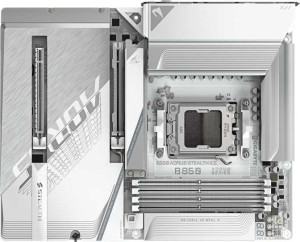
Gigabyte B850 Aorus Stealth Ice

Asus ROG Strix B850-I Gaming WiFi Gigabyte B850 Aorus Stealth Ice

Overview

Welcome to our in-depth comparison of the Asus ROG Strix B850-I Gaming WiFi and the Gigabyte B850 Aorus Stealth Ice — two B850-chipset motherboards targeting very different builders. While both share the AM5 socket, Wi-Fi 7, and DDR5 support, they diverge sharply on form factor, storage expandability, and rear port configurations. Read on to see which board best matches your build requirements.

Common Features

  • Both motherboards use the AM5 CPU socket.
  • Both motherboards feature the B850 chipset.
  • Wi-Fi is supported on both motherboards, covering Wi-Fi 4 (802.11n), Wi-Fi 5 (802.11ac), Wi-Fi 6 (802.11ax), Wi-Fi 6E (802.11ax), and Wi-Fi 7 (802.11be).
  • Bluetooth 5.4 is available on both motherboards.
  • Both motherboards include an HDMI 2.1 output.
  • Overclocking is supported on both motherboards.
  • Both motherboards use DDR5 memory.
  • Both motherboards support 2 memory channels.
  • ECC memory is not supported on either motherboard.
  • Both motherboards include 1 USB 3.2 Gen 2 port (USB-C) on the rear.
  • Neither motherboard includes USB 3.2 Gen 1 ports (USB-C), USB 4 40Gbps ports, USB 4 20Gbps ports, Thunderbolt 4 ports, or Thunderbolt 3 ports.
  • Neither motherboard offers DisplayPort outputs.
  • Both motherboards provide 2 USB 3.2 Gen 1 ports through internal expansion.
  • Both motherboards include 2 SATA 3 connectors.
  • Neither motherboard has an mSATA connector.
  • Both motherboards feature 1 PCIe 5.0 x16 slot.
  • Both motherboards deliver a 120 dB signal-to-noise ratio on the DAC.
  • Both motherboards support 7.1 audio channels.
  • An S/PDIF Out port is present on both motherboards.
  • Both motherboards support RAID 0, RAID 1, RAID 5, and RAID 10 (1+0), but neither supports RAID 0+1.

Main Differences

  • The form factor is Mini-ITX on Asus ROG Strix B850-I Gaming WiFi and ATX on Gigabyte B850 Aorus Stealth Ice.
  • Easy BIOS reset is available on Asus ROG Strix B850-I Gaming WiFi but not on Gigabyte B850 Aorus Stealth Ice.
  • The board height is 170 mm on Asus ROG Strix B850-I Gaming WiFi and 244 mm on Gigabyte B850 Aorus Stealth Ice.
  • The board width is 170 mm on Asus ROG Strix B850-I Gaming WiFi and 305 mm on Gigabyte B850 Aorus Stealth Ice.
  • Maximum memory capacity is 96 GB on Asus ROG Strix B850-I Gaming WiFi and 256 GB on Gigabyte B850 Aorus Stealth Ice.
  • Maximum RAM speed is 4800 MHz on Asus ROG Strix B850-I Gaming WiFi and 5200 MHz on Gigabyte B850 Aorus Stealth Ice.
  • Maximum overclocked RAM speed is 8400 MHz on Asus ROG Strix B850-I Gaming WiFi and 8200 MHz on Gigabyte B850 Aorus Stealth Ice.
  • Memory slots number 2 on Asus ROG Strix B850-I Gaming WiFi and 4 on Gigabyte B850 Aorus Stealth Ice.
  • USB 3.2 Gen 2 ports (USB-A) total 4 on Asus ROG Strix B850-I Gaming WiFi and 2 on Gigabyte B850 Aorus Stealth Ice.
  • USB 3.2 Gen 1 ports (USB-A) total 0 on Asus ROG Strix B850-I Gaming WiFi and 4 on Gigabyte B850 Aorus Stealth Ice.
  • USB 2.0 rear ports total 2 on Asus ROG Strix B850-I Gaming WiFi and 4 on Gigabyte B850 Aorus Stealth Ice.
  • A USB 3.2 Gen 2x2 port is present on Asus ROG Strix B850-I Gaming WiFi but not available on Gigabyte B850 Aorus Stealth Ice.
  • USB 2.0 ports through internal expansion total 2 on Asus ROG Strix B850-I Gaming WiFi and 4 on Gigabyte B850 Aorus Stealth Ice.
  • Fan headers number 6 on Asus ROG Strix B850-I Gaming WiFi and 8 on Gigabyte B850 Aorus Stealth Ice.
  • M.2 sockets total 2 on Asus ROG Strix B850-I Gaming WiFi and 4 on Gigabyte B850 Aorus Stealth Ice.
  • A TPM connector is present on Gigabyte B850 Aorus Stealth Ice but not available on Asus ROG Strix B850-I Gaming WiFi.
  • A PCIe 4.0 x16 slot is present on Asus ROG Strix B850-I Gaming WiFi but not available on Gigabyte B850 Aorus Stealth Ice.
  • A PCIe x4 slot is present on Gigabyte B850 Aorus Stealth Ice but not available on Asus ROG Strix B850-I Gaming WiFi.
  • Audio connectors total 3 on Asus ROG Strix B850-I Gaming WiFi and 2 on Gigabyte B850 Aorus Stealth Ice.
Specs Comparison
Asus ROG Strix B850-I Gaming WiFi

Asus ROG Strix B850-I Gaming WiFi

Gigabyte B850 Aorus Stealth Ice

Gigabyte B850 Aorus Stealth Ice

General info:
CPU socket AM5 AM5
chipset B850 B850
form factor Mini-ITX ATX
release date January 2025 May 2025
supports Wi-Fi
Wi-Fi version Wi-Fi 4 (802.11n), Wi-Fi 5 (802.11ac), Wi-Fi 6 (802.11ax), Wi-Fi 6E (802.11ax), Wi-Fi 7 (802.11be) Wi-Fi 4 (802.11n), Wi-Fi 5 (802.11ac), Wi-Fi 6 (802.11ax), Wi-Fi 6E (802.11ax), Wi-Fi 7 (802.11be)
Has Bluetooth
Bluetooth version 5.4 5.4
HDMI version HDMI 2.1 HDMI 2.1
Easy to overclock
has RGB lighting
Easy to reset BIOS
Has dual BIOS
has aptX
CPU sockets 1 1
Has integrated graphics
warranty period 3 years 3 years
height 170 mm 244 mm
width 170 mm 305 mm
Has integrated CPU

The most defining difference between these two boards is their form factor: the Asus ROG Strix B850-I is a Mini-ITX board measuring just 170 × 170 mm, while the Gigabyte B850 Aorus Stealth Ice follows the full ATX standard at 305 × 244 mm. This is not a minor detail — it dictates the entire build. The Mini-ITX format enables compact, space-efficient cases ideal for small form factor builds or home theater setups, while ATX opens the door to larger chassis with better airflow, more expansion slots, and easier cable management. Both share the same AM5 socket and B850 chipset, so CPU compatibility and platform features are identical.

On connectivity, the two boards are effectively tied: both support the full Wi-Fi 7 (802.11be) stack (backwards-compatible through Wi-Fi 4), Bluetooth 5.4, and HDMI 2.1. Wi-Fi 7 is the current top-tier standard, offering lower latency and higher throughput — a meaningful inclusion on both boards. The shared dual BIOS feature is also a reliability win for both, providing a recovery chip if the primary BIOS becomes corrupted.

One practical differentiator worth noting is that the Asus ROG Strix B850-I supports easy BIOS reset, while the Gigabyte does not — a small but real convenience advantage during overclocking or troubleshooting sessions. Both boards are rated as easy to overclock and carry a 3-year warranty. Overall, the choice here is driven almost entirely by build size: if you need a compact system, the Asus holds a clear edge; if you are building a full-size tower and want more physical room to work with, the Gigabyte is the natural fit.

Memory:
maximum memory amount 96GB 256GB
RAM speed (max) 4800 MHz 5200 MHz
overclocked RAM speed 8400 MHz 8200 MHz
memory slots 2 4
DDR memory version 5 5
memory channels 2 2
Supports ECC memory

Slot count and maximum capacity are where these two boards diverge most significantly. The Asus ROG Strix B850-I offers just 2 memory slots with a ceiling of 96 GB, while the Gigabyte B850 Aorus Stealth Ice doubles that with 4 slots and a much higher cap of 256 GB. For most gaming or everyday workloads, 96 GB is more than sufficient today — but content creators, video editors, or users running memory-intensive virtual machines will find the Gigabyte's headroom considerably more future-proof. The 2-slot limitation on the Asus is a direct consequence of its Mini-ITX footprint; there is simply not enough board real estate to fit four DIMM slots.

On raw speed, the gap is narrower but still present. The Gigabyte supports a native RAM speed of 5200 MHz versus 4800 MHz on the Asus — a modest but measurable difference in bandwidth-sensitive tasks. When it comes to overclocked speeds, the Asus actually edges ahead at 8400 MHz compared to 8200 MHz on the Gigabyte, though real-world gains at those extremes are marginal and depend heavily on the specific memory kit used. Both boards run DDR5 in a dual-channel configuration, so the memory architecture is fundamentally the same.

Taken together, the Gigabyte holds a clear advantage in this category for users who anticipate heavy memory demands or want long-term upgrade flexibility. The Asus is not deficient for typical use cases, but its 2-slot design means you are locked into your initial memory configuration with no room to add more sticks later — a meaningful constraint if your needs evolve over time.

Ports:
USB 3.2 Gen 2 ports (USB-A) 4 2
USB 3.2 Gen 1 ports (USB-A) 0 4
USB 3.2 Gen 2 ports (USB-C) 1 1
USB 3.2 Gen 1 ports (USB-C) 0 0
USB 2.0 ports 2 4
USB 3.2 Gen 2x2 ports 1 0
USB 4 40Gbps ports 0 0
USB 4 20Gbps ports 0 0
Thunderbolt 4 ports 0 0
Thunderbolt 3 ports 0 0
has an HDMI output
DisplayPort outputs 0 0
RJ45 ports 1 1
Has USB Type-C
eSATA ports 0 0
DVI outputs 0 0
has a VGA connector
PS/2 ports 0 0

Speed quality versus sheer quantity is the central tension in this ports comparison. The Asus ROG Strix B850-I leans heavily toward high-speed connectivity: it offers 4 USB 3.2 Gen 2 Type-A ports (each running at 10 Gbps) and — critically — a USB 3.2 Gen 2x2 port capable of 20 Gbps, which the Gigabyte entirely lacks. That 20 Gbps port is particularly useful for fast external SSDs or high-bandwidth peripherals where transfer speed is a priority. The Gigabyte B850 Aorus Stealth Ice counters with a broader mix: 4 USB 3.2 Gen 1 Type-A ports (5 Gbps each) alongside 2 Gen 2 ports, plus 4 USB 2.0 ports — giving it a higher total port count but at generally lower peak speeds.

Where the two boards align: both provide a single USB 3.2 Gen 2 Type-C rear port, one RJ45 ethernet jack, and an HDMI output. Neither offers Thunderbolt, USB 4, or DisplayPort — so users requiring those interfaces would need to source them through add-in cards regardless of which board they choose.

For users who regularly connect fast external storage or high-throughput devices, the Asus holds a clear edge thanks to its superior Gen 2 port density and the exclusive Gen 2x2 port. The Gigabyte is the better fit for desks crowded with legacy peripherals — keyboards, hubs, older drives — where raw port count matters more than peak transfer rates. Neither board dominates unconditionally; the right choice depends on what you are actually plugging in.

Connectors:
USB 3.2 Gen 1 ports (through expansion) 2 2
USB 2.0 ports (through expansion) 2 4
SATA 3 connectors 2 2
fan headers 6 8
USB 3.0 ports (through expansion) 2 2
M.2 sockets 2 4
Has TPM connector
U.2 sockets 0 0
Has mSATA connector
SATA 2 connectors 0 0

Storage expansion potential splits these two boards decisively. The Gigabyte B850 Aorus Stealth Ice provides 4 M.2 sockets — double the 2 M.2 sockets on the Asus ROG Strix B850-I. In practical terms, this means the Gigabyte can accommodate up to four NVMe SSDs natively without touching a single SATA port, making it a substantially stronger platform for storage-heavy workloads, content libraries, or multi-drive NAS-style configurations. Both boards offer the same 2 SATA 3 connectors, so traditional storage parity holds, but the M.2 gap is hard to overlook.

Thermal management tells a similar story. The Gigabyte's 8 fan headers versus the Asus's 6 give it more flexibility to connect case fans, radiator pumps, and AIO headers simultaneously without relying on splitters — a genuine quality-of-life advantage in more complex cooling setups. The Gigabyte also includes a TPM connector, which the Asus lacks; while not essential for most home users, it matters for enterprise environments or anyone requiring hardware-level security features such as BitLocker with a discrete TPM chip.

Across this spec group, the Gigabyte holds a clear overall edge — more M.2 slots, more fan headers, and a TPM header add up to a more expandable and versatile internal connector layout. The Asus's more limited profile is again a reflection of its compact Mini-ITX design rather than a product shortcoming per se, but users who anticipate growing their storage array or building a thermally complex system will find the Gigabyte better equipped from the start.

Expansion slots:
PCIe 4.0 x16 slots 1 0
PCIe 5.0 x16 slots 1 1
PCIe 3.0 x16 slots 0 0
PCIe x1 slots 0 0
PCI slots 0 0
PCIe 2.0 x16 slots 0 0
PCIe x4 slots 0 1
PCIe x8 slots 0 0

Both boards lead with a PCIe 5.0 x16 primary slot, which is the current top-tier standard for discrete GPU connectivity — delivering up to 128 GB/s of bandwidth and ensuring full compatibility with the latest graphics cards. On that front, the two are evenly matched. The divergence comes in secondary expansion: the Asus ROG Strix B850-I adds a PCIe 4.0 x16 slot, while the Gigabyte B850 Aorus Stealth Ice instead provides a PCIe x4 slot (no generation specified in the data).

What this means practically depends on the use case. The Asus's second full-bandwidth PCIe 4.0 x16 slot opens the door to a wider range of add-in cards — capture cards, high-speed networking adapters, or storage controllers — that benefit from the additional lanes and bandwidth of a 4.0 x16 interface. The Gigabyte's x4 slot is more limited in raw throughput but still serviceable for many expansion cards that do not require heavy bandwidth.

For users who plan to install a GPU and nothing else, both boards are effectively tied — the primary PCIe 5.0 x16 slot handles that job equally well on either. But for anyone wanting to add a second high-bandwidth card, the Asus holds a meaningful edge with its additional PCIe 4.0 x16 slot, ironically offering more expansion flexibility despite its smaller Mini-ITX footprint in this particular category.

Audio:
Signal-to-Noise ratio (DAC) 120 dB 120 dB
audio channels 7.1 7.1
Has S/PDIF Out port
audio connectors 3 2

Audio is nearly a dead heat between these two boards. Both deliver a 120 dB signal-to-noise ratio from their onboard DAC, support 7.1 surround sound, and include an S/PDIF optical output for routing audio to an external receiver or DAC. A 120 dB SNR is a strong figure for integrated motherboard audio, meaning clean, low-noise output that holds up well for gaming headsets, studio monitors, and general listening without requiring a dedicated sound card.

The one tangible difference is connector count: the Asus ROG Strix B850-I provides 3 analog audio jacks on its rear panel versus 2 on the Gigabyte. In practical terms, that extra jack on the Asus allows simultaneous connection of more analog devices — for example, front speakers, rear speakers, and a microphone input — without needing to swap plugs. It is a modest but real convenience advantage for users running a multi-speaker analog setup.

Overall, the audio specs here are so closely matched that neither board offers a meaningful qualitative edge in sound output. The Asus's additional connector gives it a slight practical advantage for analog multi-device configurations, but for the majority of users — particularly those relying on USB audio, S/PDIF, or a headset — this distinction will never surface in day-to-day use.

Storage:
Supports RAID 1
Supports RAID 10 (1+0)
Supports RAID 5
Supports RAID 0
Supports RAID 0+1

Storage redundancy support is identical across both boards. The Asus ROG Strix B850-I and the Gigabyte B850 Aorus Stealth Ice each support RAID 0, 1, 5, and 10, while neither supports RAID 0+1. This covers the full range of configurations most users would realistically consider: RAID 0 for striped performance, RAID 1 for mirrored redundancy, RAID 5 for the balanced parity-based approach, and RAID 10 for the combined speed-and-redundancy setup preferred in more demanding environments.

This is a clean tie — there is no differentiator to analyze here. Whichever board you choose, your RAID options are exactly the same, and neither imposes any limitation the other does not share.

Comparison Summary & Verdict

After examining every specification, these two boards serve clearly distinct audiences. The Asus ROG Strix B850-I Gaming WiFi is purpose-built for compact, high-performance Mini-ITX systems: its small 170×170 mm footprint, USB 3.2 Gen 2x2 port, easy BIOS reset button, and higher overclocked RAM ceiling of 8400 MHz make it ideal for space-conscious enthusiasts who refuse to compromise on speed. The Gigabyte B850 Aorus Stealth Ice, on the other hand, is the clear choice for full-size ATX builds demanding serious expandability — with 4 M.2 sockets, 4 memory slots supporting up to 256 GB, 8 fan headers, and a TPM connector, it caters to power users, content creators, and workstation builders who need room to grow.

Asus ROG Strix B850-I Gaming WiFi
Buy Asus ROG Strix B850-I Gaming WiFi if...

Buy the Asus ROG Strix B850-I Gaming WiFi if you are building a compact Mini-ITX system and want a higher overclocked RAM speed, a USB 3.2 Gen 2x2 port, and a convenient BIOS reset option.

Gigabyte B850 Aorus Stealth Ice
Buy Gigabyte B850 Aorus Stealth Ice if...

Buy the Gigabyte B850 Aorus Stealth Ice if you need an ATX board with maximum expandability, including 4 M.2 sockets, 4 memory slots with up to 256 GB capacity, and 8 fan headers for demanding full-size builds.