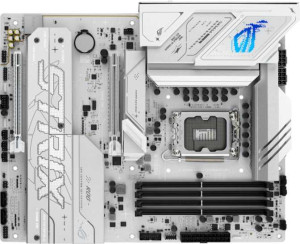
Asus ROG Strix B860-A Gaming WiFi
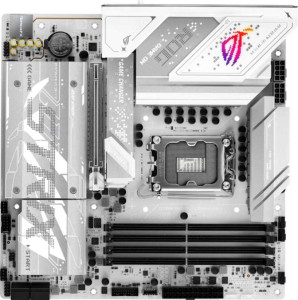
Asus ROG Strix B860-G Gaming WiFi

Asus ROG Strix B860-A Gaming WiFi Asus ROG Strix B860-G Gaming WiFi

Overview

Choosing between the Asus ROG Strix B860-A Gaming WiFi and the Asus ROG Strix B860-G Gaming WiFi means navigating meaningful trade-offs in form factor, high-speed connectivity, and overclocking headroom. Both boards are built around the same B860 chipset and LGA 1851 socket, ensuring a shared foundation of DDR5 memory, Wi-Fi 7, and PCIe 5.0 support. Yet they diverge sharply across USB 4 port configurations, fan header counts, and expansion slots — differences that can significantly shape the character of your next build.

Common Features

  • Both boards use the LGA 1851 CPU socket.
  • Both boards feature the B860 chipset.
  • Wi-Fi is supported on both boards, covering Wi-Fi 4 (802.11n), Wi-Fi 5 (802.11ac), Wi-Fi 6 (802.11ax), Wi-Fi 6E (802.11ax), and Wi-Fi 7 (802.11be).
  • Bluetooth 5.4 is available on both boards.
  • Both boards support HDMI 2.1 output.
  • Overclocking is supported on both boards.
  • Both boards support a maximum memory amount of 256GB.
  • Both boards have 4 memory slots.
  • Both boards use DDR5 memory.
  • Both boards operate with 2 memory channels.
  • ECC memory is not supported on either board.
  • Neither board has USB 3.2 Gen 1 ports of the USB-C type on the rear panel.
  • Both boards provide 4 USB 2.0 rear ports.
  • Thunderbolt 3 ports are not present on either board.
  • Both boards include a DisplayPort output.
  • Both boards include a single RJ45 port.
  • USB Type-C connectivity is present on both boards.
  • eSATA ports are not available on either board.
  • Both boards include 2 USB 3.2 Gen 1 ports through expansion headers.
  • Both boards include 1 USB-C 3.2 Gen 2 port through expansion headers.
  • Both boards provide 4 SATA 3 connectors.
  • Both boards include 4 M.2 sockets.
  • TPM connectors are not present on either board.
  • U.2 sockets are not available on either board.
  • mSATA connectors are not present on either board.
  • Both boards feature 1 PCIe 5.0 x16 slot.
  • PCIe 3.0 x16 slots are not present on either board.
  • PCIe x1 slots are not present on either board.
  • Both boards deliver a 120 dB signal-to-noise ratio on the DAC.
  • Both boards support 7.1 audio channels.
  • An S/PDIF Out port is available on both boards.
  • Both boards have 2 audio connectors.
  • Both boards support RAID 0, RAID 1, RAID 5, and RAID 10 (1+0).
  • RAID 0+1 is not supported on either board.

Main Differences

  • The form factor is ATX on the Asus ROG Strix B860-A Gaming WiFi and Micro-ATX on the Asus ROG Strix B860-G Gaming WiFi.
  • The board width is 305 mm on the Asus ROG Strix B860-A Gaming WiFi and 244 mm on the Asus ROG Strix B860-G Gaming WiFi.
  • The maximum supported overclocked RAM speed is 8600 MHz on the Asus ROG Strix B860-A Gaming WiFi and 9066 MHz on the Asus ROG Strix B860-G Gaming WiFi.
  • USB 3.2 Gen 2 ports (USB-A) number 2 on the Asus ROG Strix B860-A Gaming WiFi and 1 on the Asus ROG Strix B860-G Gaming WiFi.
  • USB 3.2 Gen 1 ports (USB-A) number 2 on the Asus ROG Strix B860-A Gaming WiFi and 3 on the Asus ROG Strix B860-G Gaming WiFi.
  • USB 3.2 Gen 2 ports (USB-C) number 1 on the Asus ROG Strix B860-A Gaming WiFi, while the Asus ROG Strix B860-G Gaming WiFi has none.
  • USB 3.2 Gen 2x2 port support is absent on the Asus ROG Strix B860-A Gaming WiFi but 1 such port is present on the Asus ROG Strix B860-G Gaming WiFi.
  • A USB 4 40Gbps port is not present on the Asus ROG Strix B860-A Gaming WiFi but 1 is available on the Asus ROG Strix B860-G Gaming WiFi.
  • A USB 4 20Gbps port is present on the Asus ROG Strix B860-A Gaming WiFi but is not available on the Asus ROG Strix B860-G Gaming WiFi.
  • A Thunderbolt 4 port is not present on the Asus ROG Strix B860-A Gaming WiFi but 1 is available on the Asus ROG Strix B860-G Gaming WiFi.
  • USB 2.0 ports through expansion headers number 2 on the Asus ROG Strix B860-A Gaming WiFi and 3 on the Asus ROG Strix B860-G Gaming WiFi.
  • Fan headers number 6 on the Asus ROG Strix B860-A Gaming WiFi and 4 on the Asus ROG Strix B860-G Gaming WiFi.
  • A PCIe 4.0 x16 slot is present on the Asus ROG Strix B860-A Gaming WiFi but is not available on the Asus ROG Strix B860-G Gaming WiFi.
Specs Comparison
Asus ROG Strix B860-A Gaming WiFi

Asus ROG Strix B860-A Gaming WiFi

Asus ROG Strix B860-G Gaming WiFi

Asus ROG Strix B860-G Gaming WiFi

General info:
CPU socket LGA 1851 LGA 1851
chipset B860 B860
form factor ATX Micro-ATX
release date January 2025 January 2025
supports Wi-Fi
Wi-Fi version Wi-Fi 4 (802.11n), Wi-Fi 5 (802.11ac), Wi-Fi 6 (802.11ax), Wi-Fi 6E (802.11ax), Wi-Fi 7 (802.11be) Wi-Fi 4 (802.11n), Wi-Fi 5 (802.11ac), Wi-Fi 6 (802.11ax), Wi-Fi 6E (802.11ax), Wi-Fi 7 (802.11be)
Has Bluetooth
Bluetooth version 5.4 5.4
HDMI version HDMI 2.1 HDMI 2.1
Easy to overclock
has RGB lighting
Easy to reset BIOS
Has dual BIOS
has aptX
CPU sockets 1 1
Has integrated graphics
warranty period 3 years 3 years
height 244 mm 244 mm
width 305 mm 244 mm
Has integrated CPU

The Asus ROG Strix B860-A and B860-G share the same core platform: both use the LGA 1851 socket, the B860 chipset, and offer identical connectivity with Wi-Fi 7, Bluetooth 5.4, and HDMI 2.1. Feature parity extends further — both boards support easy overclocking, dual BIOS, BIOS reset, RGB lighting, and carry a 3-year warranty. For a user comparing these two on platform capability alone, there is effectively no difference.

The single meaningful differentiator in this group is form factor. The B860-A is a full-size ATX board at 305 × 244 mm, while the B860-G is a Micro-ATX board at 244 × 244 mm — roughly 20% smaller in footprint. In practice, this determines case compatibility: the B860-G fits in both Micro-ATX and ATX cases, while the B860-A requires a mid-tower or full-tower ATX enclosure. The smaller form factor of the B860-G also typically means fewer expansion slots and less physical room for onboard headers, which matters if you plan to run multiple PCIe cards or extensive internal cabling.

The B860-A holds the edge for builders who want maximum expandability and are working with a full-size ATX case, while the B860-G is the better fit for compact or space-constrained builds. Since all other general specs are identical, the choice here comes down entirely to your chassis and how much physical expansion room your build requires.

Memory:
maximum memory amount 256GB 256GB
overclocked RAM speed 8600 MHz 9066 MHz
memory slots 4 4
DDR memory version 5 5
memory channels 2 2
Supports ECC memory

Both the Asus ROG Strix B860-A Gaming WiFi and the Asus ROG Strix B860-G Gaming WiFi support a maximum memory amount of 256GB. They also each have 4 memory slots and support DDR5 memory, with a memory channel configuration of 2. Neither motherboard supports ECC memory.

The main difference between the two products in this spec group is the overclocked RAM speed. The B860-A Gaming WiFi supports a maximum overclocked RAM speed of 8600 MHz, while the B860-G Gaming WiFi can reach a slightly higher overclocked speed of 9066 MHz. This difference in RAM speed may have an impact on performance in memory-intensive applications.

In summary, the two motherboards are quite similar in terms of memory capacity, slots, and channels, with the primary distinction being the overclocked RAM speed, where the B860-G offers a slightly faster option.

Ports:
USB 3.2 Gen 2 ports (USB-A) 2 1
USB 3.2 Gen 1 ports (USB-A) 2 3
USB 3.2 Gen 2 ports (USB-C) 1 0
USB 3.2 Gen 1 ports (USB-C) 0 0
USB 2.0 ports 4 4
USB 3.2 Gen 2x2 ports 0 1
USB 4 40Gbps ports 0 1
USB 4 20Gbps ports 1 0
Thunderbolt 4 ports 0 1
Thunderbolt 3 ports 0 0
has an HDMI output
DisplayPort outputs 1 1
RJ45 ports 1 1
Has USB Type-C
eSATA ports 0 0
DVI outputs 0 0
has a VGA connector
PS/2 ports 0 0

The Asus ROG Strix B860-A Gaming WiFi and the Asus ROG Strix B860-G Gaming WiFi have several similarities when it comes to ports. Both models offer 4 USB 2.0 ports, 1 DisplayPort output, and 1 RJ45 port. Additionally, both motherboards have HDMI output and USB Type-C support, though the B860-A has 1 USB 3.2 Gen 2 USB-C port, while the B860-G has no USB 3.2 Gen 2 USB-C port but does feature 1 USB 4 40Gbps port.

Where the two differ is in the number and types of USB 3.2 Gen ports. The B860-A Gaming WiFi includes 2 USB 3.2 Gen 2 USB-A ports, 2 USB 3.2 Gen 1 USB-A ports, and 1 USB 4 20Gbps port. On the other hand, the B860-G Gaming WiFi has 1 USB 3.2 Gen 2 USB-A port, 3 USB 3.2 Gen 1 USB-A ports, and 1 USB 3.2 Gen 2x2 port, along with 1 USB 4 40Gbps port and 1 Thunderbolt 4 port, which the B860-A does not have.

In summary, both motherboards offer a similar set of ports, but the B860-G provides more advanced USB and Thunderbolt options, such as the USB 3.2 Gen 2x2 port, USB 4 40Gbps, and Thunderbolt 4 port, while the B860-A has a higher number of USB 3.2 Gen 2 USB-A and USB 3.2 Gen 1 USB-A ports.

Connectors:
USB 3.2 Gen 1 ports (through expansion) 2 2
USB-C 3.2 Gen 2 ports (through expansion) 1 1
USB 2.0 ports (through expansion) 2 3
SATA 3 connectors 4 4
fan headers 6 4
USB 3.0 ports (through expansion) 2 2
M.2 sockets 4 4
Has TPM connector
U.2 sockets 0 0
Has mSATA connector
SATA 2 connectors 0 0

The Asus ROG Strix B860-A Gaming WiFi and the Asus ROG Strix B860-G Gaming WiFi both have a solid range of connectors, with some differences between them. Both models offer 2 USB 3.2 Gen 1 ports, 1 USB-C 3.2 Gen 2 port, 2 USB 3.0 ports (through expansion), and 4 SATA 3 connectors. They also include 4 M.2 sockets, and neither motherboard has a U.2 or mSATA connector.

One difference between the two is the number of USB 2.0 ports through expansion. The B860-A Gaming WiFi has 2, while the B860-G Gaming WiFi provides 3. Additionally, the B860-A Gaming WiFi features 6 fan headers, compared to the B860-G's 4 fan headers.

In summary, both motherboards provide a comparable set of connectors overall, but the B860-G offers slightly more USB 2.0 ports through expansion, while the B860-A has more fan headers.

Expansion slots:
PCIe 4.0 x16 slots 1 0
PCIe 5.0 x16 slots 1 1
PCIe 3.0 x16 slots 0 0
PCIe x1 slots 0 0
PCI slots 0 0
PCIe 2.0 x16 slots 0 0
PCIe x4 slots 0 0
PCIe x8 slots 0 0

The Asus ROG Strix B860-A Gaming WiFi and the Asus ROG Strix B860-G Gaming WiFi differ in their PCIe slot configurations. The B860-A Gaming WiFi offers both 1 PCIe 4.0 x16 slot and 1 PCIe 5.0 x16 slot, with no PCIe x1, x4, x8, or PCI slots available. In contrast, the B860-G Gaming WiFi only provides 1 PCIe 5.0 x16 slot and lacks a PCIe 4.0 x16 slot. Both motherboards have no PCIe x1, x4, or x8 slots and no PCI slots.

Essentially, while both motherboards have a single PCIe 5.0 x16 slot, the B860-A Gaming WiFi includes an additional PCIe 4.0 x16 slot, offering more flexibility in expansion for users who might want to run multiple GPUs or other PCIe 4.0-compatible devices.

In summary, the main difference in expansion slots is the inclusion of a PCIe 4.0 x16 slot on the B860-A, which the B860-G does not have.

Audio:
Signal-to-Noise ratio (DAC) 120 dB 120 dB
audio channels 7.1 7.1
Has S/PDIF Out port
audio connectors 2 2

The Asus ROG Strix B860-A Gaming WiFi and the Asus ROG Strix B860-G Gaming WiFi have identical audio specifications. Both motherboards feature a Signal-to-Noise ratio (DAC) of 120 dB, support 7.1 audio channels, and include an S/PDIF Out port. Additionally, both motherboards are equipped with 2 audio connectors.

There are no differences in the audio performance or features between the two models in this category. Both are designed to offer high-quality audio with the same specifications and capabilities.

In summary, the audio specs are the same for both motherboards, with no distinguishing features between the two in this group.

Storage:
Supports RAID 1
Supports RAID 10 (1+0)
Supports RAID 5
Supports RAID 0
Supports RAID 0+1

The Asus ROG Strix B860-A Gaming WiFi and the Asus ROG Strix B860-G Gaming WiFi share identical storage features. Both motherboards support RAID 1, RAID 10 (1+0), RAID 5, and RAID 0 configurations. Neither motherboard supports RAID 0+1.

There are no differences in the storage capabilities between the two models. Both are equipped to handle the same RAID setups, offering flexibility for users seeking different storage configurations.

In summary, the storage specifications are the same for both motherboards, with no distinctions in RAID support.

Comparison Summary & Verdict

After examining the full spec sheet, both boards prove to be capable B860 platforms with identical audio quality, Wi-Fi 7, and four M.2 sockets. The Asus ROG Strix B860-A Gaming WiFi earns its place in full-size builds thanks to its ATX form factor, an extra PCIe 4.0 x16 expansion slot, six fan headers for more granular cooling control, and a rear USB 3.2 Gen 2 Type-C port. By contrast, the Asus ROG Strix B860-G Gaming WiFi targets compact and high-performance builds with its Micro-ATX footprint, a higher overclocked RAM ceiling of 9066 MHz, a Thunderbolt 4 port, and a USB 4 40Gbps connection for demanding peripherals. Choose the B860-A for maximum expandability in a spacious chassis, and opt for the B860-G when a smaller build paired with cutting-edge high-speed I/O is the priority.

Asus ROG Strix B860-A Gaming WiFi
Buy Asus ROG Strix B860-A Gaming WiFi if...

Buy the Asus ROG Strix B860-A Gaming WiFi if you are building in a full ATX case and want maximum expandability, including an extra PCIe 4.0 x16 slot and six fan headers for advanced cooling control.

Asus ROG Strix B860-G Gaming WiFi
Buy Asus ROG Strix B860-G Gaming WiFi if...

Buy the Asus ROG Strix B860-G Gaming WiFi if you need a compact Micro-ATX board with the highest RAM overclocking headroom, Thunderbolt 4 support, and a USB 4 40Gbps port for top-tier peripheral connectivity.