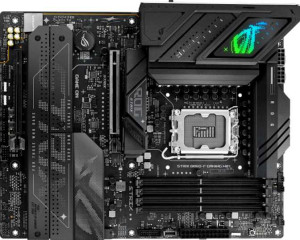
Asus ROG Strix B860-F Gaming WiFi
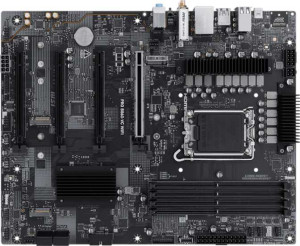
MSI Pro B860-VC Wi-Fi

Asus ROG Strix B860-F Gaming WiFi MSI Pro B860-VC Wi-Fi

Overview

Welcome to our in-depth specification comparison between the Asus ROG Strix B860-F Gaming WiFi and the MSI Pro B860-VC Wi-Fi. Both boards share the same LGA 1851 socket and B860 chipset, but they diverge in meaningful ways across connectivity, storage expansion, and feature sets. Whether you prioritize a richer port selection or a more straightforward build, this comparison will help you identify which board aligns best with your needs.

Common Features

  • Both boards use the LGA 1851 CPU socket.
  • Both boards feature the B860 chipset.
  • Both boards have an ATX form factor.
  • Wi-Fi is supported on both boards, covering Wi-Fi 4, Wi-Fi 5, Wi-Fi 6, Wi-Fi 6E, and Wi-Fi 7.
  • Bluetooth is available on both boards at version 5.4.
  • Both boards support overclocking.
  • Both boards support a maximum of 256GB of memory.
  • Both boards have 4 memory slots.
  • Both boards use DDR5 memory.
  • Both boards operate in dual-channel memory mode.
  • ECC memory is not supported on either board.
  • Neither board has USB 3.2 Gen 2 Type-C ports.
  • Neither board has USB 3.2 Gen 1 Type-C ports.
  • Both boards include 1 USB 4 40Gbps port.
  • Neither board has USB 4 20Gbps ports.
  • Both boards include 1 Thunderbolt 4 port.
  • Both boards have 1 RJ45 port.
  • Both boards include a USB Type-C connector.
  • Both boards have 4 SATA 3 connectors.
  • Both boards include 6 fan headers.
  • Neither board has a U.2 socket.
  • Neither board has an mSATA connector.
  • Neither board has SATA 2 connectors.
  • Both boards have 1 PCIe 4.0 x16 slot.
  • Both boards have 1 PCIe 5.0 x16 slot.
  • Neither board has PCIe 3.0 x16, PCIe 2.0 x16, PCI, PCIe x4, or PCIe x8 slots.
  • Both boards support 7.1 audio channels.
  • Both boards support RAID 0, RAID 1, RAID 5, and RAID 10.
  • RAID 0+1 is not supported on either board.

Main Differences

  • RGB lighting is present on Asus ROG Strix B860-F Gaming WiFi but not available on MSI Pro B860-VC Wi-Fi.
  • Height is 244 mm on Asus ROG Strix B860-F Gaming WiFi and 243.8 mm on MSI Pro B860-VC Wi-Fi.
  • Width is 305 mm on Asus ROG Strix B860-F Gaming WiFi and 304.8 mm on MSI Pro B860-VC Wi-Fi.
  • Maximum overclocked RAM speed is 9066 MHz on Asus ROG Strix B860-F Gaming WiFi and 8800 MHz on MSI Pro B860-VC Wi-Fi.
  • USB 3.2 Gen 2 Type-A ports total 1 on Asus ROG Strix B860-F Gaming WiFi and 2 on MSI Pro B860-VC Wi-Fi.
  • USB 3.2 Gen 1 Type-A ports total 6 on Asus ROG Strix B860-F Gaming WiFi and 2 on MSI Pro B860-VC Wi-Fi.
  • USB 2.0 ports total 0 on Asus ROG Strix B860-F Gaming WiFi and 4 on MSI Pro B860-VC Wi-Fi.
  • A USB 3.2 Gen 2x2 port is present on Asus ROG Strix B860-F Gaming WiFi but not available on MSI Pro B860-VC Wi-Fi.
  • An HDMI output is present on Asus ROG Strix B860-F Gaming WiFi but not available on MSI Pro B860-VC Wi-Fi.
  • DisplayPort outputs total 1 on Asus ROG Strix B860-F Gaming WiFi and 0 on MSI Pro B860-VC Wi-Fi.
  • USB 3.2 Gen 1 expansion ports total 2 on Asus ROG Strix B860-F Gaming WiFi and 4 on MSI Pro B860-VC Wi-Fi.
  • USB 2.0 expansion ports total 3 on Asus ROG Strix B860-F Gaming WiFi and 4 on MSI Pro B860-VC Wi-Fi.
  • USB 3.0 expansion ports total 2 on Asus ROG Strix B860-F Gaming WiFi and 4 on MSI Pro B860-VC Wi-Fi.
  • M.2 sockets total 4 on Asus ROG Strix B860-F Gaming WiFi and 3 on MSI Pro B860-VC Wi-Fi.
  • A TPM connector is present on MSI Pro B860-VC Wi-Fi but not available on Asus ROG Strix B860-F Gaming WiFi.
  • PCIe x1 slots total 0 on Asus ROG Strix B860-F Gaming WiFi and 2 on MSI Pro B860-VC Wi-Fi.
  • An S/PDIF Out port is present on Asus ROG Strix B860-F Gaming WiFi but not available on MSI Pro B860-VC Wi-Fi.
  • Audio connectors total 2 on Asus ROG Strix B860-F Gaming WiFi and 3 on MSI Pro B860-VC Wi-Fi.
Specs Comparison
Asus ROG Strix B860-F Gaming WiFi

Asus ROG Strix B860-F Gaming WiFi

MSI Pro B860-VC Wi-Fi

MSI Pro B860-VC Wi-Fi

General info:
CPU socket LGA 1851 LGA 1851
chipset B860 B860
form factor ATX ATX
release date January 2025 February 2025
supports Wi-Fi
Wi-Fi version Wi-Fi 4 (802.11n), Wi-Fi 5 (802.11ac), Wi-Fi 6 (802.11ax), Wi-Fi 6E (802.11ax), Wi-Fi 7 (802.11be) Wi-Fi 4 (802.11n), Wi-Fi 5 (802.11ac), Wi-Fi 6 (802.11ax), Wi-Fi 6E (802.11ax), Wi-Fi 7 (802.11be)
Has Bluetooth
Bluetooth version 5.4 5.4
Easy to overclock
has RGB lighting
Easy to reset BIOS
Has dual BIOS
has aptX
CPU sockets 1 1
Has integrated graphics
warranty period 3 years 3 years
height 244 mm 243.8 mm
width 305 mm 304.8 mm
Has integrated CPU

At their core, the Asus ROG Strix B860-F Gaming WiFi and the MSI Pro B860-VC Wi-Fi are built on an identical foundation: both use the LGA 1851 socket with the B860 chipset in a standard ATX form factor, support the same broad Wi-Fi 7 stack (including Wi-Fi 4 through 6E), share Bluetooth 5.4 for strong wireless stability and range, and offer dual BIOS, easy BIOS reset, and a 3-year warranty. For a buyer focused purely on platform capabilities, these two boards are functionally twins.

The only meaningful differentiator in this group is RGB lighting: the ROG Strix includes it, while the MSI Pro does not. For builders who invest in a windowed case and care about aesthetics or lighting synchronization ecosystems, this is a genuine advantage for the ROG Strix. For those who prioritize a clean, no-frills look or simply do not care about lighting, the absence of RGB on the MSI Pro is a non-issue — and arguably reduces visual clutter. The physical dimensions are for all practical purposes identical (~244 × 305 mm vs. ~243.8 × 304.8 mm), so both boards will fit the same cases without distinction.

Based strictly on this group′s data, the two boards are evenly matched on every functional specification. The ROG Strix holds a marginal edge only if RGB aesthetics matter to the buyer; otherwise, there is no general-info reason to prefer one over the other.

Memory:
maximum memory amount 256GB 256GB
overclocked RAM speed 9066 MHz 8800 MHz
memory slots 4 4
DDR memory version 5 5
memory channels 2 2
Supports ECC memory

Both boards share the same structural memory profile: 4 DDR5 slots, a 256 GB maximum capacity, and a dual-channel architecture. For the vast majority of use cases — gaming, content creation, workstation tasks — this configuration is more than sufficient, and neither board imposes any meaningful limitation over the other in terms of raw memory headroom.

Where a gap emerges is in overclocked RAM speed. The ROG Strix B860-F supports profiles up to 9066 MHz, while the MSI Pro B860-VC tops out at 8800 MHz. The 266 MHz difference matters primarily to enthusiasts pushing XMP/EXPO profiles to the absolute ceiling — in that niche, higher validated speeds can offer marginal gains in memory-bandwidth-sensitive workloads like video editing timelines or certain simulation tasks. For everyday gaming or general productivity, the real-world delta between these two figures is negligible.

The ROG Strix holds a narrow edge in this group strictly due to its higher overclocked speed ceiling. It is not a decisive advantage for most buyers, but for users who specifically intend to run high-frequency DDR5 kits, the ROG Strix offers slightly more headroom on paper.

Ports:
USB 3.2 Gen 2 ports (USB-A) 1 2
USB 3.2 Gen 1 ports (USB-A) 6 2
USB 3.2 Gen 2 ports (USB-C) 0 0
USB 3.2 Gen 1 ports (USB-C) 0 0
USB 2.0 ports 0 4
USB 3.2 Gen 2x2 ports 1 0
USB 4 40Gbps ports 1 1
USB 4 20Gbps ports 0 0
Thunderbolt 4 ports 1 1
Thunderbolt 3 ports 0 0
has an HDMI output
DisplayPort outputs 1 0
RJ45 ports 1 1
Has USB Type-C
eSATA ports 0 0
DVI outputs 0 0
has a VGA connector
PS/2 ports 0 0

Connectivity is where these two boards diverge most noticeably. The ROG Strix B860-F offers a richer rear I/O overall: it includes a USB 3.2 Gen 2x2 port (delivering 20 Gbps — useful for the fastest external SSDs), plus more USB 3.x Gen 1 Type-A ports for a total of seven high-speed USB-A connections. The MSI Pro B860-VC, by contrast, compensates with four USB 2.0 ports — adequate for low-bandwidth peripherals like keyboards and mice, but a clear step down in throughput. Both boards share a USB4 40 Gbps port and a Thunderbolt 4 port, which is a strong common ground for fast storage and daisy-chaining high-bandwidth devices.

The most practical gap for many users will be display output. The ROG Strix includes both an HDMI output and a DisplayPort, while the MSI Pro offers neither. This matters in scenarios where a user temporarily needs display output without a discrete GPU installed — during initial builds, troubleshooting, or light-use configurations. The MSI Pro leaves no fallback option in those situations.

The ROG Strix B860-F holds a clear advantage in this group. Its superior USB bandwidth options, higher count of USB 3.x ports, and the addition of HDMI and DisplayPort outputs make it the more versatile and future-ready choice for connectivity-conscious builders.

Connectors:
USB 3.2 Gen 1 ports (through expansion) 2 4
USB 2.0 ports (through expansion) 3 4
SATA 3 connectors 4 4
fan headers 6 6
USB 3.0 ports (through expansion) 2 4
M.2 sockets 4 3
Has TPM connector
U.2 sockets 0 0
Has mSATA connector
SATA 2 connectors 0 0

Internally, the two boards take different approaches to expansion. The ROG Strix B860-F pulls ahead in storage potential with 4 M.2 sockets versus the MSI Pro B860-VC′s 3 — a meaningful difference for builders who want to run multiple NVMe drives simultaneously without resorting to SATA, whether for a large game library, a content production setup, or a tiered storage configuration. Both boards match each other with 4 SATA 3 connectors and 6 fan headers, so thermal management and traditional drive connectivity are on equal footing.

The MSI Pro counters with an advantage in internal USB expansion headers, offering 4 USB 3.2 Gen 1 and 4 USB 2.0 internal ports compared to the ROG Strix′s 2 and 3 respectively. For case designs with many front-panel USB ports or USB-connected internal devices, the MSI Pro provides more routing flexibility. It also includes a TPM connector, which the ROG Strix lacks — relevant for enterprise environments or users with strict hardware-based security requirements such as BitLocker configurations tied to a discrete TPM module.

This group is genuinely split depending on the use case. The ROG Strix B860-F has the edge for NVMe storage-heavy builds, while the MSI Pro B860-VC is better suited for builders needing more internal USB headers or a dedicated TPM header. Neither board holds an across-the-board advantage here.

Expansion slots:
PCIe 4.0 x16 slots 1 1
PCIe 5.0 x16 slots 1 1
PCIe 3.0 x16 slots 0 0
PCIe x1 slots 0 2
PCI slots 0 0
PCIe 2.0 x16 slots 0 0
PCIe x4 slots 0 0
PCIe x8 slots 0 0

For the primary expansion slots, both boards are identical: a PCIe 5.0 x16 slot for a modern discrete GPU and a PCIe 4.0 x16 slot for secondary cards or additional NVMe adapters. The PCIe 5.0 primary slot ensures neither board is a bottleneck for current or near-future graphics cards, and the PCIe 4.0 secondary slot offers solid bandwidth for anything from capture cards to multi-GPU storage controllers.

The only differentiator here is the MSI Pro B860-VC′s two additional PCIe x1 slots, which the ROG Strix B860-F entirely lacks. These smaller slots are useful for adding low-profile expansion cards — think sound cards, additional network adapters, or USB controller cards — without consuming the larger x16 slots. For a straightforward gaming or workstation build with just a GPU, this distinction rarely comes up, but it does give the MSI Pro more flexibility for niche or multi-card peripheral configurations.

The MSI Pro B860-VC holds a narrow edge in this group purely due to those two PCIe x1 slots. For most users the difference is academic, but builders who anticipate adding small expansion cards will find the MSI Pro the more accommodating platform.

Audio:
audio channels 7.1 7.1
Has S/PDIF Out port
audio connectors 2 3

Audio is one of the more interesting trade-off points between these two boards. Both support 7.1 surround sound, which is the relevant baseline for gaming headsets and home theater setups alike. Beyond that shared capability, each board makes a different choice about how to deliver audio connectivity.

The ROG Strix B860-F includes an S/PDIF optical output, which allows a direct digital connection to external DACs, AV receivers, or soundbars — bypassing the onboard analog circuitry entirely for cleaner signal transmission. However, it offers only 2 analog audio connectors. The MSI Pro B860-VC flips this: no S/PDIF, but 3 analog connectors, giving users more simultaneous analog device connections — handy for setups with separate front/rear speaker pairs or multiple analog peripherals plugged in at once.

Which board has the edge depends entirely on the user′s audio setup. The ROG Strix is the stronger choice for anyone routing audio digitally to external equipment via S/PDIF, while the MSI Pro serves analog-first setups more conveniently. Neither is strictly superior — they simply cater to different audio workflows, making this group a draw with a use-case caveat.

Storage:
Supports RAID 1
Supports RAID 10 (1+0)
Supports RAID 5
Supports RAID 0
Supports RAID 0+1

RAID support is perfectly mirrored across both boards. The Asus ROG Strix B860-F and the MSI Pro B860-VC both support RAID 0, 1, 5, and 10 — covering the full practical spectrum from pure performance striping (RAID 0) to redundancy-focused mirroring (RAID 1) to the balanced parity and capacity of RAID 5 and the combined stripe-and-mirror of RAID 10. Neither board supports RAID 0+1, but that configuration is rarely missed given that RAID 10 serves essentially the same purpose with better fault tolerance.

For a buyer whose decision hinges on storage redundancy or multi-drive performance configurations, these two boards offer no grounds for differentiation whatsoever. This group is a complete tie — the RAID feature set is identical, and no advantage exists on either side.

Comparison Summary & Verdict

After examining all available specifications, both boards deliver a solid B860-chipset foundation with DDR5 support, Wi-Fi 7, and Thunderbolt 4. However, their strengths point to different audiences. The Asus ROG Strix B860-F Gaming WiFi stands out with its 4 M.2 slots, higher overclocked RAM ceiling of 9066 MHz, HDMI and DisplayPort video outputs, RGB lighting, and a USB 3.2 Gen 2x2 port, making it the stronger choice for enthusiasts and content creators who demand maximum storage and display flexibility. The MSI Pro B860-VC Wi-Fi, on the other hand, offers a TPM connector, 2 PCIe x1 slots, more audio connectors, and a broader expansion header layout, making it a practical, business-oriented option for users who prioritize platform compatibility and straightforward system integration over gaming aesthetics.

Asus ROG Strix B860-F Gaming WiFi
Buy Asus ROG Strix B860-F Gaming WiFi if...

Buy the Asus ROG Strix B860-F Gaming WiFi if you want more M.2 storage slots, a higher overclocked RAM speed, built-in HDMI and DisplayPort outputs, RGB lighting, and a USB 3.2 Gen 2x2 port for a feature-rich enthusiast build.

MSI Pro B860-VC Wi-Fi
Buy MSI Pro B860-VC Wi-Fi if...

Buy the MSI Pro B860-VC Wi-Fi if you need a TPM connector for business or security requirements, prefer additional PCIe x1 expansion slots, or want a no-frills board with broader internal expansion header support.