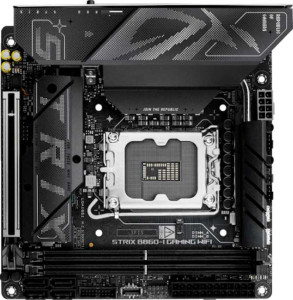
Asus ROG Strix B860-I Gaming WiFi
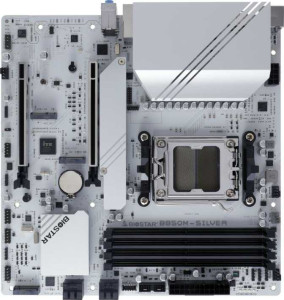
Biostar B850M-Silver

Asus ROG Strix B860-I Gaming WiFi Biostar B850M-Silver

Overview

Welcome to our in-depth comparison of the Asus ROG Strix B860-I Gaming WiFi and the Biostar B850M-Silver — two mid-range motherboards that target very different builders. From their distinct CPU socket ecosystems and form factors to their connectivity options and memory capabilities, these boards each carve out a unique identity. Read on to see how they stack up across every major specification category.

Common Features

  • Both products support HDMI 2.1.
  • Both products are easy to overclock.
  • Both products support easy BIOS reset.
  • Both products feature dual BIOS.
  • Both products have a single CPU socket.
  • Neither product has integrated graphics.
  • Neither product has an integrated CPU.
  • Both products carry a 3-year warranty.
  • Both products use DDR5 memory.
  • Both products support 2 memory channels.
  • Both products have 1 USB 3.2 Gen 2 Type-A port.
  • Neither product has a USB 3.2 Gen 1 Type-C port.
  • Both products have 2 USB 2.0 ports.
  • Neither product has a USB 4 20Gbps port.
  • Neither product has a Thunderbolt 3 port.
  • Both products have an HDMI output.
  • Both products have 1 RJ45 port.
  • Both products have a USB Type-C connector.
  • Both products provide 2 USB 3.2 Gen 1 ports through expansion.
  • Both products provide 1 USB-C 3.2 Gen 2 port through expansion.
  • Both products have 4 SATA 3 connectors.
  • Both products provide 2 USB 3.0 ports through expansion.
  • Both products have a TPM connector.
  • Neither product has a U.2 socket.
  • Neither product has an mSATA connector.
  • Neither product has any SATA 2 connectors.
  • Both products have 1 PCIe 5.0 x16 slot.
  • Neither product has any PCIe 3.0 x16 slots.
  • Neither product has any PCIe x1 slots.
  • Neither product has any PCI slots.
  • Neither product has any PCIe 2.0 x16 slots.
  • Neither product has any PCIe x4 slots.
  • Neither product has any PCIe x8 slots.
  • Both products support 7.1 audio channels.
  • Both products support RAID 0.
  • Both products support RAID 1.
  • Neither product supports RAID 0+1.

Main Differences

  • The CPU socket is LGA 1851 on Asus ROG Strix B860-I Gaming WiFi and AM5 on Biostar B850M-Silver.
  • The chipset is B860 on Asus ROG Strix B860-I Gaming WiFi and B850 on Biostar B850M-Silver.
  • The form factor is Mini-ITX on Asus ROG Strix B860-I Gaming WiFi and Micro-ATX on Biostar B850M-Silver.
  • Wi-Fi is integrated on Asus ROG Strix B860-I Gaming WiFi but not available on Biostar B850M-Silver.
  • Bluetooth is present on Asus ROG Strix B860-I Gaming WiFi but not available on Biostar B850M-Silver.
  • RGB lighting is featured on Asus ROG Strix B860-I Gaming WiFi but not present on Biostar B850M-Silver.
  • The board height is 170 mm on Asus ROG Strix B860-I Gaming WiFi and 244 mm on Biostar B850M-Silver.
  • The board width is 170 mm on Asus ROG Strix B860-I Gaming WiFi and 244 mm on Biostar B850M-Silver.
  • Maximum memory capacity is 128 GB on Asus ROG Strix B860-I Gaming WiFi and 256 GB on Biostar B850M-Silver.
  • Overclocked RAM speed reaches 9066 MHz on Asus ROG Strix B860-I Gaming WiFi and 8000 MHz on Biostar B850M-Silver.
  • Memory slots number 2 on Asus ROG Strix B860-I Gaming WiFi and 4 on Biostar B850M-Silver.
  • ECC memory support is available on Biostar B850M-Silver but not on Asus ROG Strix B860-I Gaming WiFi.
  • USB 3.2 Gen 1 Type-A ports number 3 on Asus ROG Strix B860-I Gaming WiFi and 4 on Biostar B850M-Silver.
  • USB 3.2 Gen 2 Type-C ports number 0 on Asus ROG Strix B860-I Gaming WiFi and 1 on Biostar B850M-Silver.
  • USB 3.2 Gen 2x2 ports number 1 on Asus ROG Strix B860-I Gaming WiFi and 0 on Biostar B850M-Silver.
  • USB 4 40Gbps ports number 1 on Asus ROG Strix B860-I Gaming WiFi and 0 on Biostar B850M-Silver.
  • Thunderbolt 4 ports number 1 on Asus ROG Strix B860-I Gaming WiFi and 0 on Biostar B850M-Silver.
  • DisplayPort outputs number 1 on Asus ROG Strix B860-I Gaming WiFi and 2 on Biostar B850M-Silver.
  • A PS/2 port is present on Biostar B850M-Silver but not available on Asus ROG Strix B860-I Gaming WiFi.
  • USB 2.0 ports through expansion number 2 on Asus ROG Strix B860-I Gaming WiFi and 4 on Biostar B850M-Silver.
  • Fan headers number 2 on Asus ROG Strix B860-I Gaming WiFi and 3 on Biostar B850M-Silver.
  • M.2 sockets number 2 on Asus ROG Strix B860-I Gaming WiFi and 3 on Biostar B850M-Silver.
  • A PCIe 4.0 x16 slot is absent on Asus ROG Strix B860-I Gaming WiFi but present on Biostar B850M-Silver.
  • An S/PDIF Out port is present on Asus ROG Strix B860-I Gaming WiFi but not available on Biostar B850M-Silver.
  • Audio connectors number 2 on Asus ROG Strix B860-I Gaming WiFi and 3 on Biostar B850M-Silver.
  • RAID 10 support is available on Asus ROG Strix B860-I Gaming WiFi but not on Biostar B850M-Silver.
  • RAID 5 support is available on Asus ROG Strix B860-I Gaming WiFi but not on Biostar B850M-Silver.
Specs Comparison
Asus ROG Strix B860-I Gaming WiFi

Asus ROG Strix B860-I Gaming WiFi

Biostar B850M-Silver

Biostar B850M-Silver

General info:
CPU socket LGA 1851 AM5
chipset B860 B850
form factor Mini-ITX Micro-ATX
release date January 2025 January 2025
supports Wi-Fi
Has Bluetooth
HDMI version HDMI 2.1 HDMI 2.1
Easy to overclock
has RGB lighting
Easy to reset BIOS
Has dual BIOS
CPU sockets 1 1
Has integrated graphics
warranty period 3 years 3 years
height 170 mm 244 mm
width 170 mm 244 mm
Has integrated CPU

The most fundamental distinction between these two boards is platform allegiance: the Asus ROG Strix B860-I targets Intel's LGA 1851 ecosystem, while the Biostar B850M-Silver is built around AMD's AM5 socket. This means they are not interchangeable and the choice between them is largely dictated by which CPU you intend to use. Beyond the socket, the form factors diverge significantly — the ROG Strix is a compact Mini-ITX board at 170×170 mm, designed for small form factor builds, whereas the Biostar is a Micro-ATX at 244×244 mm, offering more physical space for expansion and airflow management in a mid-size case.

Connectivity is another sharp differentiator. The ROG Strix ships with integrated Wi-Fi and Bluetooth, making it genuinely self-contained for wireless-first builds — particularly valuable in a Mini-ITX case where adding a PCIe Wi-Fi card would consume the board's only slot. The Biostar includes neither Wi-Fi nor Bluetooth, so users who need wireless connectivity will have to factor in the added cost and slot usage of an adapter. On the aesthetics front, the ROG Strix also includes RGB lighting, while the Biostar takes a utilitarian, no-frills approach with none.

Where these boards converge is reassuring: both share HDMI 2.1 output, support overclocking, offer easy BIOS reset, and feature dual BIOS for recovery redundancy — all backed by identical 3-year warranties. Overall, the ROG Strix B860-I holds a clear edge in this general category for anyone prioritizing a compact, wireless-ready build with premium features out of the box. The Biostar B850M-Silver is the more straightforward, no-extras choice for AMD platform users who plan to wire everything up and don't need built-in wireless.

Memory:
maximum memory amount 128GB 256GB
overclocked RAM speed 9066 MHz 8000 MHz
memory slots 2 4
DDR memory version 5 5
memory channels 2 2
Supports ECC memory

The Asus ROG Strix B860-I Gaming WiFi supports a maximum memory amount of 128GB, while the Biostar B850M-Silver can handle up to 256GB. Both motherboards support DDR5 memory and feature dual memory channels, but the Biostar board offers more memory slots—four compared to the two available on the Asus board.

In terms of overclocking, the Asus motherboard supports higher RAM speeds, with an overclocked speed of 9066 MHz, while the Biostar motherboard has a slightly lower maximum overclocked RAM speed of 8000 MHz.

Additionally, the Biostar B850M-Silver is the only board that supports ECC memory, a feature not available on the Asus ROG Strix B860-I Gaming WiFi, which does not support ECC memory.

Ports:
USB 3.2 Gen 2 ports (USB-A) 1 1
USB 3.2 Gen 1 ports (USB-A) 3 4
USB 3.2 Gen 2 ports (USB-C) 0 1
USB 3.2 Gen 1 ports (USB-C) 0 0
USB 2.0 ports 2 2
USB 3.2 Gen 2x2 ports 1 0
USB 4 40Gbps ports 1 0
USB 4 20Gbps ports 0 0
Thunderbolt 4 ports 1 0
Thunderbolt 3 ports 0 0
has an HDMI output
DisplayPort outputs 1 2
RJ45 ports 1 1
Has USB Type-C
eSATA ports 0 0
DVI outputs 0 0
has a VGA connector
PS/2 ports 0 1

The Asus ROG Strix B860-I Gaming WiFi offers a variety of ports, including 1 USB 3.2 Gen 2 (USB-A), 3 USB 3.2 Gen 1 (USB-A), and 2 USB 2.0 ports. It also features 1 USB 3.2 Gen 2x2 port, 1 USB 4 40Gbps port, and 1 Thunderbolt 4 port. On the display side, it has 1 HDMI output and 1 DisplayPort output. The motherboard includes 1 RJ45 port for network connectivity, but it lacks a VGA connector, PS/2 ports, and eSATA ports.

In comparison, the Biostar B850M-Silver has a similar offering of USB 3.2 Gen 2 (USB-A) ports (1), 4 USB 3.2 Gen 1 (USB-A) ports, and 2 USB 2.0 ports. It also includes 1 USB 3.2 Gen 2 (USB-C) port, but does not have any USB 3.2 Gen 2x2, USB 4, or Thunderbolt ports. The Biostar board provides 2 DisplayPort outputs and 1 HDMI output, just like the Asus. Both motherboards feature 1 RJ45 port, but the Biostar model includes a PS/2 port, which the Asus board does not.

Overall, the key differences between the two motherboards include the additional USB 4 and Thunderbolt 4 ports on the Asus ROG Strix B860-I Gaming WiFi, as well as the Biostar's inclusion of a PS/2 port. Both boards lack VGA connectors and eSATA ports.

Connectors:
USB 3.2 Gen 1 ports (through expansion) 2 2
USB-C 3.2 Gen 2 ports (through expansion) 1 1
USB 2.0 ports (through expansion) 2 4
SATA 3 connectors 4 4
fan headers 2 3
USB 3.0 ports (through expansion) 2 2
M.2 sockets 2 3
Has TPM connector
U.2 sockets 0 0
Has mSATA connector
SATA 2 connectors 0 0

The Asus ROG Strix B860-I Gaming WiFi includes 2 USB 3.2 Gen 1 ports, 1 USB-C 3.2 Gen 2 port, and 2 USB 2.0 ports through expansion. It also provides 4 SATA 3 connectors, 2 fan headers, 2 M.2 sockets, and has a TPM connector. Notably, the board does not have any U.2 or mSATA connectors, and it lacks SATA 2 connectors.

In comparison, the Biostar B850M-Silver offers a similar number of USB ports through expansion, with 2 USB 3.2 Gen 1 ports, 1 USB-C 3.2 Gen 2 port, and 4 USB 2.0 ports. Like the Asus board, it also provides 4 SATA 3 connectors and includes a TPM connector. However, the Biostar board offers an additional fan header (3 total) and 3 M.2 sockets, compared to the 2 M.2 sockets on the Asus motherboard. The Biostar board, like the Asus model, does not have U.2 or mSATA connectors, nor does it include SATA 2 connectors.

While both motherboards share many features, the Biostar B850M-Silver stands out with an extra fan header and one more M.2 socket, providing more flexibility for cooling and storage expansion.

Expansion slots:
PCIe 4.0 x16 slots 0 1
PCIe 5.0 x16 slots 1 1
PCIe 3.0 x16 slots 0 0
PCIe x1 slots 0 0
PCI slots 0 0
PCIe 2.0 x16 slots 0 0
PCIe x4 slots 0 0
PCIe x8 slots 0 0

The Asus ROG Strix B860-I Gaming WiFi features 1 PCIe 5.0 x16 slot and lacks PCIe 4.0 x16, PCIe 3.0 x16, PCIe x1, PCI, PCIe 2.0 x16, PCIe x4, and PCIe x8 slots. This makes it limited to a single PCIe 5.0 x16 slot for expansion.

In contrast, the Biostar B850M-Silver offers both 1 PCIe 4.0 x16 slot and 1 PCIe 5.0 x16 slot, providing slightly more flexibility for high-speed expansion. Like the Asus board, the Biostar model also lacks PCIe x1, PCI, PCIe 2.0 x16, PCIe x4, and PCIe x8 slots, meaning its expansion options are similarly limited to the two x16 slots.

Both motherboards provide a single PCIe 5.0 x16 slot, but the Biostar board offers the added advantage of a PCIe 4.0 x16 slot for additional high-speed expansion options.

Audio:
audio channels 7.1 7.1
Has S/PDIF Out port
audio connectors 2 3

Both the Asus ROG Strix B860-I Gaming WiFi and the Biostar B850M-Silver feature 7.1 audio channels, ensuring high-quality audio output. However, they differ in additional audio capabilities. The Asus motherboard includes an S/PDIF Out port, which the Biostar model lacks. In terms of audio connectors, the Asus board offers 2 connectors, while the Biostar board provides 3 connectors.

Overall, the Asus ROG Strix B860-I Gaming WiFi offers a more comprehensive audio output option with the inclusion of the S/PDIF Out port, but the Biostar B850M-Silver provides an extra audio connector for additional connectivity.

Storage:
Supports RAID 1
Supports RAID 10 (1+0)
Supports RAID 5
Supports RAID 0
Supports RAID 0+1

Both the Asus ROG Strix B860-I Gaming WiFi and the Biostar B850M-Silver support RAID 1 for data redundancy and RAID 0 for performance. The Asus motherboard also supports RAID 10 (1+0) for a balance of performance and redundancy, as well as RAID 5 for fault tolerance and increased storage capacity. However, the Biostar board does not support RAID 10 (1+0) or RAID 5.

Neither motherboard supports RAID 0+1, a configuration combining RAID 0 and RAID 1.

In summary, while both boards support RAID 1 and RAID 0, the Asus ROG Strix B860-I Gaming WiFi offers more RAID options, with support for RAID 10 and RAID 5, which the Biostar board lacks.

Comparison Summary & Verdict

After examining every specification, it is clear that both boards serve distinct audiences. The Asus ROG Strix B860-I Gaming WiFi is purpose-built for compact, feature-rich Intel builds, offering a Mini-ITX footprint with integrated Wi-Fi and Bluetooth, a Thunderbolt 4 port, USB 4 40Gbps, and support for RAID 5 and RAID 10 — making it ideal for small-form-factor enthusiasts who refuse to compromise on connectivity. The Biostar B850M-Silver, by contrast, suits AMD platform builders who need room to grow, delivering 4 memory slots with up to 256 GB capacity, ECC memory support, 3 M.2 sockets, and an extra PCIe 4.0 x16 slot in a more spacious Micro-ATX layout. Your choice ultimately comes down to platform preference, desk space, and whether cutting-edge I/O or expandable capacity matters more to your build.

Asus ROG Strix B860-I Gaming WiFi
Buy Asus ROG Strix B860-I Gaming WiFi if...

Buy the Asus ROG Strix B860-I Gaming WiFi if you are building a compact Intel-based system and need integrated Wi-Fi, Bluetooth, Thunderbolt 4, and USB 4 40Gbps connectivity in a Mini-ITX form factor.

Biostar B850M-Silver
Buy Biostar B850M-Silver if...

Buy the Biostar B850M-Silver if you prefer the AMD AM5 platform and need greater memory expandability with up to 256 GB across 4 slots, ECC support, and an additional M.2 socket in a Micro-ATX layout.