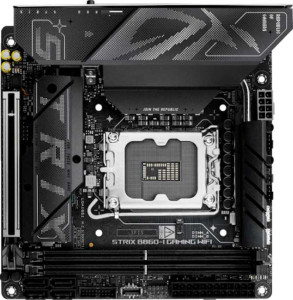
Asus ROG Strix B860-I Gaming WiFi
Gigabyte B850I Aorus Pro

Asus ROG Strix B860-I Gaming WiFi Gigabyte B850I Aorus Pro

Overview

Welcome to our in-depth comparison of the Asus ROG Strix B860-I Gaming WiFi and the Gigabyte B850I Aorus Pro — two compact Mini-ITX motherboards targeting enthusiasts who refuse to compromise on features despite a smaller footprint. While both boards share a strong connectivity foundation and modern memory support, they diverge on critical fronts such as CPU platform compatibility, rear port selection, and storage expansion, making the choice between them far from straightforward.

Common Features

  • Both boards use the Mini-ITX form factor.
  • Wi-Fi is supported on both products, covering Wi-Fi 4, Wi-Fi 5, Wi-Fi 6, Wi-Fi 6E, and Wi-Fi 7.
  • Bluetooth 5.4 is present on both products.
  • Both products output HDMI 2.1.
  • Overclocking support is available on both products.
  • RGB lighting is featured on both products.
  • Both boards support a maximum of 128 GB of memory.
  • Each board provides 2 memory slots.
  • Both boards use DDR5 memory.
  • Both boards support dual-channel memory.
  • ECC memory is not supported on either product.
  • Neither board includes USB 3.2 Gen 1 ports of the USB-C variety on the rear panel.
  • Both boards provide 2 USB 2.0 rear ports.
  • Neither board includes USB 4 20 Gbps ports.
  • Neither board includes Thunderbolt 3 ports.
  • An HDMI output is present on both products.
  • Both boards include 1 RJ45 port.
  • USB Type-C connectivity is available on both products.
  • Neither board includes eSATA ports.
  • Both boards provide 2 USB 3.2 Gen 1 ports through expansion, 1 USB-C 3.2 Gen 2 port through expansion, 2 USB 2.0 ports through expansion, and 2 USB 3.0 ports through expansion.
  • Both boards feature 2 M.2 sockets.
  • Neither board includes U.2 sockets or mSATA connectors.
  • Neither board includes SATA 2 connectors.
  • Both boards deliver a 120 dB signal-to-noise ratio on the DAC.
  • 7.1-channel audio is supported on both products.
  • An S/PDIF Out port is present on both products.
  • Both boards provide 2 audio connectors.
  • Each board includes 1 PCIe 5.0 x16 slot and no PCIe 4.0, 3.0, or 2.0 x16 slots.
  • Neither board includes PCIe x1, x4, x8, or PCI slots.
  • RAID 0, RAID 1, RAID 5, and RAID 10 are supported on both products.
  • RAID 0+1 is not supported on either product.

Main Differences

  • The CPU socket is LGA 1851 on Asus ROG Strix B860-I Gaming WiFi and AM5 on Gigabyte B850I Aorus Pro.
  • The chipset is B860 on Asus ROG Strix B860-I Gaming WiFi and B850 on Gigabyte B850I Aorus Pro.
  • Easy BIOS reset is supported on Asus ROG Strix B860-I Gaming WiFi but not available on Gigabyte B850I Aorus Pro.
  • The maximum overclocked RAM speed is 9066 MHz on Asus ROG Strix B860-I Gaming WiFi and 8400 MHz on Gigabyte B850I Aorus Pro.
  • USB 3.2 Gen 2 ports (USB-A) number 1 on Asus ROG Strix B860-I Gaming WiFi and 2 on Gigabyte B850I Aorus Pro.
  • USB 3.2 Gen 1 ports (USB-A) number 3 on Asus ROG Strix B860-I Gaming WiFi and 2 on Gigabyte B850I Aorus Pro.
  • A USB 3.2 Gen 2 port (USB-C) is present on Gigabyte B850I Aorus Pro but not available on Asus ROG Strix B860-I Gaming WiFi.
  • A USB 3.2 Gen 2x2 port is present on Asus ROG Strix B860-I Gaming WiFi but not available on Gigabyte B850I Aorus Pro.
  • A USB 4 40 Gbps port is present on Asus ROG Strix B860-I Gaming WiFi but not available on Gigabyte B850I Aorus Pro.
  • A Thunderbolt 4 port is present on Asus ROG Strix B860-I Gaming WiFi but not available on Gigabyte B850I Aorus Pro.
  • A DisplayPort output is present on Asus ROG Strix B860-I Gaming WiFi but not available on Gigabyte B850I Aorus Pro.
  • SATA 3 connectors number 4 on Asus ROG Strix B860-I Gaming WiFi and 2 on Gigabyte B850I Aorus Pro.
  • Fan headers number 2 on Asus ROG Strix B860-I Gaming WiFi and 3 on Gigabyte B850I Aorus Pro.
  • A TPM connector is present on Asus ROG Strix B860-I Gaming WiFi but not available on Gigabyte B850I Aorus Pro.
Specs Comparison
Asus ROG Strix B860-I Gaming WiFi

Asus ROG Strix B860-I Gaming WiFi

Gigabyte B850I Aorus Pro

Gigabyte B850I Aorus Pro

General info:
CPU socket LGA 1851 AM5
chipset B860 B850
form factor Mini-ITX Mini-ITX
release date January 2025 January 2025
supports Wi-Fi
Wi-Fi version Wi-Fi 4 (802.11n), Wi-Fi 5 (802.11ac), Wi-Fi 6 (802.11ax), Wi-Fi 6E (802.11ax), Wi-Fi 7 (802.11be) Wi-Fi 4 (802.11n), Wi-Fi 5 (802.11ac), Wi-Fi 6 (802.11ax), Wi-Fi 6E (802.11ax), Wi-Fi 7 (802.11be)
Has Bluetooth
Bluetooth version 5.4 5.4
HDMI version HDMI 2.1 HDMI 2.1
Easy to overclock
has RGB lighting
Easy to reset BIOS
Has dual BIOS
has aptX
CPU sockets 1 1
Has integrated graphics
warranty period 3 years 3 years
height 170 mm 170 mm
width 170 mm 170 mm
Has integrated CPU

At the platform level, these two boards represent a fundamental fork in the road: the Asus ROG Strix B860-I is built around Intel's LGA 1851 socket with the B860 chipset, targeting Intel's latest CPU generation, while the Gigabyte B850I Aorus Pro uses AMD's AM5 socket with the B850 chipset. This is the single most decisive spec in this group — it dictates your entire CPU ecosystem, upgrade path, and platform compatibility. Neither is objectively superior here; the choice depends entirely on whether you are committed to Intel or AMD processors.

Beyond the platform split, the two boards are remarkably well-matched. Both occupy the same Mini-ITX 170×170 mm footprint, support the same Wi-Fi 7 standard (backwards-compatible through Wi-Fi 4), share Bluetooth 5.4, output over HDMI 2.1, and both carry a dual BIOS for firmware redundancy and a 3-year warranty. For a compact build, this parity across connectivity and physical dimensions means neither board forces a compromise on features.

The one practical differentiator within shared territory is BIOS management: the ROG Strix B860-I offers both easy BIOS reset and easy overclocking, while the B850I Aorus Pro supports easy overclocking but lacks a dedicated easy-reset mechanism. For enthusiasts who experiment with settings frequently, that BIOS reset capability on the Asus board is a tangible convenience advantage. Overall, the Asus holds a slight edge in usability features, but the dominant decision factor here is simply Intel vs AMD platform allegiance.

Memory:
maximum memory amount 128GB 128GB
overclocked RAM speed 9066 MHz 8400 MHz
memory slots 2 2
DDR memory version 5 5
memory channels 2 2
Supports ECC memory

Both the Asus ROG Strix B860-I Gaming WiFi and the Gigabyte B850I Aorus Pro support a maximum memory amount of 128GB, ensuring ample space for demanding applications. They each come with 2 memory slots and utilize DDR5 memory, with both boards featuring dual memory channels. Neither supports ECC memory, which is common in high-performance setups requiring error-correcting codes.

When it comes to memory speeds, the Asus motherboard supports overclocked RAM speeds of up to 9066 MHz, while the Gigabyte model supports up to 8400 MHz. This gives the Asus board a higher potential for memory performance when overclocked.

In summary, while both boards offer similar memory capacities and configurations, the Asus board stands out with its higher overclocked RAM speed, offering a better option for users seeking to push their memory performance further.

Ports:
USB 3.2 Gen 2 ports (USB-A) 1 2
USB 3.2 Gen 1 ports (USB-A) 3 2
USB 3.2 Gen 2 ports (USB-C) 0 1
USB 3.2 Gen 1 ports (USB-C) 0 0
USB 2.0 ports 2 2
USB 3.2 Gen 2x2 ports 1 0
USB 4 40Gbps ports 1 0
USB 4 20Gbps ports 0 0
Thunderbolt 4 ports 1 0
Thunderbolt 3 ports 0 0
has an HDMI output
DisplayPort outputs 1 0
RJ45 ports 1 1
Has USB Type-C
eSATA ports 0 0
DVI outputs 0 0
has a VGA connector
PS/2 ports 0 0

The Asus ROG Strix B860-I Gaming WiFi and the Gigabyte B850I Aorus Pro offer a range of port options, but with some differences in their configurations. Both motherboards include USB 2.0 ports (2 each) and HDMI outputs, ensuring compatibility with a variety of peripherals and displays. The Asus model, however, features a broader selection of USB ports, including 1 USB 3.2 Gen 2x2 port, 1 USB 4 40Gbps port, and a Thunderbolt 4 port, which are absent on the Gigabyte board. The Gigabyte model, in contrast, provides 2 USB 3.2 Gen 2 ports (USB-A) and 1 USB 3.2 Gen 2 port (USB-C), offering more USB-A connectivity but lacking the USB 4 and Thunderbolt 4 options found on the Asus board.

Both boards are equipped with an RJ45 port for wired networking, but only the Asus model includes a DisplayPort output. The Gigabyte model, on the other hand, does not offer any DisplayPort outputs.

In terms of additional legacy connections, both motherboards lack eSATA, DVI, and VGA connectors, and neither features PS/2 ports. While both have USB Type-C, the Asus board offers a more advanced array of USB and Thunderbolt options, making it the more versatile choice for high-speed data transfer and external device connectivity.

Connectors:
USB 3.2 Gen 1 ports (through expansion) 2 2
USB-C 3.2 Gen 2 ports (through expansion) 1 1
USB 2.0 ports (through expansion) 2 2
SATA 3 connectors 4 2
fan headers 2 3
USB 3.0 ports (through expansion) 2 2
M.2 sockets 2 2
Has TPM connector
U.2 sockets 0 0
Has mSATA connector
SATA 2 connectors 0 0

The Asus ROG Strix B860-I Gaming WiFi and the Gigabyte B850I Aorus Pro share many similar connectors, but there are a few differences. Both motherboards offer the same number of USB 3.2 Gen 1, USB-C 3.2 Gen 2, and USB 2.0 ports through expansion, each with 2, 1, and 2 respectively. They also both provide 2 USB 3.0 ports through expansion. When it comes to storage connectivity, the Asus board offers 4 SATA 3 connectors, while the Gigabyte board has only 2.

In terms of cooling, the Gigabyte model has 3 fan headers, whereas the Asus model offers 2. Both motherboards feature 2 M.2 sockets, but the Asus model includes a TPM connector, while the Gigabyte board does not. Neither model has U.2 or mSATA connectors, and both lack SATA 2 connectors.

Overall, the Asus ROG Strix B860-I Gaming WiFi provides slightly more storage connectivity with its additional SATA 3 connectors, while the Gigabyte B850I Aorus Pro offers an extra fan header for cooling. The presence of the TPM connector on the Asus model may be relevant for security-conscious users, as the Gigabyte model lacks this feature.

Expansion slots:
PCIe 4.0 x16 slots 0 0
PCIe 5.0 x16 slots 1 1
PCIe 3.0 x16 slots 0 0
PCIe x1 slots 0 0
PCI slots 0 0
PCIe 2.0 x16 slots 0 0
PCIe x4 slots 0 0
PCIe x8 slots 0 0

The Asus ROG Strix B860-I Gaming WiFi and the Gigabyte B850I Aorus Pro have identical configurations when it comes to expansion slots. Both motherboards feature 1 PCIe 5.0 x16 slot and do not offer any other types of PCIe slots such as PCIe 4.0, PCIe 3.0, or PCIe x1. They also lack PCI slots, PCIe 2.0 x16 slots, PCIe x4 slots, and PCIe x8 slots, which means neither offers additional flexibility in terms of expansion for other cards beyond the PCIe 5.0 x16 slot.

Overall, both motherboards have the same number and type of expansion slots, making them identical in terms of expansion options for users looking to install a single PCIe 5.0 x16 card.

Audio:
Signal-to-Noise ratio (DAC) 120 dB 120 dB
audio channels 7.1 7.1
Has S/PDIF Out port
audio connectors 2 2

The Asus ROG Strix B860-I Gaming WiFi and the Gigabyte B850I Aorus Pro offer identical audio specifications. Both motherboards feature a signal-to-noise ratio (DAC) of 120 dB, providing high-quality audio output. They each support 7.1 audio channels, making them suitable for immersive surround sound setups. Both boards also include an S/PDIF Out port for digital audio output and come with 2 audio connectors, which are standard for high-fidelity audio applications.

In summary, the audio capabilities of both motherboards are the same, offering robust features for users who require quality sound output from their system.

Storage:
Supports RAID 1
Supports RAID 10 (1+0)
Supports RAID 5
Supports RAID 0
Supports RAID 0+1

Both the Asus ROG Strix B860-I Gaming WiFi and the Gigabyte B850I Aorus Pro support similar RAID configurations, offering support for RAID 1, RAID 10 (1+0), RAID 5, and RAID 0. This means both motherboards allow for a variety of storage setups that include redundancy or improved performance. However, neither board supports RAID 0+1, limiting options for certain types of striped and mirrored configurations.

Overall, the storage capabilities are identical for both motherboards, with both offering the same RAID support for users seeking flexibility in their storage solutions.

Comparison Summary & Verdict

After examining every specification, it is clear that both the Asus ROG Strix B860-I Gaming WiFi and the Gigabyte B850I Aorus Pro are capable Mini-ITX boards, but they serve meaningfully different builders. The Asus ROG Strix B860-I Gaming WiFi is the stronger pick for those investing in the Intel LGA 1851 platform, particularly users who value a richer rear I/O — including a Thunderbolt 4 port, a USB 4 40 Gbps port, a DisplayPort output, and more SATA 3 connectors — as well as the convenience of easy BIOS reset and support for higher overclocked RAM speeds up to 9066 MHz. The Gigabyte B850I Aorus Pro, on the other hand, is the natural choice for builders committed to the AMD AM5 ecosystem, offering an extra fan header for improved thermal management and a USB 3.2 Gen 2 USB-C rear port, making it a tidy, well-rounded option for AMD-focused compact builds.

Asus ROG Strix B860-I Gaming WiFi
Buy Asus ROG Strix B860-I Gaming WiFi if...

Buy the Asus ROG Strix B860-I Gaming WiFi if you are building on the Intel LGA 1851 platform and want a richer I/O suite, including Thunderbolt 4, USB 4 40 Gbps, a DisplayPort output, more SATA ports, and support for higher overclocked RAM speeds.

Gigabyte B850I Aorus Pro
Buy Gigabyte B850I Aorus Pro if...

Buy the Gigabyte B850I Aorus Pro if you are building on the AMD AM5 platform and prefer an extra fan header for better thermal control alongside a USB 3.2 Gen 2 USB-C rear port.