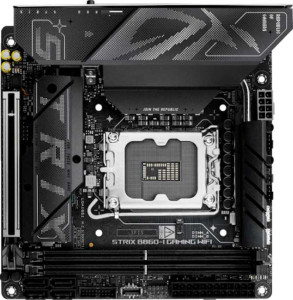
Asus ROG Strix B860-I Gaming WiFi
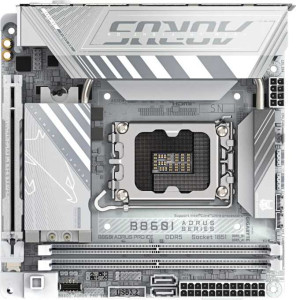
Gigabyte B860I Aorus Pro Ice

Asus ROG Strix B860-I Gaming WiFi Gigabyte B860I Aorus Pro Ice

Overview

Welcome to our in-depth specification comparison between the Asus ROG Strix B860-I Gaming WiFi and the Gigabyte B860I Aorus Pro Ice, two compact Mini-ITX motherboards built on the B860 chipset with LGA 1851 support. While they share a strong common foundation, key battlegrounds emerge around USB port configurations, storage connectivity, RAID support, and onboard features like RGB lighting and BIOS accessibility. Read on to discover which board best fits your build.

Common Features

  • Both motherboards use the LGA 1851 CPU socket.
  • Both motherboards feature the B860 chipset.
  • Both motherboards use the Mini-ITX form factor.
  • Wi-Fi is supported on both motherboards.
  • Both support Wi-Fi 4 (802.11n), Wi-Fi 5 (802.11ac), Wi-Fi 6 (802.11ax), Wi-Fi 6E (802.11ax), and Wi-Fi 7 (802.11be).
  • Bluetooth is available on both motherboards, both at version 5.4.
  • Both motherboards include an HDMI 2.1 output.
  • Both support a maximum memory amount of 128GB.
  • Both motherboards have 2 memory slots.
  • Both use DDR5 memory.
  • Both support dual-channel memory.
  • ECC memory is not supported on either motherboard.
  • Neither motherboard has any USB 3.2 Gen 2 ports in USB-C format.
  • Neither motherboard has any USB 3.2 Gen 1 ports in USB-C format.
  • Both motherboards include 1 USB 4 40Gbps port.
  • Neither motherboard has any USB 4 20Gbps ports.
  • Both motherboards include 1 Thunderbolt 4 port.
  • Neither motherboard has any Thunderbolt 3 ports.
  • Both motherboards include a DisplayPort output.
  • Both provide 2 USB 3.2 Gen 1 ports through expansion, 1 USB-C 3.2 Gen 2 port through expansion, 2 USB 2.0 ports through expansion, and 2 USB 3.0 ports through expansion.
  • Both motherboards have 2 M.2 sockets.
  • A TPM connector is present on both motherboards.
  • Neither motherboard has any U.2 sockets.
  • An mSATA connector is not available on either motherboard.
  • Both motherboards have 1 PCIe 5.0 x16 slot and no other PCIe or PCI slots.
  • Both motherboards support 7.1 audio channels.
  • An S/PDIF Out port is available on both motherboards.
  • Both motherboards have 2 audio connectors.
  • Both support RAID 0 and RAID 1.
  • RAID 0+1 is not supported on either motherboard.

Main Differences

  • RGB lighting is present on the Asus ROG Strix B860-I Gaming WiFi but not available on the Gigabyte B860I Aorus Pro Ice.
  • An easy BIOS reset feature is available on the Asus ROG Strix B860-I Gaming WiFi but not present on the Gigabyte B860I Aorus Pro Ice.
  • The maximum supported overclocked RAM speed is 9066 MHz on the Asus ROG Strix B860-I Gaming WiFi and 9200 MHz on the Gigabyte B860I Aorus Pro Ice.
  • USB 3.2 Gen 2 ports (USB-A) number 1 on the Asus ROG Strix B860-I Gaming WiFi and 3 on the Gigabyte B860I Aorus Pro Ice.
  • USB 3.2 Gen 1 ports (USB-A) number 3 on the Asus ROG Strix B860-I Gaming WiFi and 2 on the Gigabyte B860I Aorus Pro Ice.
  • USB 2.0 ports number 2 on the Asus ROG Strix B860-I Gaming WiFi, while the Gigabyte B860I Aorus Pro Ice has none.
  • A USB 3.2 Gen 2x2 port is present on the Asus ROG Strix B860-I Gaming WiFi but not available on the Gigabyte B860I Aorus Pro Ice.
  • SATA 3 connectors number 4 on the Asus ROG Strix B860-I Gaming WiFi and 2 on the Gigabyte B860I Aorus Pro Ice.
  • Fan headers number 2 on the Asus ROG Strix B860-I Gaming WiFi and 3 on the Gigabyte B860I Aorus Pro Ice.
  • RAID 10 (1+0) support is present on the Asus ROG Strix B860-I Gaming WiFi but not available on the Gigabyte B860I Aorus Pro Ice.
  • RAID 5 support is present on the Asus ROG Strix B860-I Gaming WiFi but not available on the Gigabyte B860I Aorus Pro Ice.
Specs Comparison
Asus ROG Strix B860-I Gaming WiFi

Asus ROG Strix B860-I Gaming WiFi

Gigabyte B860I Aorus Pro Ice

Gigabyte B860I Aorus Pro Ice

General info:
CPU socket LGA 1851 LGA 1851
chipset B860 B860
form factor Mini-ITX Mini-ITX
release date January 2025 January 2025
supports Wi-Fi
Wi-Fi version Wi-Fi 4 (802.11n), Wi-Fi 5 (802.11ac), Wi-Fi 6 (802.11ax), Wi-Fi 6E (802.11ax), Wi-Fi 7 (802.11be) Wi-Fi 4 (802.11n), Wi-Fi 5 (802.11ac), Wi-Fi 6 (802.11ax), Wi-Fi 6E (802.11ax), Wi-Fi 7 (802.11be)
Has Bluetooth
Bluetooth version 5.4 5.4
HDMI version HDMI 2.1 HDMI 2.1
Easy to overclock
has RGB lighting
Easy to reset BIOS
Has dual BIOS
has aptX
CPU sockets 1 1
Has integrated graphics
warranty period 3 years 3 years
height 170 mm 170 mm
width 170 mm 170 mm
Has integrated CPU

At the platform level, the Asus ROG Strix B860-I Gaming WiFi and the Gigabyte B860I Aorus Pro Ice are virtually identical twins: both use the LGA 1851 socket with the B860 chipset, share the compact Mini-ITX (170 × 170 mm) footprint, support the same full Wi-Fi 7 (802.11be) stack, carry Bluetooth 5.4, output via HDMI 2.1, and both include dual BIOS and a 3-year warranty. For anyone choosing between these two on platform fundamentals alone, there is nothing to separate them.

The real differentiation surfaces in two quality-of-life features. First, the ROG Strix includes RGB lighting while the Aorus Pro Ice does not — a meaningful distinction for builders who invest in windowed cases and themed builds, but irrelevant for those prioritizing a clean, minimalist aesthetic (where the Ice actually wins by default). Second, and more practically significant, the ROG Strix is listed as easy to reset BIOS whereas the Aorus Pro Ice is not. In a Mini-ITX context — where physical access is tight and BIOS recovery after a failed overclock or memory training loop can be genuinely frustrating — having a dedicated or simplified reset mechanism is a tangible convenience advantage.

Overall, the ROG Strix B860-I holds a modest but real edge in this group: the simplified BIOS reset capability is a practical benefit that matters specifically in the compact-build scenarios these boards target, and RGB support adds flexibility without any downside for those who want it. The Aorus Pro Ice is not worse in any functional sense, but it offers fewer conveniences at the general-info level.

Memory:
maximum memory amount 128GB 128GB
overclocked RAM speed 9066 MHz 9200 MHz
memory slots 2 2
DDR memory version 5 5
memory channels 2 2
Supports ECC memory

The Asus ROG Strix B860-I Gaming WiFi and Gigabyte B860I Aorus Pro Ice both support a maximum memory amount of 128GB, and feature 2 memory slots and 2 memory channels, with DDR5 memory version support. The primary difference between the two models is their overclocked RAM speed; the Asus board supports an overclocked speed of 9066 MHz, while the Gigabyte board offers a slightly higher overclocked speed of 9200 MHz.

Neither of the motherboards supports ECC memory, meaning they are not designed for error-correcting code memory.

Overall, the memory specifications are largely similar between the two products, with the only notable difference being the slightly higher overclocked RAM speed of the Gigabyte board at 9200 MHz versus the 9066 MHz on the Asus model.

Ports:
USB 3.2 Gen 2 ports (USB-A) 1 3
USB 3.2 Gen 1 ports (USB-A) 3 2
USB 3.2 Gen 2 ports (USB-C) 0 0
USB 3.2 Gen 1 ports (USB-C) 0 0
USB 2.0 ports 2 0
USB 3.2 Gen 2x2 ports 1 0
USB 4 40Gbps ports 1 1
USB 4 20Gbps ports 0 0
Thunderbolt 4 ports 1 1
Thunderbolt 3 ports 0 0
has an HDMI output
DisplayPort outputs 1 1
RJ45 ports 1 1
Has USB Type-C
eSATA ports 0 0
DVI outputs 0 0
has a VGA connector
PS/2 ports 0 0

The Asus ROG Strix B860-I Gaming WiFi and Gigabyte B860I Aorus Pro Ice both offer a variety of USB ports, but with some differences in their configurations. The Asus board features 1 USB 3.2 Gen 2 port (USB-A), 3 USB 3.2 Gen 1 ports (USB-A), 2 USB 2.0 ports, and 1 USB 3.2 Gen 2x2 port. In addition, it includes 1 USB 4 40Gbps port and 1 Thunderbolt 4 port. The Gigabyte board, on the other hand, provides 3 USB 3.2 Gen 2 ports (USB-A), 2 USB 3.2 Gen 1 ports (USB-A), and lacks USB 3.2 Gen 2x2 and USB 4 40Gbps ports but also features 1 Thunderbolt 4 port.

Both boards have the same number of HDMI output (1) and DisplayPort outputs (1), along with 1 RJ45 Ethernet port and 1 USB Type-C port. Neither product has eSATA, DVI, VGA, or PS/2 ports. The Gigabyte board is slightly different in terms of USB port distribution, with more USB 3.2 Gen 2 ports but fewer USB 2.0 ports compared to the Asus board.

In summary, the main differences in port configurations lie in the number and types of USB ports, with the Asus offering more variety in USB 2.0 and USB 3.2 Gen 2x2 options, while the Gigabyte offers a higher concentration of USB 3.2 Gen 2 ports.

Connectors:
USB 3.2 Gen 1 ports (through expansion) 2 2
USB-C 3.2 Gen 2 ports (through expansion) 1 1
USB 2.0 ports (through expansion) 2 2
SATA 3 connectors 4 2
fan headers 2 3
USB 3.0 ports (through expansion) 2 2
M.2 sockets 2 2
Has TPM connector
U.2 sockets 0 0
Has mSATA connector
SATA 2 connectors 0 0

The Asus ROG Strix B860-I Gaming WiFi and Gigabyte B860I Aorus Pro Ice have several similarities and differences in their connectors. Both boards offer 2 USB 3.2 Gen 1 ports, 1 USB-C 3.2 Gen 2 port, and 2 USB 2.0 ports through expansion. They also each provide 2 M.2 sockets, a TPM connector, and 2 USB 3.0 ports through expansion. The main difference between the two is in the SATA 3 connectors and fan headers.

The Asus board features 4 SATA 3 connectors, while the Gigabyte model provides only 2 SATA 3 connectors. In terms of fan headers, the Asus board has 2, while the Gigabyte board offers 3 fan headers. Both models lack mSATA connectors and U.2 sockets, and neither has SATA 2 connectors.

In summary, the key differences lie in the number of SATA 3 connectors and fan headers, with the Asus board offering more SATA 3 connectors and the Gigabyte board providing an additional fan header.

Expansion slots:
PCIe 4.0 x16 slots 0 0
PCIe 5.0 x16 slots 1 1
PCIe 3.0 x16 slots 0 0
PCIe x1 slots 0 0
PCI slots 0 0
PCIe 2.0 x16 slots 0 0
PCIe x4 slots 0 0
PCIe x8 slots 0 0

The Asus ROG Strix B860-I Gaming WiFi and Gigabyte B860I Aorus Pro Ice share the same expansion slot configuration. Both motherboards feature 1 PCIe 5.0 x16 slot, but neither model includes any PCIe 4.0 x16, PCIe 3.0 x16, PCIe x1, PCI, PCIe 2.0 x16, PCIe x4, or PCIe x8 slots.

As a result, both products offer a similar set of expansion slot options, with the sole available slot being the PCIe 5.0 x16 slot. Neither board provides additional slot types for other expansion needs.

In summary, both motherboards have identical expansion slot configurations, providing a single PCIe 5.0 x16 slot with no other types of slots available for expansion.

Audio:
audio channels 7.1 7.1
Has S/PDIF Out port
audio connectors 2 2

The Asus ROG Strix B860-I Gaming WiFi and Gigabyte B860I Aorus Pro Ice both offer identical audio features. Both motherboards support 7.1 audio channels, have an S/PDIF Out port, and include 2 audio connectors.

These specifications are exactly the same for both products, meaning users can expect the same audio capabilities from either motherboard, including high-quality surround sound support and the ability to connect to external audio equipment via the S/PDIF port.

In summary, there are no differences between the two models in terms of their audio specifications—they both deliver the same audio experience with 7.1 channels and the same connectivity options.

Storage:
Supports RAID 1
Supports RAID 10 (1+0)
Supports RAID 5
Supports RAID 0
Supports RAID 0+1

The Asus ROG Strix B860-I Gaming WiFi and Gigabyte B860I Aorus Pro Ice differ slightly in their RAID support. The Asus board supports RAID 1, RAID 10 (1+0), and RAID 5, but does not support RAID 0+1. In contrast, the Gigabyte board supports RAID 1 and RAID 0, but does not support RAID 10 (1+0) or RAID 5, and also lacks RAID 0+1 support.

Both boards include support for RAID 1, which mirrors data across two drives, but the Asus model offers additional RAID configurations like RAID 10 and RAID 5, providing more flexibility for data redundancy and performance. The Gigabyte board is limited to RAID 0 and RAID 1.

In summary, the Asus board offers a wider range of RAID options, while the Gigabyte board is more limited in its RAID support, only covering RAID 1 and RAID 0.

Comparison Summary & Verdict

Both boards deliver a solid Mini-ITX platform with Wi-Fi 7, Bluetooth 5.4, PCIe 5.0, DDR5 support up to 128GB, Thunderbolt 4, and 7.1 audio — making either a capable foundation for a compact, modern build. However, their differences point to distinct audiences. The Asus ROG Strix B860-I Gaming WiFi stands out with RGB lighting, an easy BIOS reset button, 4 SATA 3 connectors, a USB 3.2 Gen 2x2 port, and broader RAID 5 and RAID 10 support, making it ideal for enthusiasts who want richer aesthetics, more storage flexibility, and advanced RAID configurations. The Gigabyte B860I Aorus Pro Ice, on the other hand, offers 3 USB 3.2 Gen 2 Type-A ports, a higher overclocked RAM ceiling of 9200 MHz, and an extra fan header, appealing to builders who prioritize high-speed USB connectivity and superior thermal management in a clean, no-RGB aesthetic.

Asus ROG Strix B860-I Gaming WiFi
Buy Asus ROG Strix B860-I Gaming WiFi if...

Buy the Asus ROG Strix B860-I Gaming WiFi if you want RGB lighting, a convenient BIOS reset feature, more SATA ports, and advanced RAID 5 and RAID 10 support for a feature-rich compact build.

Gigabyte B860I Aorus Pro Ice
Buy Gigabyte B860I Aorus Pro Ice if...

Buy the Gigabyte B860I Aorus Pro Ice if you need more USB 3.2 Gen 2 Type-A ports, a slightly higher overclocked RAM speed of 9200 MHz, and an extra fan header for better cooling control.