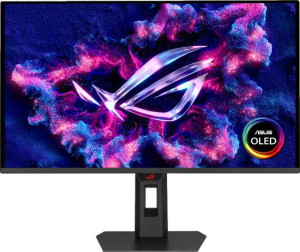
Asus ROG Strix OLED XG27AQDPG 27"
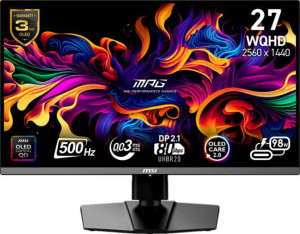
MSI MPG 272QR QD-OLED X50 27"

Asus ROG Strix OLED XG27AQDPG 27" MSI MPG 272QR QD-OLED X50 27"

Common Features

  • Both displays use QD-OLED, OLED/AMOLED technology.
  • The response time for both monitors is 0.03 ms.
  • Both monitors have a screen size of 26.5″.
  • The resolution for both monitors is 2560 x 1440 px.
  • Both monitors have a pixel density of 110 ppi.
  • Both monitors have an anti-glare coating.
  • Both monitors support a refresh rate of 500Hz.
  • Both monitors have a maximum horizontal viewing angle of 178º.
  • Both monitors are designed for gaming.
  • Both monitors support total tilt adjustment.
  • Both monitors include a swivel stand.
  • Both monitors support VESA mounting.
  • Both monitors have a 10-bit bit depth.
  • Both monitors have a contrast ratio of 1500000:1.
  • Both monitors have 2 HDMI ports.
  • Both monitors have 1 DisplayPort output.
  • Both monitors include a 3.5 mm audio jack.
  • Neither monitor supports DVI connectivity.
  • Both monitors use HDMI 2.1.
  • Neither monitor supports Ethernet or Wi-Fi.
  • Both monitors do not have stereo speakers.
  • Neither monitor has a built-in smart TV.
  • Both monitors do not include a remote control.
  • Both monitors do not support Dolby Digital or Dolby Digital Plus.
  • Neither monitor has DTS Surround.
  • Both monitors do not have an ambient light sensor.
  • Neither monitor has a front camera.

Main Differences

  • Adaptive synchronization is Nvidia G-Sync, AMD FreeSync, Nvidia G-Sync Compatible on Asus ROG Strix OLED XG27AQDPG 27″ and VESA Adaptive Sync on MSI MPG 272QR QD-OLED X50 27″.
  • Supports portrait mode is available on Asus ROG Strix OLED XG27AQDPG 27″ but not available on MSI MPG 272QR QD-OLED X50 27″.
  • Brightness (typical) is 300 nits on Asus ROG Strix OLED XG27AQDPG 27″ and 550 nits on MSI MPG 272QR QD-OLED X50 27″.
  • Supports color calibration is available on Asus ROG Strix OLED XG27AQDPG 27″ but not available on MSI MPG 272QR QD-OLED X50 27″.
  • Display colors are 1073 million on Asus ROG Strix OLED XG27AQDPG 27″ and 1070 million on MSI MPG 272QR QD-OLED X50 27″.
  • sRGB coverage is 145% on Asus ROG Strix OLED XG27AQDPG 27″ and 138% on MSI MPG 272QR QD-OLED X50 27″.
  • DisplayPort version is DisplayPort 1.4 on Asus ROG Strix OLED XG27AQDPG 27″ and DisplayPort 2.1 on MSI MPG 272QR QD-OLED X50 27″.
  • USB ports are 2 on Asus ROG Strix OLED XG27AQDPG 27″ and 4 on MSI MPG 272QR QD-OLED X50 27″.
  • USB Type-C is not available on Asus ROG Strix OLED XG27AQDPG 27″ but present on MSI MPG 272QR QD-OLED X50 27″.
  • Picture-in-Picture (PiP) feature is not available on Asus ROG Strix OLED XG27AQDPG 27″ but present on MSI MPG 272QR QD-OLED X50 27″.
Specs Comparison
Asus ROG Strix OLED XG27AQDPG 27"

Asus ROG Strix OLED XG27AQDPG 27"

MSI MPG 272QR QD-OLED X50 27"

MSI MPG 272QR QD-OLED X50 27"

Display:
Display type QD-OLED, OLED/AMOLED QD-OLED, OLED/AMOLED
response time 0.03 ms 0.03 ms
screen size 26.5" 26.5"
resolution 2560 x 1440 px 2560 x 1440 px
pixel density 110 ppi 110 ppi
Adaptive synchronization Nvidia G-Sync, AMD FreeSync, Nvidia G-Sync Compatible VESA Adaptive Sync
has anti-glare coating
refresh rate 500Hz 500Hz
maximum horizontal viewing angle 178º 178º
maximum vertical viewing angle 178º 178º
has a matte panel
has a glossy panel
has a touch screen

The Asus ROG Strix OLED XG27AQDPG and MSI MPG 272QR QD-OLED X50 both feature QD-OLED panels, offering vibrant color reproduction and deep blacks, with an OLED/AMOLED display type. Both monitors have the same screen size of 26.5″, a resolution of 2560 x 1440 px, and a pixel density of 110 ppi, ensuring sharp and detailed visuals. Response time for both is an impressive 0.03 ms, making them suitable for fast-paced gaming and other high-speed applications. Additionally, both monitors support anti-glare coatings to reduce reflections and have a matte panel finish, with neither offering a glossy panel or touch functionality.

When it comes to adaptive synchronization, the Asus monitor supports Nvidia G-Sync, AMD FreeSync, and is Nvidia G-Sync Compatible, while the MSI monitor only features VESA Adaptive Sync. This means the Asus model offers a broader range of compatibility with different graphics cards, whereas the MSI model is more limited in this regard.

Both monitors offer identical viewing angles, with maximum horizontal and vertical viewing angles of 178º. As for refresh rates, both models support an impressive 500Hz, ensuring smooth motion for high-frame-rate content. Overall, these monitors are quite similar in terms of core specifications, with the main difference lying in their adaptive synchronization technologies.

General info:
Type Gaming Gaming
release date June 2025 January 2025
supports total tilt
Has a swivel stand
Supports VESA mount
supports portrait mode

Both the Asus ROG Strix OLED XG27AQDPG and MSI MPG 272QR QD-OLED X50 are gaming monitors, designed for high-performance gaming setups. They share several key features, including the ability to tilt the screen, support a swivel stand, and support VESA mounts for easy wall or arm mounting. However, the two products differ slightly in terms of portrait mode support.

The Asus monitor supports portrait mode, allowing for flexible orientation of the display, which can be useful for certain types of work or media viewing. In contrast, the MSI monitor does not support portrait mode, which limits its flexibility for users who might prefer that viewing orientation.

Aside from this difference, the general specifications for both monitors align closely, making them similar in terms of their overall design and adjustability features for gaming setups.

Colors:
brightness (typical) 300 nits 550 nits
supports color calibration
display colors 1073 million 1070 million
bit depth 10-bit 10-bit
contrast ratio 1500000:1 1500000:1
sRGB coverage 145% 138%

The Asus ROG Strix OLED XG27AQDPG and MSI MPG 272QR QD-OLED X50 offer excellent color performance, but there are some differences in their color specifications. The Asus monitor features a typical brightness of 300 nits, while the MSI monitor is brighter with a typical brightness of 550 nits. This means the MSI model may be better suited for environments with more ambient light.

In terms of color depth, both monitors support 10-bit color, which allows for smoother gradients and more vibrant color reproduction. The Asus model can display 1073 million colors, while the MSI model displays 1070 million colors. This is a slight difference, but both offer high color accuracy. Additionally, the Asus monitor covers 145% of the sRGB color gamut, whereas the MSI model covers 138%. The Asus display therefore provides slightly broader color coverage, which can be advantageous for tasks requiring precise color fidelity.

Lastly, the Asus monitor supports color calibration, allowing users to fine-tune color accuracy, while the MSI model does not offer this feature. This makes the Asus model a better option for those who need or prefer custom color calibration.

Connectivity:
HDMI ports 2 2
supports Thunderbolt
DisplayPort outputs 1 1
DisplayPort version DisplayPort 1.4 DisplayPort 2.1
has a socket for a 3.5 mm audio jack
has a DVI connector
USB ports 2 4
Has USB Type-C
HDMI version HDMI 2.1 HDMI 2.1
supports Ethernet
supports Wi-Fi
has AirPlay
mini DisplayPort outputs 0 0
has a VGA connector

Both the Asus ROG Strix OLED XG27AQDPG and MSI MPG 272QR QD-OLED X50 provide a solid range of connectivity options. Both monitors come with 2 HDMI ports, support HDMI 2.1, and offer a single DisplayPort output—however, they differ in the DisplayPort versions. The Asus monitor uses DisplayPort 1.4, while the MSI monitor is equipped with the newer DisplayPort 2.1, which could offer enhanced capabilities for certain high-bandwidth applications.

The Asus model has 2 USB ports, while the MSI model provides 4 USB ports, giving it more flexibility for connecting peripherals. Additionally, the MSI monitor includes a USB Type-C port, which the Asus monitor lacks. Both monitors feature a 3.5mm audio jack, but neither supports Thunderbolt, Ethernet, or Wi-Fi. AirPlay is also not supported on either model.

Both monitors do not include older ports such as DVI, VGA, or mini DisplayPort, ensuring a streamlined connection setup. Overall, while both monitors offer similar HDMI and DisplayPort options, the MSI model provides more USB ports and a USB Type-C connection for added convenience.

Features:
has PiP
has stereo speakers
has built-in smart TV
has a remote control
supports Dolby Digital
supports Dolby Digital Plus
has DTS Surround
has an ambient light sensor
has a front camera

The Asus ROG Strix OLED XG27AQDPG and MSI MPG 272QR QD-OLED X50 both lack stereo speakers, built-in smart TV functionality, remote control, and support for Dolby Digital or Dolby Digital Plus. Neither monitor includes an ambient light sensor or a front camera, ensuring that their focus is strictly on the display performance without additional multimedia features.

However, there is a key difference between the two models in terms of Picture-in-Picture (PiP) support. The Asus monitor does not have PiP functionality, while the MSI monitor includes this feature, allowing users to view multiple sources on the screen simultaneously. This could be an appealing option for users who need to multitask or follow multiple content streams at once.

In terms of audio, neither monitor includes DTS Surround, so users would need to rely on external speakers or audio systems for immersive sound. Overall, the MSI model stands out with its PiP capability, while both monitors are similar in lacking most other multimedia features.

Comparison Summary

This is a specification comparison between Asus ROG Strix OLED XG27AQDPG 27″ and MSI MPG 272QR QD-OLED X50 27″. Both monitors use QD-OLED technology with a 26.5″ screen size, 2560 x 1440 px resolution, and a 500Hz refresh rate, while sharing a 10-bit color depth, anti-glare coating, and VESA mount support. Differences include Adaptive synchronization with G-Sync and FreeSync on the Asus versus VESA Adaptive Sync on the MSI, brightness at 300 nits on Asus and 550 nits on MSI, and color calibration support available on Asus but not MSI. Additionally, the MSI provides USB Type-C connectivity and a Picture-in-Picture feature, which the Asus does not offer, and sRGB coverage is 145% on Asus compared to 138% on MSI.