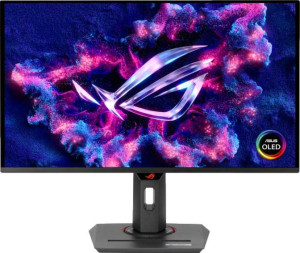
Asus ROG Strix OLED XG27UCDMG 27"
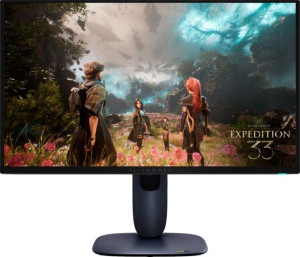
Dell Alienware AW2725Q 27"

Asus ROG Strix OLED XG27UCDMG 27" Dell Alienware AW2725Q 27"

Common Features

  • Both products have a resolution of 3840 x 2160 px.
  • Both products have a pixel density of 166 ppi.
  • Both products have a maximum horizontal viewing angle of 178º.
  • Both products have a maximum vertical viewing angle of 178º.
  • Both products have a matte panel.
  • Both products support VESA mount.
  • Both products support adaptive synchronization.
  • Both products have a response time of 0.03 ms.
  • Both products have a refresh rate of 240Hz.
  • Both products have HDMI 2.1 ports.
  • Both products have two HDMI ports.
  • Both products support DisplayPort 1.4.
  • Both products have USB version 3.1.
  • Both products have a DVI connector.
  • Both products have standby power consumption of 0.5W.
  • Both products support Picture-in-Picture (PiP).
  • Both products do not have stereo speakers.
  • Both products do not have built-in smart TV functionality.
  • Both products do not have a remote control.

Main Differences

  • The display type is OLED/AMOLED on Asus ROG Strix OLED XG27UCDMG 27″ and QD-OLED, OLED/AMOLED on Dell Alienware AW2725Q 27″.
  • The screen size is 26.5″ on Asus ROG Strix OLED XG27UCDMG 27″ and 26.7″ on Dell Alienware AW2725Q 27″.
  • Adaptive synchronization is Nvidia G-Sync, AMD FreeSync, Nvidia G-Sync Compatible, AMD FreeSync Premium Pro on Asus ROG Strix OLED XG27UCDMG 27″ and AMD FreeSync Premium Pro, Nvidia G-Sync Compatible, VESA Adaptive Sync on Dell Alienware AW2725Q 27″.
  • The EU energy label is F on Asus ROG Strix OLED XG27UCDMG 27″ and G on Dell Alienware AW2725Q 27″.
  • Asus ROG Strix OLED XG27UCDMG 27″ supports total tilt while Dell Alienware AW2725Q 27″ does not.
  • The height is 369.2 mm on Asus ROG Strix OLED XG27UCDMG 27″ and 355.97 mm on Dell Alienware AW2725Q 27″.
  • The width is 610.3 mm on Asus ROG Strix OLED XG27UCDMG 27″ and 609.51 mm on Dell Alienware AW2725Q 27″.
  • The thickness is 66.5 mm on Asus ROG Strix OLED XG27UCDMG 27″ and 72.63 mm on Dell Alienware AW2725Q 27″.
  • The weight is 7440 g on Asus ROG Strix OLED XG27UCDMG 27″ and 6370 g on Dell Alienware AW2725Q 27″.
  • Asus ROG Strix OLED XG27UCDMG 27″ supports portrait mode while Dell Alienware AW2725Q 27″ does not.
  • The volume is 14983.96354 cm³ on Asus ROG Strix OLED XG27UCDMG 27″ and 15758.333161461 cm³ on Dell Alienware AW2725Q 27″.
  • The brightness (typical) is 450 nits on Asus ROG Strix OLED XG27UCDMG 27″ and 250 nits on Dell Alienware AW2725Q 27″.
  • The display colors are 1073 million on Asus ROG Strix OLED XG27UCDMG 27″ and 1070 million on Dell Alienware AW2725Q 27″.
  • Asus ROG Strix OLED XG27UCDMG 27″ has a socket for a 3.5 mm audio jack while Dell Alienware AW2725Q 27″ does not.
  • Asus ROG Strix OLED XG27UCDMG 27″ has 4 USB ports while Dell Alienware AW2725Q 27″ has 5 USB ports.
  • Operating power consumption is 80W on Asus ROG Strix OLED XG27UCDMG 27″ and 39.4W on Dell Alienware AW2725Q 27″.
Specs Comparison
Asus ROG Strix OLED XG27UCDMG 27"

Asus ROG Strix OLED XG27UCDMG 27"

Dell Alienware AW2725Q 27"

Dell Alienware AW2725Q 27"

Display:
Display type OLED/AMOLED QD-OLED, OLED/AMOLED
response time 0.03 ms 0.03 ms
screen size 26.5" 26.7"
resolution 3840 x 2160 px 3840 x 2160 px
pixel density 166 ppi 166 ppi
Adaptive synchronization Nvidia G-Sync, AMD FreeSync, Nvidia G-Sync Compatible, AMD FreeSync Premium Pro AMD FreeSync Premium Pro, Nvidia G-Sync Compatible, VESA Adaptive Sync
has anti-glare coating
refresh rate 240Hz 240Hz
maximum horizontal viewing angle 178º 178º
maximum vertical viewing angle 178º 178º
has a matte panel
has a glossy panel
has a touch screen

Both the Asus ROG Strix OLED XG27UCDMG 27″ and the Dell Alienware AW2725Q 27″ offer a 3840 x 2160 px resolution with a pixel density of 166 ppi, providing sharp, detailed visuals. The screen sizes are quite similar, with the Asus measuring 26.5″ and the Dell slightly larger at 26.7″. Both displays feature a fast 0.03 ms response time, ensuring smooth motion for gaming and video playback.

In terms of display type, the Asus uses an OLED/AMOLED panel, while the Dell uses a QD-OLED panel alongside OLED/AMOLED, both of which promise vibrant colors and deep blacks. Both displays support a 240Hz refresh rate, offering excellent performance for fast-moving content. Additionally, both screens have anti-glare coatings, matte panels, and no glossy panels, minimizing reflections and providing a more comfortable viewing experience.

When it comes to adaptive synchronization, the Asus offers Nvidia G-Sync, AMD FreeSync, Nvidia G-Sync Compatible, and AMD FreeSync Premium Pro, while the Dell supports AMD FreeSync Premium Pro, Nvidia G-Sync Compatible, and VESA Adaptive Sync. Both monitors offer full 178º horizontal and vertical viewing angles, ensuring clear visuals from various positions.

General info:
Type Gaming Gaming
release date March 2025 May 2025
EU energy label F G
supports total tilt
Has a swivel stand
Supports VESA mount
height 369.2 mm 355.97 mm
width 610.3 mm 609.51 mm
thickness 66.5 mm 72.63 mm
weight 7440 g 6370 g
supports portrait mode
volume 14983.96354 cm³ 15758.333161461 cm³

Both the Asus ROG Strix OLED XG27UCDMG 27″ and the Dell Alienware AW2725Q 27″ are classified as gaming monitors, but they differ in a few key general features. The Asus has an EU energy label of F, while the Dell has a slightly less efficient EU energy label of G. In terms of ergonomics, the Asus supports total tilt and has a swivel stand, while the Dell does not support tilt adjustment, though it does have a swivel stand. Both monitors are compatible with VESA mounts, making them easy to mount on compatible arms or wall brackets.

When it comes to size and weight, the Asus is slightly larger and heavier, with a height of 369.2 mm, a width of 610.3 mm, and a thickness of 66.5 mm. It weighs 7440 g, while the Dell stands at a height of 355.97 mm, width of 609.51 mm, and a thicker 72.63 mm. The Dell is lighter, at 6370 g. The Asus also has a slightly smaller volume of 14983.96 cm³ compared to the Dell’s 15758.33 cm³.

For versatility, the Asus supports portrait mode, while the Dell does not, offering less flexibility for users who might prefer rotating their display. Overall, while both monitors are built with gaming in mind, the Asus offers more ergonomic features, including tilt and portrait mode, and is slightly larger and heavier, while the Dell focuses on a slightly more compact build.

Colors:
brightness (typical) 450 nits 250 nits
supports color calibration
display colors 1073 million 1070 million
contrast ratio 1500000:1 1500000:1

The Asus ROG Strix OLED XG27UCDMG 27″ and the Dell Alienware AW2725Q 27″ differ in brightness and display colors. The Asus has a typical brightness of 450 nits, significantly brighter than the Dell's 250 nits. Both displays offer a high contrast ratio of 1500000:1, ensuring deep blacks and vivid visuals.

In terms of display colors, the Asus supports 1073 million colors, slightly surpassing the Dell, which supports 1070 million colors. Both monitors do not support color calibration, meaning users will not be able to fine-tune the display’s color accuracy through built-in software.

Overall, while both monitors deliver impressive contrast ratios, the Asus offers a brighter display and a slightly wider color range, making it more suited for those who prioritize vibrant visuals.

Connectivity:
HDMI ports 2 2
supports Thunderbolt
DisplayPort outputs 1 1
DisplayPort version DisplayPort 1.4 DisplayPort 1.4
has a socket for a 3.5 mm audio jack
has a DVI connector
USB ports 4 5
USB version 3.1 3.1
Has USB Type-C
HDMI version HDMI 2.1 HDMI 2.1
supports Ethernet
supports Wi-Fi
has AirPlay
mini DisplayPort outputs 0 0
has a VGA connector

Both the Asus ROG Strix OLED XG27UCDMG 27″ and the Dell Alienware AW2725Q 27″ offer similar connectivity options, with two HDMI ports and one DisplayPort output supporting DisplayPort 1.4. Both also include USB Type-C and USB 3.1 ports, though the Asus provides 4 USB ports, while the Dell offers 5. Neither display supports Thunderbolt, Ethernet, Wi-Fi, or AirPlay, and neither has a mini DisplayPort or VGA connector.

One key difference is the 3.5 mm audio jack. The Asus features a socket for this, allowing direct audio output, while the Dell does not include this option. Both monitors use HDMI 2.1 for their HDMI ports, ensuring high-bandwidth connectivity suitable for modern devices.

Overall, the connectivity features of both displays are quite similar, with the main distinction being the presence of a 3.5 mm audio jack on the Asus, and a slightly higher number of USB ports on the Dell.

Power:
operating power consumption 80W 39.4W
standby power consumption 0.5W 0.5W

The power consumption of the Asus ROG Strix OLED XG27UCDMG 27″ and the Dell Alienware AW2725Q 27″ differs in terms of operating power. The Asus has an operating power consumption of 80W, while the Dell consumes only 39.4W during operation. Both monitors share the same standby power consumption of 0.5W, meaning they use the same minimal power when not actively in use.

Overall, the Asus requires more power during use compared to the Dell, which may influence energy consumption over time. However, both products are efficient in their standby modes, consuming very little power when idle.

Features:
has PiP
has stereo speakers
has built-in smart TV
has a remote control
supports Dolby Digital
supports Dolby Digital Plus
has DTS Surround
has an ambient light sensor
has a front camera

Both the Asus ROG Strix OLED XG27UCDMG 27″ and the Dell Alienware AW2725Q 27″ come with Picture-in-Picture (PiP) functionality, allowing users to display two sources at once. Neither monitor includes stereo speakers, a built-in smart TV, a remote control, or support for Dolby Digital or Dolby Digital Plus. Additionally, both lack DTS Surround support, an ambient light sensor, and a front camera.

Since the features of both monitors are identical in this group, there are no significant differences in terms of built-in functionality. They both focus primarily on display performance without additional multimedia features like audio enhancement or smart TV capabilities.

Comparison Summary

This is a specification comparison between Asus ROG Strix OLED XG27UCDMG 27″ and Dell Alienware AW2725Q 27″. Both monitors share a resolution of 3840 x 2160 px, 240Hz refresh rate, and response time of 0.03 ms. However, there are several differences: the screen size is 26.5″ on the Asus model and 26.7″ on the Dell, the brightness is 450 nits on the Asus and 250 nits on the Dell, and the operating power consumption is 80W on the Asus and 39.4W on the Dell. Additionally, the Asus supports portrait mode while the Dell does not.