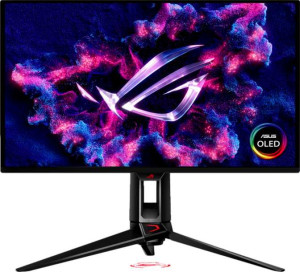
Asus ROG Swift OLED PG27UCDM 27"
Dell Alienware AW2725Q 27"

Asus ROG Swift OLED PG27UCDM 27" Dell Alienware AW2725Q 27"

Common Features

  • Both monitors use QD-OLED, OLED/AMOLED display technology.
  • Both monitors have a response time of 0.03 ms.
  • Both monitors have a resolution of 3840 x 2160 px.
  • Both monitors have a pixel density of 166 ppi.
  • Both monitors have an anti-glare coating.
  • Both monitors have a refresh rate of 240Hz.
  • Both monitors have a maximum horizontal viewing angle of 178º.
  • Both monitors have a maximum vertical viewing angle of 178º.
  • Both monitors support AMD FreeSync Premium Pro.
  • Both monitors are compatible with Nvidia G-Sync.
  • Both monitors are gaming type monitors.
  • Both monitors have a swivel stand.
  • Both monitors support VESA mount.
  • Both monitors have a typical brightness of 250 nits.
  • Both monitors do not support color calibration.
  • Both monitors have 2 HDMI ports.
  • Both monitors do not support Thunderbolt.
  • Both monitors have 1 DisplayPort output.
  • Both monitors do not have a 3.5 mm audio jack.
  • Both monitors do not have a DVI connector.
  • Both monitors have a USB Type-C port.
  • Both monitors use HDMI 2.1.
  • Both monitors do not support Ethernet.
  • Both monitors have standby power consumption of 0.5W.
  • Both monitors have Picture-in-Picture support.
  • Both monitors do not have stereo speakers.
  • Both monitors do not have built-in smart TV features.
  • Both monitors do not include a remote control.
  • Both monitors do not support Dolby Digital.
  • Both monitors do not support Dolby Digital Plus.
  • Both monitors do not have DTS Surround.
  • Both monitors do not have an ambient light sensor.

Main Differences

  • Screen size is 26.5″ on Asus ROG Swift OLED PG27UCDM 27″ and 26.7″ on Dell Alienware AW2725Q 27″.
  • Adaptive synchronization supports VESA Adaptive Sync on Dell Alienware AW2725Q 27″ but not on Asus ROG Swift OLED PG27UCDM 27″.
  • Total tilt is supported on Asus ROG Swift OLED PG27UCDM 27″ but not available on Dell Alienware AW2725Q 27″.
  • Height is 369 mm on Asus ROG Swift OLED PG27UCDM 27″ and 355.97 mm on Dell Alienware AW2725Q 27″.
  • Width is 610 mm on Asus ROG Swift OLED PG27UCDM 27″ and 609.51 mm on Dell Alienware AW2725Q 27″.
  • Thickness is 70 mm on Asus ROG Swift OLED PG27UCDM 27″ and 72.63 mm on Dell Alienware AW2725Q 27″.
  • Weight is 7620 g on Asus ROG Swift OLED PG27UCDM 27″ and 6370 g on Dell Alienware AW2725Q 27″.
  • Portrait mode is supported on Asus ROG Swift OLED PG27UCDM 27″ but not available on Dell Alienware AW2725Q 27″.
  • Display colors are 1073 million on Asus ROG Swift OLED PG27UCDM 27″ and 1070 million on Dell Alienware AW2725Q 27″.
  • DisplayPort version is 2.1 on Asus ROG Swift OLED PG27UCDM 27″ and 1.4 on Dell Alienware AW2725Q 27″.
  • USB ports are 4 on Asus ROG Swift OLED PG27UCDM 27″ and 5 on Dell Alienware AW2725Q 27″.
  • Operating power consumption is 80W on Asus ROG Swift OLED PG27UCDM 27″ and 39.4W on Dell Alienware AW2725Q 27″.
Specs Comparison
Asus ROG Swift OLED PG27UCDM 27"

Asus ROG Swift OLED PG27UCDM 27"

Dell Alienware AW2725Q 27"

Dell Alienware AW2725Q 27"

Display:
Display type QD-OLED, OLED/AMOLED QD-OLED, OLED/AMOLED
response time 0.03 ms 0.03 ms
screen size 26.5" 26.7"
resolution 3840 x 2160 px 3840 x 2160 px
pixel density 166 ppi 166 ppi
Adaptive synchronization AMD FreeSync Premium Pro, Nvidia G-Sync Compatible AMD FreeSync Premium Pro, Nvidia G-Sync Compatible, VESA Adaptive Sync
has anti-glare coating
refresh rate 240Hz 240Hz
maximum horizontal viewing angle 178º 178º
maximum vertical viewing angle 178º 178º
has a matte panel
has a glossy panel
has a touch screen

The Asus ROG Swift OLED PG27UCDM and the Dell Alienware AW2725Q both feature a QD-OLED display type, offering rich colors and deep blacks typical of OLED technology. They also have identical response times of 0.03 ms, which ensures fast and smooth motion handling in games or videos. Both displays have a resolution of 3840 x 2160 px and a pixel density of 166 ppi, providing sharp and clear images. In terms of size, the Asus monitor measures 26.5″, slightly smaller than the Dell, which is 26.7″. The difference in size is minimal and unlikely to have a noticeable impact on user experience.

When it comes to adaptive synchronization, both monitors support AMD FreeSync Premium Pro and Nvidia G-Sync Compatibility, ensuring smooth gameplay without screen tearing. However, the Dell monitor has the additional support for VESA Adaptive Sync, giving it an extra level of compatibility with more devices. Both monitors have anti-glare coatings to reduce reflections, and neither features a glossy panel or a touchscreen.

In terms of viewing angles, both displays offer a wide 178º horizontal and vertical viewing angle, ensuring consistent color and contrast when viewed from off-angles. The refresh rate on both models is 240Hz, delivering ultra-smooth motion for fast-paced gaming or video content. Lastly, both monitors have matte panels, meaning neither features a glossy finish that could cause distracting reflections.

General info:
Type Gaming Gaming
release date January 2025 May 2025
supports total tilt
Has a swivel stand
Supports VESA mount
height 369 mm 355.97 mm
width 610 mm 609.51 mm
thickness 70 mm 72.63 mm
weight 7620 g 6370 g
supports portrait mode
volume 15756.3 cm³ 15758.333161461 cm³

The Asus ROG Swift OLED PG27UCDM and Dell Alienware AW2725Q are both gaming monitors, but they have some differences in their physical features. The Asus monitor supports full tilt adjustment, while the Dell monitor does not. Both monitors have a swivel stand and support VESA mounting, so they can be easily mounted on compatible arms or stands for additional flexibility.

In terms of size, the Asus monitor has a height of 369 mm, while the Dell is slightly shorter at 355.97 mm. The width of the two monitors is nearly identical, with the Asus being 610 mm and the Dell at 609.51 mm. However, the thickness differs slightly, with the Dell being a bit thicker at 72.63 mm compared to the Asus's 70 mm.

Regarding weight, the Asus ROG Swift OLED PG27UCDM weighs 7620 g, making it heavier than the Dell Alienware AW2725Q, which weighs 6370 g. Both monitors support portrait mode, but the Dell model does not. The volume of the two monitors is also very close, with the Asus measuring 15756.3 cm³ and the Dell at 15758.3 cm³, making the Dell just marginally larger.

Colors:
brightness (typical) 250 nits 250 nits
supports color calibration
display colors 1073 million 1070 million

Both the Asus ROG Swift OLED PG27UCDM and Dell Alienware AW2725Q have a typical brightness of 250 nits, offering similar performance in terms of how bright the display can get under typical conditions. Neither monitor supports color calibration, so users may not have the option to fine-tune color accuracy out of the box.

In terms of display colors, the Asus monitor supports 1073 million colors, while the Dell supports 1070 million. The difference in color support is minimal, with the Asus having a very slight edge in terms of the total number of colors it can display.

Connectivity:
HDMI ports 2 2
supports Thunderbolt
DisplayPort outputs 1 1
DisplayPort version DisplayPort 2.1 DisplayPort 1.4
has a socket for a 3.5 mm audio jack
has a DVI connector
USB ports 4 5
Has USB Type-C
HDMI version HDMI 2.1 HDMI 2.1
supports Ethernet
supports Wi-Fi
has AirPlay
mini DisplayPort outputs 0 0
has a VGA connector

Both the Asus ROG Swift OLED PG27UCDM and Dell Alienware AW2725Q come with 2 HDMI ports, and both support HDMI 2.1, ensuring compatibility with high-quality video sources. Each monitor also has 1 DisplayPort output, but the Asus supports the newer DisplayPort 2.1 version, while the Dell is equipped with DisplayPort 1.4. The Asus model has 4 USB ports, while the Dell offers 5 USB ports, providing slightly more connectivity options for peripherals.

Both monitors feature USB Type-C ports, and neither supports Thunderbolt. Neither monitor includes a socket for a 3.5 mm audio jack, has a DVI connector, or supports Ethernet or Wi-Fi. Both models also lack AirPlay functionality and do not have mini DisplayPort outputs or VGA connectors.

Power:
operating power consumption 80W 39.4W
standby power consumption 0.5W 0.5W

In terms of power consumption, the Asus ROG Swift OLED PG27UCDM consumes 80W during operation, which is higher than the Dell Alienware AW2725Q's operating power consumption of 39.4W. Both monitors have the same standby power consumption of 0.5W when not in use.

This difference in operating power consumption means the Asus model draws more power while in use, which may be a consideration for users concerned with energy efficiency.

Features:
has PiP
has stereo speakers
has built-in smart TV
has a remote control
supports Dolby Digital
supports Dolby Digital Plus
has DTS Surround
has an ambient light sensor
has a front camera

Both the Asus ROG Swift OLED PG27UCDM and Dell Alienware AW2725Q support PiP (Picture-in-Picture) functionality, allowing users to view multiple sources simultaneously. Neither monitor features stereo speakers, built-in smart TV capabilities, or a remote control. Additionally, neither supports Dolby Digital or Dolby Digital Plus audio formats, nor do they include DTS Surround sound support.

Both monitors lack an ambient light sensor and a front camera, meaning they do not automatically adjust brightness based on surrounding light conditions, nor do they offer any built-in camera features.

Comparison Summary

This is a specification comparison between Asus ROG Swift OLED PG27UCDM 27″ and Dell Alienware AW2725Q 27″. Both monitors feature QD-OLED display technology, a 3840 x 2160 px resolution, 240Hz refresh rate, and anti-glare coating. The Asus model supports total tilt and portrait mode, while the Dell model does not. Screen size slightly differs at 26.5″ for Asus and 26.7″ for Dell. DisplayPort version is 2.1 on Asus and 1.4 on Dell, and USB ports number 4 on Asus and 5 on Dell. Operating power consumption is 80W on Asus and 39.4W on Dell, with display colors of 1073 million on Asus and 1070 million on Dell.